
Skyborne Hider
Filters Skyborne chat and disguises them as Night Elves or Blood Elves on your target and focus portraits, with a friends and guild whitelist.
Details
Expansion
 Forever
 Categories
Developers

Having issues?
Skyborne Hider
Tired of Skyborne? Skyborne Hider cleans them out of your interface.
Features
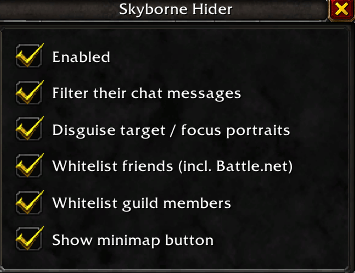
Chat filter: hides messages from Skyborne players in Say, Yell, emotes, whispers, party, raid, guild, instance and public channels.
Portrait disguise: Skyborne players show up as a Night Elf (Alliance) or Blood Elf (Horde) on your target and focus frames, matching their gender.
Friends & guild whitelist: friends (including Battle.net friends) and guild members can be left alone, so you still see chat from people you play with.
Settings window: left-click the minimap button to switch every option on or off.
Minimap button: Shift + drag to move it around the minimap edge. Right-click for help.
## Commands
| Command | What it does |
|---|---|
/skyhide config | Open the settings window |
/skyhide | Turn the addon on or off |
/skyhide chat | Toggle the chat filter |
/skyhide portraits | Toggle the portrait disguise |
/skyhide friends | Toggle the friends whitelist |
/skyhide guild | Toggle the guild whitelist |
/skyhide minimap | Show or hide the minimap button |
## Please note
Addons cannot change 3D character models in the game world. Only the chat and the target/focus portraits are affected. Skyborne players still look like Skyborne in the world, and their nameplates and tooltips are unchanged.
You must be logged in to leave a comment.