

SimpleBenikUI
This is a simple replica of BenikUI until we get a full ElvUI and BenikUI
Details
Expansion
 Forever
 Categories
Developers

Having issues?
Meet ForeverForge UI - the fully customisable successor to SimpleBenikUI: every unit frame, action bar, party and raid frame, chat window and more can be moved, sized and styled your way. SimpleBenikUI stays available for anyone who just wants this look without the setup, and it will be kept working with the game - it is now in limited support (no new features). Questions or bugs: ForeverForge Discord
CustomUI
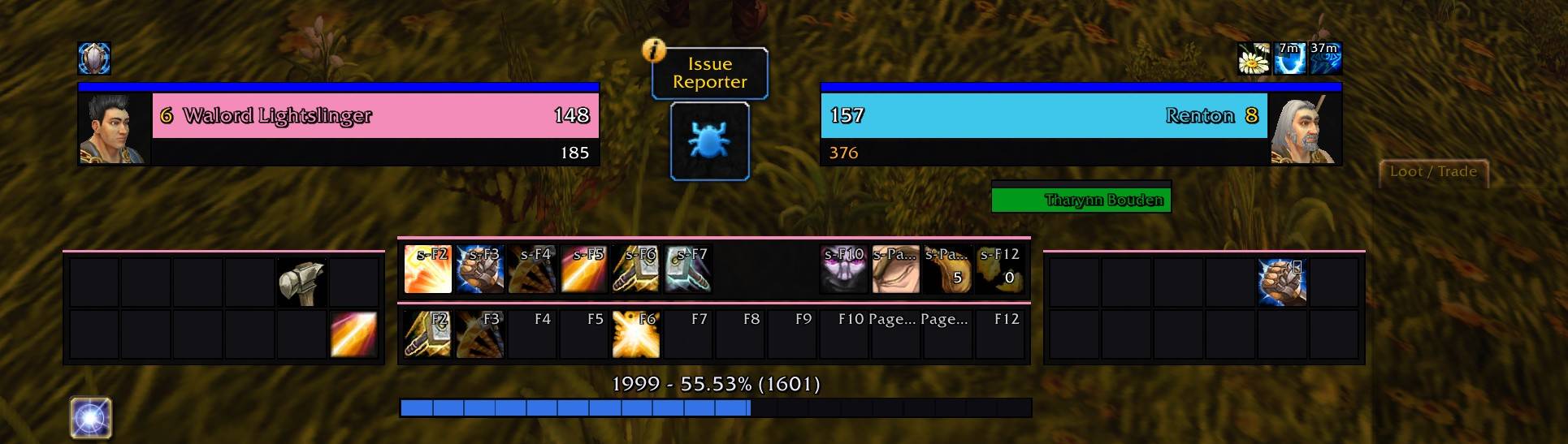
A clean, flat unit frame and action bar replacement for WoW: Forever. No framework, no dependencies, no 400-page options panel.
If you like the dark, boxy, minimal look that BenikUI gives ElvUI, this aims for that same feel — but standalone. It replaces the player and target frames and rebuilds your action bars into a tidy four-block layout, and then it gets out of the way. It is not a UI suite and does not try to become one.
What it does
- Player and target frames — a slim power bar across the top, a thick class-coloured health bar, and a text row underneath that doubles as your cast bar and your mana/rage/energy readout. The target frame mirrors the player frame so the pair reads symmetrically.
- Target-of-target and pet frames — compact versions in the same style. Both hide themselves the moment their unit is gone.
- Four action bar blocks — two full-width 12-button bars in the centre, and a 6x2 block on each side.
- Experience bar — segmented, with the readout sitting just above it: current XP, percentage, XP remaining, and rested.
- Buffs and debuffs in two places at once (see below).
Blizzard's player frame, target frame, cast bar, aura frames and XP bar are hidden. Everything else — bags, micro menu, minimap, chat — is left exactly as you had it.
Buffs and debuffs, in two places
This is the part worth knowing about.
On the character frames. Small icons sit directly above the player and target frames, sized down so they stay out of the way while you are watching your health. Debuffs are colour-coded by dispel type, and timers count down on the icons.
In their own movable panels. Separately, you get two standalone panels for your own buffs and your own debuffs, at full size, defaulting to the upper right of the screen — roughly where you would expect them. Each panel moves independently: type /cui unlock, drag them anywhere you like, then /cui lock. Positions are saved per account, so they stay put across characters and sessions.
You get both at once. The frame icons are for glancing at mid-fight; the corner panels are for reading properly.
Slash commands
| Command | What it does |
|---|---|
/rl | Reload the UI. A shortcut for /reload, because you will type it a lot. |
/cui unlock | Unlock every frame — unit frames, action bars, XP bar and both aura panels — and drag them where you want |
/cui lock | Lock everything again. Positions save automatically |
/cui reset | Put everything back to default positions |
/cui scale 1.2 | Scale the whole UI, 0.5 to 2.0 |
/cui debug | Print each unit frame's state. Handy if you ever need to report a bug |
/cui | List the commands |
Your action bars keep working
CustomUI does not build new action buttons. It re-parents Blizzard's own buttons into its layout, which means your keybinds, macros, drag-and-drop, stance and form paging, cooldown swipes and range colouring all behave exactly as they always have. Nothing to re-bind, nothing to set up again.
If Blizzard re-anchors the buttons — entering Edit Mode, changing pages — a hook puts them straight back. Anything that would have to happen mid-combat is queued until you drop out of it, since the client blocks moving secure frames during a fight.
One thing to check: make sure all your action bars are enabled in Options → Action Bars (or Edit Mode). CustomUI tries to switch them on at login, but if a block comes up empty, that is why.
Built for Forever specifically
Forever is not Classic. It shares mainline WoW's UI architecture and inherits the Midnight addon restrictions, which means health, power, names and aura durations often arrive as secret values that addon code cannot read, compare or do arithmetic on.
CustomUI is written for that from the ground up rather than patched around it:
- Every value out of a
Unit*API is checked before anything touches it - Health and power go straight into the status bar, which understands secrets natively
- Percentages use the correct curve, with the engine doing the rounding — so you get
67%, not0.6712834% - Aura timers fall back to the engine's own countdown when the duration is secret
- Names and levels are coloured without ever concatenating onto a secret
The practical result: it keeps working in combat, which is when a lot of frames written for older clients quietly stop updating.
Configuration
There is no in-game options panel. Everything lives in Config.lua — sizes, colours, fonts, anchors, how many columns each action bar block uses, aura counts and icon sizes. Edit, then /rl.
A few things people usually want first:
C.scale         = 1.0    -- overall size
C.buttonSize    = 32     -- action button size
C.auraSize      = 21     -- icon size above the unit frames
C.skinButtons   = true   -- flat dark buttons; set false to keep Blizzard's art
C.portrait3D    = true   -- false for flat 2D portrait icons
Want the side blocks a different shape? C.bars takes a column count per block — columns = 5, buttons = 10 gives 5x2, columns = 4 gives 4x3, and so on.
Each feature can also be switched off on its own if it clashes with something else you run: C.hideBlizzardUnitFrames, C.hideBlizzardCastBar, C.hideBlizzardAuras, C.hideBlizzardXPBar, C.barsEnabled, C.playerAuraPanels.
Health and power numbers
At full, you see just the max value. Below full, you get current, max and a percentage, with the percentage always on the outer edge:
full      1710
player    1147 - 1710 67%
target    67% 1147 - 1710
The two are independent — casting a spell never disturbs the health text, and taking a hit never disturbs the power text.
Known limitations
- Returning to "full" takes a few seconds. In combat the raw numbers are secret, so there is no way to ask the game "am I at full health?" Instead, CustomUI watches for regeneration going quiet — regen ticks stop once a bar tops out — and collapses the text back to the max value after 5 seconds of silence. Lower
C.assumeFullDelayif you want it snappier, or set it to0to turn it off. - No in-game options panel. Settings are in
Config.lua. - Target-of-target and pet frames are name-only; they do not show the number readout.
Bug reports
If something breaks, /cui debug and the Lua error text are the two most useful things you can send. Each module is isolated, so a failure in one part will not take the rest of the UI down with it.
Not affiliated with ElvUI or BenikUI — this is a standalone addon that borrows their visual sensibility, nothing more.
You must be logged in to leave a comment.