
Simple Scrolling Loot
Lightweight scrolling loot notifications
Details
Expansion
 Forever
 Categories
Developers

Having issues?
# Simple Scrolling Loot
Simple Scrolling Loot is a lightweight, standalone loot notification addon for
World of Warcraft. It shows your own item and money gains near the
center of the screen without relying on Blizzard Scrolling Combat Text.
## Features
- Shows only loot received by your character; party and raid member loot is
never displayed.
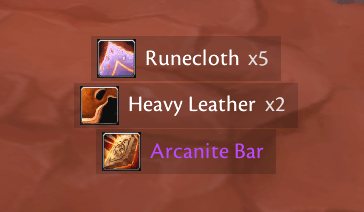
- Displays item icon, rarity-coloured item name, stack quantity, and optional
total vendor value.
- Optionally shows separate non-zero quantities of the same item in bags and
bank.
- Shows positive money gains with gold, silver, and copper formatting.
- Supports configurable minimum item quality, icon size, font size, opacity,
spacing, duration, travel distance, scale, and maximum visible rows.
- Includes an optional Blizzard-styled rounded-corner frame with configurable
opacity.
- Offers upward, downward, and static-fade notification modes.
- Includes simple guided positioning and preview notifications.
- Never hooks, hides, or otherwise changes the Blizzard loot window.
- Uses no external libraries and does not depend on Blizzard Scrolling Combat
Text.
## Client coverage
Simple Scrolling Loot targets WoW Classic Era (including Hardcore realms) and
Burning Crusade Classic Anniversary Edition. The package contains client-
specific TOC metadata and verifies the loaded client family and critical APIs
before enabling notifications. Run `/ssloot debug api` when reporting a
compatibility problem.
## Commands
`/ssloot` or `/simplescrollingloot` opens settings.
- `/ssloot on` or `/ssloot off` enables or disables notifications.
- `/ssloot test` shows sample notifications.
- `/ssloot unlock` shows the movable notification position; `/ssloot lock`
finishes positioning.
- `/ssloot reset` resets settings after confirmation.
- `/ssloot debug` toggles diagnostic logging.
- `/ssloot debug api` prints the client/API compatibility report.
- `/ssloot help` lists commands in game.
## Installation
Extract the `SimpleScrollingLoot` folder into
`World of Warcraft/<client>/Interface/AddOns/`, then restart the game or run
`/reload`.
## Support
Please report reproducible issues, your WoW client build, locale, and the
output of `/ssloot debug api` at the GitHub repository:
https://github.com/Sukecz/SimpleScrollingLoot
The addon is original code and is not affiliated with, copied from, or
dependent on SLoTe or Blizzard Scrolling Combat Text.
You must be logged in to leave a comment.