

SexyInterrupter
A InterruptRotation Addon
Details
Expansion
 Forever
 Categories
Developers

Having issues?
🔥 SexyInterrupter
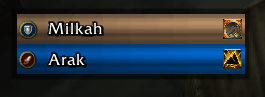
Stop the cast. Share the kick. Never argue about "who's next?" again. A lightweight group-interrupt coordinator: it tracks who in your party or raid can interrupt, shows every player's interrupt cooldown live and tells you the moment it's your turn to kick. Everything is adjustable in Edit Mode.




No spreadsheets, no chat spam, no "I thought you had it!" — just a clean rotation on your screen.
✨ Features
🎯 Smart interrupt rotation
- Automatically builds a kick order for your whole group or raid
- Sorted by who's ready first, then by role priority (🛡️ Tank → ⚔️ Damage → 💚 Healer)
- The next player in line is always at the top of the list
📣 "Interrupt now!" prompt
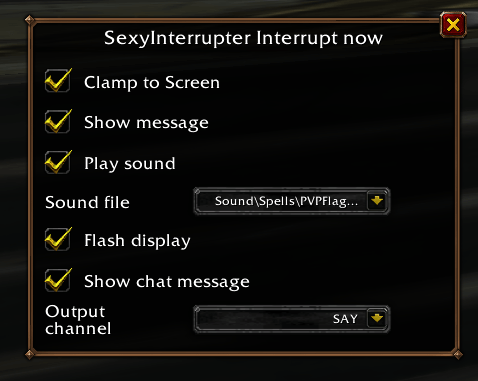
- Big on-screen message showing your target's name when it starts casting and it's your turn
- Optional sound alert 🔔 (pick any sound from your SharedMedia library, with preview)
- Optional screen flash ⚡ so you can't miss it
- Message disappears automatically when the cast ends or you change target
🧠 Learns interrupts on its own
- Detects every player's interrupt as they use it — no manual setup
- Supports players with multiple interrupts (each gets its own row, icon and cooldown)
- Hover the spell icon to see the exact ability
- Works for all classes, including 🐉 Evoker (Quell)
🔄 Real-time group sync
- Cooldowns are shared between everyone running the addon (party, raid, instance groups)
- Role changes and spec swaps are synced instantly
- Players are only removed when they've really left, not on every loading screen
- Out-of-range players are dimmed 👻 so you know who can actually reach the target
🎨 Fully configurable — right in Edit Mode
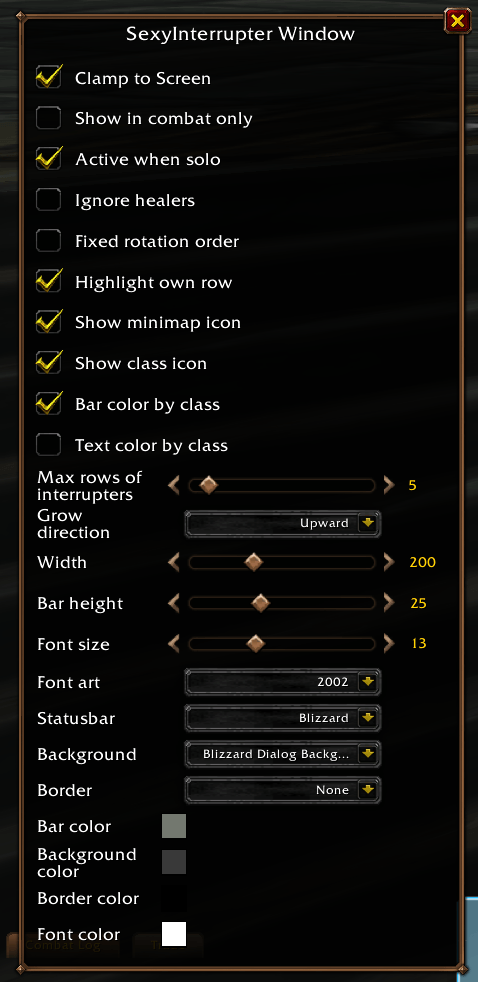
Everything lives in Blizzard's Edit Mode dialog — drag the window where you want it and tweak it on the spot, with a live preview:
| 📐 Layout | Window width, bar height, max rows, grow direction (up / down) |
| 🔤 Fonts | Font, size and colour (with live font previews) |
| 🖼️ Textures | Status bar, background and border textures (via SharedMedia) |
| 🌈 Colours | Bar, background, border and font colours, optional class colours |
| 🔔 Notifications | Message, sound (with preview), screen flash |
| 💬 Chat announce | Optionally announce your interrupts in Say / Yell / Party / Raid |
| 👁️ Visibility | Show in combat only, minimap button on/off |
Settings are saved per profile and survive /reload and Edit Mode layout changes.
🥇 Priority assignments
- Group leaders can override the priority of individual players
- Fine-tune who kicks first for tricky encounters
🧭 Extras
- 🗺️ Minimap button — left-click opens Edit Mode, right-click opens the settings
- 🌍 Localized in English and German
- 🪶 Lightweight, no dependencies you have to install (all libraries are bundled)
- ✅ One download for Retail and World of Warcraft: Forever
🚀 Getting started
- Install SexyInterrupter and make sure your group members have it too (it works best when everyone does!)
- Log in — the window appears as soon as you're in a group
- Open Edit Mode (
/si lockor click the minimap button) to move and style it - Kick things. 💥
⌨️ Slash commands
| Command | What it does |
|---|---|
/si | Open the settings |
/si lock | Open Edit Mode to move & style the window |
/si kick | Manually mark your interrupt as used (backup if auto-detection misses one) |
/si version | Show the installed version |
❓ FAQ
Do all my group members need the addon? Everyone who has it shares their cooldowns. Players without it can't be tracked, so the more people run it, the better the rotation.
Where did the options go? Almost all options moved into Edit Mode so you can see every change instantly. The regular settings page keeps the priority assignments and profiles.
Something isn't right / I have an idea! Please open an issue on GitHub — bug reports and feature requests are very welcome.
🙏 Credits
Built with Ace3, LibSharedMedia-3.0, LibDBIcon, LibDataBroker and EditModeExpanded by teelolws.
You must be logged in to leave a comment.