
Self-Found: Forever
Enforces Solo Self-Found rules on WoW Forever and records your character's entire journey, with a verified run status, renown banners and 25+ pages of stats.
Details
Expansion
 Forever
 Categories
Developers

Having issues?
Self-Found: Forever
One character. One journey. Everything earned by your own hand.
Self-Found: Forever is a Solo Self-Found addon for World of Warcraft: Forever. It enforces Self-Found rules for you, so the Auction House, trades, the guild bank and player mail stay closed. It also keeps a complete record of your character's life, from the first wolf you kill at level 1 to the day you reach 60.
Every quest, kill, death, dungeon, piece of gear, spell, recipe, flight, campfire and level-up is written into a tamper-evident journal. You get a verification code that proves your run is clean, and a renown banner that rises as you play. Other players running the addon can see your status and witness your run.
Made by AddonsByFranny. Free and open source (GPL-3.0).
What it does
Self-Found is a way of playing where you only use what you find, make or earn yourself. That means no Auction House, no trading, no handouts from friends or your own alts, and no help from the guild bank. The game doesn't enforce this, so this addon does:
- It blocks the shortcuts. The Auction House, trades, the guild bank and crafting orders close the moment they open.
- It catches what slips through. Anything that gets past the blocks is recorded as a violation in your run's history.
- It records your whole journey. Over 25 pages of stats, history and progress cover every part of your character's life.
- It proves your run. A sealed journal, a verification code and witnesses from other players back up your claim to a clean run.
- It rewards you for playing. Nearly 70 achievements, 29 badges, 12 titles and a banner that climbs from Wanderer to Legend.
Key features
Rule enforcement
Always on during a run:
- Auction House and Black Market are closed when opened.
- Trades are cancelled.
- The guild bank is closed.
- Crafting orders from other players are blocked.
- The mail Send tab is hidden.
- Mail from other players that contains items or gold is sent back automatically.
- Guild-funded repairs are hidden.
- The shared Warband bank tab is blocked. Your own personal bank stays usable.
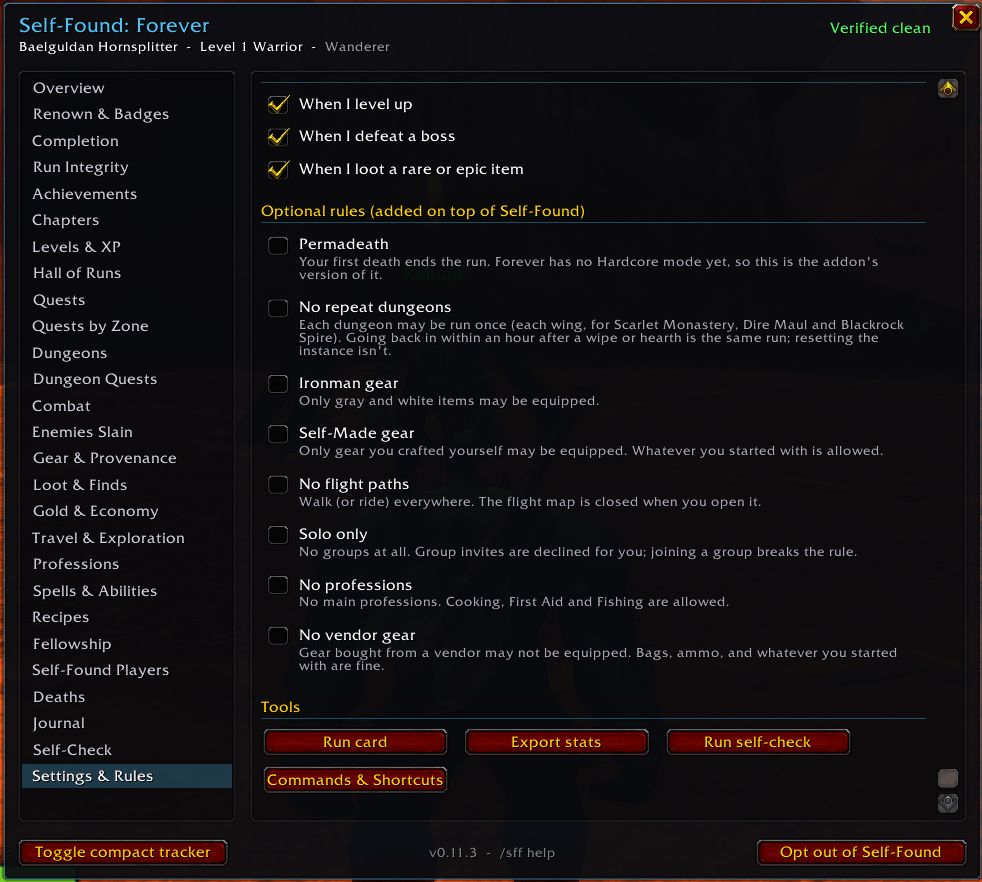
Optional rules you can add on top:
| Rule | What it means |
|---|---|
| Permadeath | Your first death ends the run. |
| No repeat dungeons | Each dungeon may only be run once. Each wing of Scarlet Monastery, Dire Maul and Blackrock Spire counts separately. |
| Ironman gear | Only grey and white items may be equipped. |
| Self-Made gear | Only gear you crafted yourself may be equipped. Starting gear is allowed. |
| No flight paths | Walk everywhere. The flight map closes when opened. |
| Solo only | Group invites are declined automatically. |
| No professions | No main professions. Cooking, First Aid and Fishing are still allowed. |
| No vendor gear | No gear bought from vendors. Bags, ammo and starting gear are fine. |
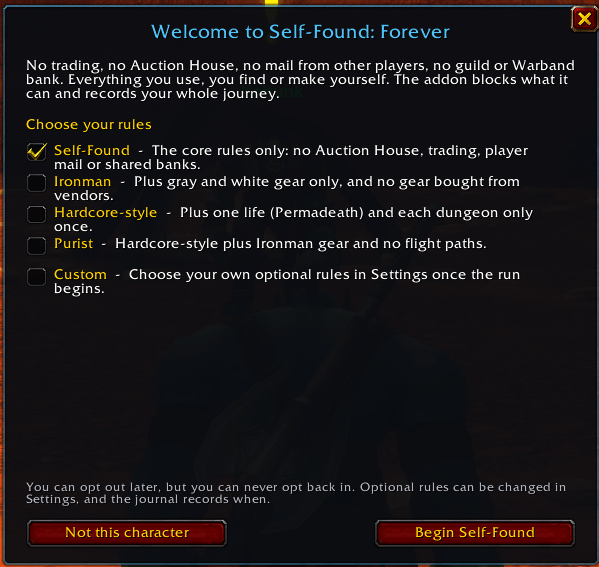
Rule presets on the welcome screen for new characters:
- Self-Found: the core rules only.
- Ironman: adds Ironman gear and No vendor gear.
- Hardcore-style: adds Permadeath and No repeat dungeons.
- Purist: adds Permadeath, No repeat dungeons, Ironman gear and No flight paths.
- Custom: pick your own rules.
Run integrity
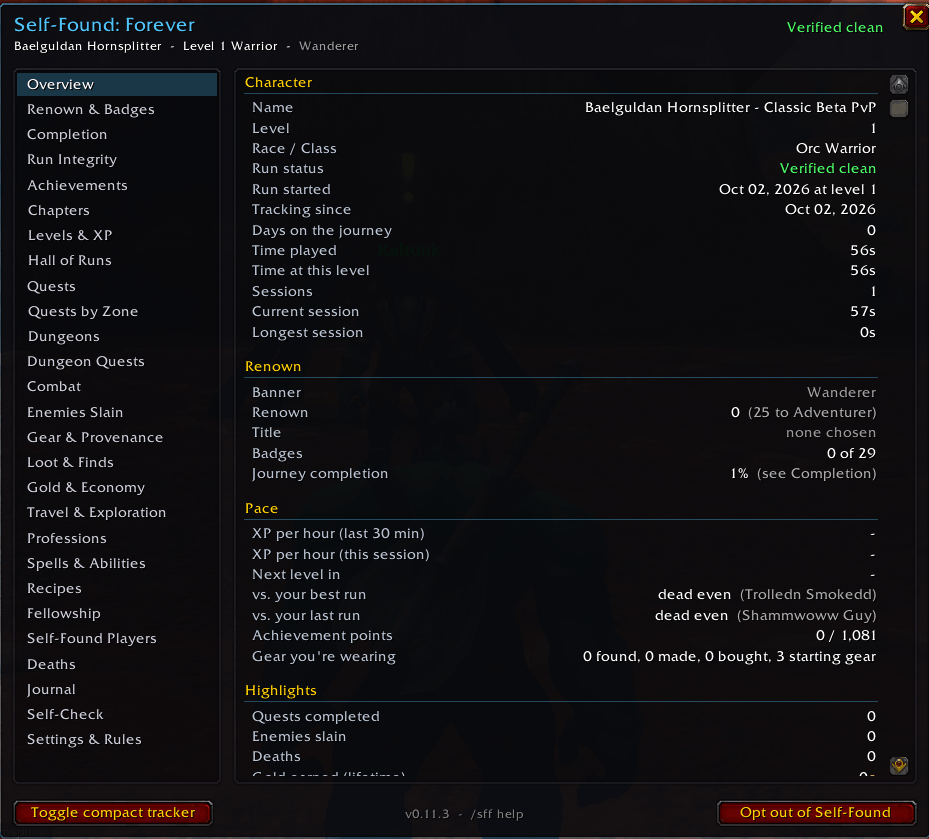
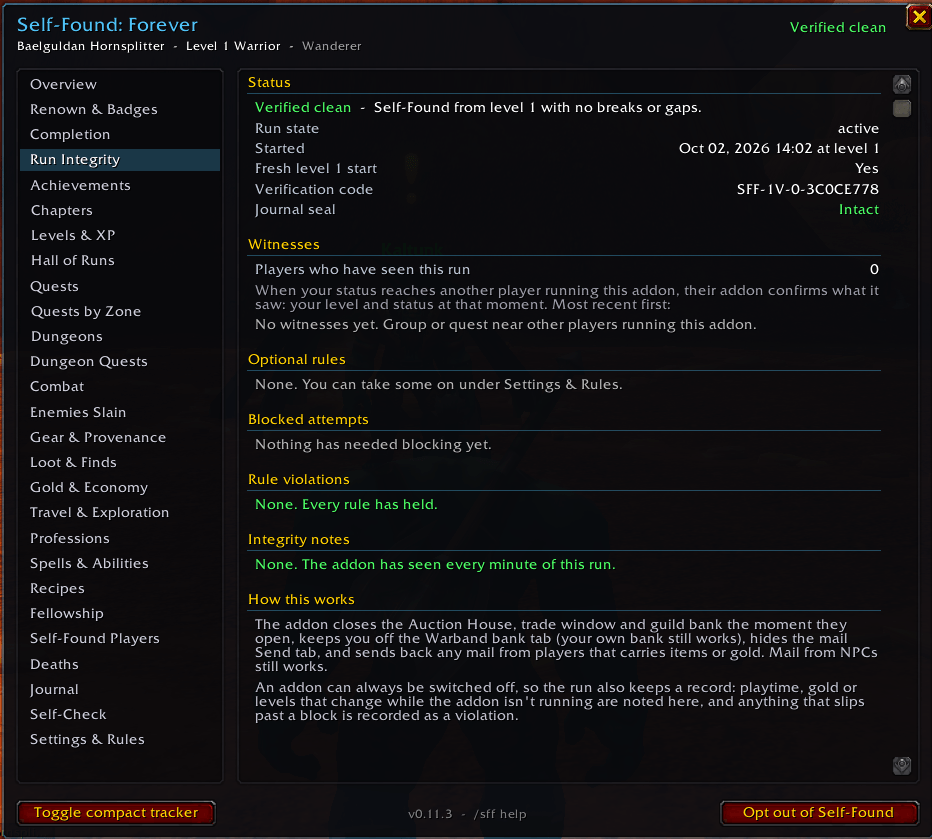
- Run status: Verified clean, Violations recorded, or Edited.
- Sealed journal: journal entries are hash-chained, so editing the saved file by hand marks the run Edited.
- Verification code: a fingerprint of your run that changes if the record is altered.
- Integrity notes: playtime, gold or levels that change while the addon is off are noted. So is a large amount of gold from a source the addon can't identify.
- Witnesses: other players running the addon confirm what they saw, meaning your level and status at that moment.
Journey tracking
- Overview: character details, XP per hour, time to next level, and your pace against your other runs.
- Chapters: your run split into ten-level chapters, with time, quests, kills, deaths, gold and main zones for each.
- Levels & XP: a timeline of every level and session recaps.
- Hall of Runs: speedrun-style splits against your best time at every level, across every character on your account.
- Quests and Quests by Zone: your full quest history, plus quests done and left in every zone (with Questie).
- Dungeons and Dungeon Quests: every dungeon run, with time, group, bosses, kills, deaths and XP, plus every quest for each dungeon.
- Combat and Enemies Slain: kills, rares, bosses, your toughest foe, and every kind of enemy you've killed.
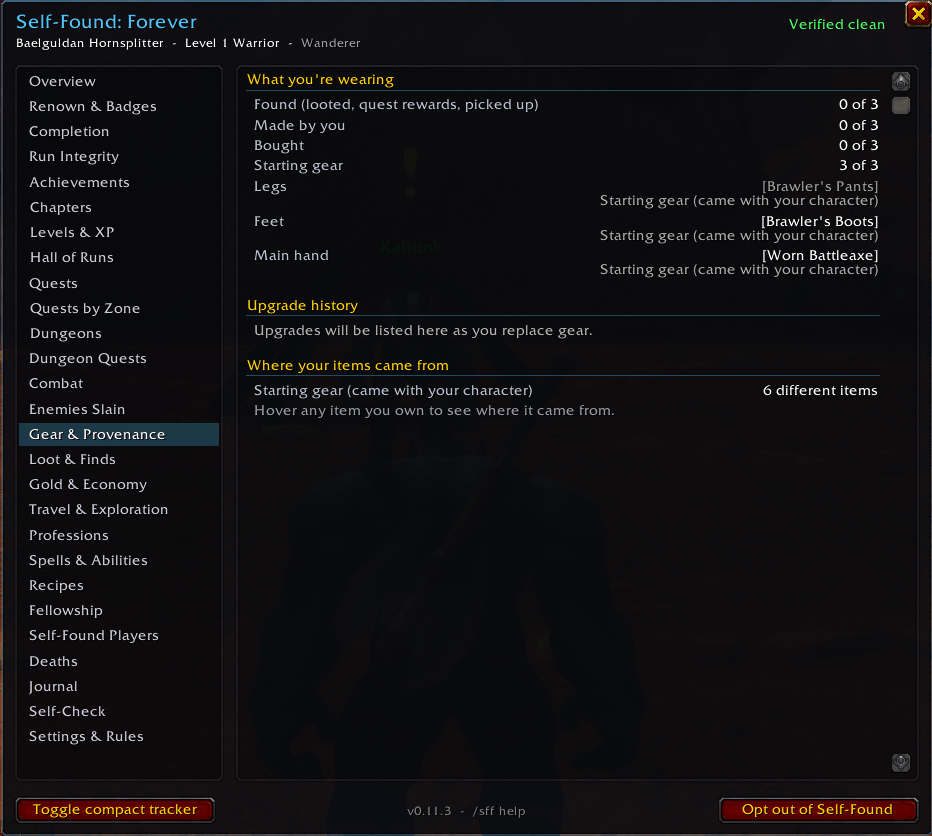
- Gear & Provenance: where every item came from (looted, crafted, quest reward, bought or starting gear), plus upgrade history for each slot. Hover any item you own to see its origin.
- Loot & Finds: loot by quality and your best finds.
- Gold & Economy: net worth charted by level, and gold earned and spent by source.
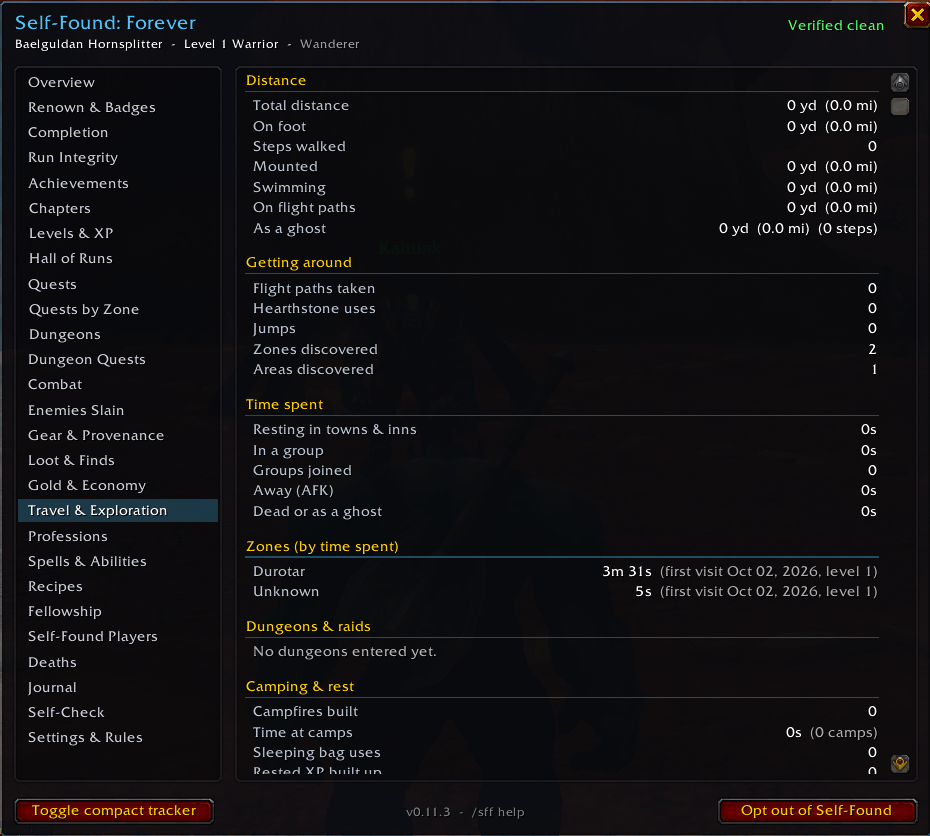
- Travel & Exploration: distance, steps, flights, zones, and time spent in each.
- Spells & Abilities: every spell your class can learn, your rank, when the next rank unlocks, training cost, and how many times you've cast it.
- Recipes: every recipe you know, how often you've crafted it, and what your trainers still have to teach.
- Professions, Fellowship and Deaths: profession ranks, everyone you've grouped with, and every death with what killed you.
- Journal: a searchable timeline of your whole life: levels, zones, dungeons, bosses, spells, recipes, mounts, reputation ranks, rare finds, gear upgrades and achievements.
- Search and sort on every long list.
WoW Forever content
- Camping & rest: tracks campfires you build, camp features you add, time spent at camp, sleeping bag uses, and rested XP built and used.
- New dungeons and raids: recognises Forever's new dungeons and raids, with achievements for entering them.
- Skyborne: an achievement for playing a Self-Found run as a Skyborne.
- Built for Forever: made for WoW Forever's game client and its newer interface.
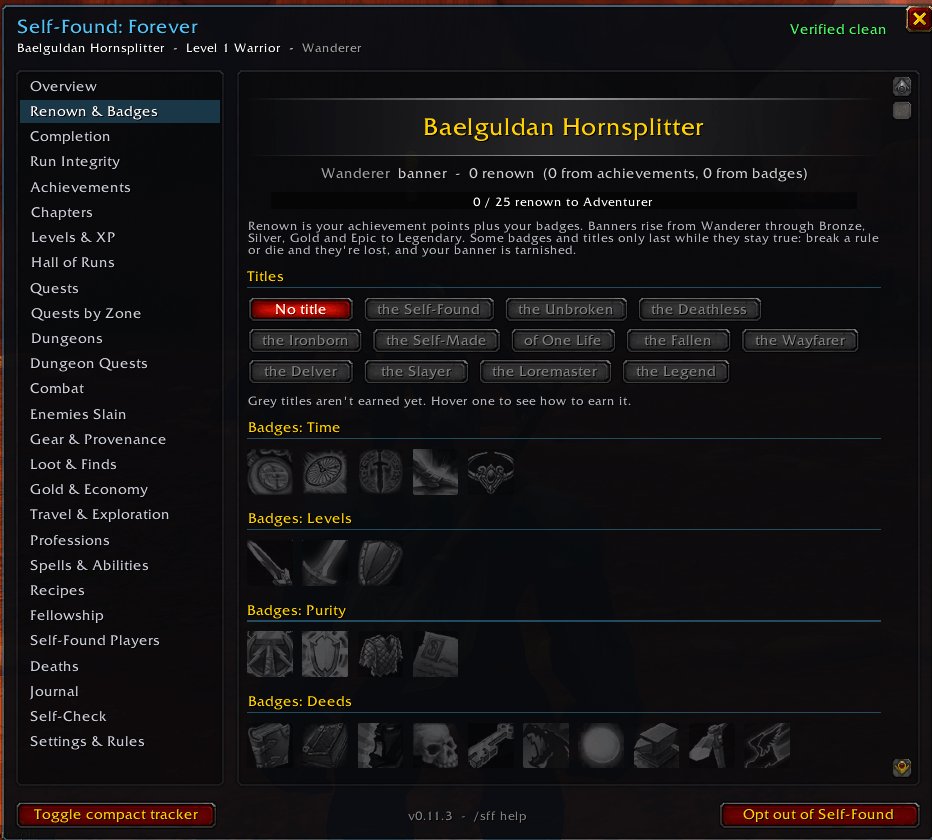
Renown, badges and titles
- Renown is your achievement points plus your milestone badges.
- Banners rise with renown: Wanderer, Bronze Adventurer, Silver Veteran, Gold Champion, Epic Hero, and Legendary Legend. Legend needs level 60 and a Verified clean run.
- Live rewards: some badges and titles only last while they stay true. Break a rule and Unbroken is gone. Die once and Deathless is gone.
- Tarnished and In Memoriam: a broken run keeps its banner but it turns grey. A Permadeath run that falls is honoured with an In Memoriam banner and the title the Fallen.
- Journey Completion: one overall percentage across levels, quests, zones, dungeons, professions, gear, spells, achievements and badges.
Community
- Status sharing: see other Self-Found players' status and renown in their tooltips.
- Self-Found Players: a leaderboard of guildmates running the addon.
- Death alerts: when a Self-Found player in your guild or group dies, you're told where, at what level and to what.
- Deadliest enemies: an enemy's tooltip shows how many Self-Found players it has killed.
Extras
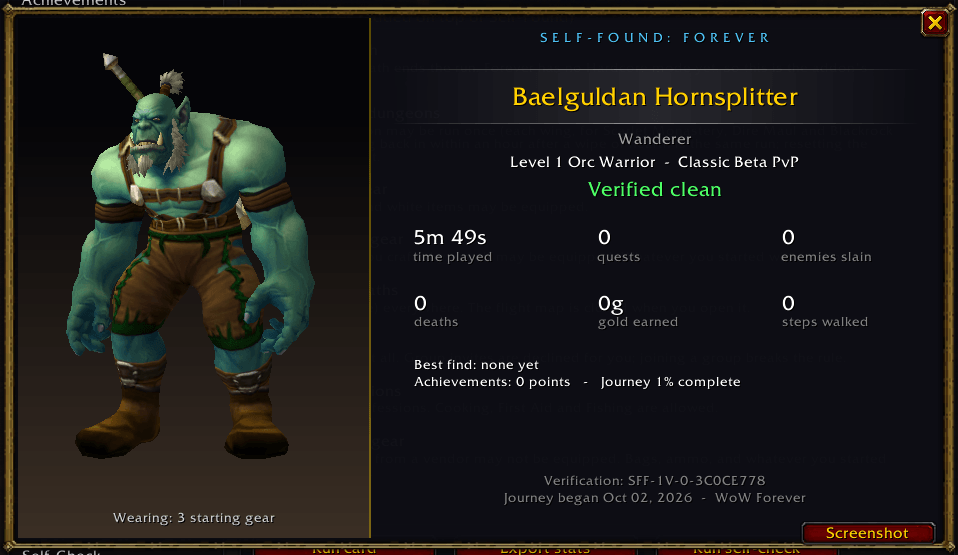
- Run card: a styled summary with a live 3D model of your character in your current gear. It's made for screenshots and opens automatically at max level.
- Compact tracker: a small always-on window with your level, quests, kills, deaths and status.
- Auto-screenshots on level-ups, boss kills and rare finds.
- Training reminders on level-up, showing what's new at your class trainer and what it costs.
- Session recap at login, covering what you did last time you played.
- Export: your whole record as copyable text.
- Accessibility: window size (70% to 150%), background opacity, colourblind-friendly status colours, and the option to turn off sounds.
- Translation-ready: text without a translation shows in English.
How it works
- Install the addon. Copy the
SelfFoundForeverfolder into your WoW Forever client'sInterfaceAddOnsfolder. Enable Self-Found: Forever on the character screen. - Log in on a new character. A welcome screen asks you to choose a rule preset, or skip this character.
- Play. The addon blocks what Self-Found doesn't allow and records everything as you go. You don't need to do anything else.
- Open your journey at any time:
- Click the minimap button.
- Use the addon compartment button by the minimap.
- Type
/sffin chat. - Go to Esc > Options > AddOns > Self-Found: Forever.
- Visit your class trainer after levelling up. The addon reads the trainer to record real spell levels and costs.
- Share your run. Show your run card, share your verification code (
/sff code), or export your record.
Optional: Questie. If you have Questie installed, Self-Found: Forever reads its quest data to show quests done and remaining in every zone and dungeon. Questie isn't required, and it isn't included with this addon.
Minimap button controls:
- Click: open your journey.
- Right-click: show or hide the compact tracker.
- Shift-click: show the run card.
- Drag: move the button.
Things to know and watch out for
- Start at level 1 for a fully verified run. You can start a run on an existing character, but anything that happened before the addon was installed can't be verified. Tracking begins from the level you start at.
- Keep the addon enabled. Playing with the addon turned off, even briefly, is noted in your run record. Playtime, gold or levels that change while it's off appear as integrity notes.
- Don't edit your saved files. The journal is sealed. Editing the addon's file in your
WTFfolder by hand marks the run as Edited, and that can't be undone. - Back up your
WTFfolder. Your whole journey lives in the addon's saved data. If you delete it or reinstall WoW without it, your record is lost. - Opting out is permanent.
/sff optoutunlocks trading, mail and the Auction House for that character, but the character can never rejoin Self-Found. - Gear rules have a short grace period. When you turn on a gear rule, anything you're already wearing that breaks it is listed, and you have 2 minutes to swap it out. Solo only and No professions work the same way.
- Watch your tooltips. With a gear rule on, item tooltips warn you before you equip something that would break it.
- Your own bank is fine, the Warband bank isn't. Anything taken out of the shared Warband bank is recorded as a violation.
- Raids are group content. Entering one breaks the Solo only rule.
- Trainer showing nothing? Tick "Unavailable" in the trainer window's filter and talk to the trainer again. The Spells & Abilities page tells you when this is needed.
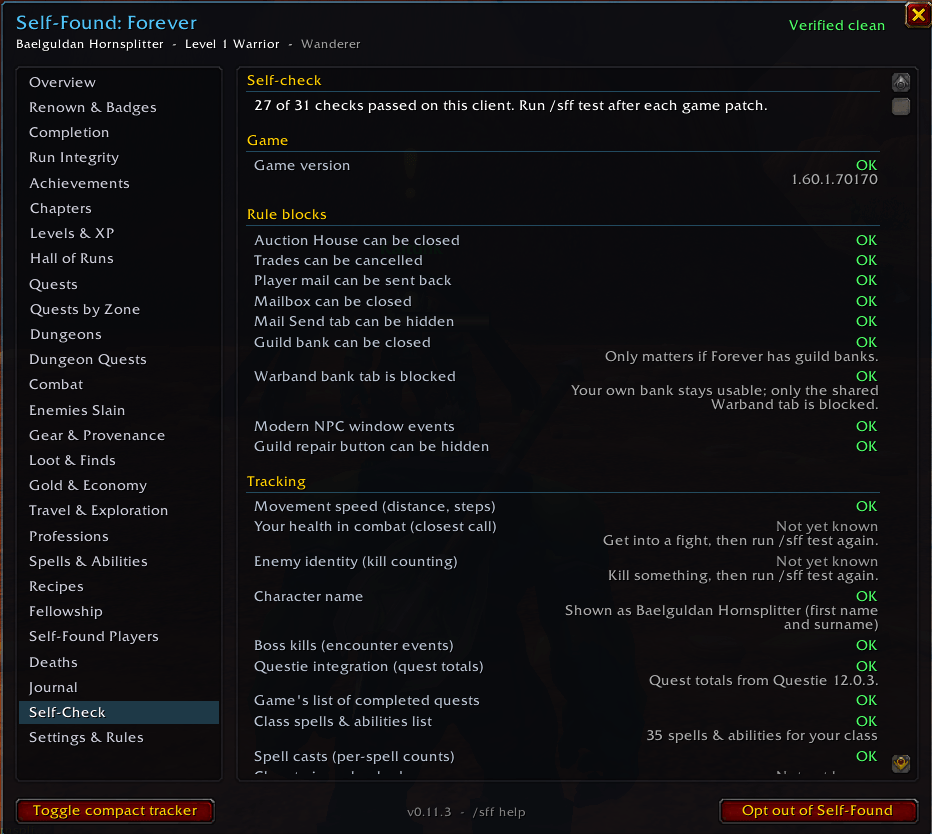
- Combat health is hidden on Forever. The game hides your health from addons during combat, so "Closest call" turns itself off. Run
/sff testto see exactly what your client allows. - Sharing only reaches addon users. Status sharing, death alerts and witnesses only work with other players running Self-Found: Forever. Each can be turned off in Settings.
- Banners and titles stay in the addon. They appear in this addon's windows and tooltips. Addons can't change your in-game nameplate or real titles.
- It's a beta. WoW Forever is still changing, and some camping buff and feature names may change with it. Built and tested for WoW Forever build 1.60.1.70170. The Self-Check page shows your build and notes when it's newer.
- Found a bug? Install BugSack to copy the full error text, and include it in your report.
Upgrading from "Solo Self-Found" (this addon's earlier name)? Install the Self-Found: Forever Import Helper alongside it, and log in once on each character to carry your journey over. Once every character has logged in, you can remove the helper.
Commands
All commands start with /sff. You can also type /selffound.
| Command | What it does |
|---|---|
/sff | Open or close the journey window |
/sff compact | Show or hide the compact tracker |
/sff status | Print your run status, blocked attempts, violations and integrity notes in chat |
/sff start | Begin a Self-Found run on this character |
/sff optout | Leave Self-Found permanently (can't be undone) |
/sff settings | Open Settings & Rules (also /sff rules) |
/sff card | Show your run card |
/sff code | Print your verification code |
/sff export | Copy your whole record as text |
/sff session | Show what you've done this session |
/sff session last | Show your previous session |
/sff trainer | Use at your class trainer to check that spell levels and costs were recorded |
/sff test | Run the Self-Check: which rules and stats work on your client (also /sff diagnostics) |
/sff minimap | Show or hide the minimap button |
/sff resetpos | Move the addon's windows back to the centre of the screen |
/sff help | Open the Commands & Shortcuts panel (also /sff keys or /sff shortcuts) |
Keybindings (optional, none set by default): find them under Esc > Options > Keybindings > Self-Found: Forever.
- Open or close the journey window
- Show or hide the compact tracker
- Show the run card
- Take a screenshot of the run card
- Open Renown & Badges
- Search the current list
- Open Commands & Shortcuts
Mouse controls:
- Run card model: drag to turn it, scroll to zoom, right-click to reset.
- Sort buttons: click for the next sort order, right-click for the previous one.
License and credits
Self-Found: Forever is free and open source under the GNU General Public License v3.
- Class spell data: from What's Training? by fusionpit, used under the MIT license.
- Questie: supported if installed, but not included.
Self-Found: Forever is a fan-made addon. It is not affiliated with or endorsed by Blizzard Entertainment. World of Warcraft is a trademark of Blizzard Entertainment, Inc.
Support development
If you enjoy Self-Found: Forever and want to support future updates and new addons, any donation is hugely appreciated.
Thank you for playing Self-Found!
You must be logged in to leave a comment.