
Ready Macros
One-click macros sorted by class and spec, with spell checks against your spellbook, weapon swap macros, and a macro library shared across your characters.
Details
Addon ID:
26767
Addon Version:
0.8.0
Expansion:
1.60
Upload date:
Oct 06, 2026
Last Updated:
Oct 06, 2026
Downloads:
Less than 100
Website:
Source Link
Expansion
 Forever
 Categories
Developers

Nekramess
Creator
Having issues?
What it does
Ready Macros gives you a list of ready-made macros for every class and spec. Click a macro and it is created in your character-specific macro tab. You do not type anything or open the macro editor. Ready Macros also checks each macro's spells against your own spellbook, saves your own macros so you can add them on your other characters, and builds weapon swap macros from the weapons you have equipped.
Macro lists
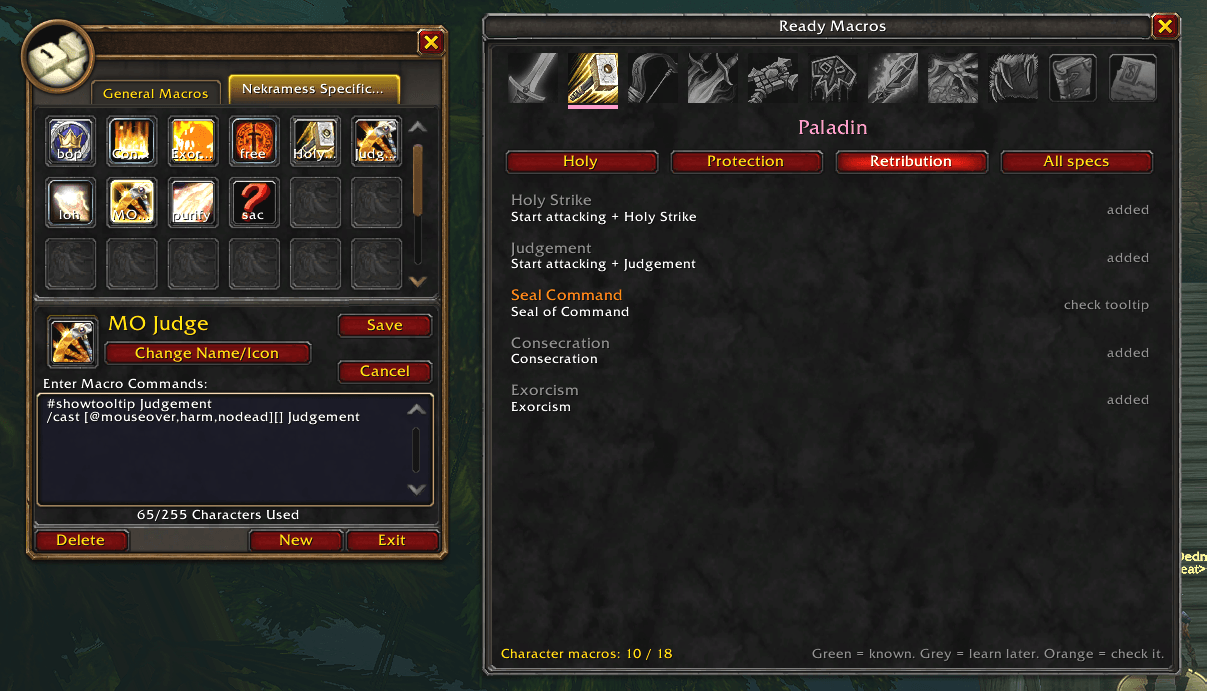
- A row of class icons for all 9 classes, plus a General icon for macros that work on any class, such as Hearthstone, raid target markers and reload.
- Each class has one tab for each of its three specs, plus an "All specs" tab.
- The window opens on your own class. It tries to open on your current spec, and otherwise remembers the last spec you viewed.
- Hover over a macro to see its full text before you add it.
- Heals, dispels, damage-over-time spells and crowd control spells use mouseover: they cast on the unit under your mouse, or on your target if you are not hovering anything.
- Warrior macros switch to the right stance when needed, for example Charge in Battle Stance and Intercept in Berserker Stance on one button.
- Melee macros start auto-attacking. Sap, Vanish, cooldowns, buffs, seals, traps and taunts aimed at a mouseover target are left out on purpose.
- Long lists are split into pages.
Creating macros
- Macros are created in the character-specific macro tab.
- Ready Macros does not overwrite a macro that already has the same name, does not create macros during combat, and tells you when your character macro slots are full.
- A counter shows how many character macro slots you have used.
Spell check
- For your own class, each macro is marked green when you know its spells, grey with the required level when you have not learned them yet, and orange when a spell may be renamed or missing. The tooltip explains which spell and why.
- Macros for other classes are marked orange when their spell names have not been confirmed.
- Type /mk ids for a copyable report of every spell in your class's macros and its status. Spell IDs your client knows are recorded automatically.
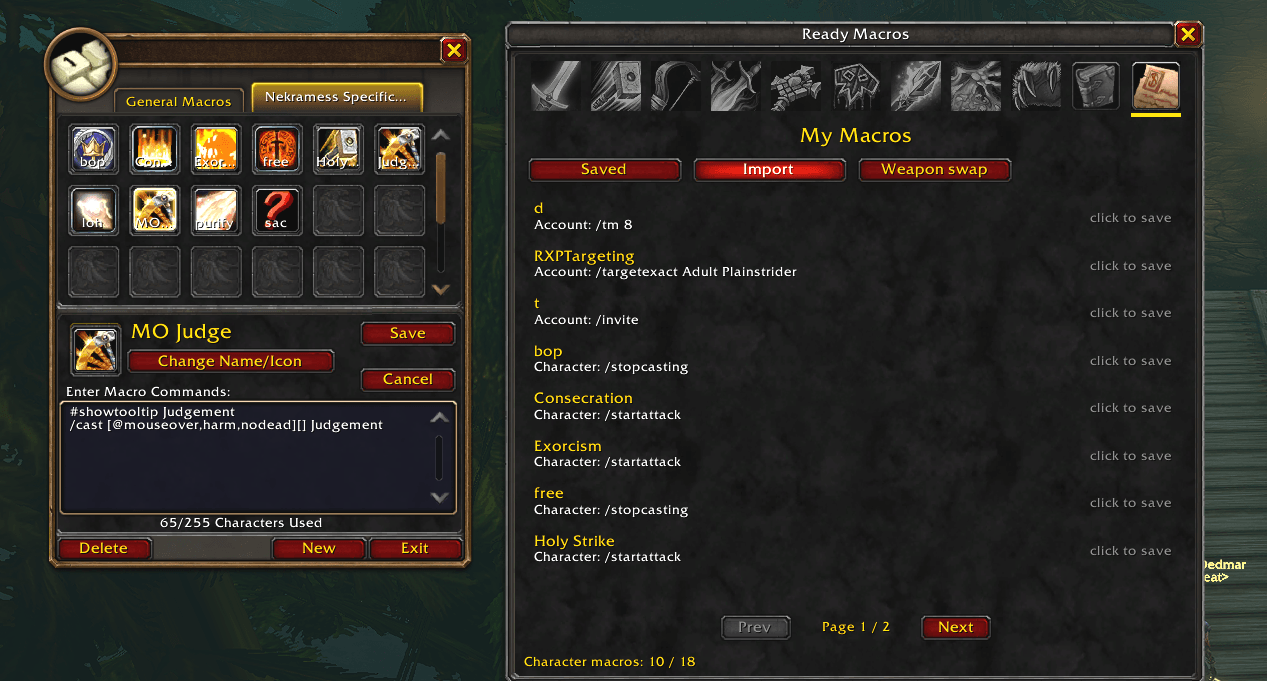
My Macros
- Import: lists every macro on your current character. Click one to save it.
- Saved: your saved macros, available on every character on your account. Click to add one to the current character. Shift-click to remove it from the list.
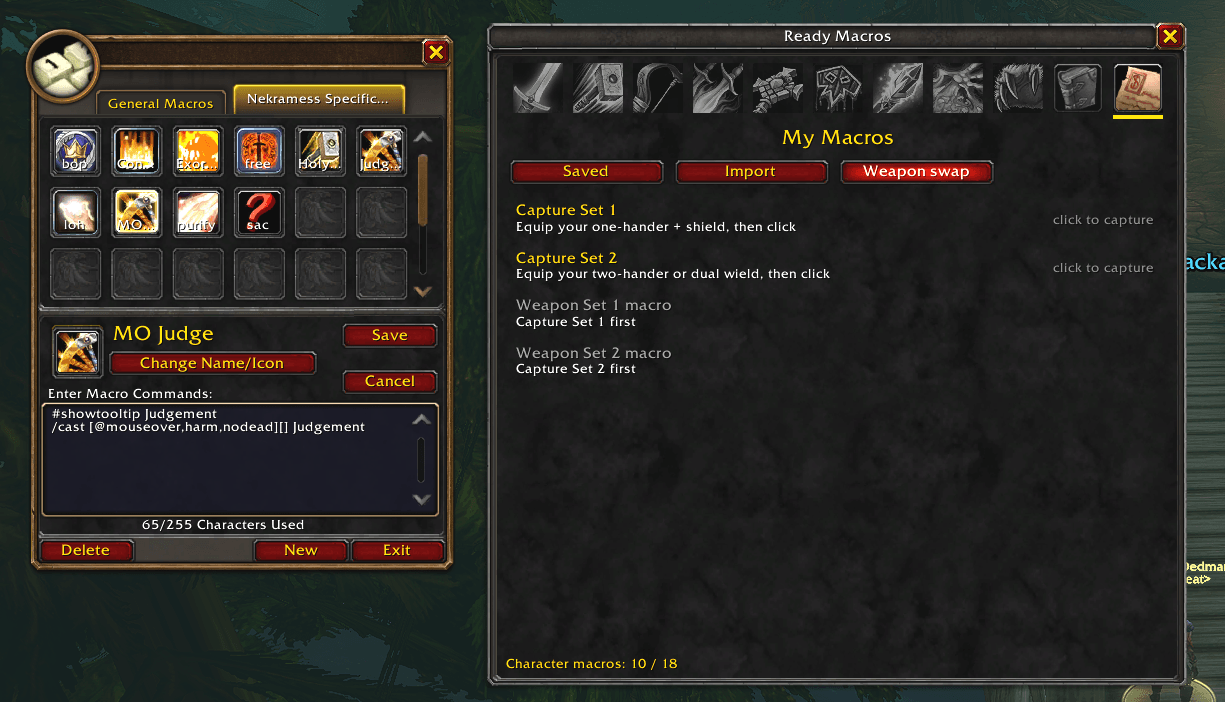
- Weapon swap: equip a weapon set and click Capture. Do this for two sets, for example one-hand and shield, then two-hand. Ready Macros reads the item names from your equipped gear and creates a macro for each set. Recapture and click again to update a macro after you change weapons.
How to use
- Type /mk or /readymacros to open or close the window.
- Pick a class and a spec tab, then click a macro to add it.
- Open the game's macro window with /macro and drag the new macro to your action bar.
Known limits
- Spell names are based on beta information and may change. 14 macros use a spell name that has not been confirmed yet, and they are marked in the list.
- Spell IDs, which are needed to show "learn later" instead of "missing", are currently included for Warrior spells only.
- Spec detection is a best guess and may open the wrong spec tab.
- Existing macros are not updated automatically. Delete your copy and add it again to get a newer version.
You must be logged in to leave a comment.