
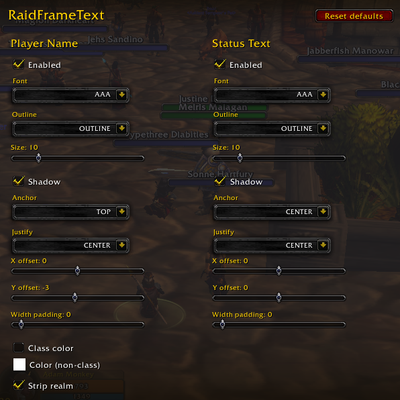
RaidFrameText
Edit Blizz Raid Frame Text font etc
Details
Addon ID:
27542
Addon Version:
1.0.0
Expansion:
1.60
Upload date:
Oct 06, 2026
Last Updated:
Oct 06, 2026
Downloads:
Less than 100
Website:
Source Link
Expansion
 Forever
 Categories
Developers

Admoney73
Creator
Having issues?
Edit Blizz Raid Frame Text font etc
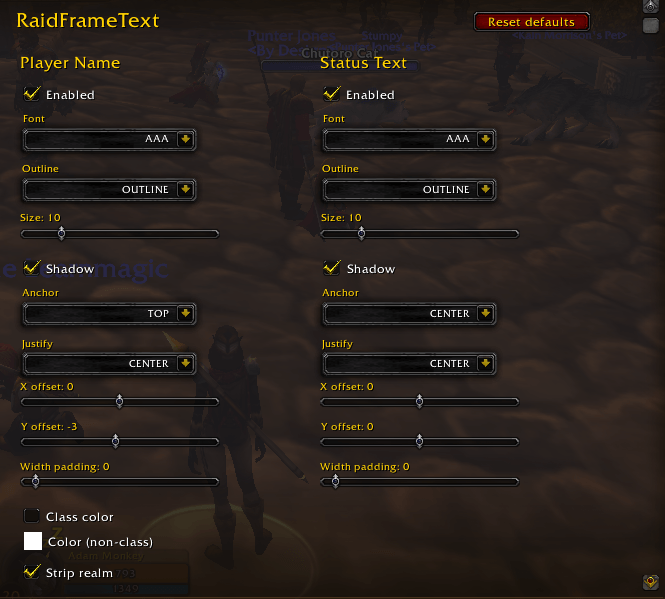
Change the Font, Size, Outline, Alignment for Player Name and Status Text
## RaidFrameText
**Take control of the names and status text on Blizzard's raid and party frames.**
Blizzard's compact raid frames use a single small font, a fixed position, and cut off long names or pad them with realm suffixes. **RaidFrameText** lets you restyle the **player name** and the **status text** (Dead, Offline, Ghost, health numbers and so on) on every Blizzard raid and party frame, with a full in-game options panel, so the frames are easier to read in the middle of a fight.
### Features
**Player name**
- Choose the **font** (the built-in WoW fonts plus any font from LibSharedMedia/SharedMedia, if you have it installed)
- **Size** from 6 to 32, with outline (none, thin, thick, monochrome) and drop shadow
- **Position:** anchor to any of 9 points on the frame, plus fine X/Y offsets
- **Justify** left, center or right, or automatically from the anchor point
- **Class colors** for player names, or a single custom color of your choice
- **Strip realm names**, so "Healbot-Faerlina" becomes "Healbot"
- **Limit name length** to a set number of characters, so long names don't run over the health bar (accented and other non-English characters are handled correctly)
**Status text**
- The same font, size, outline, shadow, anchor, offset and justify options, set separately from the names
**General**
- Works on **Blizzard's compact party frames, raid frames and raid group frames**, including pet frames
- Changes **apply instantly** as you move the sliders, with no reload needed
- Adjusts automatically when frames resize or your group changes
- Each section can be turned off separately to leave Blizzard's default in place
- A **Reset defaults** button restores everything in one click
### How it improves your game
- **Healers** can make names big, bold and class-colored, so finding the priest or the warrior tank in a 40-player raid takes a glance instead of a squint.
- **Small or scaled-down raid frames** stay readable: shrink the font and cap the name length, and nothing overlaps.
- **Move the status text** away from the name, so "Dead" or "Offline" is always visible.
### Commands
- `/rft`: open the options panel (also under Options → AddOns → RaidFrameText)
- `/rft reset`: reset all settings to default
- `/rft apply`: re-apply the settings to all frames
### Notes
- Affects Blizzard's own raid and party frames only, not replacement frame addons like ElvUI, Grid2 or VuhDo.
- LibSharedMedia/SharedMedia is optional and only adds more font choices.
You must be logged in to leave a comment.