
Radialcast
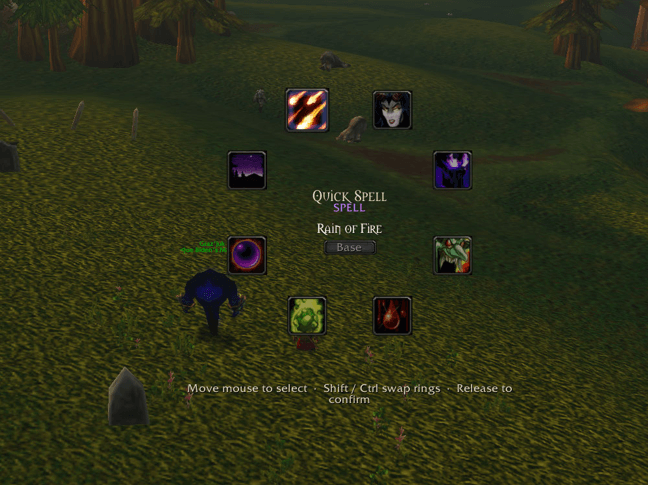
A radial spell wheel on middle mouse. Hold it, flick toward a spell, release to cast.
Details
Addon ID:
26284
Addon Version:
Radialcast.zip
Expansion:
1.60
Upload date:
Oct 06, 2026
Last Updated:
Oct 06, 2026
Downloads:
Less than 100
Website:
Source Link
Expansion
 Forever
 Categories
Developers

Spurion
Creator
Having issues?
A radial spell wheel on middle mouse. Hold it, flick toward a spell, release to cast.
Features
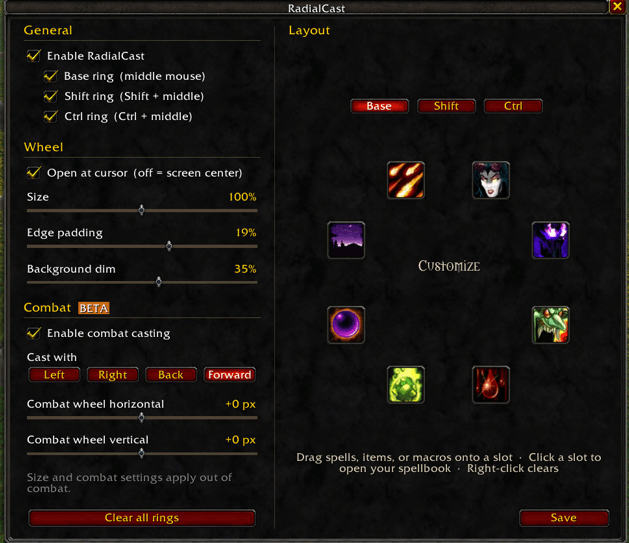
- Three spell rings: Base, Shift, and Ctrl. Hold a modifier while the wheel is open to swap instantly
- Drag and drop setup straight from your spellbook, bags, or macros
- Cooldown swipes and timers on every slot
- Layouts save per character
- Combat casting (beta): hover a slot and click with your choice of left, right, back, or forward mouse button
Setup
- Drop the RadialCast folder into Interface/AddOns and type "/reload" or restart the game
- Type /rcast to open settings
- Drag your spells onto the ring and hit Save
Commands
/rcast: settings and layout editor/rcast [enable / disable] [modifier:ctrl,shift,base]: turn everything or specific rings on and off/rcaststatus: see what's active
Combat casting (BETA)
- Hold middle mouse, hover a slot, and click to cast. Pick the button in
/rcast -> Cast With: [left | right | back | forward] - Shift and Ctrl still swap rings live in combat.
- The combat wheel opens at a fixed screen position, adjustable in
/rcast. - Limitation: WoW locks addon buttons during combat, so the wheel's slots stay clickable (invisibly) at that position for the whole fight. Clicking one with your cast button casts it even when the wheel is closed. Other mouse buttons pass through normally.
- Why not flick-and-release? That needs secure code this client can't currently run. Out of combat, flick-and-release works as normal.
- Combat casting can be turned off in
/rcast.
Combat casting is still in beta, so let me know if you run into anything.
You must be logged in to leave a comment.