
ProfessionProgress
Simple and minimalist addon to show the progress of professions. Displays the progress of all professions with progress bars.
Details
Expansion
 Forever
 Categories
Developers

Having issues?
ProfessionProgress
ProfessionProgress is a compact profession and skill progress tracker for World of Warcraft Classic.
It keeps the progress of your learned professions visible on screen in a small, configurable panel, so you can follow skill gains without constantly reopening profession windows.
ProfessionProgress automatically detects the professions available on your character and can also temporarily track non-profession skill gains such as Lockpicking or weapon skills.
Features
- Tracks primary and secondary professions
- Compact, always-visible profession progress display
- Dynamic profession detection
- Per-character settings
- Minimap configuration button
- Show or hide the main ProfessionProgress panel
- Show or hide individual professions
- Dynamic panel resizing
- Optional Skill Overlay
- Optional Detected Skill Ups tracking
- Visual warning states near profession caps
- Click profession icons to open profession books when available
- Two display layouts: Bar and Gauge
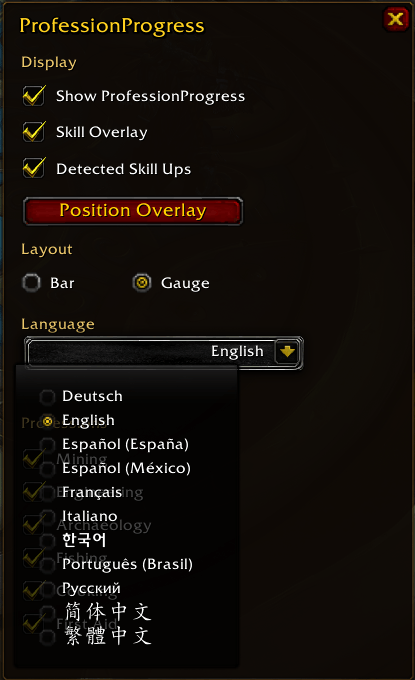
- Built-in language selector
- Localized addon interface in 11 languages
- WoW Forever compatibility
- Mists of Pandaria Classic compatibility
Languages
ProfessionProgress v2.5.1 adds full localization support for the addon interface.
Supported languages:
- Deutsch —
deDE - English —
enUS - Español (España) —
esES - Español (México) —
esMX - Français —
frFR - Italiano —
itIT - 한국어 —
koKR - Português (Brasil) —
ptBR - Русский —
ruRU - 简体中文 —
zhCN - 繁體中文 —
zhTW
On first use, ProfessionProgress automatically selects the language that matches the World of Warcraft client.
The language can then be changed at any time from the ProfessionProgress configuration window.
The language selector keeps an English fallback in its title for accessibility. For example:
Idioma/LanguageSprache/LanguageLangue/Language
When English is selected, the title is shown simply as Language.
Changing the addon language does not require /reload.
Profession and specialization names provided by World of Warcraft continue to use the language supplied by the game client.
Layout Modes
ProfessionProgress includes two display styles.
Bar
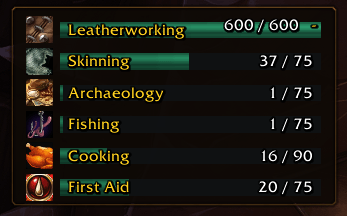
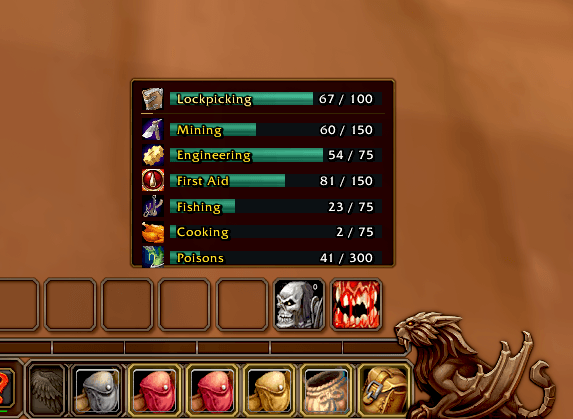
The classic ProfessionProgress layout.
Designed for readability:
- Shows profession names
- Shows traditional progress bars
- Makes current progress easy to read at a glance
- Best suited for players who prioritize clarity over minimum screen usage
Gauge
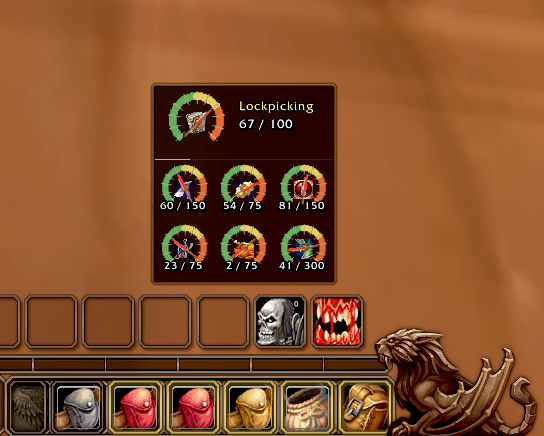
A compact dial-style layout.
Designed to save screen space:
- Uses small gauge-style progress indicators
- Displays profession icons in the center of each gauge
- Shows the current skill value and maximum in a compact form
- Uses a multi-column layout to reduce the panel footprint
- Keeps profession names available through tooltips and Skill Overlay
The layout can be changed at any time from the ProfessionProgress configuration window.
Visual Progress Warnings
ProfessionProgress uses visual states to indicate when a profession is approaching its current trained cap:
- Green: normal progress
- Green pulse: 20% or less remaining
- Yellow pulse: 10% or less remaining
- Red pulse: 5% or less remaining
- Red fixed: current trained cap reached
- Green full: absolute expansion cap reached
These warning labels and explanatory tooltips are localized according to the selected addon language.
Skill Overlay
The optional Skill Overlay provides lightweight feedback when skill increases occur.
Successful gains appear in green:
+1+2+3
Recognized profession attempts that complete without increasing skill may display a localized failure message.
The overlay has no background, fades quickly, and can be repositioned with Alt + left-drag.
Detected Skill Ups
When Detected Skill Ups is enabled, ProfessionProgress watches real non-profession character skill values.
Examples include:
- Lockpicking
- Axes
- Swords
- Daggers
- Defense
- Other character skills exposed by the client
When one of these skills increases:
- A single temporary skill display appears
- The newest detected skill replaces the previous one
- The current rank and real maximum rank are shown
- The display remains active for 60 seconds after the most recent increase
- A one-pixel yellow TTL line fills from left to right during that lifetime
- A new skill-up restarts the TTL indicator
- The display fades out automatically when the lifetime expires
- The main panel returns to its normal size afterward
In Gauge mode, the temporary skill appears as a dedicated header gauge above the permanent profession grid.
Per-Character Settings
Each character can keep its own configuration, including:
- Position
- Scale
- Visibility
- Lock state
- Profession visibility
- Layout mode
- Skill Overlay preference
- Detected Skill Ups preference
- Selected addon language
The initial language follows the World of Warcraft client locale, while a manually selected language remains part of the character's configuration.
Profession Book Shortcuts
Click a profession icon to open its profession book when available.
WoW Forever uses the modern profession interface where required, including professions such as Fishing.
Compatibility
ProfessionProgress v2.5.1 supports:
- Mists of Pandaria Classic
- WoW Forever
The addon keeps separate compatibility paths where the clients expose different profession or skill APIs.
It also preserves defensive handling for protected/secret system strings introduced by recent WoW Forever client updates.
Purpose
ProfessionProgress is designed for players who actively level professions and character skills and want a clean, contextual view of progress without giving up unnecessary screen space.
Choose Bar for maximum readability or Gauge for a compact HUD-style presentation, and use the built-in language selector to keep the addon interface comfortable to use across supported WoW locales.
You must be logged in to leave a comment.