

ProcDoc
Big, pulsing proc alerts for WoW Forever. Never miss a proc again, with drag-and-drop placement, timers, stack tracking and custom art.
Details
Expansion
 Forever
 Categories
Developers

Having issues?
ProcDoc
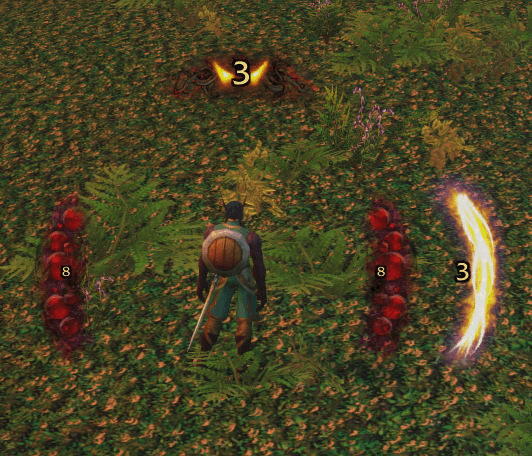
Never miss a proc again. ProcDoc shows big, glowing, pulsing alerts the moment you get a proc worth reacting to (Clearcasting, Shadow Trance, Overpower, Riposte and more). A countdown shows how long you have to use it. It's built from the ground up for World of Warcraft: Forever.
It works out of the box. Install it and your procs light up. When you want to make it yours, everything can be arranged and styled right on screen with the mouse.
Features
Alerts you'll actually notice
- Glowing proc art in the style of Blizzard's spell overlays, pulsing around your character
- A punchy pop-in when a proc happens, and a quick shrink-away when it's used or runs out
- Crisp at any resolution: images draw at their real pixel size, never stretched
- A sound on every proc, with 7 to choose from, per proc or as your default
Arrange everything with the mouse
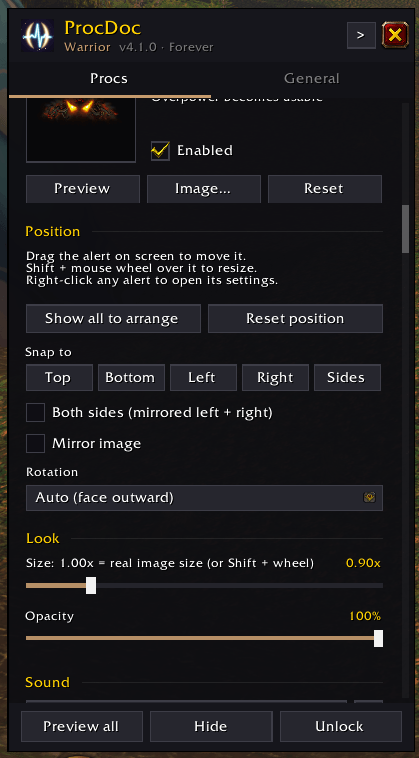
- Drag any alert to put it where you want it
- Shift + mouse wheel over an alert to resize it
- Snap buttons: Top, Bottom, Left, Right, or Sides for a mirrored left + right pair
- Auto rotation turns the art to face outward wherever you put it, with mirror and manual rotation options too
- Show all to arrange puts every alert on screen at once, with a center guide
Make it yours
- 69 alert images to pick from, including 8 originals made for ProcDoc: Frost Shards, Fel Flame, Shadow Wisps, Crimson Claws, Storm Arc, Arcane Runes, Divine Rays and Ember Crown
- Or use the spell's icon, Blizzard's own proc art, or your own image
- Per-proc size, opacity, sound and more
Countdown timers
- Drag the number anywhere on its alert, and Shift + wheel to resize it
- Choose the font, outline, color and a "running out" color, plus tenths of a second at the end
Stack tracking
- A row of dots shows how many stacks of a buff you have, and the newest dot pops as you gain one
- Show the alert at N stacks: appear at 1 stack, or only once it has built up
- Test stacks plays a pretend stacking buff through an alert, so you can style it without a real one
Track anything
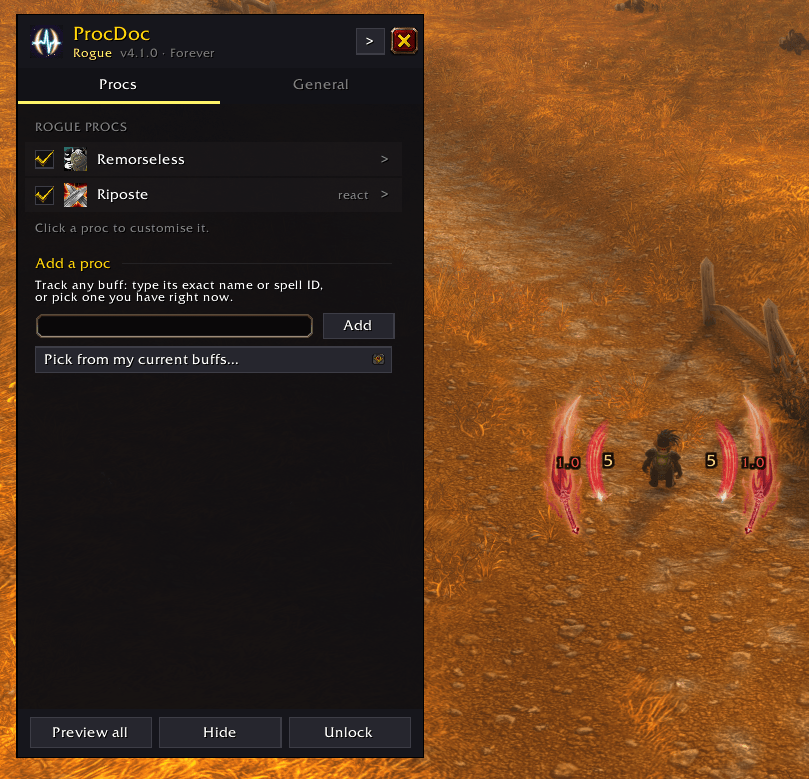
- Add a proc: track any buff by name or spell ID, or pick one you have right now
- Auto-detect: anything the game flags with its own proc glow is picked up automatically
Built for WoW Forever
- Reads procs reliably even in combat, where Forever hides buff details from addons, and clears the alert as soon as a proc is spent
- Reaction abilities (Overpower, Revenge, Riposte, Counterattack, Mongoose Bite) light up without needing to be on your action bars
Easy to reach
- Minimap button (left-click for options, right-click to arrange), addon compartment support, and
/procdoc - A slim options window that sits beside your alerts and remembers where you leave it
Built-in procs
| Class | Procs |
|---|---|
| Warrior | Enrage, Overpower, Revenge |
| Hunter | Quick Shots, Counterattack, Mongoose Bite |
| Rogue | Remorseless Attacks, Riposte |
| Mage | Clearcasting |
| Druid | Clearcasting, Nature's Grace |
| Shaman | Clearcasting, Flurry |
| Warlock | Shadow Trance (Nightfall) |
| Priest / Paladin | Add your own with Add a proc |
ProcDoc focuses on reaction procs: moments where something just happened and you should act on it. It doesn't remind you about buffs you maintain or abilities that are simply off cooldown.
Commands
| Command | What it does |
|---|---|
/procdoc or /pd | Open or close the options |
/procdoc unlock / lock | Show all alerts to arrange them / stop |
/procdoc test / hide | Preview your alerts / hide previews |
/procdoc stacktest [name] | Play a pretend stacking buff through an alert |
/procdoc minimap | Show or hide the minimap button |
/procdoc buffs | List your current buffs with spell IDs |
/procdoc trace | Record what ProcDoc sees, to troubleshoot a missed proc |
Troubleshooting
A proc didn't show up? Type /procdoc trace, play until it happens again, then /reload. The log is saved with your settings and shows exactly what ProcDoc saw at that moment. Please include it when you report a problem.
Want to track a buff that isn't listed? Open /procdoc, go to the Procs tab and use Add a proc.
You must be logged in to leave a comment.