

Priestly – Priest Buff Manager (Pally Power Style)
A lightweight Pally Power–style priest buff manager that shows who needs buffs at a glance.
Details
Expansion
 Forever
 Categories
Developers

Having issues?
Priestly
Never forget Priest buffs again.
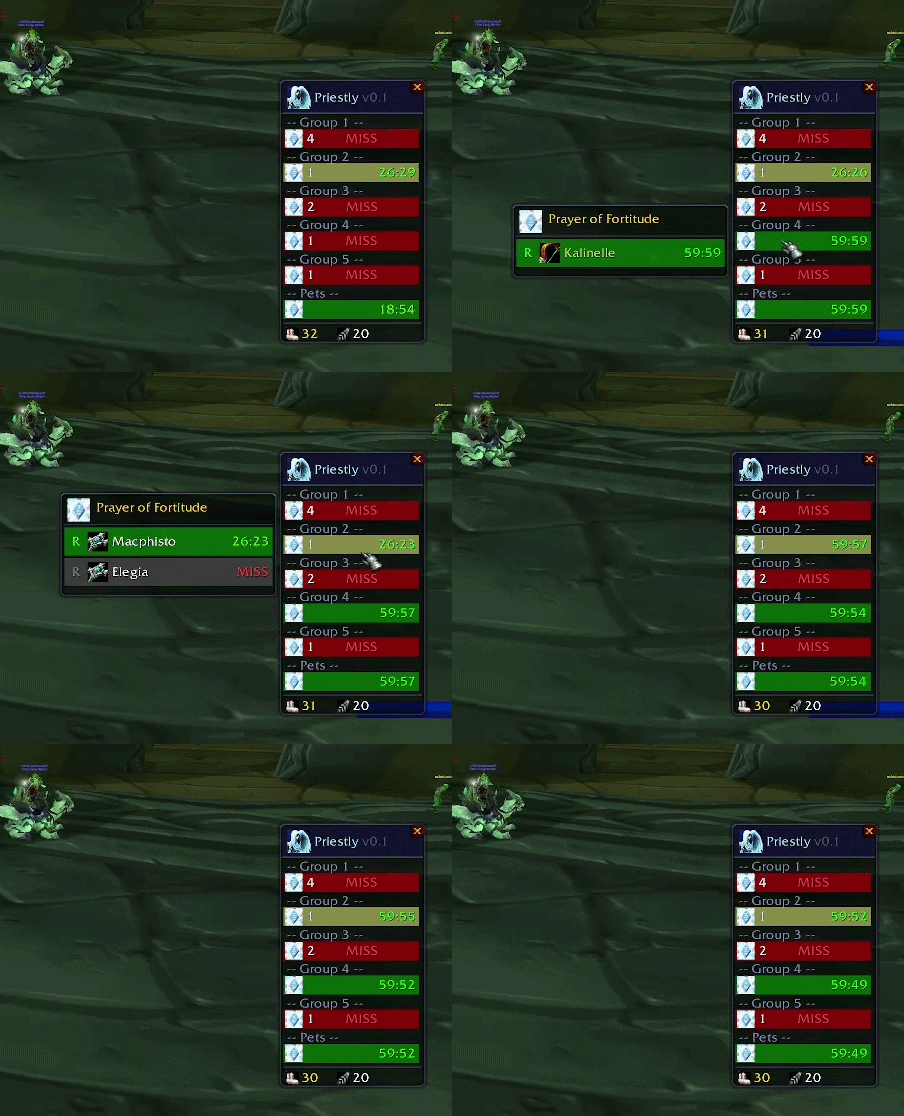
Priestly is a lightweight, Pally Power–style buff manager for Priests that shows exactly who needs buffs and when, without digging through raid frames.
If you liked Pally Power, this is the Priest equivalent.
Built for World of Warcraft: Forever (1.60.1).
Playing TBC Anniversary? Install v1.0.6 — the last release for that client. It stays available here and the CurseForge app will keep offering it on that game version.
Features
- See missing buffs instantly across your group or raid
- Smart timers show exactly when rebuffs are needed
- One-click group or single-target buffing
- Clean, group-based layout inspired by Pally Power
- Automatically opens and closes with your group
- Full options panel — buff toggles, Shadow Protection rules, pet tracking, solo display and frame opacity
Supported buffs
- Power Word: Fortitude / Prayer of Fortitude
- Divine Spirit / Prayer of Spirit
- Shadow Protection / Prayer of Shadow Protection
Reagent counts are shown once you know the spells that need them:
- Holy / Sacred Candles
- Light Feathers
What it does
- Organizes players by group, with pets in their own group
- Tracks buff durations with built-in timers
- Makes it easy to see who needs a rebuff and when
- Automatically opens when you join a group
- Closes when you leave — and if you close it yourself, it stays closed
Built for Forever
Forever runs Vanilla content on the modern client, and Priestly is built around what that actually does rather than what used to be true:
- Works before the Prayers exist. Every row is built from the spells you actually know. While you only have the single-target buffs, left-click simply buffs whoever needs it — nothing is ever wired to a spell you do not have, and it switches over on its own the moment you learn a Prayer.
- Durations are learned, not assumed. Forever's buff durations match neither TBC nor Vanilla and are still being tuned, so the bars scale against what your own buffs actually report.
- Combat is handled. This client hides buff information from addons the moment you enter combat. Rather than showing the whole raid as unbuffed, Priestly keeps counting down from the last reading and marks anyone it has not seen with
?. - Full names. Forever characters have surnames and first names are not unique, so members are shown by their full name and buff state follows the character, not the raid slot.
Great for
- 10, 20 and 40 player raid buff management
- Dungeon groups where buffs are often forgotten
- Priests who want a Pally Power–style experience
Controls
Main frame rows (per group, per buff)
- Left-click: Cast the group Prayer on that group — or, if you have not learned the Prayer yet, buff the member who needs it most
- Right-click: Cast a single buff on the first unbuffed member, or the member with the lowest remaining duration
- Mouseover: Open a per-member popover for finer control
Clicks prefer someone in range, so a buff is not thrown at a member you cannot reach.
Popover (per member)
- Left-click: Cast the group Prayer for that member's group — or the single buff, if no Prayer is known
- Right-click: Cast a single buff on that specific member
Range and timer indicators
Range
- Green = in range
- Yellow = out of range
- Grey = offline
Timer
- Green = more than 50% remaining
- Yellow = 10% to 50% remaining
- Red = less than 10% remaining
?= buff state cannot be read right now (combat)
Options
Open with /priestly config, or through Game Menu → Options → AddOns → Priestly.
- Buff tracking — turn Fortitude or Spirit tracking off
- Shadow Protection — always show it, show it when a group member already has it, or show it only inside instances you pick
- Pet tracking — include Hunter, Warlock, Mage and Shadowfiend pets
- Show when solo — keep the window up outside a group
- Frame opacity — 20% to 100%
Settings are saved per character. This client has a bug where account-wide saved variables are written but never read back, so addons using them reset to defaults every session. Priestly stores its settings per character, which does work — the cost is that configuring one character does not configure the others.
Commands
/priestly— Toggle the window/priestly show— Force the window open/priestly hide— Close the window/priestly config— Open the options panel/priestly reset— Reset the window position/priestly help— Print commands and controls in chat
Roadmap
Frequent updates planned throughout the Forever beta and beyond.
Planned or possible future additions include:
- A frame scale option, for the smaller UI on this client
- Buff assignments for coordinating multiple Priests
- Fear Ward tracking
- Power Infusion tracking
Known Issues
Your settings reset every time you reload. This is a bug in the Forever client and it affects every addon, not just this one: the game writes addon settings to disk correctly and then never reads them back when you log in. Storing them per character fails the same way as account-wide.
So the window position, the frame lock, the buff toggles and your Shadow Protection instance list all start fresh each session. Nothing an addon can do fixes it directly.
There is another place on this client that does remember things, and Priestly will move its settings there, so this should be temporary. Until then, please don't report lost settings as a Priestly bug — and if you've seen it in other addons too, that's the same cause.
Feedback
If you run into bugs or have suggestions, please leave a comment or open an issue.
If Priestly ever tells you it does not recognize an instance you walked into, please send that name along — most of Forever's dungeons are above the current level cap and cannot be verified yet, and a report is the fastest way to get them right.
Feedback is always welcome.
You must be logged in to leave a comment.