

PlayerTracker
Tracks grouped players over time: loot seen/received, Need/Greed/Pass behavior, deaths, dungeon & raid clears, and session history. Know exactly who you've run with, what they won, and how they play — across every session.
Details
Expansion
 Forever
 Categories
Developers

Having issues?
PlayerTracker
Remember the players you meet.
Ever see a name in the Group Finder and wonder:
“Have I played with this person before?”
PlayerTracker remembers for you.
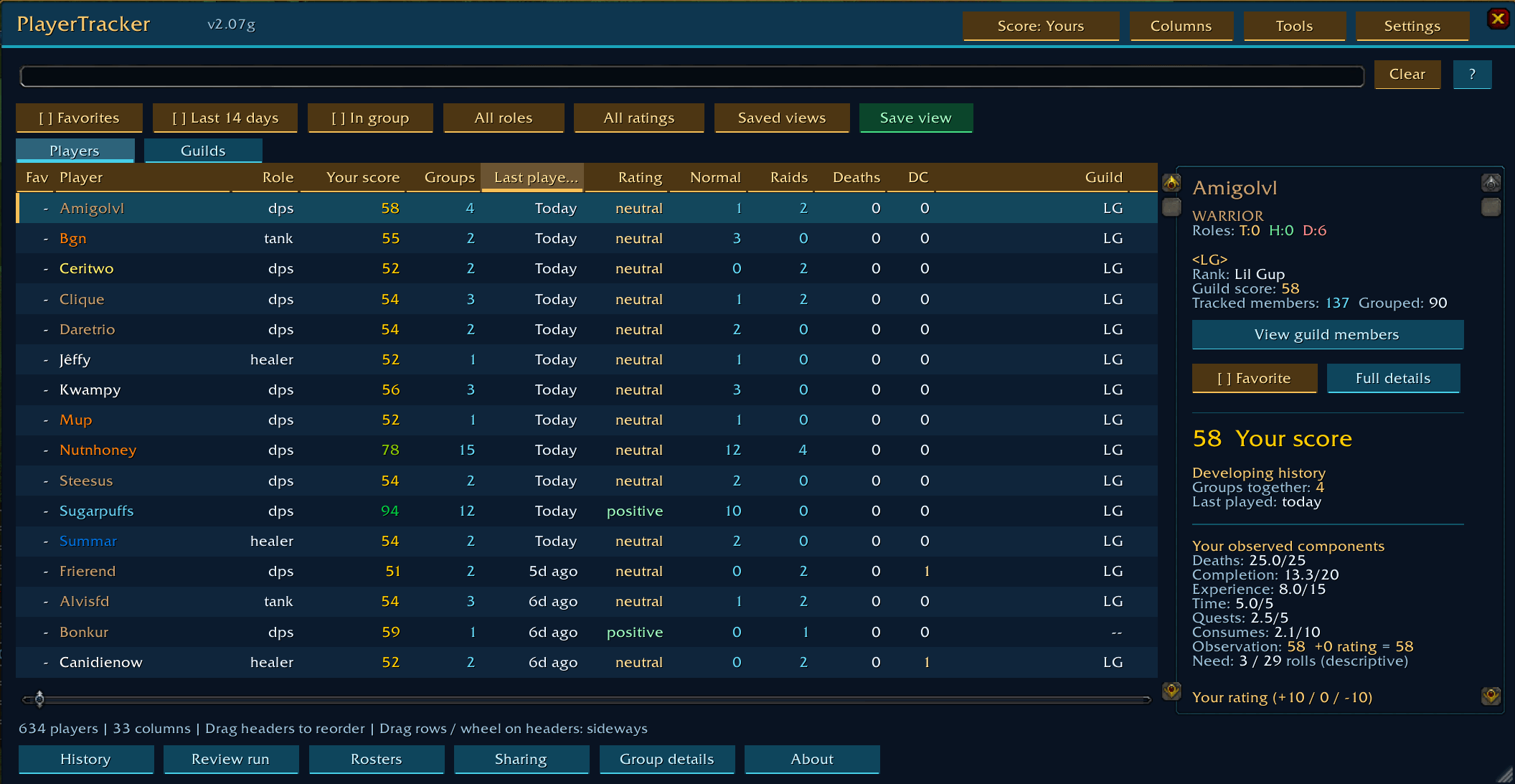
As you play, PlayerTracker quietly builds a private history of the people you encounter: who you grouped with, which dungeons and raids you ran together, how those runs went, loot, performance, roles, trades, services, notes and more.
Then, when you encounter someone again, PlayerTracker puts that history where you can actually use it.
No setup. No reviews required. No other players need the addon. Just install it and play.
Supports Classic Era / Hardcore, TBC Classic and WoW Forever.
Open PlayerTracker with /pt, /ptr or /playertracker.
Built for WoW Forever
WoW Forever gives you a new world full of people to meet. PlayerTracker helps you remember the ones you've already met.
When a familiar player appears in the Group Finder, PlayerTracker can identify them from your own history and show a compact PT indicator.
Hover the listing to see things like:
- How many times you've grouped together
- Your rating or private note
- Your PlayerTracker score for them
- Previous experience together in the listed dungeon or raid
- Runs and clears
- Retained boss progress
Select the player to open their full PlayerTracker profile.
Unknown player? PlayerTracker leaves them unknown. It does not /who them, message them or try to guess who they are.
“Last time together”
When someone you've played with before joins your group, PlayerTracker can optionally remind you:
You last played with this person in Stratholme.
Along with your previous note, rating and shared run.
Strangers stay quiet, and the reminder is entirely private.
Forever-aware tracking
PlayerTracker supports Forever's first-name + surname character identities, new race/class combinations, Group Finder, public dungeon/raid completion information, loot-roll information and available combat-performance data.
Forever support is under active development as the client evolves, and PlayerTracker deliberately leaves information unknown when the game does not expose it reliably rather than inventing an answer.
What PlayerTracker remembers
The people you've grouped with
PlayerTracker automatically records your history with other players, including:
Groups together · First/last encounter · Time together · Roles · Dungeons · Raids · Bosses · Quests · Deaths · Loot · Trades · Services
Add your own favorites, tags, ratings or private notes when you want to, but none of them are required for tracking.
PlayerTracker can also remember observed group responsibilities such as party leader, raid leader, master looter, raid main tank and raid assistant.
Your dungeon and raid history
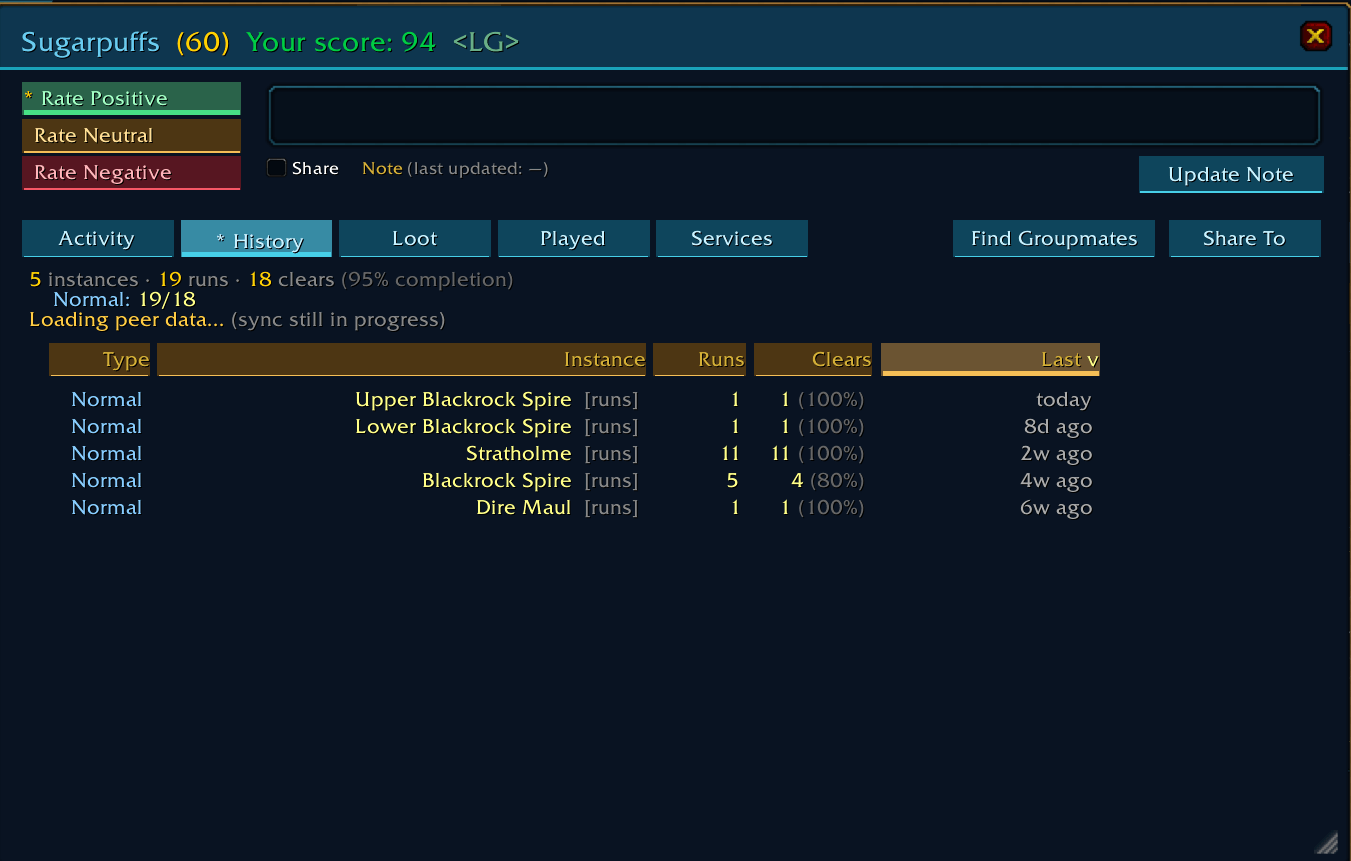
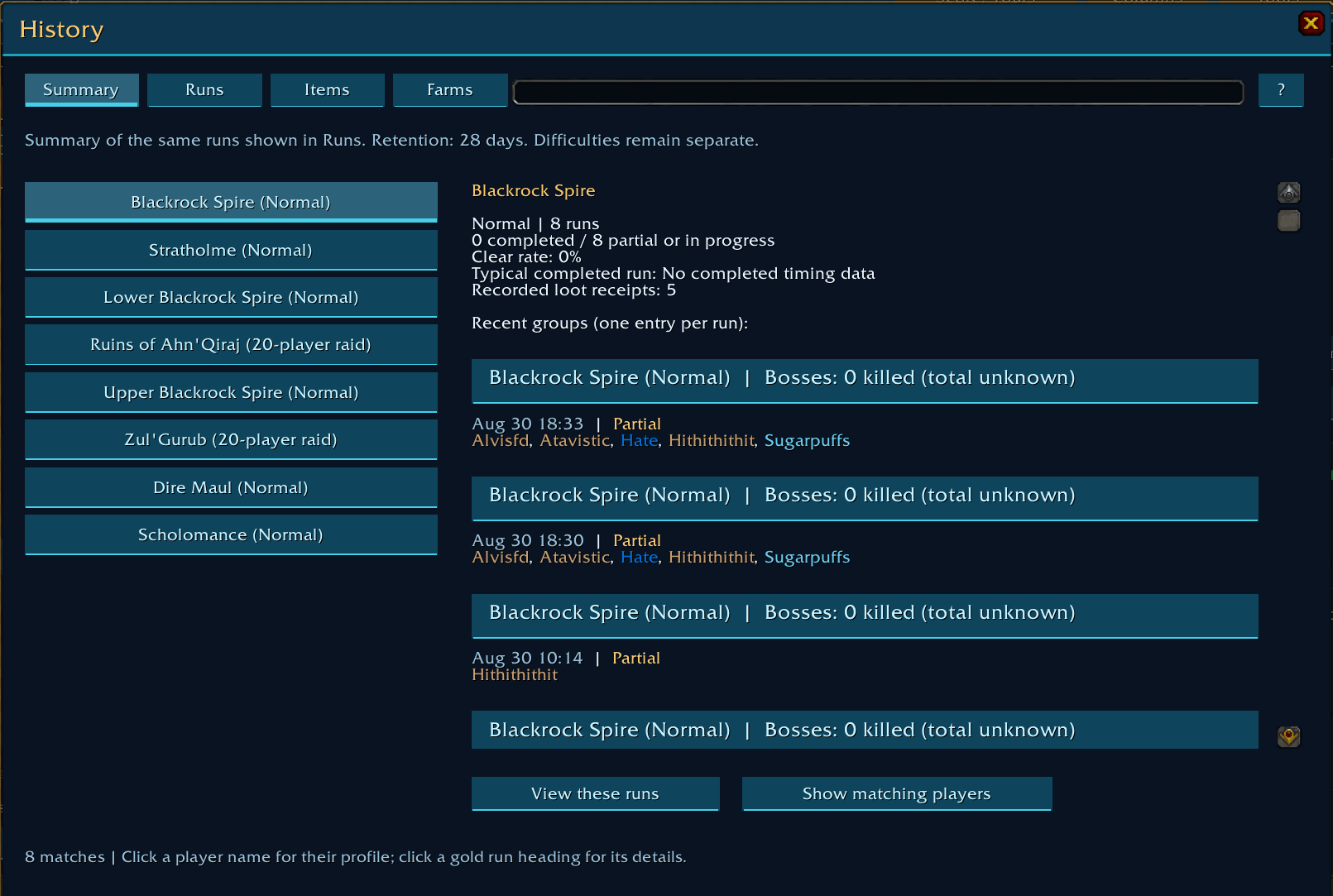
PlayerTracker keeps a detailed history of the runs you've experienced.
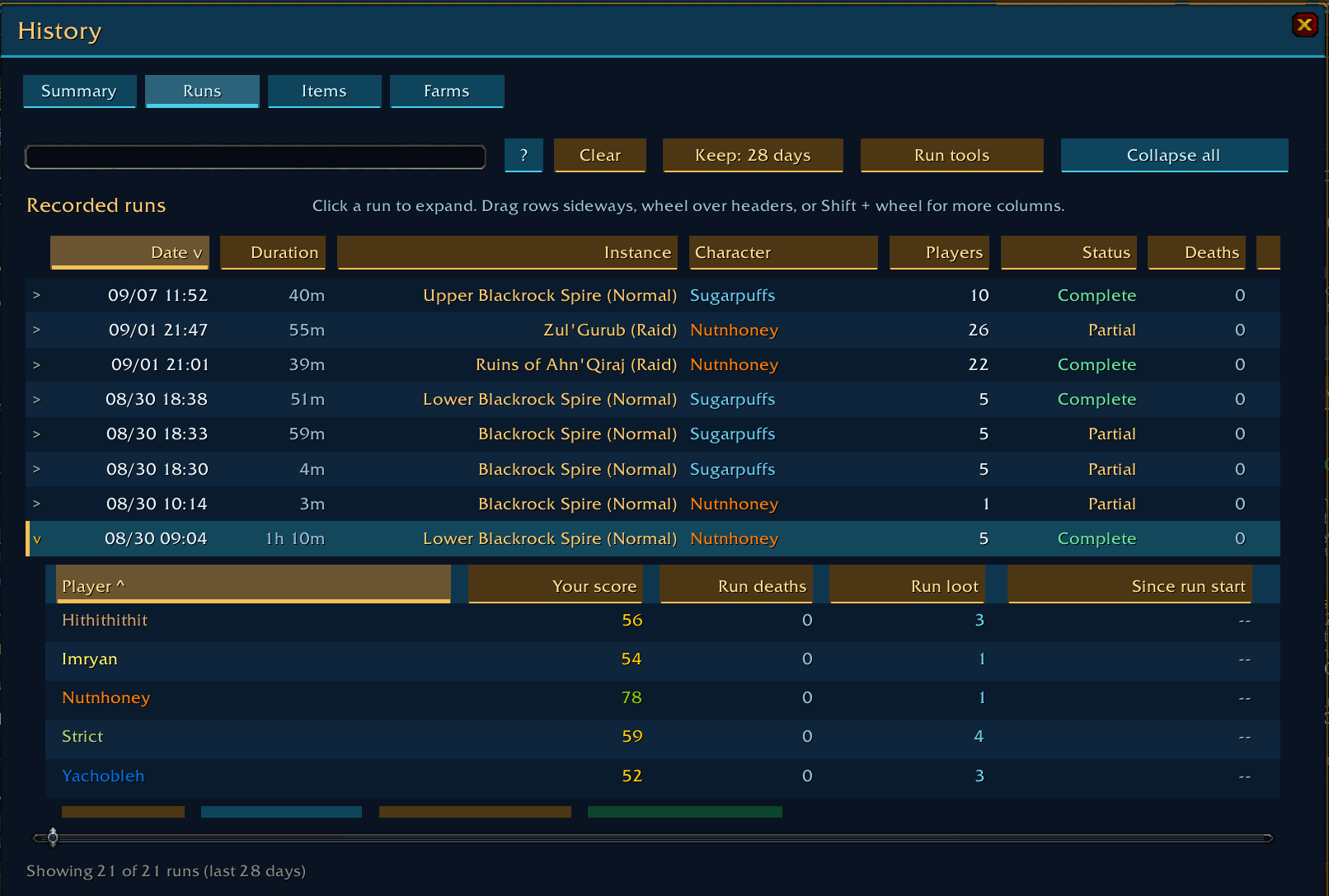
Open History → Runs to review previous groups and see:
Members · Duration · Boss progress · Clear status · Deaths · Loot · Performance · Score changes
Expand a run to inspect the individual players, or jump directly from a player's profile back to a run you shared.
Quick scouting visits with no recorded kills are hidden from the main run history by default, so actual dungeon runs don't get buried beneath instance checks.
How people performed when you played with them
PlayerTracker can passively retain observed DPS/HPS from shared dungeon and raid runs when that information is available.
A player's Performance history can show:
Last run · Lifetime average · Last 5 · Last 10 · Number of measured runs
PlayerTracker can also compare similar runs — matching things such as instance, difficulty, observed role and level — so you're not blindly comparing unrelated content.
With enough local observations, it can show how that player compared with other people you personally measured in similar situations.
This is your own observed history, not a global server ranking.
Performance numbers do not affect PlayerTracker reputation scores.
People you've farmed with
Running the same dungeon repeatedly with mostly the same group?
PlayerTracker automatically recognizes it as a farming session.
See the runs, clears, bosses, loot and time together under History → Farms.
There is no “farm mode” to remember to turn on, and every dungeon remains available as its own individual run.
Your play sessions
PlayerTracker can also summarize an entire play session.
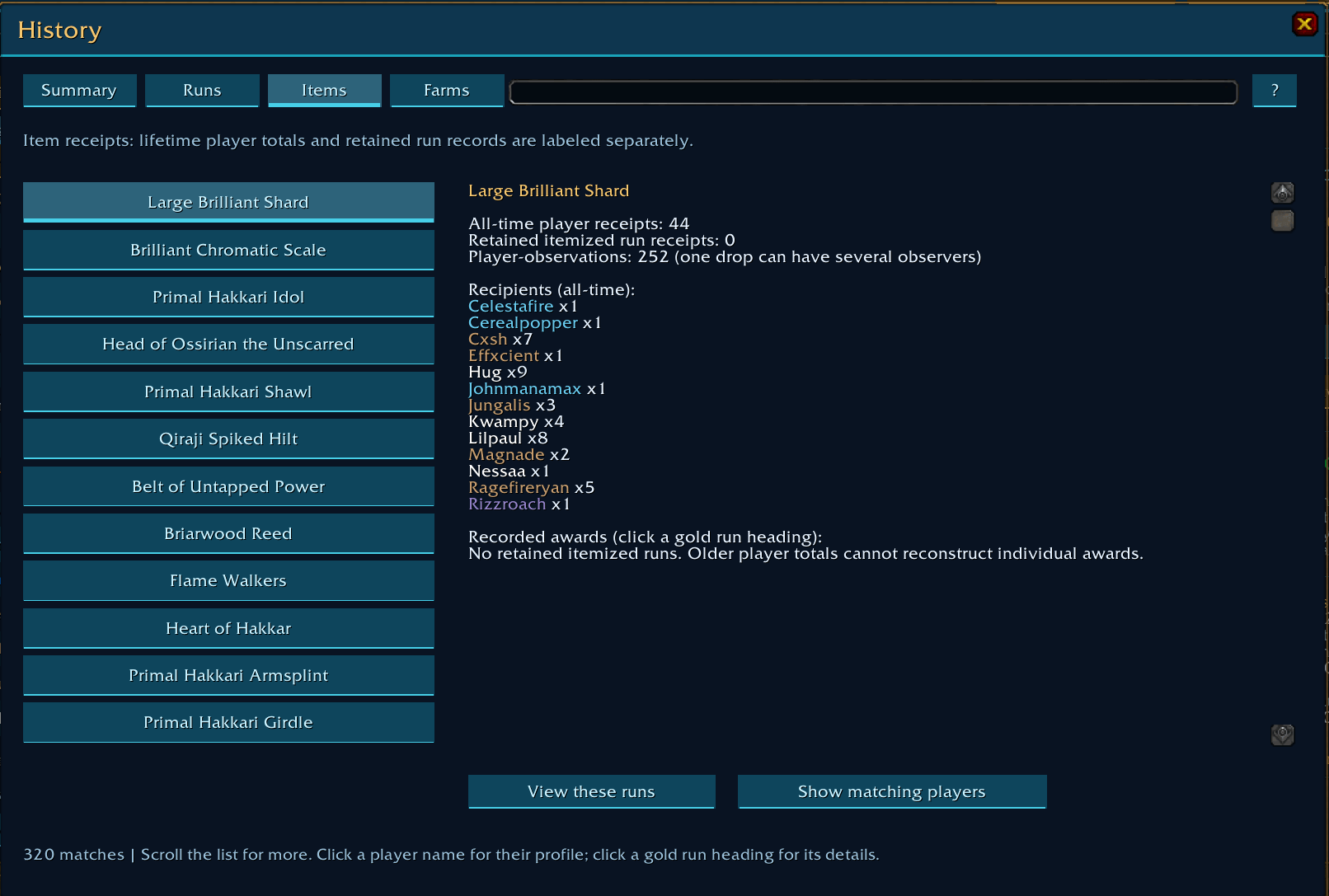
History → Sessions brings together the people you played with, runs completed, bosses killed, loot received, services and completed trades.
It happens automatically: there is no session timer to start or stop.
An optional private notification can show the recap when the session ends.
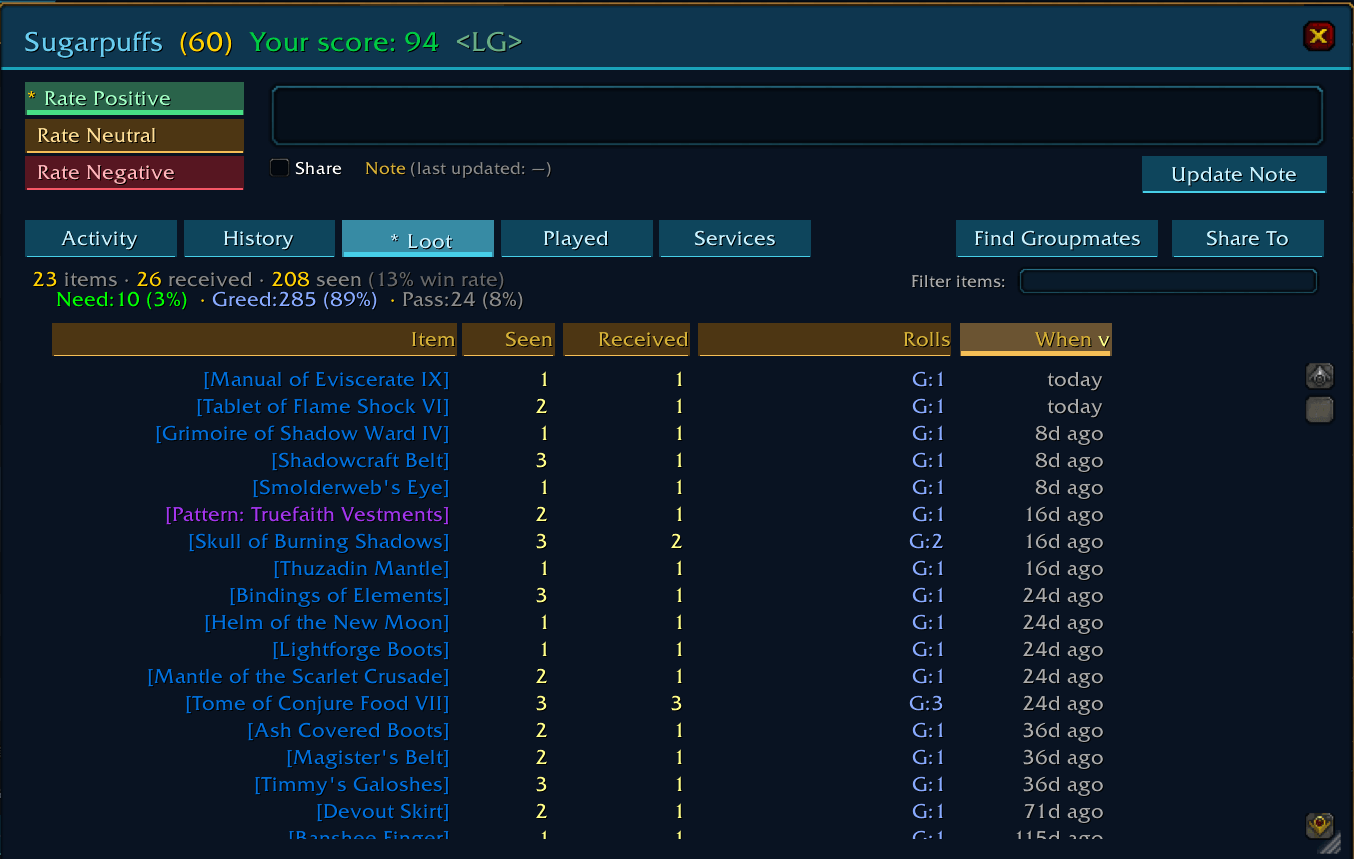
Loot and roll behavior
PlayerTracker remembers observed:
Need · Greed · Pass · Loot seen · Loot received · Item history
This lets you look back at what actually happened instead of trying to remember a player from a run weeks ago.
With Gargul, PlayerTracker can retain additional supported award information, including award corrections and offspec status.
Without Gargul, normal passive loot tracking still works where supported by the client.
The enchanter, lockpicker or trader you forgot to add
Ever find yourself asking:
“Who was that person who enchanted my weapon?”
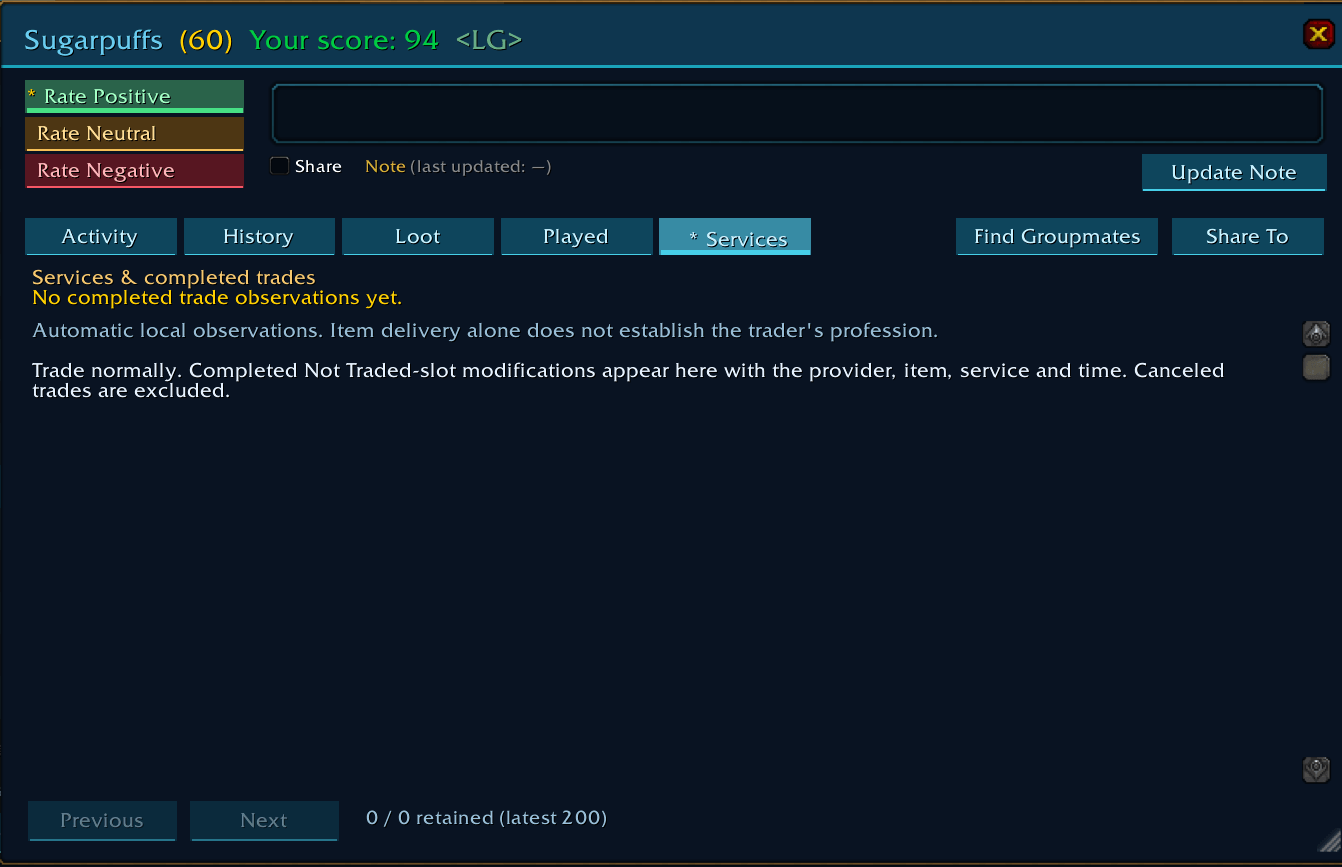
PlayerTracker can remember completed trades and observed services.
Depending on what the client exposes, that can include things such as:
Enchants · Item modifications · Lockpicking · Item deliveries · Money exchanged
Use Tools → Service address book to search your history by player, service or item and find someone you've dealt with before.
Receiving an item does not cause PlayerTracker to guess someone's profession or recipes.
Quests you've completed together
PlayerTracker can passively remember successful quest turn-ins while grouped with other players.
Where the game provides the information, it separates them into:
Regular · Repeatable · Dungeon · Raid
That gives you another way to distinguish someone you've adventured with repeatedly from someone you happened to group with once.
Your history, wherever you see the player
PlayerTracker isn't useful only when the /pt window is open.
Player tooltips
Hover a player to see the PlayerTracker information you care about.
You can individually enable or disable tooltip fields including:
Groups · Scores · Notes · Ratings · Roles · Runs · Clears · Bosses · Performance · Quests · Loot · Rolls · Services · Hardcore history · Guild information
Open Settings → Tooltip for a live preview and choose exactly what you want displayed.
Chat
Optional local PT tags can display a score beside familiar player names in supported chat channels.
Only you see the tag.
Friend and guild logins
PlayerTracker can optionally remind you when a familiar friend or guild member logs in, including your previous note, rating, score or observed role.
Current group
Players currently in your group stay visually separated from the rest of your PlayerTracker results, making it easy to inspect the people you're actually playing with.
Personal scores — based on your experience
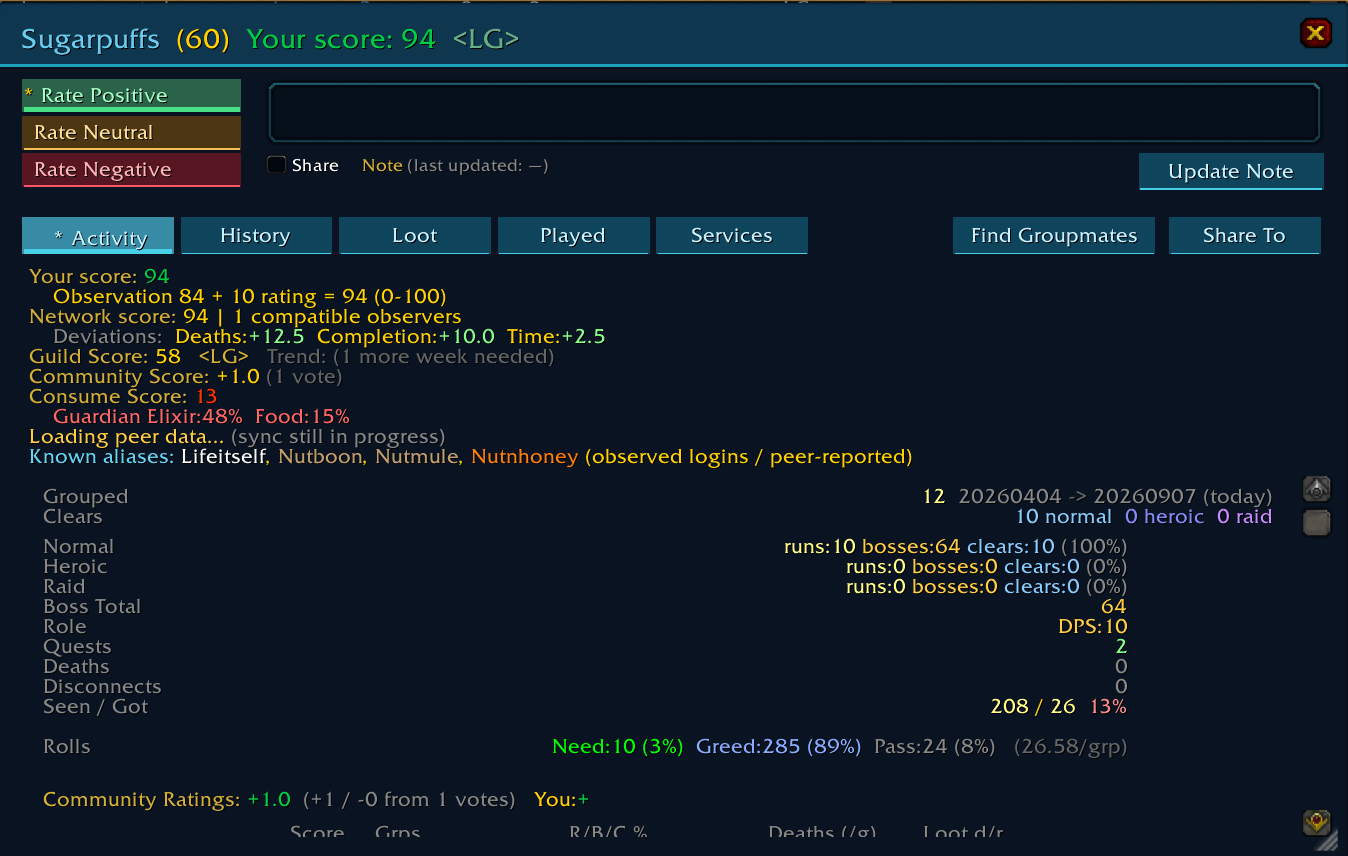
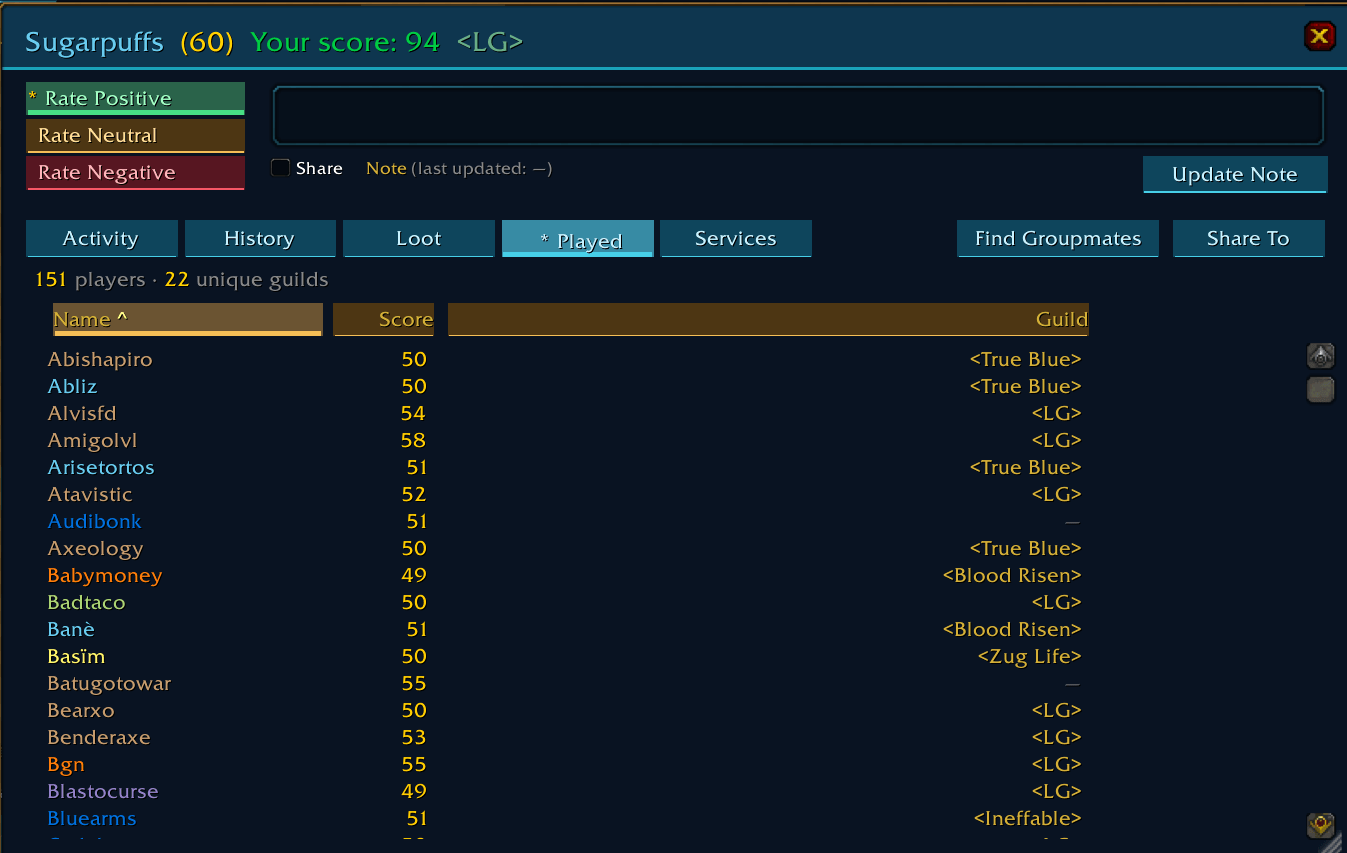
PlayerTracker can calculate a 0–100 personal score from your own observations.
The score can consider things such as shared experience, successful runs, deaths, time together, quests and relevant preparation observations.
Your optional manual rating adds a simple adjustment:
Positive +10 · Neutral 0 · Negative −10
The rating doesn't stack if you click it repeatedly.
PlayerTracker may also show Guild or Network scores when enough appropriate evidence exists.
These scores are context for your judgment. They are not proof that someone is good, bad, responsible for a wipe or responsible for another player's death.
If PlayerTracker doesn't have enough evidence, it says so.
Especially useful in Hardcore
On Hardcore, remembering who you've played with can matter a little more.
PlayerTracker can retain observed death history and combine supported direct Blizzard information with optional Deathlog / DeathNotificationLib information.
It distinguishes direct observations from external reports and preserves historical deaths when a character name is reused.
Risk and trend information can provide additional context when enough evidence exists.
PlayerTracker does not join a death channel or broadcast deaths on your behalf.
Powerful search
Once you've accumulated history, PlayerTracker becomes a searchable address book of the people you've encountered.
Examples:
| Search | Finds |
|---|---|
role:healer | Players observed healing |
rating:+ | Players you rated positively |
since:14 | People you've grouped with in the last 14 days |
score:60 | Players with a personal score of at least 60 |
inst:"Dire Maul" | Players from your recorded Dire Maul history |
guild:"Guild Name" | Players observed in that guild |
service:stamina | Matching recorded services or serviced items |
trade:"Healing Potion" | Matching completed trades |
quests:5 | Players with at least five shared quest turn-ins |
Combine filters to get more specific:
role:healer rating:+
The built-in ? guide lists the available search fields.
Share only if you want to
Everything PlayerTracker records starts with your own local history.
There is no central PlayerTracker player database.
Your records live in your WoW SavedVariables and work across your characters.
Other players do not need PlayerTracker for you to track your own experiences with them.
If you want to exchange observations with trusted friends, PlayerTracker also supports optional peer subscriptions and manual export/import.
Those features are optional.
Private information such as saved rosters, private run reviews and service journals stays outside normal peer sharing.
You can also use /pt stealth on to pause PlayerTracker addon communication.
What PlayerTracker does NOT do
PlayerTracker is deliberately observation-based.
It does not pretend to know things your client never observed.
It does not provide an all-server reputation database.
It does not automatically /who strangers.
It does not add people to your friends list.
It does not send probing whispers.
It does not assume two characters belong to the same person merely because something looks similar.
It does not turn missing or restricted information into a fake zero.
Unknown means unknown.
Getting started
Install PlayerTracker and play normally.
That's it.
Tracking begins automatically.
Open /pt whenever you want to inspect what PlayerTracker has remembered.
Select a player for a quick profile or open Full Details for their:
Activity · History · Loot · Played Together · Services · Performance
Customize the main table with Columns, change your player tooltips under Settings → Tooltip, and control optional reminders under Settings → Notifications.
Optional integrations
PlayerTracker can make use of supported information from:
Details! — Classic/TBC performance observations
Gargul — additional loot-award information
Deathlog / DeathNotificationLib — additional Hardcore death observations
None are required for basic PlayerTracker functionality.
Useful commands
| Command | Function |
|---|---|
/pt | Open PlayerTracker |
/pt history | Open run history |
/pt sessions | View automatic session recaps |
/pt services | Open the Service Address Book |
/pt together | Show previous history with familiar current companions |
/pt sharing | Sharing and backup controls |
/pt officer | Copyable report for tracked guild members |
/pt impact last | Score impact from the previous run |
/pt postsummary | Post a run summary |
/pt lfg | TBC Form Group assistant |
/pt help | Complete command help |
/pt ver | Show installed version |
Install it now. Let the history build itself.
The best time to install PlayerTracker is before you meet the player you'll want to remember later.
PlayerTracker records quietly in the background while you play.
A week from now, a month from now or several expansions from now, when a familiar name appears again:
you'll know exactly why you recognize it.
Current version: 2.08u
Clients: Classic Era / Hardcore · TBC Classic · WoW Forever
Authors: Nutnhoney @ Dreamscythe · Sugarpuffs @ Doomhowl
If PlayerTracker helps you, recommending it to another player is the best donation.
You must be logged in to leave a comment.