

PetWalker
Never lose your pet again.
Details
Expansion
 Forever
 Categories
Developers

Having issues?
PetWalker
Never lose your pet again.
Summary
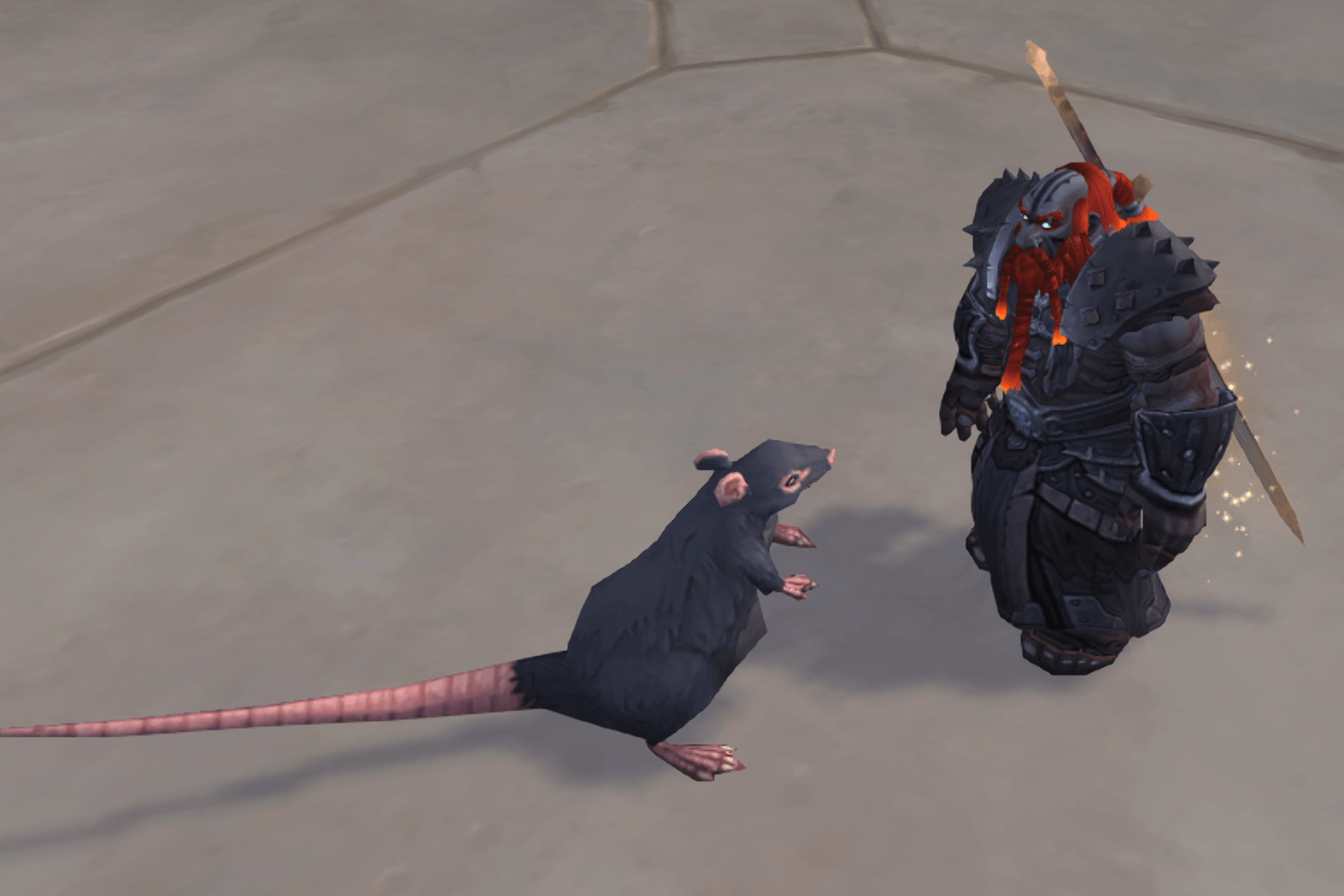
The addon helps you to always have a companion pet out (summoned). You can choose between two operating modes:
- Auto Restore only: Whenever your pet is lost – for whatever reason –, it will be restored. This works across logouts and characters.
- Random Summon: Automatically summons a random pet (from a configurable pool) every n minutes, or via keybind or slash command. This pet will be auto-restored whenever it is lost, until a new one is summoned.
Please post feedback, suggestions, and issues at PetWalker’s issue tracker on GitHub.
Features
- New September 2026 (v3.1): Different instance modes (restrictions). See
/pw iin the Settings section. - New July 2026 (v3.0): Configurable probability (see section “Advanced setting: Configurable probability of favorite pets”).
Main Features
- Resummon (restore) your pet if it has “disappeared”. Most of the time this happens due to faulty game mechanics: using portals or teleports, mounting/dismounting, end of combat, entering or exiting instances, and other seemingly random occasions.
- You can set a repeating timer to auto-summon a new pet from a configurable random pool every n minutes.
- You can manually summon a new pet from a configurable random pool via keybind or slash command.
- Your ‘current pet’ is saved across chars. So, if you log out with a given pet on toon A, then login with your toon B, you should see the same pet summoned, right at (or very shortly after) login. (You can exclude a toon from that by setting it to char-specific favorites.)
- Your remaining auto-summon timer is saved at logout and re-applied when you log in again (on any toon). So, if you have set your timer to two hours, you will see a new pet every two hours of gaming time, no matter how often you log out/in or for how long you have been offline. You can see the current remaining timer in the Status report (command
/pw s, see Usage). - The addon does its best not to interfere with various activities/circumstances: M+ keys, Arena, Stealthed, In Combat, and more.
- The pool of favorite pets to summon can be char-specific or account-wide. You can change this on a per-char basis at any time, and your char-specific list will be retained for later if you switch from char-specific to global favourites.
- Easy switching between ‘random-summoning of new pets’ and ‘just keep my pet out’. (
/pw 0to disable the auto-timer, see Usage) - The addon knows about special pets and does not try to summon pets that can or should not be summoned, e.g. the Pocopoc pet in Zereth Mortis, the Winter Veil pets, or the vendor pets with CD like Guild Herald.
- PetWalker ignores pets that are automatically summoned because they are slotted into a team. It will reliably restore your previous pet 15 seconds after a pet battle. (See also FAQ.)
Other Features / Notes
- No GUI settings. Basically it’s a set-and-forget addon.
- 100% standalone, no libraries or other dependencies.
- Lightweight in terms of CPU and memory usage.
- Alt friendly: All settings are account wide (except for char-specific favorite pets, ofc).
- For obvious reasons, conflicting with any similar addon that auto-summons pets.
- Fully compatible with Rematch.
If you’re having trouble reading this description on CurseForge, you might want to try switching to the Repo Page. You’ll find the exact same text there, but it’s much easier to read and free from CurseForge’s rendering errors.
Usage
PetWalker works out of the box, you don’t need to set anything. This doesn’t mean it can’t be customized or lacks features.
Most things are done via the chat console interface. The base command is /pw; if /pw is conflicting with another addon’s command, then use the long form /petwalker instead. The most important actions can be bound to hotkeys via Blizz standard keybindings.
Commands
/pw a: Toggle all automatic summoning of pets. Basically the main switch of the addon (all events are unregistered/registered), but manual summoning via keybind or slash command (see below) is still available. — Keybind available./pw d: Dismiss current pet and disable auto-summoning. A kind of emergency command, if you want to get rid of your pet immediately and prevent all automatic summoning. Re-enable with/pw a. — Keybind available./pw n: Summon new pet (from the active pet pool: Favs or All, see Settings). Summoning a pet with/pw n(or the keybind) resets your current auto-summon timer, if enabled. — Keybind available./pw p: Cycle through your recent (previously summoned) pets. For example, if your auto-summon timer gives you a new pet, but you actually liked one of the last ones better, you can quickly get it back with this command. By default, the last 3 pets before the current one are recorded. You can also set a keybind for this command. — Keybind available./pw t: Summon the targeted pet of another player (if it’s in your collection).- If the target pet is not in your collection, PetWalker will print a weblink for the pet to the chat (from warcraftpets.com or wowhead.com). — Keybind available.
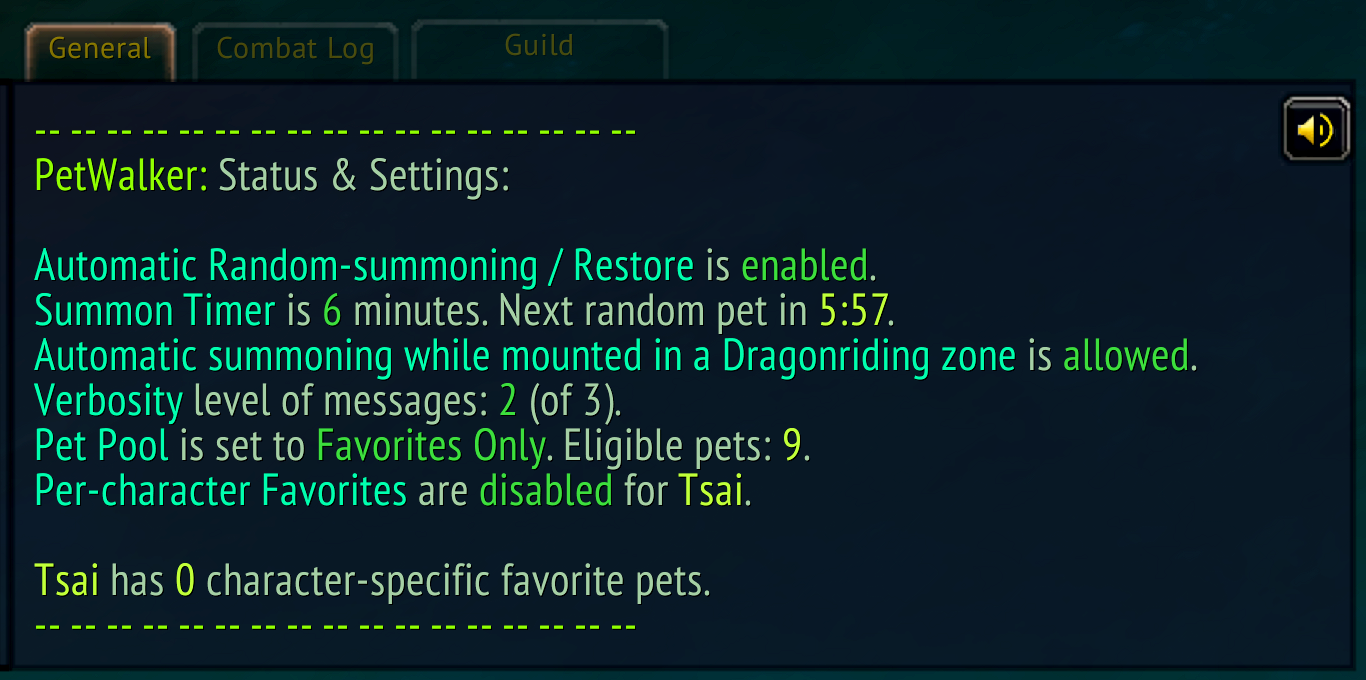
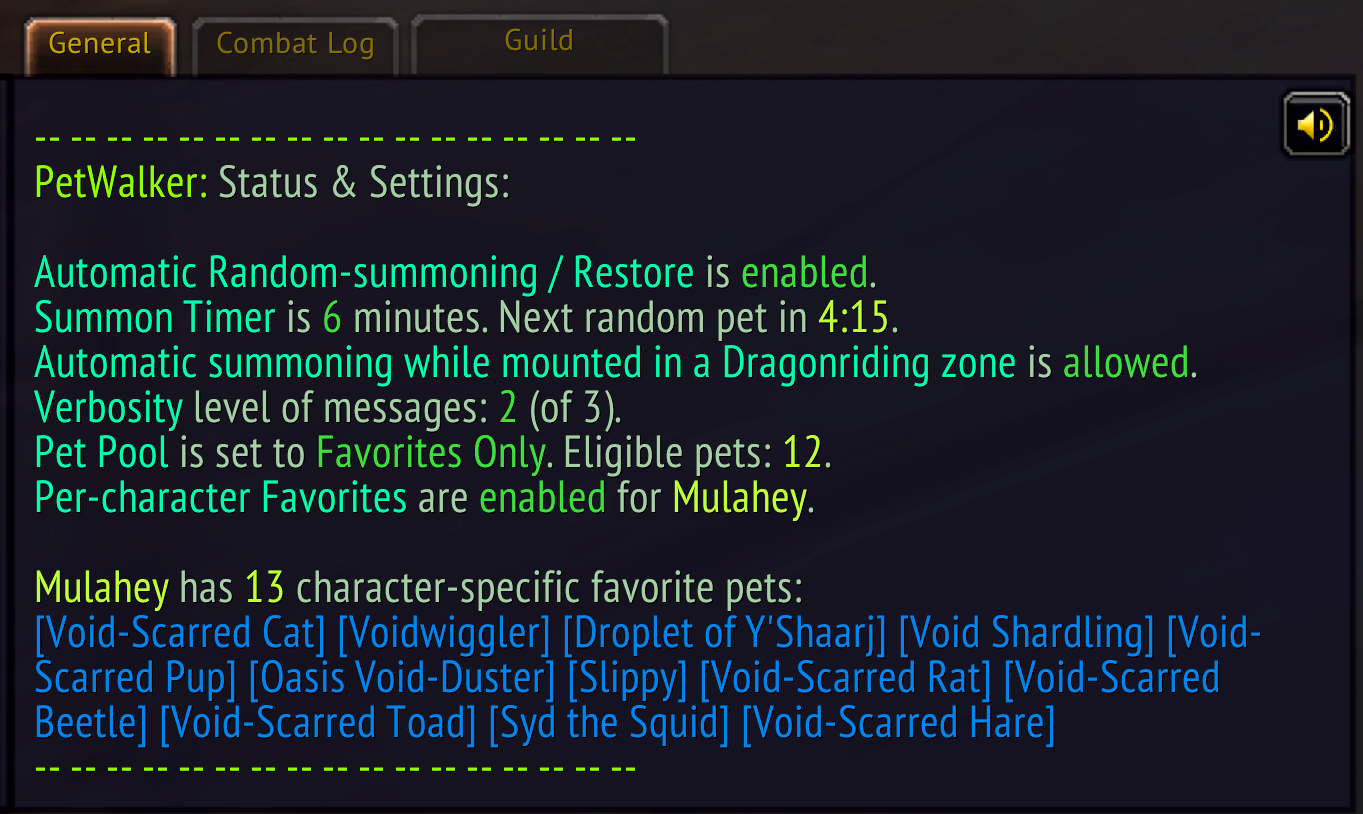
/pw s: Display the Status & Settings report in the console, with these infos:- Addon version.
- If the addon is active (auto-summoning/restore enabled or disabled).
- The summon timer interval and the remaining time (that is, when you will get the next new pet).
- Verbosity level of messages.
- Whether the pet pool is set to Favorites or to All Pets, and the number of eligible pets for auto-summoning:
- In Favorites mode, the number of eligible pets corresponds to the number of selected favorites (either per char or globally via
/pw c) - In All Pet mode, the number of eligible pets reflects the result of your Pet Journal filters (or the total number of summonable pets, if no filters are set).
- In Favorites mode, the number of eligible pets corresponds to the number of selected favorites (either per char or globally via
- Type of favorites: global or character-specific.
- A list of character-specific favorite pets (if you have set any).
- A list of global favorites is not displayed because you can easily get that list by sorting the Pet Journal or Rematch by favorites.
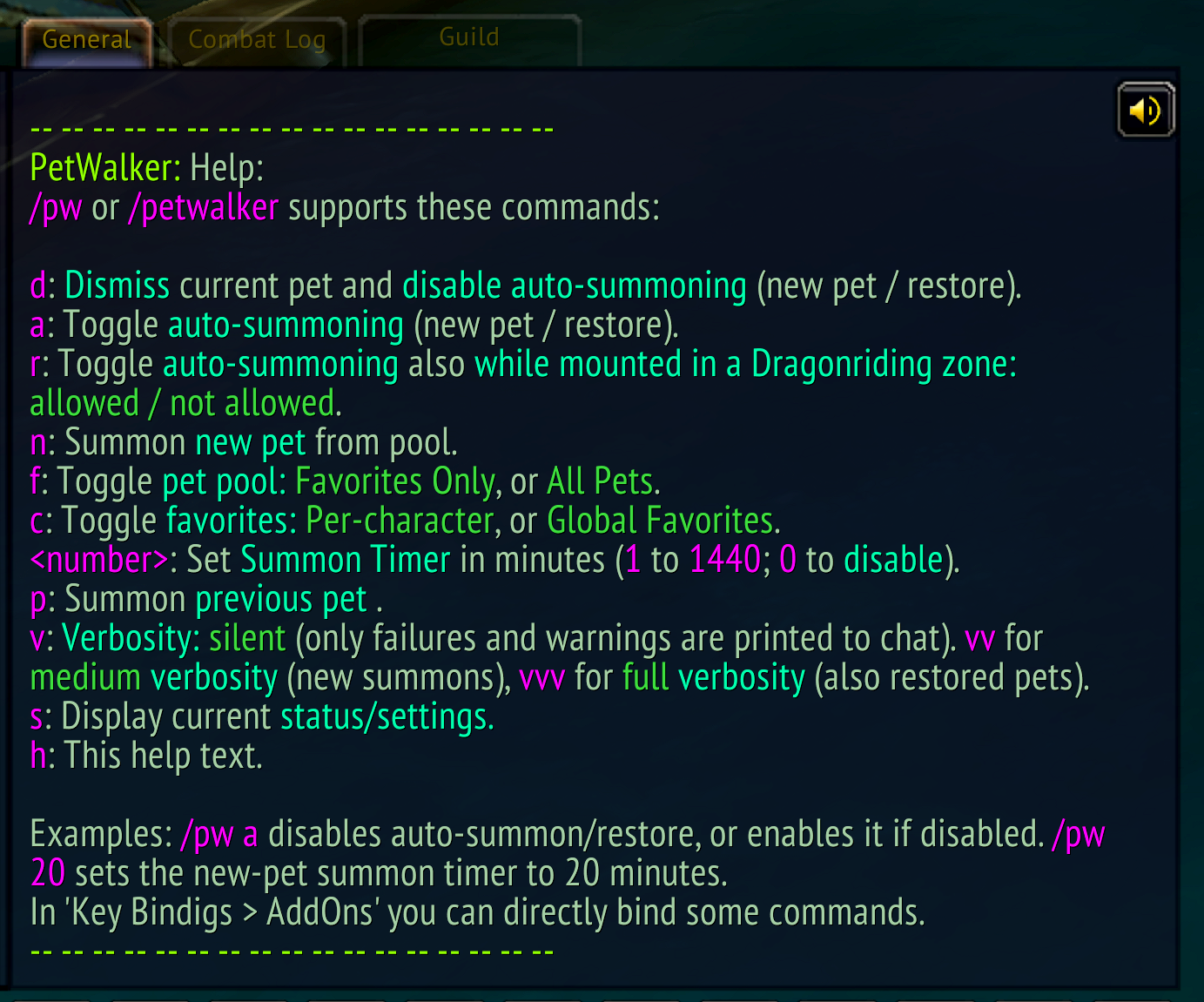
/pw h: Display the Help text in the console. (Also/pw helpor just/pw.) This command lists all available commands and settings with a short description for each. This is your best friend if you are new to PetWalker!
Settings
/pw <number>: Interval [minutes] for summoning a new pet. ‘0’ disables summoning of new pets, though the pet-restore functionality is still active (use/pw ato disable any auto actions)./pw f: Toggle the random-summon pool between Favorites and All Pets.- With the All Pets setting, the currently active filters of the Pet Journal still apply (Pet Family and Sources). Since these filters can be combined, this offers quite some possibilities to create varied pools for random summoning, without the need to select favorites.
- Hint: You can also use the search box of the Pet Journal as filter: If your summon pool is set to All Pets and the search box contains “rabbit”, PetWalker will only summon pets with “rabbit” in their name.
- Note that this works only with the filters or search box in Blizz’s Pet Journal, not in Rematch.
- If you set the pool to Favorites, make sure that your favorites are not excluded by the Pet Journal filters or search string.
- For the
/pw f <number>setting (new in v3.0, July 2026), see “Advanced setting: Configurable probability” below.
/pw c: Toggle global vs char-specific favorites. (Applies if Favorites are enabled via/pw f.) You can also use the Petwalker “Char Favs” checkbox in the Pet Journal, at the bottom./pw p <number>: Set how many of your previous pets should be remembered (1 to 20; default: 3)./pw i: [New in v3.1, September 2026] Toggle instance restrictions between Normal (default) and Strict:- Normal: Auto-summoning/restoring disabled in M+ Keys, Arena, Heroic Raid, Mythic Raid. In all other instances, PW works just like in the open world.
- Strict: Auto-summoning/restoring disabled in all instances.
- In instances where auto-summoning is disabled, your existing pet will also be dismissed automatically after entering.
- If you don’t care about instances and just want your pet around everywhere, you can disable the instance restrictions entirely with
/pw !i(or/pw i!). PetWalker will then treat any instance as open world. Go back to Normal instance mode with/pw i. - No matter the restrictions, PetWalker will not dismiss a pet you manually summoned inside an instance. This is intentional. Also your keybinds for New Pet or Previous Pet remain functional (but the pet will not be auto-restored when lost).
/pw sr: Allow/disallow automatic summoning of pets while mounted (and on the ground) and in Skyride mode.- As of version 1.2.0 (March 2023), automatic pet summoning can also happen while you are mounted. With “normal” mounts, this behavior is trouble-free and only beneficial, but in Skyride mode it can cause occasional GCD glitches. Therefore, you can disable it with this toggle. It is enabled by default. More on that topic in the FAQ below!
/pw v[vv]: Verbosity level for messages:/pw v: silent: Only important messages (missing favorites, failed summons, etc.) are printed to the chat./pw vv: medium: You get a message when a new pet is summoned (either via auto-timer or manually via/pw nor keybind)./pw vvv: full: All messages; you get a message also when a lost pet is restored, which happens quite often.
Advanced setting: Configurable probability of favorite pets in All Pets mode
This is a relatively new feature, introduced in version 3.0, July 2026:
- You set the probability with the usual favorites toggle
/pw f, but followed by a number between0and1(inclusive). - For example,
/pw f 0.5gives you an equal probability (50%) that a random pet is picked from your favorites or from your non-favorites pool. With0.9, nine out of ten pets (on average) will be from your favorites, and so on. - Hint: You don’t have to type the zero before the decimal point,
.5is valid too. - With
/pw f 0, you’ll only ever get non-favorites. /pw f 1doesn’t do what you’d expect, but will simply activate the old All Pets mode as you know it (all pets, favs and non-favs, in one single pool).- To summon only favorites, you just toggle from All Pets to Favs Only with
/pw fas usual. - Your probability value is remembered, and used whenever you switch back to All Pets mode with
/pw f. - When you set/change the probability value, PW will automatically go into All Pets mode, if you were in Favs Only mode.
Keybinds for commands
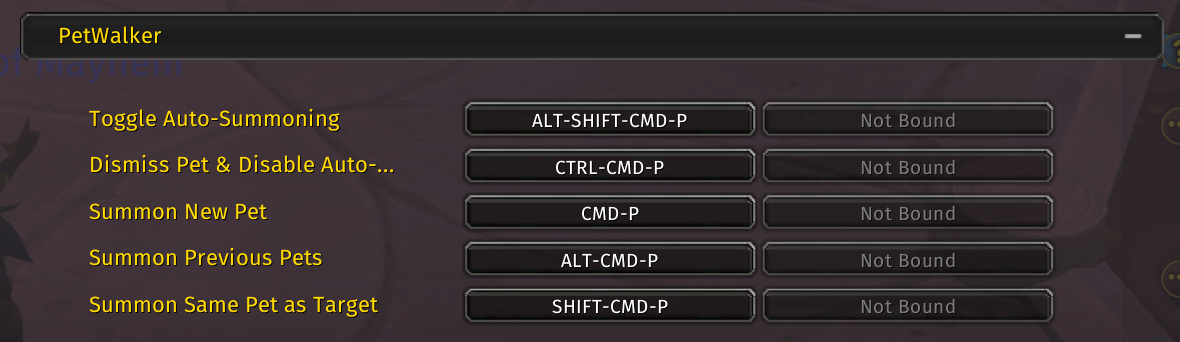
You’ll find five bindable commands in the Keybindings section of the Blizz Options panel:
- Toggle automatic summoning of pets; same as
/pw a. - Dismiss current pet and disable auto-summoning; same as
/pw d. - Summon new pet; same as
/pw n. - Cycle through previous pets; same as
/pw p. - Summon same pet as target; same as
/pw t.
GUI elements
In the Pet Journal, at the bottom, you’ll find a “Char Favs” checkbox. This does the same as the /pw c toggle.
FAQ
How to set char-specific favorite pets?
- Set PetWalker to ‘char-specific favorites’ (toggle command:
/pw c). - Set your favorites as usual in the Pet Journal (or Rematch).
In the Pet Journal, char-specific favorites are only visually marked with the fav star when you are in char-specific favorites mode; in normal favorites mode, your normal (global) favourites are marked with a star. (In Rematch, they are never visually marked. However, you can set/unset them there using the context menu (right-click), just like in the Pet Journal).
Unlike the global favorites, these char-specific favorites are not sorted at the top of the Pet Journal list. However, the Status display (/pw s command) will show you a list of your current char-specific favorites. This makes them easier to identify, for example if you want to remove a pet from your favorites.
I do not want to summon a new pet every n minutes, I just want to keep my current pet out
Simply set the Summon New Pet timer to ‘0’ (zero). You can set it to 0 with the command /pw 0. With this setting, the addon will never give you a new pet, and will do its best to keep your current pet out, until you decide to summon a different one. How the pet is summoned, is irrelevant: it can be summoned via Pet Journal, or via PetWalker keybind, or whatever. PetWalker will remember it, treat is as your “valid” current pet and will try to re-summon it whenever it is lost.
PetWalker only summons a few pets out of my pool, or I get the “0 (zero) eligible pets” message
The Filter settings in the Pet Journal can actually restrict the pet pool, i.e. you can actively use the filters to “shape” your pet pool without using explicit favorites. This includes any text in the search box(!).
However, it is also possible that the game has messed up the filters (I often see this after a hard disconnect), or you have been searching for a pet and forgot to reset the filters.
First, check PetWalker’s status with /pw s. If it reports that your pool is set to All Pets, but also says that there are only (for example) 5 pets “eligible”, while you have 500 pets in your collection, then you can be pretty sure that the Pet Journal filters or the search box are restricting the pool.
If this is not what you want, open Pet Journal (not Rematch!) and remove all filters by clicking the “X” badge on the Filter drop-down menu, and clear the search box of any text.
Note that you must have access to the Blizz Pet Journal to do this, so make sure that Rematch does not overwrite it! (Go to Rematch > Options > Miscellaneous Options and check “Use Default Pet Journal” or uncheck the Rematch checkbox at the bottom of the Pet Journal. With this setting, you can still invoke Rematch with its own hotkey).
See also issue#6.
How does PetWalker handle pet battle situations?
PetWalker reliably restores your previous pet 15 seconds after a pet battle. The delay is intentional and allows you to chain pet battles (e.g., when power-leveling), without any annoying automatic summoning/unsummoning of your pet in-between.
Pets that have been auto-summoned by the game mechanics because they are slotted into a team are ignored by PW and the pet restoration of your pre-battle pet works reliably 98% (estimated) of the time.
Which events does PetWalker listen to?
The main event that causes PetWalker to check for the pet and summon it if necessary is PLAYER_STARTED_MOVING.
This is a fairly common event. I have experimented with several other events, but overall I have found that this one gives the best results. (After all, the aim of PetWalker is to ensure that your pet is always out, not that it’s out from time to time).
On rare occasions, a summoning action can interfere with other casts (GCD conflict), for example Druids who shape-shift immediately after they start moving. But since PetWalker does nothing in combat (and other sensitive situations), it should be pretty safe.
Despite PLAYER_STARTED_MOVING being such a frequent event, PetWalker doesn’t have any noticeable impact on performance. All checks and actions it performs are optimized and throttled.
Should I disable “auto-summoning while mounted for Skyriding” (/pw sr)?
Since version 1.2.0 (March 2023), automatic pet summoning can also happen while you are mounted (not flying).
With ground mounts or on ground and in Steady Flight mode, this is clearly a good thing, because: A problem with (auto-)summoning pets can be that it triggers the Global Cooldown (GCD), which can prevent you from casting a spell or using an ability until the GCD is over (1–1.5s). You are usually less likely to want to cast a spell while mounted, so it is good if the pet is summoned before you dismount. This reduces the chance of a GCD conflict later.
With Skyriding, it’s a bit different: The Skyriding abilities require you to be off GCD. While on the ground, this applies to “Lift Off” and “Skyward Ascent”. This means that, unlike with ground mounts or in Steady Flight mode, the GCD triggered by summoning a pet while Skyride-mounted has a realistic chance of interfering with other abilities (the Skyride abilities), especially when landing, moving a few meters, and quickly taking off again.
So I’ve added the possibility to allow/disallow auto-summoning while mounted for Skyriding. The toggle command is /pw sr. I recommend experimenting with this to see if it produces more or less GCD conflicts for you. As with most PW settings, this is an account-wide setting.
By default, this setting is enabled, so auto-summoning while mounted for Skyriding will happen.
Personally, I’m using it because even if I have an occasional GCD conflict with a Skyriding ability, it still reduces the chance of a GCD conflict after dismounting. But your experience may vary depending on your personal Skyriding landing/lift-off “style”.
To be clear, the GCD is not caused by PetWalker, it’s a Blizz thing: any pet summoning, no matter how it is done, triggers the GCD. It’s stupid IMO, but there’s nothing we can do about it. The summoning-while-mounted feature is meant to reduce the chance of GCD conflicts, but it cannot be eliminated.
Pet auras (Daisy, Feathers, Crackers, and Cap’n Crackers) prevent PW from summoning pets
Yes, this is working as intended. If you /whistle for example Crackers (to have him on the shoulder), and then resummon Crackers or summon Feathers or Cap’n Crackers, the Crackers aura would be cancelled. So, if PW detects that one of the auras is active, and your last saved pet is a competing one (which is usually the case, since you had to summon Crackers before /whistle’ing him), it will stop autosummoning/restoring.
If you want to have another pet out while Crackers sits on your shoulder, just summon one from the Pet Journal, or press your Previous Pet shortcut (if the previous pet is not competing with the aura). From that moment on, PW will resume working as normal, e.g the pet will be restored as usual when lost. (If your random summon timer is active, you should make sure that there is no competing pet in the pool.) See also issue 18.
Feel free to share your suggestions or report issues on the GitHub Issues page of the repository.
Please avoid posting suggestions or issues in the comments on Curseforge.
Addons by me:
- PetWalker: Never lose your pet again (…or randomly summon a new one).
- Auto Quest Tracker Mk III: Continuation of the one and only original. Up to date and tons of new features.
- Goyita: Your Black Market assistant. Know when BMAH auctions will end. Tracking, notifications, history, info.
- Move 'em All: Mass move items/stacks from your bags to wherever. Works also fine with most bag addons.
- Auto Discount Repair: Automatically repair your gear – where it’s cheap.
- Auto-Confirm Equip: Less (or no) confirmation prompts for BoE and BtW gear.
- Slip Frames: Unit frame transparency and click-through on demand – for Player, Pet, Target, and Focus frame.
- Action Bar Button Growth Direction: Fix the button growth direction of multi-row action bars to what is was before Dragonflight (top --> bottom).
- EditBox Font Improver: Better fonts and font size for the macro/script edit boxes of many addons, incl. Blizz's. Comes with 70+ preinstalled monospaced fonts.
You must be logged in to leave a comment.