
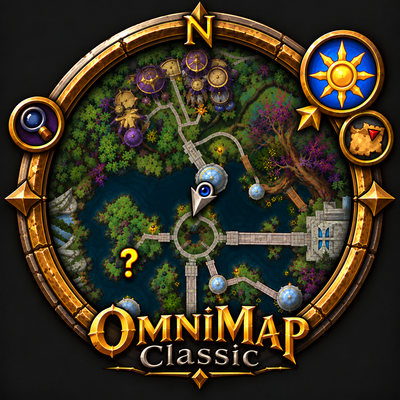
OmniMap Classic
Restores the vanilla stone minimap on WoW Forever and lets you place, resize or hide every piece around the ring.
Details
Expansion
 Forever
 Categories
Developers

Having issues?
OmniMap Classic — The Classic minimap, back on Forever
The stone ring, and everything it carried.
On WoW Forever your minimap is the Retail one: a bare circle parked in a corner. The Classic one was set into a ring of carved stone. OmniMap Classic puts it back — and lets you choose what you keep.
The ring
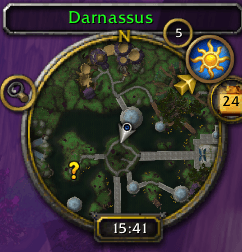
The map is set into the stone again instead of sitting on top of it. Every piece finds its place and has its own switch: the zone name engraved along the top, the tracking glass , the mail , the zoom buttons , the sun , the calendar , the clock , the group eye and the coordinates , back inside the ring instead of dangling below it. The N marking north returns to the top of the disc, replaced by the full compass ring if you play with the map rotating.
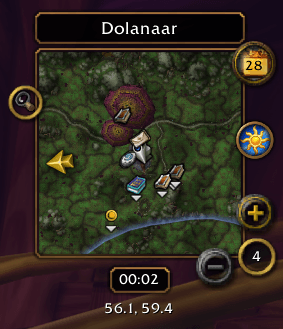
Prefer a square ? Tick one box
Square map swaps the ring for a square map in a gold frame, with the zone name and the clock in their own plates and the coordinates under the clock. Every piece sits on the frame, and the ones you move follow its edges. Square and ring each remember their own layout: switching never mixes them up.
The zone name gets its colors back
The detail Retail lost: light blue in a sanctuary, green in friendly territory, orange in contested, red in hostile or in combat, white anywhere else. On Retail that name is always yellow, whatever happens.
Your addon buttons, tidied away
Many addons drop their little round button around the minimap. With five or six of them, the ring disappears underneath.
Right-click the addon menu on the ring: all those buttons appear lined up next to the map. Right-click again: they're put away. Never on hover only when you click. The OmniMap and OmniDash buttons go in too.
Rather keep them around the map ? Untick Tidy addon buttons . Already using MinimapButtonButton ? OmniMap leaves the job to it.
Move and resize the pieces
Grab them and drag: they travel around the ring and stop where you let go, never leaving it. Seven pieces move this way the tracking glass, the sun, the calendar, the addon menu, the mail, the group eye and the OmniMap button and their place is remembered. A right-click puts a piece back where it started.
Every button on the map has the same size as the zoom buttons . Four of them also have their own size slider, from half to one and a half. Once everything sits right, tick Lock the pieces and nothing moves again worth doing, because the calendar and the addon menu are buttons too.
The zoom buttons, your way
Always visible as on Classic, or tick Zoom on hover only and they fade in when the mouse passes over the map, as on Retail. The mouse wheel zooms either way.
Mouse
| Gesture | Effect |
|---|---|
| Left-click the round button | Open the settings |
| Right-click the addon menu | Show or put away your addon buttons |
| Drag a piece of the ring | Move it around the ring |
| Right-click a piece you moved | Put it back where it started |
| Mouse wheel over the map | Zoom in and out |
Settings
`/omnimap`, on a single page, in three blocks: The map (square map, zone name, coordinates, zoom), Ring pieces (each piece, its size slider, the addon menu and the button tidying) and Misc (the Classic minimap itself, the OmniMap button, the lock). Every setting explains itself on hover, and a Reset button asks for confirmation before wiping anything.
Good to know
- English and French , following your game's language.
- Settings are kept for the whole account , not per character. A minimap skin is something you choose once.
- Nothing is destroyed. Untick Classic minimap , reload, and your original minimap comes back untouched.
- Switching between ring and square asks for a UI reload , so everything starts clean.
- Minimap size is set in the game's Edit Mode , not here. The whole ring grows as one piece.
- Run only one minimap skin at a time. If another addon redresses the minimap too, the two will fight over the same pieces.
`/omnimap` or `/omc` to open the settings — `/omnimap reset` to put everything back.
By Mr_Ghoosty. Also the author of OmniDash, the all-in-one dashboard, and OmniXP Bar, the experience bar.
You must be logged in to leave a comment.