
Olympus AsmonGold Finder
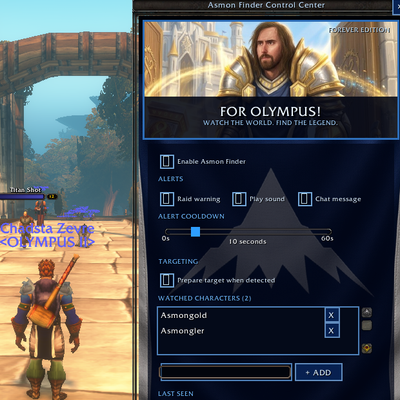
Asmon Finder Spot watched players the moment they appear — and know exactly where you were when it happened.
Details
Expansion
 Forever
 Categories
Developers

Having issues?
Spot watched players the moment they appear — and know exactly where you were when it happened.
Asmon Finder is a World of Warcraft addon for WoW Forever (and compatible clients) that watches for character names you care about, fires a clear alert, and remembers the last sighting with zone + map coordinates. Built for Forever’s full character names (no realms) — names like Donald Trump or Asmongold match exactly, case-insensitively.
Install the AsmonFinder/ folder into the game. That is the addon.
- Watch list — track one or many full character names
- Detection sources — target, mouseover, nameplates, combat log
- Alerts — raid warning, chat message, and sound (each toggleable)
- Cooldown — configurable so you aren’t spammed
- Last seen — name, zone/subzone, detection source, map coordinates
- Secure targeting — click-to-target via
/targetexact(no illegal silent targeting) - Settings UI —
/asmonopens an in-game panel - SavedVariables — settings and last sighting persist between sessions
Copy the AsmonFinder folder (the one that contains AsmonFinder.toc) into your client’s AddOns directory.
macOS (Battle.net default):
/Applications/World of Warcraft/<flavor>/Interface/AddOns/AsmonFinder
On many Forever / classic-beta installs that path looks like:
/Applications/World of Warcraft/_classic_beta_/World of Warcraft/_classic_beta_/Interface/AddOns/AsmonFinder
Windows (typical):
C:Program Files (x86)World of Warcraft<flavor>InterfaceAddOnsAsmonFinder
Your AddOns folder should look like:
Interface/AddOns/AsmonFinder/
  AsmonFinder.toc
  AsmonFinder.lua
  Types.lua
  Settings.lua
  Core.lua
  AddonController.lua
  SettingsPanel.lua
  WowBridge.lua
  images/
    AsmoPal_UI.tga
Do not nest it as
AddOns/AsmonFinder/AsmonFinder/. The.tocmust sit directly insideAddOns/AsmonFinder/.
- Fully restart the game (or log to character select)
- At the character list, click AddOns
- Enable Asmon Finder
- If it shows as out of date, either:
- Check Load out of date AddOns, or
- Update
## Interface:inAsmonFinder.tocto match your client’s interface version
/asmon
/asmon test
| Command | Action |
|---|---|
/asmon | Open / close the settings panel |
/asmon test | Fire a test alert (Asmongold via test) |
/asmon test <name> | Fire the real alert pipeline for any full name |
/asmon inspect | Print exact target, mouseover, and nameplate names exposed by the client |
/asmon debug | Toggle live unit/event diagnostics in chat |
/asmon reset | Reset settings to defaults |
/asmon help | List commands |
- Enable / disable the scanner
- Toggle raid warning, sound, and chat alerts
- Alert cooldown (seconds)
- “Prepare target when detected” (queues the secure target button)
- Watched character list — add / remove full names
- Last seen — name, zone, source, coordinates
- Target button — secure
/cleartarget+/targetexact <Full Name>
WoW Forever uses full names, not Name-Realm.
AsmongoldmatchesasmongoldDonald Trumpmatchesdonald trump- Partial names do not match (
Trump≠Donald Trump) - Hyphens/spaces are part of the name — nothing is stripped as a “realm”
The addon listens for:
PLAYER_TARGET_CHANGEDUPDATE_MOUSEOVER_UNITNAME_PLATE_UNIT_ADDEDCOMBAT_LOG_EVENT_UNFILTERED
It also polls the public target, mouseover, and nameplate1–nameplate40 unit tokens every 0.5 seconds. This is a compatibility fallback for client builds that do not reliably emit modern nameplate events. WoW does not expose an API for enumerating every nearby player, so a player must be visible through one of those unit tokens or appear in the combat log.
When a watched name is seen, it:
- Respects enable + cooldown settings
- Saves last seen (zone, source, time, map
x/y/mapId) - Shows configured alerts
- Optionally prepares a secure click-to-target button
Silent auto-targeting from insecure addon code is intentionally not used. Targeting goes through a player click on a SecureActionButton (same idea as RareScanner’s /targetexact button).
AsmonFinder/          ← install this into Interface/AddOns
├── AsmonFinder.toc
├── AsmonFinder.lua   ← boot + SavedVariables
├── Types.lua         ← LuaLS/LuaCATS type declarations
├── Settings.lua      ← defaults + settings store
├── Core.lua          ← detection / alerts
├── AddonController.lua
├── SettingsPanel.lua ← in-game UI
├── WowBridge.lua     ← WoW API adapter
├── UI_PREVIEW.html   ← standalone browser UI preview
└── images/           ← browser + WoW-compatible artwork
Versioned copies such as AsmonFinder-1.04 are snapshots. WoW only loads a folder named AsmonFinder.
The addon is tested with Busted. On macOS:
brew install lua luarocks
luarocks install busted
busted lua-tests
Open AsmonFinder/UI_PREVIEW.html directly in a browser. It needs no server and uses the same 430 × 780 layout measurements as the Lua panel. The watch list, cooldown, test alert, close button, and target label are interactive.
| Problem | Fix |
|---|---|
| Addon doesn’t appear | Confirm path ends in Interface/AddOns/AsmonFinder/AsmonFinder.toc |
| Marked out of date | Enable “Load out of date AddOns” or bump ## Interface: in the .toc |
/asmon does nothing | Addon disabled, or Lua error — check Logs/ or Escape → Options → AddOns |
| Secure target error on open | Make sure you’re on the latest SettingsPanel.lua (secure button must parent to UIParent) |
| Names never match | Use the full Forever name, including spaces |
| No coordinates | Client didn’t return map position for that moment — zone/source still save |
Use this in the repo description field:
WoW Forever addon that detects watched players by full name, alerts you, and saves last-seen zone + map coordinates.
Add a license of your choice before publishing if you want others to redistribute it.
- Secure targeting pattern aligned with how addons like RareScanner use
/targetexactinstead of unprotected targeting APIs
You must be logged in to leave a comment.