
Offhand – Dual-Screen and Multi-Monitor UI
True dual-monitor and split-screen support for WoW! Anchor your 3D game world and combat HUD to your primary screen, while transforming your second monitor into a dedicated 2D interface workspace for your map, bags, and UI panels.
Details
Expansion
 Forever
 Developers

Having issues?
Offhand - Dual-Screen and Multi-Monitor UI | v2.1.12 PRE-RELEASE (BETA 14)
Have you ever wanted to keep your bags, map, and character screen open without cluttering your gameplay?
Playing World of Warcraft with multiple monitors usually means minimizing the game to check a browser, or restricting your game to a single monitor while bulky UI panels cover your action. True multi-monitor or split screen gaming natively forces the UI to center perfectly across your bezels, splitting your character in half and ruining the experience.
Blizzard's native UI tools don't support moving the 3D rendering viewport away from the center of the fullscreen window.
Offhand was built to solve this exact frustration.
PUBLIC SERVICE ANNOUNCEMENT:
All previous "Release" files have been removed due to an effort to remove user confusion and version issues. An ongoing "Pre-Release" fix effort is currently underway due to the overwhelming interest and response to the addon. Myself and an invested team of beta testers are working through the issues to ensure full multi-monitor setup support and a stable Forever Beta experience.
Stable "Pre-Release" deployments will be added to the Files section as "Beta" releases. Please feel free to download these and contribute to the feedback and testing, either here in the comments sections, or with the rest of the beta testing team on the Discord:
Make sure to Click "Offhand" in the "Start Here" channel to get assigned to the correct channels.
Companion download and antivirus status
Current verified status — October 4, 2026: Microsoft Security Intelligence has reviewed the submitted canonical Offhand Companion Beta 18 executable and archives without retaining a malware detection. The exact Beta 18 ZIP is now downloading without an antivirus block in our local Chrome and Edge tests. Edge may still show "isn't commonly downloaded" for the direct unsigned EXE; that is an application-reputation notice rather than a malware verdict. Independent browser testing and third-party vendor follow-up are continuing.
The in-game addon downloaded from CurseForge contains Lua addon code and does not contain the Windows Companion executable. The Companion is an optional, separate Windows utility hosted in the project's official GitHub releases.
I continue to see comments stating that the Companion is a virus or linking to VirusTotal reports. I understand why those results are concerning. The section below records what happened, what has changed, what remains unresolved, and how to verify whether a report refers to the current file.
What do the previous and ongoing comments mean?
Those users genuinely saw browser and antivirus warnings during earlier
downloads. Chrome and Brave blocked some Companion archives, and Microsoft
Defender reported the generic machine-learning label
Trojan:Win32/Wacatac.B!ml. I took those reports seriously, paused normal
distribution work, audited and simplified the Companion, published its complete
source, froze the release artifacts by SHA-256, and submitted the exact files
directly to Microsoft and the remaining reporting vendors.
Microsoft Security Intelligence subsequently reviewed the submitted Beta 18 executable and archives without retaining a malware detection. The authenticated Microsoft submission records and exact hashes are published in the Offhand security guide. The recommended Beta 18 ZIP now downloads successfully in our local Chrome and Edge tests, although independent browser testing is continuing.
This does not mean users were wrong to report what their security software showed, and it is not a request to ignore future warnings. The earlier comments are an important record of the problem that prompted this investigation.
However, security results are tied to an exact file hash. Some ongoing comments link scans of older builds or different files. A VirusTotal link for an older build, a locally rebuilt executable, or a newly generated archive does not describe the current canonical Beta 18 files. Compare the report's SHA-256 with the hashes below before applying its verdict to the current download.
If somebody receives a new named malware detection against one of the exact canonical hashes, we want that report and will investigate it. It should include the complete warning, download URL, hash, browser, security product, and definition version. General claims without the file hash cannot establish which release was scanned.
What does the current Edge warning mean?
The Companion is not yet digitally signed. Edge may describe the standalone
Offhand.exe as "isn't commonly downloaded." Microsoft documents this as a
SmartScreen application-reputation notice for an uncommon or unsigned program;
it is not the same result as "Virus detected" or a named malware detection.
The ZIP is therefore the recommended portable download while the executable
builds reputation.
Why can VirusTotal still show detections?
VirusTotal reports the independent verdicts of many security vendors; it does not create or remove those verdicts. Some engines have assigned the unsigned Companion generic machine-learning or heuristic labels. Microsoft's review does not automatically change the databases of CrowdStrike, Elastic, Malwarebytes, SecureAge, Trapmine, VIPRE, or other vendors, so older or cached VirusTotal results may remain visible while separate correction requests are processed.
A low detection count does not prove that a file is safe, and neither a clean scan nor this PSA is an absolute guarantee. The current status means that Microsoft did not retain a malware detection for the submitted Beta 18 files; it does not ask users to suspend normal security precautions. The evidence available for Beta 18 should be considered together: immutable hashes, public source and build instructions, GitHub provenance where provided, Microsoft's completed reviews, and the documented behavior below.
The most recent Beta 18 Virus Total report is available here: https://www.virustotal.com/gui/file/a42a45cb149c66ef884308f15a79ee8905c58a94e9b4ae1a3b05b43baf929f37?nocache=1
What does the Companion actually do?
The Companion is open source. It looks only for allowlisted World of Warcraft processes, changes the selected WoW window's border and dimensions, reads the connected display rectangles, remains available in the notification area, and updates Offhand's own topology or guarded Forever recovery files. These legitimate window-management behaviors can overlap with broad antivirus heuristics.
It does not request administrator access, install a service or driver, create a Windows startup entry, register global hotkeys, inject into WoW, read game memory, automate gameplay, download and execute programs, collect telemetry, or read browser data, passwords, or account credentials. It contacts the official GitHub Releases API only when you click Check for Updates.
Recommended download and verification
Download the official Offhand Companion v2.1.2 Beta 18 ZIP.
Offhand.exeSHA-256:A42A45CB149C66EF884308F15A79EE8905C58A94E9B4AE1A3B05B43BAF929F37Offhand-Companion.zipSHA-256:AD49BE14A9C8ADF5A888F873CE9B99F183C4AD2924909ECDF52801F303248A93
Compare the downloaded file with checksums-sha256.txt from the same release.
Do not download the Companion from mirrors, Discord attachments, or re-upload
sites, and do not disable Windows Security. If a warning says "Virus
detected", names a threat, or the checksum does not match, stop and report the
exact download URL, filename, SHA-256, browser, security product and definition
version, and a full screenshot so the specific file can be investigated.
If you prefer not to run an executable, use the no-executable manual setup. Full behavior, source-build steps, Microsoft submission references, and verification commands are available in the security guide. Addon-only updates can continue using the byte-identical Beta 18 Companion while protocol 1 remains compatible.
Thank you for your understanding and patience.
Equip your Offhand. Dual-Wield Your Monitors.
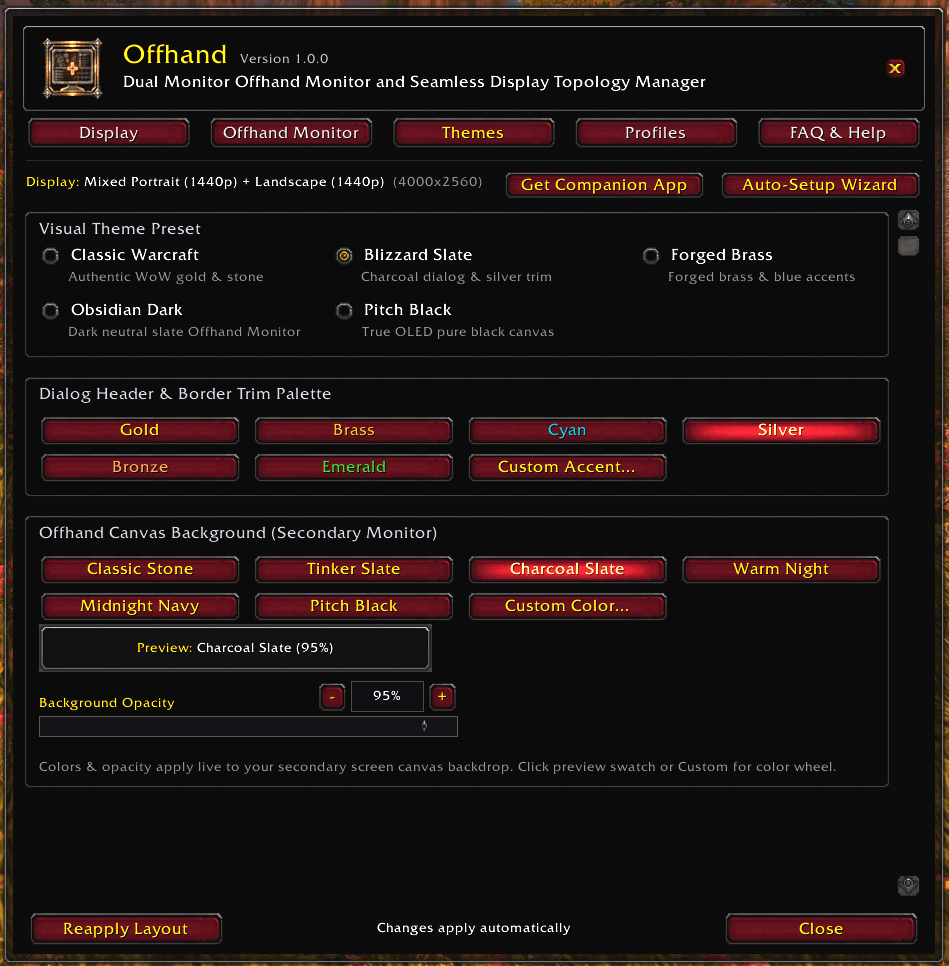
Offhand acts as a bridge between your monitors, turning your second screen into a dedicated UI workspace. It automatically shunts the core gameplay 3D rendering camera entirely to your primary monitor, while extending the 2D interface canvas across both screens.
- Zero Camera Bleed: Your character, action, and target reticles remain perfectly centered on your main monitor, just like normal.
- Clean Up Your Gameplay: Move your chat box, damage meters, and bulky interface panels away from the center of your screen so you can enjoy the world as intended.
- Unobstructed Questing: Leave your World Map open constantly on your offhand monitor without it blocking your view of the world.
- Immersive Dual-Wielding: A true multi-monitor experience built specifically for World of Warcraft.
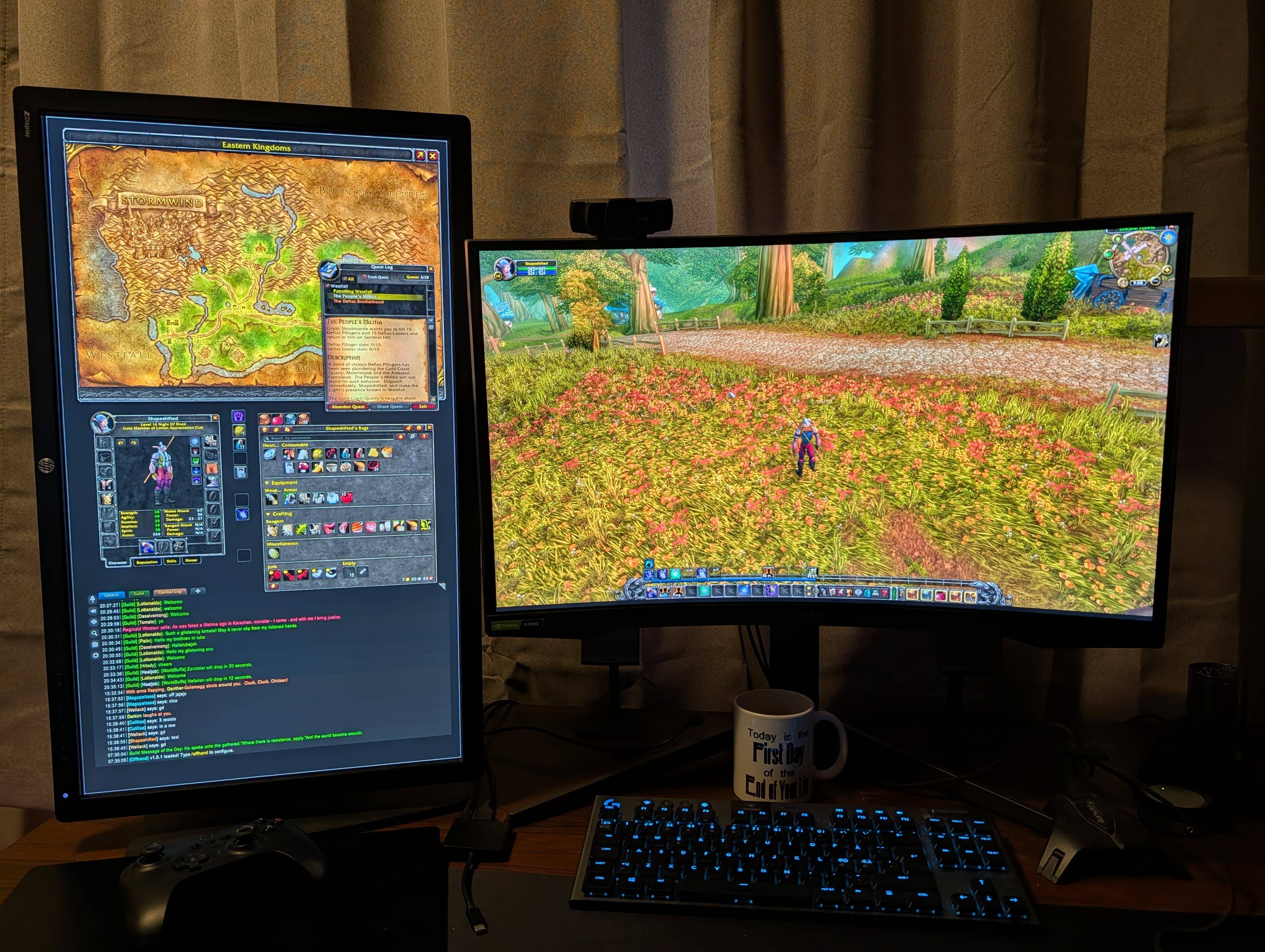
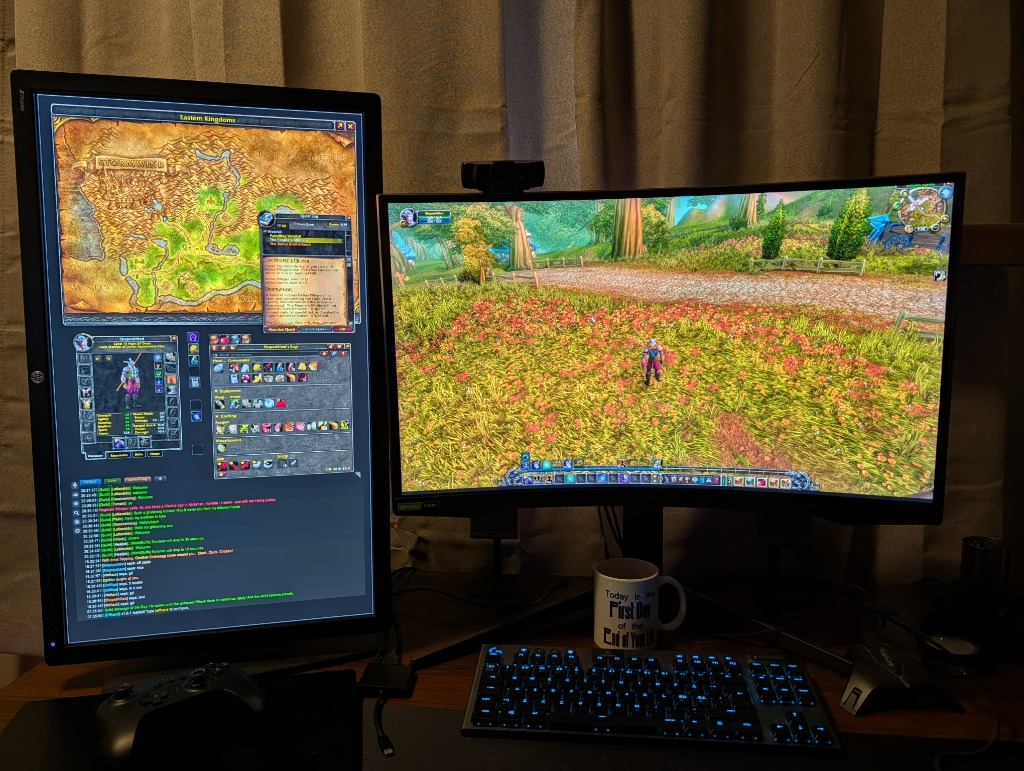 Above: What it looks like on your physical desk. Unobstructed gameplay on your main monitor, with your UI safely stored on the left.
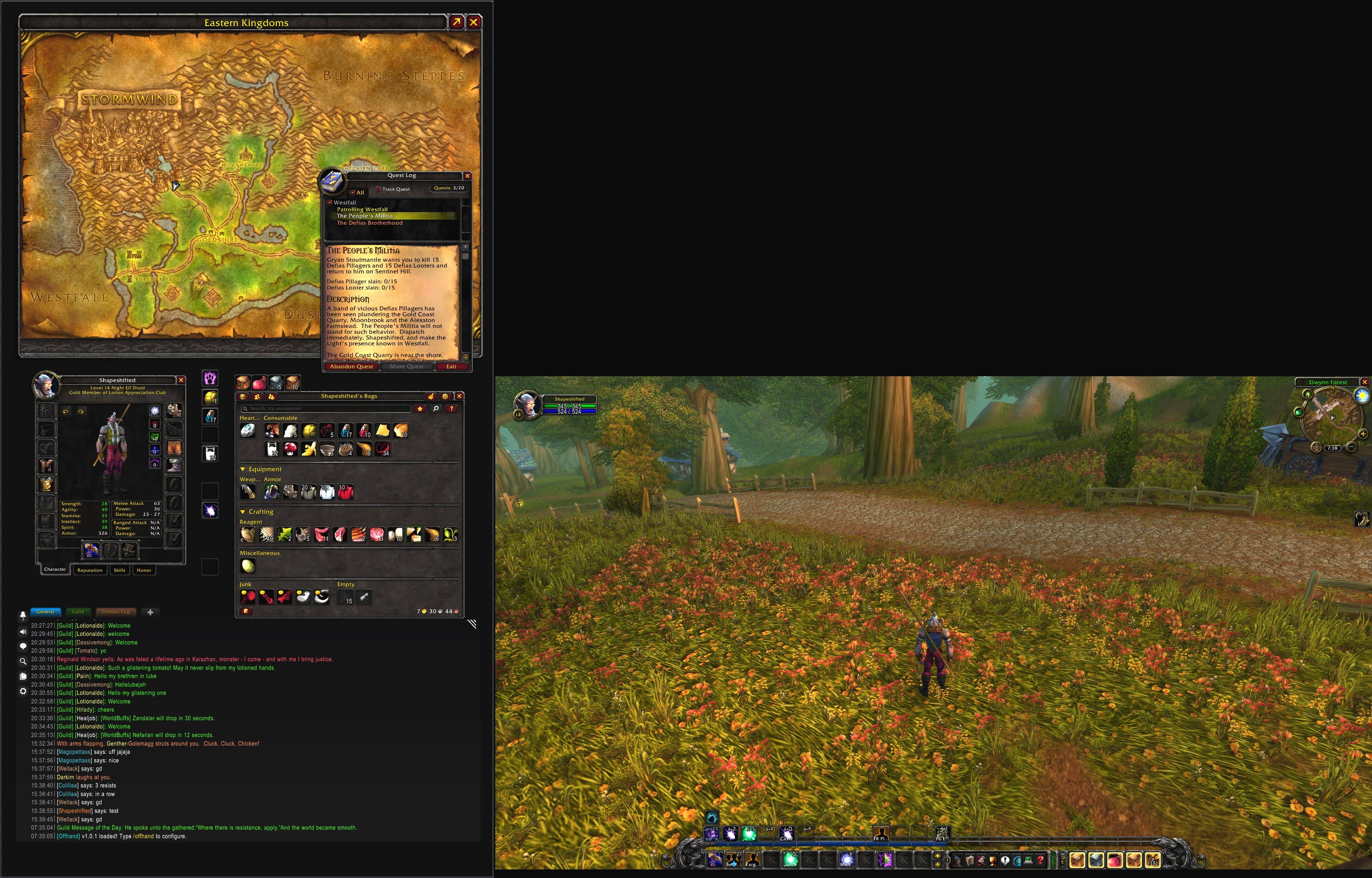
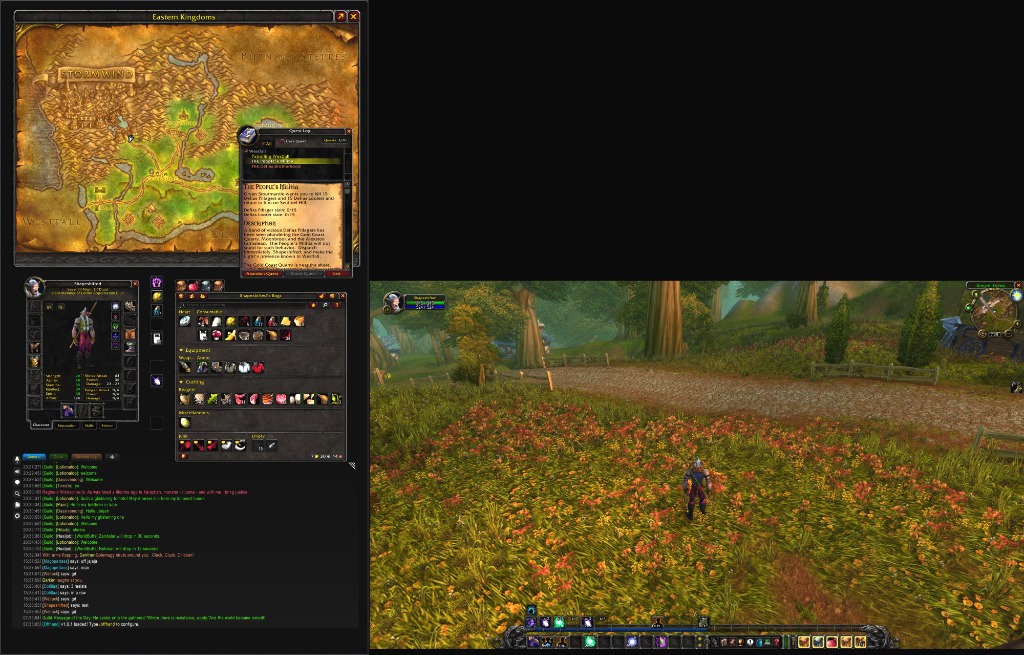 Above: How the game actually renders. The themed canvas on the left is your dedicated Offhand Monitor for UI panels. Any black "void" above or below the 3D game view is simply OS-level padding for monitors with different vertical resolutions (like a 1080p screen next to a 1440p screen) and is never visible while playing. The 3D rendering viewport is mathematically restricted to your primary Mainhand Monitor to keep your character perfectly centered.
Why Offhand is Essential
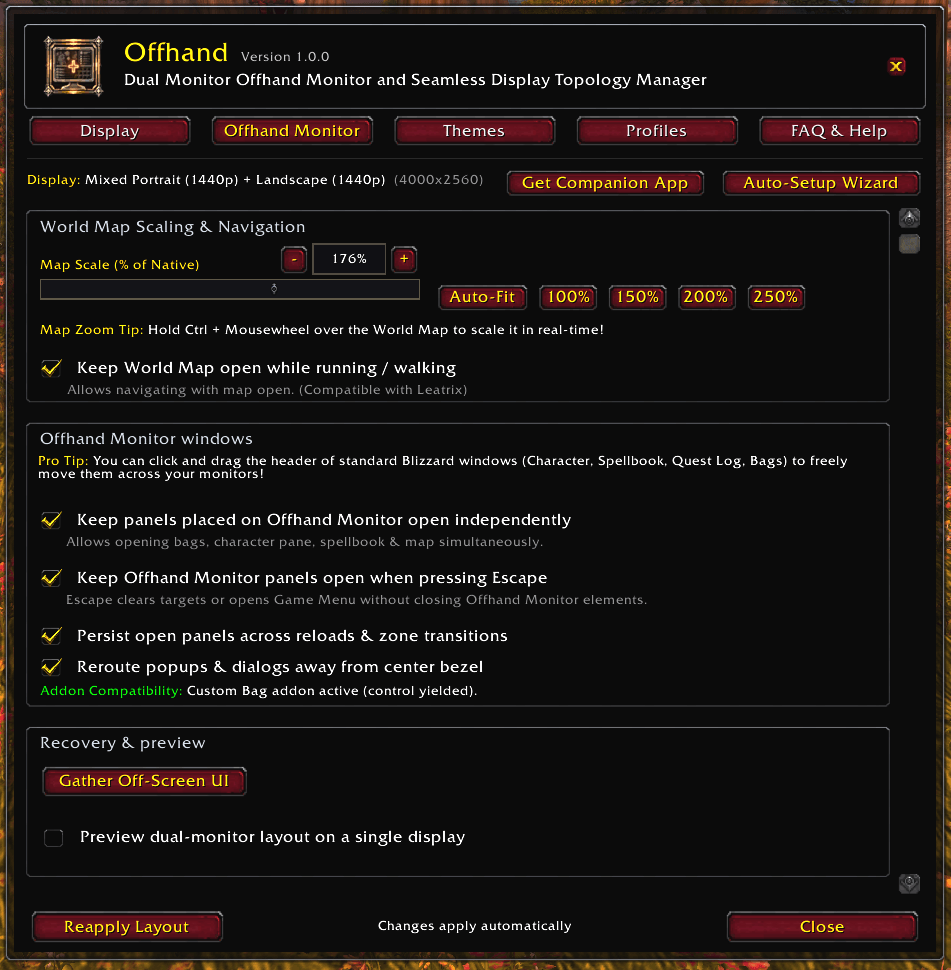
- Drag & Drop Persistence: UI panels dragged to the workspace monitor stay there permanently. Close them, and they reopen in their designated spot seamlessly.
- Custom Bag Support: Natively detects and restores custom inventory addons like Baganator, Bagnon, AdiBags, ArkInventory, BetterBags, and ElvUI without fighting their internal loading sequences.
- Smart Demodalization: Natively detaches the World Map and Character panels from the Blizzard UI grid, preventing them from closing when you open other windows.
- Optional Windows Companion App: Span the game window effortlessly with one click, completely bypassing the need for complex GPU Surround or Eyefinity setups.
- Lightweight Performance: Built to be mathematically precise and efficient, whether you are pushing Retail content or surviving Classic Era Hardcore.
Core Features
Intelligent Viewport Rendering
- Dynamically recalculates the game's 3D rendering viewport to exist entirely on one monitor.
- Customizable offset settings to handle any combination of monitors (e.g. 1080p left, 1440p right).
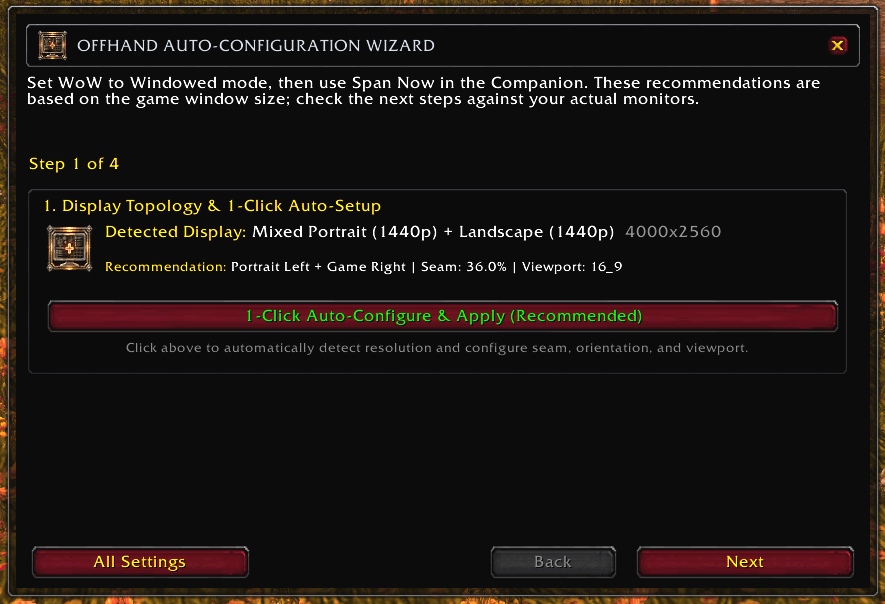
- Built-in Setup Wizard makes calibrating the viewport alignment a one-click process.
Seamless Window Management
- Automatically tracks panels dragged to the Offhand monitor.
- Saves coordinate positions and gracefully clamps panels to the screen boundaries.
- Resurrects workspace panels safely during
/reloadand cross-instance loading screens.
The Desktop Companion App

Why do you need this? Windows natively restricts true "Borderless Fullscreen" modes to a single monitor. To stretch World of Warcraft across multiple screens, you are forced to play in standard "Windowed" mode. This means you have to manually drag the edges of your game window across your monitors every time you launch the game, and you are stuck staring at ugly Windows title bars and borders.
The Offhand Companion App completely solves this. It runs silently in your system tray, automatically stretching the game window across your monitors and stripping away the Windows borders for a flawless, seamless fullscreen experience.
Get the Companion App
Secure, open-source download from the official Offhand GitHub Repository.

- A lightweight, open-source C# Windows system tray application.
- Automates window spanning on game launch or via a global hotkey.
- Removes all Windows borders for seamless multi-monitor and split screen immersion.
- Entirely optional: You can still manually stretch the window yourself, or use traditional GPU driver spanning (NVIDIA Surround / AMD Eyefinity) if preferred.
Native Localization
Offhand is localized for a global player base and adapts to your client's language out of the box.
- English
- German (
deDE) - French (
frFR) - Spanish (
esES/esMX) - Portuguese (
ptBR) - Italian (
itIT) - Russian (
ruRU) - Korean (
koKR) - Simplified & Traditional Chinese (
zhCN/zhTW)
Getting Started
- Install the Addon: Install via CurseForge, WowUp, or manually drop the Offhand folder into your InterfaceAddOns directory.
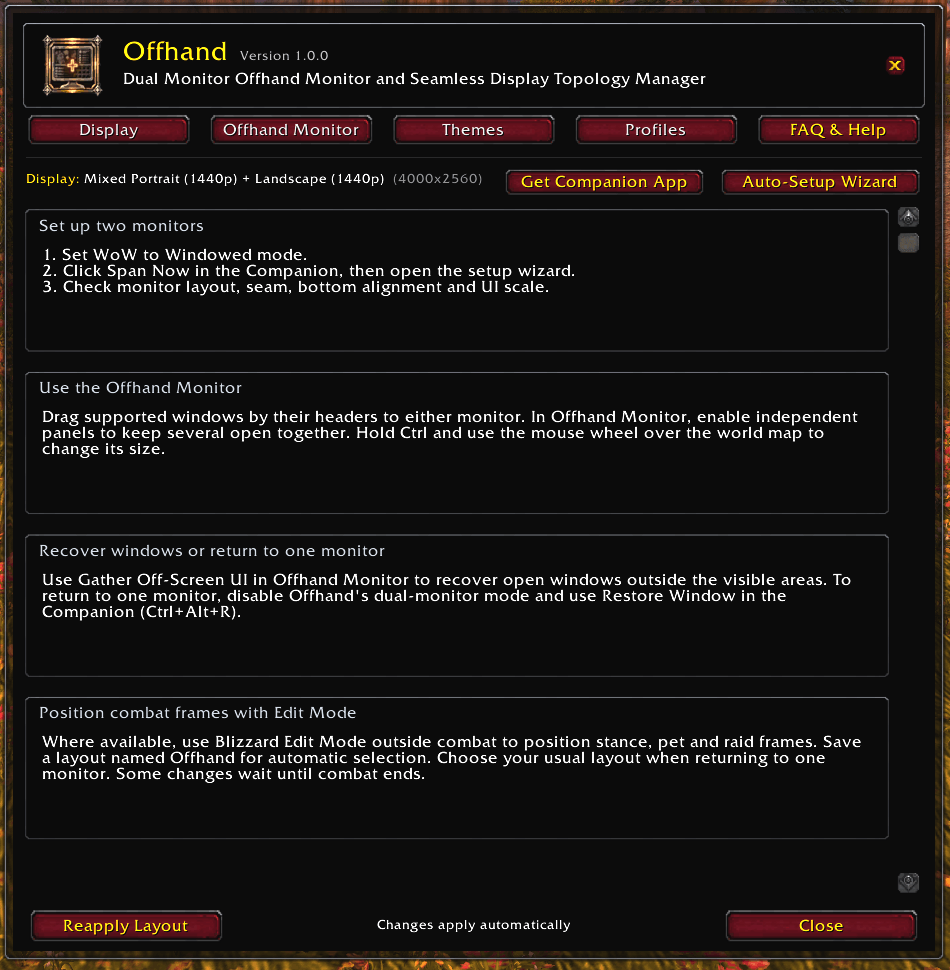
- Span Your Window: Log into the game in Windowed mode. You will be greeted by the Offhand Welcome Guard. Use the in-game link to download the Offhand Companion App, run it, and click Span Now to seamlessly stretch the game across your monitors without ugly Windows borders.
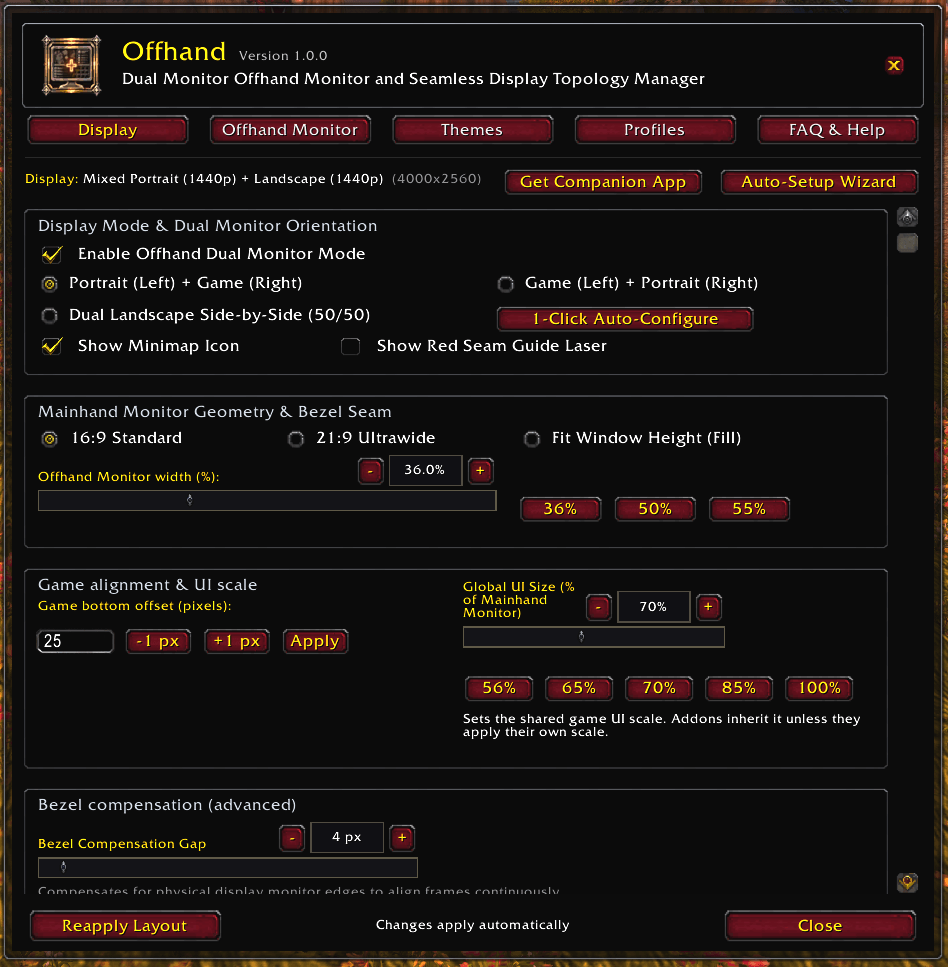
- Calibrate: Once your window is spanned, click Launch Wizard on the in-game prompt (or type /oh) to let Offhand instantly detect your layout and calibrate your resolution, seam, and UI scale.
- Build Your Workspace: Drag your bags, map, character sheet, and chat over to your secondary monitor and start playing!
Supported Commands
/offhand— Opens the configuration panel and Setup Wizard.
Known Limitations
Windowed Mode Requirement
Windows natively restricts "Borderless Fullscreen" modes to a single monitor. Because of this operating system limitation, you must run World of Warcraft in standard "Windowed" mode for spanning to work. The Offhand Companion App automatically strips away the ugly Windows title bar and borders to simulate a seamless fullscreen experience.
If you cannot switch the game out of Fullscreen, open your WTFConfig.wtf file and ensure it contains: SET gxWindow "1".
Mac & Linux Support
The Offhand World of Warcraft Addon functions perfectly on Mac and Linux clients. However, the one-click Offhand Companion App is a Windows .exe. Mac and Linux users will need to manually stretch their game window across their monitors or use their preferred OS window manager to span the canvas.
Frequently Asked Questions
Q: Does this work on a single Ultrawide monitor?
Yes! Even if you only have one physical monitor, Offhand can offset the 3D gameplay camera to one side of your ultrawide screen, leaving a dedicated blank UI workspace on the other side.Q: Will this lower my FPS?
Rendering a wider resolution across two monitors will naturally require more GPU processing power than playing on a single screen. However, the Offhand addon itself is incredibly lightweight and will not cause Lua CPU lag or micro-stutters.Q: Is the Companion app safe and compliant with Blizzard's Terms of Service?
Yes. The in-game addon only uses standard Blizzard UI APIs. The open-source Companion app only resizes your Windows desktop window — it does not interact with the game's memory, alter game files, or automate any gameplay.Q: Can I use ElvUI or other UI overhauls with this?
Yes! Offhand simply adjusts the rendering viewport. Standard UI addons, action bars, and unit frames will generally adapt to the new viewport seamlessly.
Compatibility
- WoW Classic Era / Hardcore / Season of Discovery: Fully supported.
- Burning Crusade Classic Anniversary: Fully supported.
- Wrath of the Lich King Classic: Fully supported.
- Cataclysm Classic: Fully supported.
- Mists of Pandaria Classic: Fully supported.
- Retail / Mainline: Fully supported.
- WoW Forever: Full supported, planned, ASAP
Need help? Got further questions?
Get in touch on Discord: https://discord.gg/TFzCzNvrQ
Disclaimer
- AI tools and LLM models were used in the development process and coding assistance of this addon. The ideas, features and functionalities within are my own, as are the days of testing invested in course of development and ongoing development.
FOREVER BETA CLIENT INFORMATION:
Important Setup Update: WoW Forever and Companion v2.0.0+
Why Forever currently relies on the Companion
The current WoW Forever beta does not consistently restore addon SavedVariables after a full client restart. Those variables normally hold workspace panel positions, open/closed state, and setup completion. This is why a layout can appear correct after /reload, but return to default anchors or depend on panel opening order after closing and relaunching WoW.
The Windows Companion solves both halves of the problem:
- It spans the WoW window across the selected monitors before Offhand lays out the UI.
- While WoW is closed, it refreshes Offhand's own recovery bridge so the newest valid Forever layout can be restored on the next cold launch.
The Companion does not inspect game memory or automate gameplay. It resizes the desktop game window and updates only Offhand's recovery bridge while WoW is closed.
Complete first-time setup
- Install Offhand: Install the addon and enable it for your character.
- Use standard Windowed mode: In WoW Graphics settings, choose Windowed, not Windowed (Fullscreen).
- Install Companion v2.0.0 or newer: Start the Companion before WoW. Select the displays to span and enable automatic spanning.
- Span the game: Launch WoW or click Span WoW Now. Wait for the Companion to finish before opening panels.
- Run the Offhand Wizard: Type
/oh, click Launch Setup Wizard, and complete all four calibration steps for monitor order, Mainhand display, alignment, and UI scale. - Forever only—configure protected UI: Outside combat, open Blizzard Edit Mode, select or create the layout named Offhand, move action bars and protected combat frames into the Mainhand game view, and save the layout.
- Arrange workspace panels: Move the map, character frame, backpack, and chat onto the Offhand workspace. These ordinary panels are restored by Offhand; protected HUD frames remain owned by Blizzard Edit Mode.
- Verify a cold launch: Exit WoW normally while leaving the Companion running. Relaunch and confirm that the window spans, workspace panels return, and the Edit Mode options frame remains visible.
Everyday startup and shutdown
- Start the Companion before WoW and leave it running in the system tray.
- Let automatic spanning finish before opening workspace panels.
- Move ordinary workspace panels with Offhand's controls; move protected Forever combat UI with Blizzard Edit Mode.
- Exit WoW normally before closing the Companion so the newest Forever state can be captured.
Recovery and troubleshooting
- Edit Mode options or another panel is off-screen: Open
/ohand click Gather Off-Screen UI. If protected Edit Mode controls are still inaccessible, click Restore Window in the Companion, enter Edit Mode, then click Span WoW Now again. - Layout works after
/reloadbut not after restarting WoW: Confirm Companion v2.0.0+ was running before launch and remained running until WoW fully exited. - Protected action bars or unit frames are misplaced: Open Blizzard Edit Mode, select the Offhand layout, reposition them on the Mainhand monitor, and save. Offhand deliberately does not move protected combat frames itself.
- Return to one monitor: Select your normal Blizzard Edit Mode layout, disable Offhand's dual-monitor mode, then click Restore Window in the Companion.
- Welcome popup repeats: Update to the newest addon release. Welcome acknowledgement and completed setup are now stored separately and included in Forever recovery. Clicking either welcome button acknowledges the message; completing the Wizard records setup completion.
What Offhand restores on Forever
Offhand restores ordinary workspace frames such as the World Map, Character frame, combined backpack, and chat, including their saved position and open/closed state. Blizzard Edit Mode remains responsible for action bars, player/target frames, stance and pet bars, party and raid frames, and other protected combat UI.
You must be logged in to leave a comment.