
NBPartyFrames
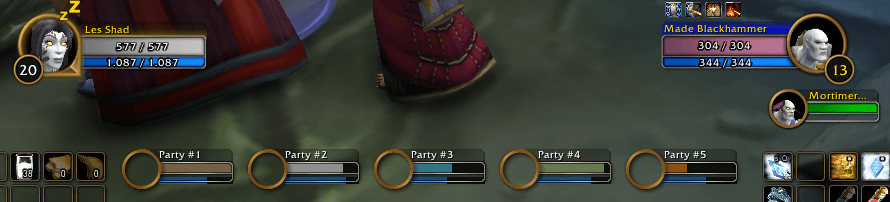
NBPartyFrames enhances Blizzard's default unit and party frames while keeping their original look and behavior. It adds class-colored health bars, scalable and movable party frames, an alignment grid, and reusable profiles.
Details
Expansion
 Forever
 Categories
Developers

Having issues?
NBPartyFrames
NBPartyFrames enhances Blizzard's default unit and party frames while keeping their original look and behavior. It adds class-colored health bars, scalable and movable party frames, an alignment grid, and reusable profiles.
Features
- Optional class colors for player, pet, target, focus, and party health bars
- Party frame scaling from 50% to 150%
- Independent positioning of all five party member frames
- Attached horizontal or vertical party layouts with adjustable spacing
- Edit mode with movable preview frames
- Independently toggleable alignment grid with adjustable spacing
- Quick party-frame scale and visibility controls from the preview context menu
- Named profiles with save, load, and delete support
- Settings stored between sessions
Installation
- Copy the
NBPartyFramesfolder into your World of WarcraftInterface/AddOnsdirectory. - Make sure the final path contains
NBPartyFrames/NBPartyFrames.tocand not an additional nested folder. - Restart the game or reload the UI.
- Enable NBPartyFrames in the AddOns list on the character-selection screen.
The required libraries are bundled with the addon; no additional dependencies need to be installed.
Usage
Open the addon settings with either command:
/nbpartyframes
/nbpf
You can also open Options > AddOns > NBPartyFrames.
Moving party frames
- Enable Edit mode in the addon settings, or use
/nbpf edit. - Drag a preview frame with the left mouse button.
- Right-click a preview frame to change the scale or hide/show the Blizzard party frames.
- Disable edit mode when you are finished.
When Attach frames is enabled, dragging any preview moves the complete group. Choose a horizontal or vertical layout and use the spacing slider to control the distance between frames. With attachment disabled, every party member frame can be positioned independently.
Use Reset to restore Blizzard's default party-frame positions.
Grid
The alignment grid can be toggled independently of edit mode with Show grid or /nbpf grid. Grid spacing can be adjusted from 8 to 128 pixels in the addon settings. The red center lines mark the horizontal and vertical center of the screen.
Profiles
Profiles store all addon settings, including frame positions, scale, layout, visibility, class colors, edit mode, grid visibility, and grid spacing.
- Save creates or updates the profile entered in the profile-name field.
- Load applies the selected profile.
- Delete removes the selected profile.
Profile switching and opening the settings panel are unavailable during combat because Blizzard protects party-frame operations in combat.
Slash commands
| Command | Description |
|---|---|
/nbpartyframes or /nbpf | Open the addon settings. |
/nbpf edit | Toggle edit mode. |
/nbpf grid | Toggle the alignment grid independently. |
Bundled libraries
- AceSerializer-3.0
- LibDeflate
- LibStub
Author
Nightbert
You must be logged in to leave a comment.