
MyQuestPlates
Clean, lightweight quest objective icons & progress counters directly on default Blizzard nameplates!
Details
Expansion
 Forever
 Categories
Developers

Having issues?
🗺️ MyQuestPlates
Clean, lightweight quest objective icons & progress counters directly on default Blizzard nameplates!
Tired of having to constantly mouse-over every single mob or glance back and forth between your Quest Log just to see which enemies you need to kill or loot? MyQuestPlates enhances the default Blizzard nameplate experience by placing clean, floating quest markers and live progress counts right above or beside relevant quest mobs!
Whether you need to collect 8 pristine pelts, slay 15 bandits, or speak with an NPC in town, MyQuestPlates gives you instant visual clarity so you can spend less time checking your map and more time adventuring. ⚔️✨
🌟 Key Features
- ⚔️ Dynamic Objective Icons:
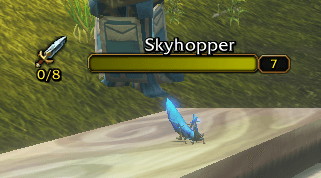
- Slay (Kill Targets): Displays a sharp sword icon over mobs you need to eliminate.
- Loot (Drop / Pickup Items): Displays a loot pouch icon on mobs that drop quest items you must collect.
- Talk & Interact: Displays a speech bubble icon for conversation or interaction objectives.
- 🔢 Live Progress Counters: See exact objective counts right under the icon (e.g.,
3/10or7/8) updated the millisecond you get credit. - 🎨 Clean, Transparent Artwork: No clunky black boxes, thick frames, or pixelated borders. Icons feature clean, transparent cutouts that float naturally beside your health bars.
- 🛡️ Zero-Taint & Native Mouse Passthrough: Engineered specifically to protect Blizzard's secure execution path. Mouse clicks pass straight through to the 3D world, ensuring you can right-click trainers, flight masters, vendors, and mailboxes without ever triggering
"Action blocked"errors. - 📜 Works Standalone with the Default Quest Log: You do not need Questie or any external database installed! MyQuestPlates reads directly from your default Blizzard Quest Log. (If you do run Questie, seamless synergy is included!)
- ⚙️ In-Game Customization (
/mqp): Easily fine-tune icon sizes, font sizes, anchor positions (Left, Right, Above), and X/Y offsets to match your exact UI aesthetic. - 🧪 Live Preview / Test Mode (
/mqp test): Instantly preview icons on nearby plates so you can adjust your positioning live without needing to be on a quest.
🎮 How It Changes Your Gameplay Experience
1. No More Guesswork in Crowded Camps 🏕️
When you pull up to an enemy camp packed with Defias Highwaymen, Defias Bandits, and Defias Rogues, you don’t have to hover your cursor over every mob to remember which one your quest requires. The moment nameplates appear, relevant targets are clearly marked with their objective type and remaining count.
2. Effortless Multi-Target & Group Pulls 💥
AOEing down a pack of 6 mobs? Watch the progress count tick up in real-time right on the nameplates (2/8 ➔ 4/8 ➔ 8/8). As soon as an objective is finished, the icon automatically vanishes, letting you quickly re-target remaining needs.
3. Slay vs. Loot at a Glance 🎒
Never confuse pure kill quests with drop-rate item quests again. If an enemy has a loot objective, the bag icon signals that you still need to loot the corpse for your quest item before running off!
4. Non-Intrusive & Peaceful Towns 🕊️
Friendly NPCs like flight masters, bankers, and trainers will never be cluttered with kill or loot icons. Only NPCs you have an explicit objective to speak with will display an indicator.
⌨️ Slash Commands
| Command | Description |
|---|---|
/mqp or /myquestplates | Opens the configuration panel. |
/mqp test | Toggles test mode preview on all visible nameplates for easy positioning. |
/mqp reset | Resets all sizing and offsets back to default settings. |
/mqp help | Displays available slash commands in chat. |
🚀 Performance & Compatibility
- Ultra-Lightweight: Zero memory leaks and zero garbage collection hitches during combat.
- Compatibility: Built for WoW: Forever (1.60), Classic Era (1.15.x), Wrath / Cataclysm Classic, and modern clients.
- Synergy: Works beautifully with the default Blizzard UI, Leatrix Plus, and Questie.
You must be logged in to leave a comment.