
My Feet Hurt
Lifetime Travel Stats Tracker for WoW Forever
Details
Addon ID:
27618
Addon Version:
1.0.2
Expansion:
1.60
Upload date:
Oct 06, 2026
Last Updated:
Oct 06, 2026
Downloads:
Less than 100
Website:
Source Link
Expansion
 Forever
 Categories
Developers

the_naked_gypsy
Creator
Having issues?
My Feet Hurt
Ever wonder how far you've actually traveled in Azeroth? My Feet Hurt is a lightweight addon that quietly tracks every mile you walk, ride, fly, swim, sail and even fall, then shows it all in a clean little window.
My feet hurt. If you're here - maybe yours do too?
Feel free to leave a comment or suggestion!
Features
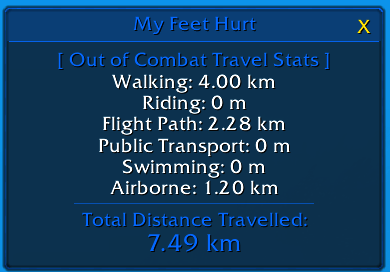
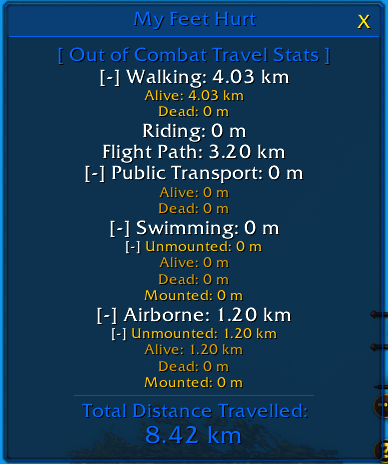
Tracks how you travel
- Walking split into Alive and Dead (Yes, corpse runs count)
- Riding on mounts
- Flight paths
- Public transport for boats / zeppelins with Alive and Dead stats
- Swimming, split into Unmounted (Alive/Dead) and Mounted
- Airborne: distance covered while jumping and falling
- Total Distance Travelled across everything
Tracking only runs out of combat.
Travel stats window
- Draggable, and sized to fit its contents
- Collapsible sections: click a category header to expand or hide its sub-stats
- Faction-colored styling
- Optional Simple window mode if you prefer a plain, minimal look
Milestone notifications
- Get an achievement message and sound when you pass distance milestones, such as 1, 2, 3, 4, 5, 10, 20, 50 and 100 miles/km, then every 100 after that
- Separate milestones for each travel type and for your overall total
- Can be switched off in the settings
Minimap button
- Click to show or hide the stats window
- Hover for a full breakdown of your stats in a tooltip
- Drag it anywhere around the minimap edge
Settings
- Switch between Miles and Kilometers
- Turn milestone notifications on or off
- Hide any tracked travel type in the window or tooltip
- Toggle Simple window mode (off by default)
- Adjust window background opacity
- Reset your lifetime stats
Commands
| Command | What it does |
|---|---|
/mfh or /myfeethurt | Show or hide the stats window |
/mfh reset | Reset all stats and milestones to 0 |
You must be logged in to leave a comment.