
MoveSpeed
Replaces the movement speed data they took off of the character screen.
Details
Expansion
 Forever
 Categories
Developers

Having issues?
MoveSpeed
A lightweight World of Warcraft addon to show your character's movement speed in WoW. I do not know why they ever took this away from us.
Features
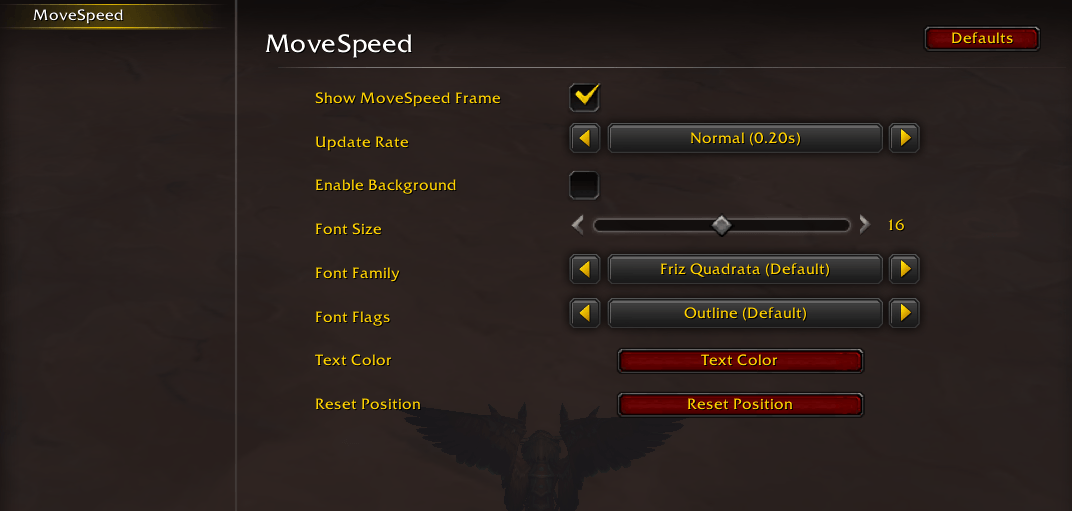
- Customization: Change font size, color, decoration, and update frequency.
- Draggable & Lockable: Click and drag the frame to position it anywhere on your screen, or lock it in place.
- Clickthrough when Locked: When locked, mouse clicks pass through to the game world so the frame never interferes with combat or targeting.
- Real-time Updates: Displays 0% when stationary and updates instantly when moving.
- Data Broker Support: Compatible with LibDataBroker (LDB) displays like TitanPanel.
- Dragonriding Support: Accurately tracks speed while gliding.
- In-Combat Display: Shows live movement speed even during combat, working around Blizzard's restrictions on combat-time math.
- Classic & Retail: Works on both, with the in-combat workaround applied automatically only where needed.
Download Latest Release Curseforge Wago
In-Combat Behavior
Starting with WoW 12.0, Blizzard restricts addons from doing math on movement speed during combat. MoveSpeed works around this using the AbbreviateNumbers API to display live speed even in combat. The main MoveSpeed frame always shows live speed.
However, the values produced this way are "tainted" in a way that can confuse some LDB display addons (Bazooka, ButtonBin, NinjaPanel) and break their layouts. To handle this, MoveSpeed has a setting "Show ---% in LDB during combat" which is enabled by default.
- Default (enabled): LDB displays show
---%during combat. The main MoveSpeed frame still shows live speed. Compatible with all LDB displays. - Disabled: LDB displays show live speed during combat. May cause display issues in some addons. Works fine with ElvUI and Arcana (with fixed-width slot configured).
You can toggle this in the settings panel or with /movespeed safeldb and /movespeed liveldb.
Slash Commands
Type /movespeed followed by a command to configure the addon without opening the settings menu.
| Command | Description |
|---|---|
reset | Resets the frame to the center of the screen (0,0). |
lock | Locks the frame location and enables clickthrough. |
unlock | Unlocks the frame so it can be moved. |
center | Sets text alignment to center. |
left | Sets text alignment to left. |
right | Sets text alignment to right. |
bg | Enables the black background (useful for visibility/positioning). |
bgoff | Disables the background (transparent). |
small | Sets font size to small (12). |
medium | Sets font size to medium (16). |
large | Sets font size to large (20). |
hide | Hides the floating frame. |
show | Shows the floating frame. |
rate <seconds> | Sets how often the speed updates (e.g., /movespeed rate 0.1). Accepts values from 0.05 to 1.0. |
safeldb | Show ---% in LDB during combat (compatible with all displays). |
liveldb | Show live speed in LDB during combat (may break some displays like Bazooka). |
Acknowledgments
Thanks to Veyska on CurseForge and NinjaRobot on Discord for help cracking the in-combat display problem.

You must be logged in to leave a comment.