
Midnight Tooltip
MidnightTooltip is a World of Warcraft addon designed to enhance the tooltip functionality within the game. This addon provides customizable tooltips that improve the user experience by displaying additional information and features.
Details
Addon ID:
25020
Addon Version:
1.00.39
Expansion:
1.60
Upload date:
Oct 06, 2026
Last Updated:
Oct 06, 2026
Downloads:
Less than 100
Website:
Source Link
Expansion
 Forever
 Categories
Developers

Vanskater
Creator
Having issues?
MidnightTooltip
MidnightTooltip is a World of Warcraft addon that provides cursor-following tooltips with extensive customization options for appearance, behavior, and player information display.
TODO:
Features
Cursor Following
- Anchor tooltips to cursor - Tooltips follow your mouse cursor with configurable anchor points
- Customizable offset - Adjust X and Y offset to position tooltips exactly where you want them
- Configurable fade delay - Control how quickly tooltips fade out (0-2 seconds)
- Tooltip scale - Adjust tooltip size from 50% to 200%
Player Information
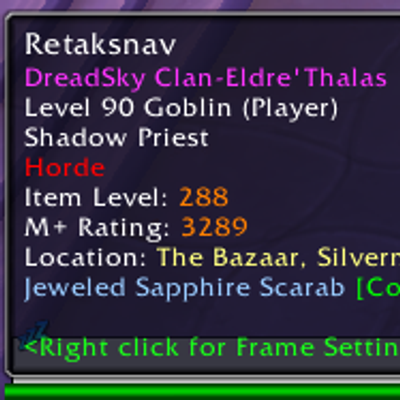
- Class-colored names - Player names displayed in their class colors
- Guild information - Shows guild names with customizable colors for your guild vs other guilds
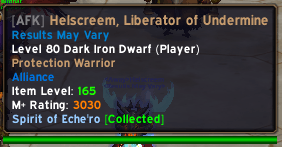
- Player status - Displays AFK/DND status
- Item level display - Shows player item levels (target a player to inspect them, then hover for cached data)
- Faction display - Shows player faction (Horde/Alliance)
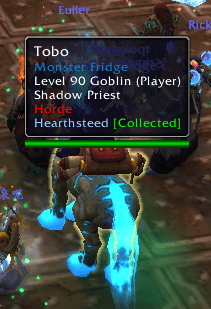
- Mount information - Shows what mount a player is riding and if you have it collected
- Role icons - Displays player role (Tank/Healer/DPS)
- Mythic+ rating - Shows player's Mythic+ score
- Target of target - Displays who the unit is targeting
Item Tooltips
- Quality border colors - Colors tooltip borders based on item quality (including upgraded items)
- Shopping tooltip positioning - Intelligently positions comparison tooltips
Combat & Instances
- Hide tooltips in combat - Option to hide tooltips during combat in dungeons/raids
- Taint-safe - Designed to avoid tainting secure frames in restricted content
Inspection System
- Smart inspect caching - Caches player inspect data for 5 minutes
- Target-based inspection - Only sends inspect requests when you target a player
- Throttled requests - Prevents API rate limiting with 1.5-second cooldown
- GUID-based storage - Stores item level data by player GUID for reliable retrieval
Installation
- Download the MidnightTooltip addon files
- Extract the contents into your World of Warcraft
Interface/AddOnsdirectory - Ensure the folder structure is:
   Interface/AddOns/MidnightTooltip/
   ├── MidnightTooltip.lua
   ├── MidnightTooltip.toc
   ├── config.lua
   ├── README.md
   ├── CHANGES.txt
   ├── core/
   ├── locales/
└── modules/- Launch World of Warcraft and enable the addon from the AddOns menu
Usage
Slash Commands
/midnighttooltipor/mtt- Open the options panel/mttr- Reload the UI to apply changes
Options Panel
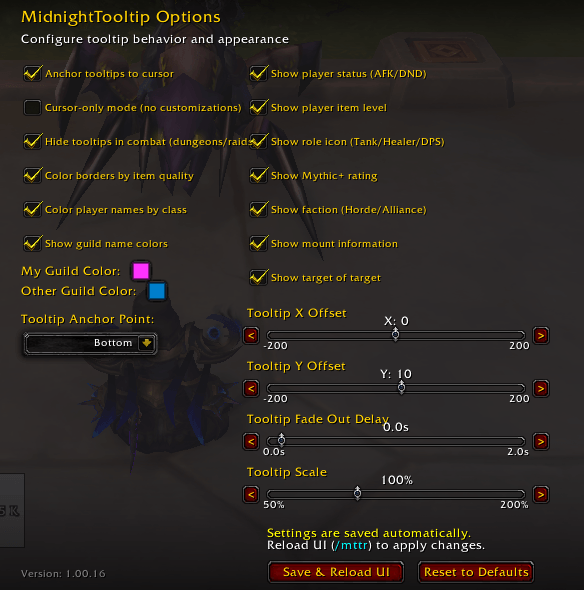
Access the options through the in-game Interface Options menu or by typing /mtt.
General Settings:
- Enable/disable cursor anchor
- Cursor-only mode (disables most customizations)
- Hide tooltips in combat during dungeons/raids
- Enable quality borders
Player Information:
- Toggle class colors
- Toggle guild colors (with custom color pickers)
- Show/hide player status, mount info, item level, faction, role icons, Mythic+ rating, target of target
Positioning:
- Tooltip anchor point (9 positions available)
- X/Y offset sliders (-200 to 200)
Appearance:
- Fade out delay (0-2 seconds)
- Tooltip scale (50%-200%)
Item Level Feature
- Target a player to send an inspect request
- Wait for data to load (usually 1-2 seconds)
- Hover over the player anytime in the next 5 minutes to see their cached item level
- Players you haven't inspected will show "Target player to get ilvl" in gray
Configuration
Settings are automatically saved in SavedVariables/MidnightTooltipDB.lua and persist across sessions, per character. ```
Known Limitations
- Item level inspection only works for players you can normally inspect
- Inspect data is limited by Blizzard's API throttling
- Some features are automatically disabled in restricted instances (dungeons/raids) to prevent lua errors
Localization
Currently supports:
- English (US/UK)
- German (DE)
- Russian (RU)
- French (FR)
- Spanish (ES/MX)
- Chinese (Simplified & Traditional)
- Korean (KR)
- Italian (IT)
- Portuguese (BR)
You must be logged in to leave a comment.