
Micro Menu Forever
Micro Menu Forever replaces Blizzard’s fixed Micro Menu with a movable, customizable launcher that can expand in any direction with multiple layouts, skins, sizes, backgrounds, and individually selectable menu buttons.
Details
Expansion
 Forever
 Categories
Developers

Having issues?
Micro Menu Forever
Micro Menu Forever gives Blizzard’s Micro Menu the flexibility it should have had from the start.
Instead of keeping the standard Micro Menu fixed in its usual location, the addon turns it into a compact launcher that can be positioned around the minimap border or detached and placed wherever you want on your UI.
Click the launcher to expand your Micro Menu, choose how the buttons are arranged, decide which buttons should appear, customize the launcher style, and keep the interface as compact or visible as you prefer.
The addon uses the real Blizzard Micro Menu buttons, preserving their normal functionality, artwork, tooltips, button states, and behavior.
Features
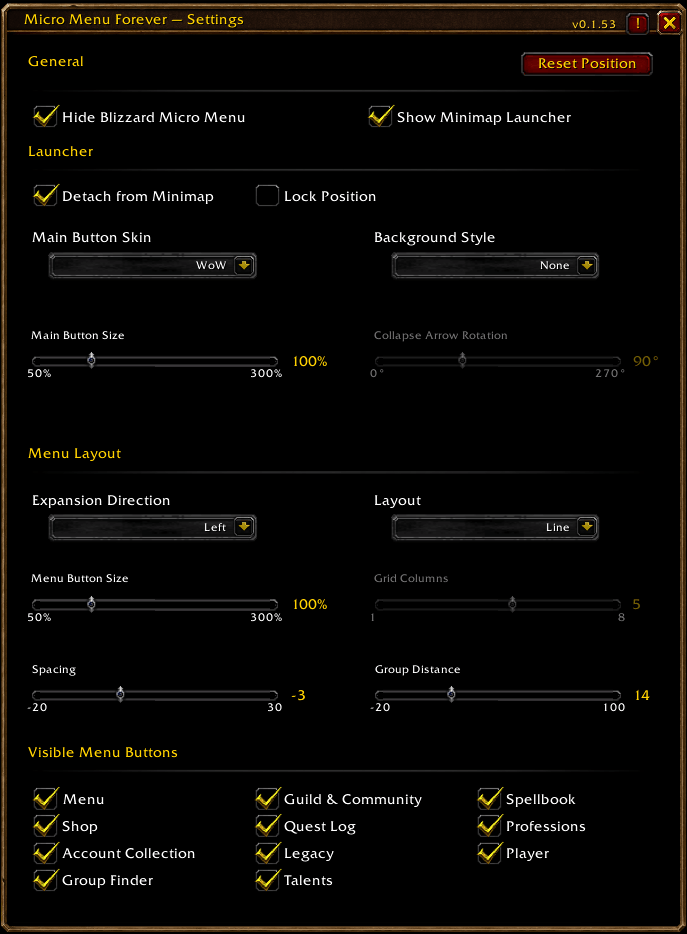
- Hide Blizzard’s original Micro Menu
- Movable Micro Menu launcher
- Attach the launcher to the minimap border
- Detach it and place it anywhere
- Lock Position when finished
- Expand the menu:
- Left
- Right
- Up
- Down
- Choose between:
- Line
- Grid
- Reverse Icon Order
- Adjustable:
- Main Button Size
- Menu Button Size
- Button Spacing
- Group Distance
- Grid Columns
- Individually choose which Micro Menu buttons are visible
- Optional background behind the expanded menu
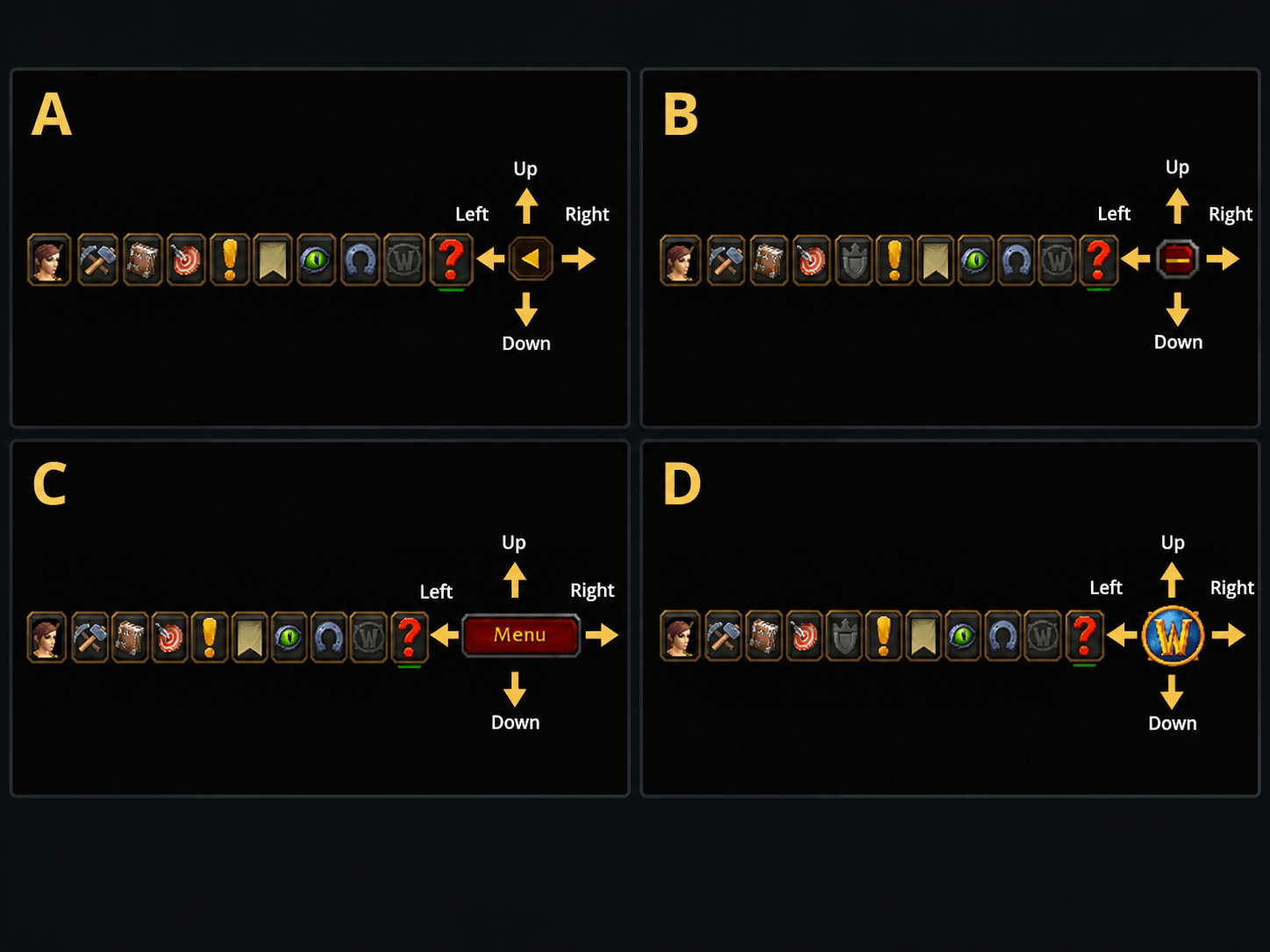
- Multiple launcher skins
- Position and settings are remembered automatically
- Reset Position returns the launcher to its default position on the minimap border
- No dependency required
Launcher Skins
Choose the launcher appearance that fits your UI:
- WoW
- Panel
- Plus / Minus
- Collapse
The Plus / Minus skin automatically displays:
- + while the menu is collapsed
- − while the menu is expanded
The Collapse skin also supports adjustable arrow rotation.
Background Styles
The expanded Micro Menu can be displayed with several background styles:
- None
- Dark Dialog
- Tooltip
- Golden Dialog
The background automatically adjusts itself to the current menu layout, button size, spacing, visible buttons, and menu position.
Layout Options
Micro Menu Forever lets you decide how the expanded menu should grow from the launcher.
Choose an expansion direction:
- Left
- Right
- Up
- Down
Then choose a layout:
Line
Displays the visible Micro Menu buttons in a single row or column.
Grid
Arranges the visible buttons into multiple rows or columns using the configurable Grid Columns setting.
You can also enable Reverse Icon Order to flip the order of the displayed Micro Menu buttons without changing the selected expansion direction.
For example, a menu expanding to the left still expands to the left, but the sequence of buttons is reversed.
Choose Your Buttons
You do not need to display every Micro Menu button.
Each button can be enabled or disabled individually:
- Menu
- Shop
- Account Collection
- Group Finder
- Guild & Community
- Quest Log
- Legacy
- Talents
- Spellbook
- Professions
- Player
Hidden buttons are automatically removed from the layout so there are no empty gaps.
The remaining buttons keep their relative order unless Reverse Icon Order is enabled.
Adjustable Size and Spacing
The expanded Micro Menu can be adjusted to fit different UI layouts and screen sizes.
You can independently control:
Main Button Size
Changes the size of the launcher.Menu Button Size
Changes the size of the expanded Blizzard Micro Menu buttons.Button Spacing
Adjusts the space between individual Micro Menu buttons.Group Distance
Adjusts the distance between the launcher and the expanded Micro Menu.Grid Columns
Controls how many buttons are placed in each primary row or column when using Grid layout.
This allows the menu to stay very compact or spread out depending on your UI.
Minimap or Detached Mode
By default, the Micro Menu launcher can be positioned around the minimap border.
Drag it around the minimap to place it where it fits best.
You can also enable Detach from Minimap.
When detached, the launcher keeps its current position near the minimap and can then be freely dragged anywhere on your screen.
Enable Lock Position once you are happy with its location to prevent accidental movement.
Reset Position
The Reset Position button returns the launcher to its default location on the minimap border.
If the launcher is currently detached, Reset Position also reattaches it to the minimap.
This provides a simple way to recover the launcher if it has been moved somewhere inconvenient.
Native Blizzard Functionality
Micro Menu Forever does not replace Blizzard’s Micro Menu buttons with imitation buttons.
It manages the actual Blizzard Micro Menu buttons, allowing their normal functionality to remain intact while changing how and where they are presented.
That means the familiar:
- artwork
- button states
- tooltips
- click behavior
- Blizzard functionality
remain available.
The addon changes the presentation and positioning of the Micro Menu while leaving the underlying Blizzard buttons intact.
Simple Controls
Left-click the launcher
Expand or collapse the Micro Menu.
Right-click the launcher
Open Micro Menu Forever settings.
Drag the launcher
Move it around the minimap border or, when detached, place it anywhere on your UI.
Designed for WoW: Forever
Micro Menu Forever is built specifically for World of Warcraft: Forever and follows the same Blizzard-inspired visual style used throughout the Forever addon collection.
You must be logged in to leave a comment.