

Meimi Important Buffs
A lightweight, customizable World of Warcraft addon for Classic Season of Discovery (SoD). This addon creates a simple, movable bar to track specific important buffs on your character.
Details
Addon ID:
27021
Addon Version:
1.0.2
Expansion:
1.60
Upload date:
Oct 06, 2026
Last Updated:
Oct 06, 2026
Downloads:
Less than 100
Website:
Source Link
Expansion
 Forever
 Categories
Developers

MeimiLabs
Creator
Having issues?
Meimi Important Buffs
A lightweight, customizable World of Warcraft addon tailored for the WoW Forever Beta (and modern Retail). This addon creates a simple, movable bar near your character to track your most important active buffs with clear countdown timers.
Features
- Customizable Tracking: Choose up to 10 slots of buffs you want to track.
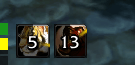
- Live Countdown Numbers: Shows clear seconds-remaining countdown text directly on your buff icons.
- Smart Priority Grouping: Add multiple buffs to a single slot (e.g. mutually exclusive buffs or procs). The slot displays the first one active.
- Tightly Packed Layout: Icons pack tightly side-by-side, removing any empty gaps when fewer buffs are active.
- Movable Anywhere: Easily drag and drop the bar to position it wherever you want around your character.
- Character-Specific: Your tracked buffs and bar positions are saved separately for each character.
Installation
- Download the latest release (
MeimiImportantBuffs_Forever_v1.0.0.zip) from the releases folder. - Extract the
MeimiImportantBuffsfolder into your World of Warcraft AddOns directory:InterfaceAddOns(e.g.,_forever_InterfaceAddOnsor_retail_InterfaceAddOns) - Log into the game and ensure MeimiImportantBuffs is enabled in your AddOns menu.
Configuration & Usage
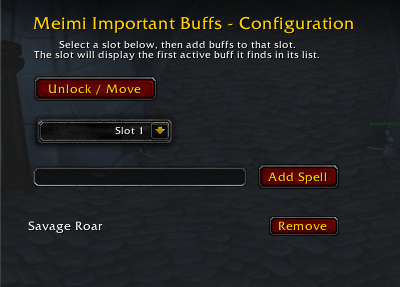
Open the configuration window at any time by typing /mib in chat, or navigate to Game Menu (Esc) -> Options -> AddOns -> MeimiImportantBuffs.
Adding Buffs to Track
- Type
/mibin chat to open the settings window. - Click any of the 10 Slot buttons (Slot 1 through 10) to select which slot you are editing.
- Type the name of the buff (e.g., "Battle Shout", "Slice and Dice") or enter its Spell ID.
- Click Add Buff (or press Enter).
- To remove a buff, click the Remove button next to it in that slot's list.
Moving the Bar
- Type
/mib unlockin chat (or click "Unlock / Move" in the settings menu). - A green anchor box will appear. Click and drag it to where you want your buffs displayed.
- Type
/mib lockto lock it in place. - If you ever want to reset it back to center, type
/mib reset.
Release Notes
Version 1.0.0 (WoW Forever Edition)
- WoW Forever Support: Built and tailored specifically for the WoW Forever Beta.
- Live Countdown Numbers: Shows clear seconds-remaining countdown text directly on your buff icons so you always know when your buffs will expire.
- Extended to 10 Slots: Configure up to 10 priority slots for active buffs.
- Flexible Tracking: Track any buff by typing its name (e.g., "Battle Shout", "Slice and Dice") or its Spell ID.
- Draggable Anywhere: Type
/mib unlockto drag the buff bar anywhere on your screen, and/mib lockwhen you're done. - Easy In-Game Configuration: Easily manage your buff slots via the Game Options menu or by typing
/mib.
Version 1.0.0 (SoD Legacy Release)
- Initial Release for Season of Discovery.
- Transitioned from a global spell pool to a Slot-Based Tracking System.
- Added tight icon packing and MeimiCore_SOD support.
You must be logged in to leave a comment.