
Mayfield’s Auction Reminder
A level-aware shopping list and buff reminder: shows which consumables you are missing, what each one is worth in DPS, where to buy them, and lets you apply them in one click.
Details
Expansion
 Forever
 Developers

Having issues?
Mayfield's Auction Reminder
It works out your shopping list for you. Not a static list you configure once and outgrow — the addon reads your class, your level, your gear and your spellbook, and tells you what you should be carrying right now.
Hit level 15 and the Coarse Sharpening Stone quietly becomes a Heavy one. Learn your first teleport and Runes of Teleportation appear in the list. Log in on your mage instead of your rogue and the poisons turn into wizard oil and intellect scrolls. You never tick a box.
IF YOU HIT A BUG, PLEASE LEAVE A COMMENT WITH THE ERROR TEXT IF YOU CAN
What it tracks
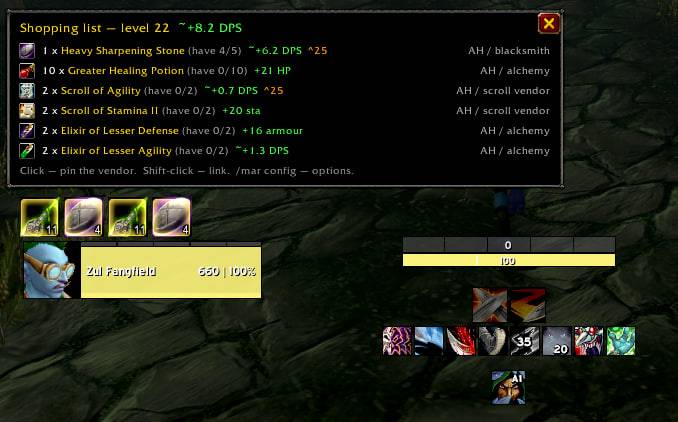
Consumables, by tier. Sharpening stones, weightstones, wizard and mana oil, healing and mana potions, poisons, scrolls, elixirs — always the highest tier you can actually use. It cannot suggest a level-30 enchant while you are 20, and when the next tier is within three levels the row is marked ^25 so you don't stock up on something you are about to replace.
Class spell reagents. Flash Powder and Blinding Powder for a rogue, Runes of Teleportation and Portals for a mage, Ankh, Rebirth seeds, candles, Symbol of Kings, Infernal Stone, Demonic Figurine. Each one appears only once you have learned the spell that burns it — no reagent gets suggested before you can use it, and no guessing at spell levels.
Ammo. Arrows or bullets, chosen by what is actually in your ranged slot.
All of it is verified item by item against Forever's own database, not copied from vanilla guides — Forever moved required levels, shuffled scroll IDs, and dropped the reagent from Resurrection and Redemption entirely.
Shopping list
Counts what is already in your bags and bank, then shows only the shortfall, with a where-to-buy column: the merchant you have actually met, by name if he is in your city, by zone if he is not — otherwise the source type. Click any row to drop a waypoint on him.
In a capital the window stays open until you close it with the X. It comes back on its own if the client hides it, and your next visit to a city opens it again. Inns and villages don't count — there is nothing to buy there.
Heavy Sharpening Stone — ~+1.5 DPSGain figures are read from the item's own tooltip and combined with your weapon speed and class, so they are right for your character. Forever rebalanced sharpening stones to +2/+3/+4/+6/+8 where vanilla had +2/+4/+6/+8/+12; a hardcoded table would have lied. Healing potions are honestly labelled +455-585 HP rather than dressed up as damage.
"You have it — you are not using it"
A bar of glowing icons for anything sitting in your bags unapplied: scroll undrunk, poison not on your blade, enchant about to expire. Click an icon to use it.
It understands that Forever gives a weapon two enchant layers: a rogue can carry a poison and a sharpening stone at once, so sharpening no longer makes the poison reminder disappear. Hidden in combat, lockable in place.
Also
Vendor map, built from your own travels. No bundled coordinates — Forever redrew the city maps, so published vanilla coordinates don't line up. The addon remembers every merchant you open, with zone and position. /mar track lights up vendor and trainer dots on the minimap.
Trainer reminders that don't nag. Visit a trainer once; it reads the whole service list, including what unlocks later and at which level, then stays silent until something actually becomes available.
Auction house helper. A panel beside the auction house listing what to restock. Click a row and it searches, reads the cheapest price, totals the quantity and checks your gold-per-item cap. Then you press Buy and Confirm.
Minimap button with a badge showing how many items you are short. Left-click for the list, right-click for options.
Options
Right-click the minimap button, or /mar config.
Only what my class needs is on by default — untick it to pick categories yourself. Beyond that: keep the window up in capitals and at the auction house, count the bank, open the map on click, show the ~DPS gain, a gold-per-item price cap for the buy button, and for the reminder bar — glow, lock, follow the list's categories or everything you carry, and how many minutes before an enchant expires to start warning.
Every category can be ticked individually with how many you want to carry. The window shows the ones that apply to your class; /mar keys prints all of them.
Commands
/mar show/hide the list /mar config options /mar list print the list to chat /mar where <key> pin that vendor on the map /mar track vendors and trainers on the minimap /mar class class auto-pick on/off /mar remind the reminder bar on/off /mar lock lock the reminder bar /mar why why the reminder bar is empty /mar want <key> N how many to carry /mar verify check item IDs and levels /mar keys list every category
You must be logged in to leave a comment.