
Max Camera Distance ( Auto Combat Zoom)
Automatically extends camera distance beyond UI limits for better raid awareness. Features Smart Zoom for Combat & Mounts with smooth transitions. Safe for The War Within (12.x) raids and compatible with MoP Classic & Anniversary TBC.
Details
Expansion
 Forever
 Categories
Developers

Having issues?
Max Camera Distance
Max Camera Distance is an advanced camera control and quality-of-life addon for World of Warcraft.
It goes far beyond simply increasing the maximum camera distance. The addon includes a reactive camera engine, Smart Zoom, ActionCam controls, mount and travel detection, AFK cinematics, camera CVar management, visual utilities, and dedicated support for multiple WoW client families — including World of Warcraft: Forever as its own separate client flavor.
The addon is designed to stay lightweight during normal gameplay and avoid unnecessary polling, scans, and CVar updates.
🚀 Key Features
📷 Extended Camera Distance
Unlock the maximum camera distance supported by each WoW client.
- Retail / Midnight: up to approximately 39 yards
- Classic clients: up to approximately 50 yards
- Client-specific limits are handled automatically
- Manual camera mode does not force your current zoom position
- The addon can apply the maximum camera cap without constantly pulling the camera outward
This allows you to keep full control of the mouse wheel while still removing Blizzard's lower camera restrictions.
🎬 Cinematic ActionCam
Bring a more modern RPG-style camera experience to World of Warcraft.
Smart Shoulder Offset
Moves the camera away from the character center for a more cinematic over-the-shoulder view.
The offset can dynamically change depending on camera distance:
- closer zoom → camera gradually returns toward the center
- medium distance → partial shoulder offset
- farther zoom → full configured shoulder offset
This makes interaction, looting, combat and exploration feel much more natural than using a permanently fixed shoulder offset.
Dynamic Camera Behavior
ActionCam can react to gameplay conditions such as:
- combat state
- mounted state
- movement
- camera distance
- configured zoom profile
Camera updates are interpolated instead of being applied as abrupt jumps.
Jitter Protection
The addon manages conflicting Blizzard camera options when required and restores previous values safely when the feature is disabled.
🔎 Reactive Zoom
Reactive Zoom provides smoother manual zooming without taking control away from the player.
Instead of continuously moving the camera, it reacts only when actual zoom input is detected.
Features include:
- smooth zoom transitions
- configurable transition timing
- responsive mouse-wheel handling
- FPS-aware zoom behavior
- no permanent frame-by-frame polling while idle
- camera cap enforcement without automatically forcing maximum zoom
Reactive Zoom is designed to remain inactive when nothing is happening.
🧠 Smart Zoom System
Smart Zoom automatically selects an appropriate camera distance depending on what your character is doing.
The system uses prioritized gameplay states.
⚔️ Combat Zoom
Automatically zoom farther out during combat for improved situational awareness.
Useful for:
- raids
- dungeons
- large encounters
- mechanics requiring wider visibility
Group combat detection can also account for raid or party members instead of relying only on the player's combat flag.
🐎 Mount Zoom
Automatically changes camera distance when mounted.
The addon uses modern mount APIs when available and maintains a short-lived mount-state cache to avoid repeatedly scanning the Mount Journal.
🐉 Skyriding / Dynamic Flight
Supported clients can use a dedicated camera profile while using Skyriding / Dynamic Flight.
🌿 Travel Forms
Travel-related states can also be detected for supported classes and clients.
This allows separate camera behavior for normal gameplay and high-speed movement.
🚶 Normal Mode
When no higher-priority state is active, the addon returns to your normal configured camera distance.
💤 Intelligent AFK Mode
Turn your character view into a lightweight cinematic scene while you are away.
AFK mode can:
- hide the game UI
- slowly rotate the camera
- create a screensaver-like character view
- restore the UI automatically when you return
Safe Exit
Pressing ESC while the cinematic UI is hidden immediately restores the interface and exits the AFK presentation.
The addon keeps restoration state so camera/UI settings are not intentionally left modified after AFK mode ends.
🌫️ World of Warcraft: Forever Support
World of Warcraft: Forever is treated as its own client flavor.
Forever is not classified as Retail and not classified as Classic Era inside the addon.
The addon uses a dedicated Camelot client manifest while still using the modern WoW API compatibility layer where appropriate.
Forever Volumetric Fog Controls
Forever includes additional graphics controls in the addon's Additional Features section.
Volume Fog
Controls:
volumeFog
Available values:
0— disabled1— enabled
Interior Volume Fog
Controls:
volumeFogInterior
Available values:
0— disabled1— enabled
This affects volumetric fog used inside interiors and supported indoor environments.
Volume Fog Quality
Controls:
volumeFogLevel
Available levels:
0— minimum123— maximum
The addon reads the actual game default through the WoW CVar API whenever possible instead of blindly replacing Blizzard's default with a hardcoded value.
These controls are available only on WoW Forever and remain completely hidden on Retail and other Classic clients.
⚙️ Safe CVar Management
Max Camera Distance contains its own CVar compatibility and restoration layer.
The addon checks whether a CVar:
- exists on the current client
- is writable
- is read-only
- is locked by Blizzard
- is secure during combat
Secure values are not forcibly changed while combat restrictions prevent it.
If a required restoration is temporarily blocked, the addon keeps the previous value and retries after combat instead of losing the user's original configuration.
🛡️ Midnight 12.1 API Safety
Modern WoW versions introduced stricter restrictions around protected and secret values.
Max Camera Distance includes compatibility logic specifically designed around these restrictions.
Potential secret values are checked before performing operations such as:
- boolean conversion
- nil comparison
- numeric conversion
- unit-state processing
- aura processing
- threat evaluation
This reduces the chance of errors caused by the stricter Midnight 12.1 addon-security model.
⚡ Runtime Optimization
The camera engine has been optimized to avoid unnecessary work.
Event-Driven Processing
Camera logic is primarily triggered by relevant game events rather than permanent polling.
Lazy State Detection
Expensive checks are only performed if the enabled feature actually needs them.
For example:
- combat scans are skipped when no combat-based feature is enabled
- threat checks are skipped when threat information is not required
- mount scans are skipped when mount-dependent camera logic is disabled
- travel-form processing is skipped when unused
Optimized Group Scanning
Raid and party unit tokens are reused instead of being continuously rebuilt.
Group combat results also use a short cache to prevent repeated full raid scans during event bursts.
Optimized Reactive Zoom
Reactive Zoom no longer keeps an idle OnUpdate handler running permanently.
It activates only while zoom movement is actually being processed.
Debounced Camera Updates
Repeated camera events are consolidated to prevent chains of redundant updates.
This is especially useful during:
- mounting
- aura changes
- entering combat
- leaving combat
- rapid state transitions
🎮 Blizzard Settings Integration
The addon works alongside Blizzard's own camera settings while preventing known configuration conflicts.
Supported behavior includes management of relevant settings such as:
- maximum zoom factor
- shoulder offset
- camera pitch
- camera yaw
- camera movement behavior
- ActionCam-related CVars
Legacy CVars are only used when the current client actually exposes them.
Removed Retail CVars are not assumed to exist.
🖼️ Additional Features
✨ Always Sharpen
Allows FidelityFX/FSR sharpening-related settings to remain enabled for a clearer game image where supported.
This can be useful even when resolution upscaling itself is not being used.
💬 Soft Target / Interaction Icons
Provides access to supported Blizzard interaction-icon behavior for objects such as:
- NPCs
- interactable targets
- portals
- supported world objects
📜 Quest Cleaner
Provides a quick way to remove tracked quests from the objective tracker.
Useful when you want a cleaner interface for:
- raids
- Mythic+
- screenshots
- streaming
- cinematic gameplay
🔧 Diagnostics
The addon includes runtime diagnostics for troubleshooting client-specific behavior.
Use:
/mcd status
to view information such as:
- detected WoW flavor
- modern API compatibility state
- Forever detection
- camera state
- relevant CVar values
- Forever fog state when applicable
This makes it easier to diagnose differences between Retail, Classic and Forever clients.
💻 Commands
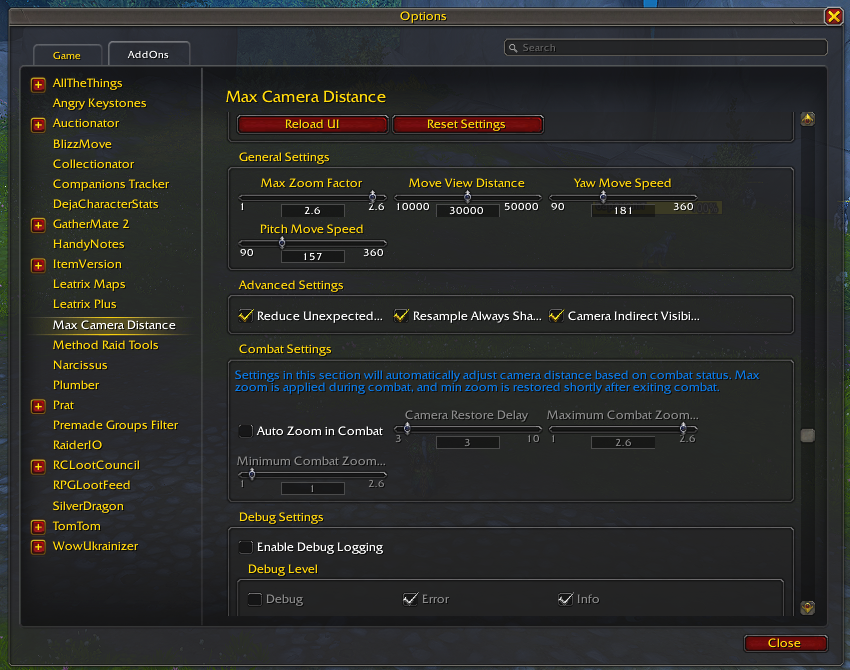
Open Settings
/mcd config
Opens the addon configuration panel.
Smart Combat Zoom
/mcd autozoom
Toggles automatic combat camera behavior.
Smart Mount Zoom
/mcd automount
Toggles automatic mount camera behavior.
Diagnostics
/mcd status
Displays current addon, client and camera diagnostic information.
✅ Supported WoW Clients
Max Camera Distance uses separate client manifests and compatibility paths instead of assuming every version of WoW exposes the same API.
Retail
World of Warcraft: Midnight
Supported interface generations include:
- 12.0.7
- 12.1
- 12.1.5
Includes:
- modern camera APIs
- Midnight Secret Value protection
- Skyriding support
- modern CVar security handling
- ActionCam
- Smart Zoom
World of Warcraft: Forever
Dedicated Camelot / Forever client support.
Includes:
- separate Forever client detection
- modern API compatibility layer
- dedicated volumetric fog controls
- Forever-specific configuration gating
Forever functionality is kept separate from both Retail and Classic Era logic.
Classic
Supported Classic-family configurations include dedicated manifests for supported Classic clients such as:
- Classic Era / Anniversary
- The Burning Crusade Anniversary
- Mists of Pandaria Classic
- supported additional Classic client branches
Features that do not exist on a particular client are automatically hidden or disabled rather than calling unavailable APIs.
🧩 Multi-Client Architecture
Max Camera Distance does not use one large compatibility assumption for every version of WoW.
Client functionality is separated into independent capability checks such as:
RetailClassicClassic EraMistsForever- modern API support
This allows Forever, for example, to use modern APIs without incorrectly enabling Retail-only gameplay functionality.
🔒 Designed for Stability
The addon includes protection against several common sources of WoW addon problems:
- missing APIs
- removed CVars
- secure CVars
- read-only CVars
- combat lockdown restrictions
- Secret Values
- repeated event bursts
- stale camera transitions
- conflicting Blizzard settings
- unsupported client functionality
User settings modified temporarily by the addon are restored whenever possible instead of simply being overwritten permanently.
Max Camera Distance
One addon for players who want both maximum tactical visibility and a better cinematic camera experience.
Whether you want:
- maximum raid visibility
- automatic combat zoom
- smoother manual zooming
- cinematic shoulder camera
- mount-aware camera profiles
- AFK camera rotation
- cleaner visual settings
- dedicated WoW Forever controls
Max Camera Distance provides those tools through one configurable camera system.
🐞 Bug Reports & Suggestions
Found a bug, compatibility issue, or have an idea for a new feature?
Please report it through:
GitHub Issues: https://github.com/LihvoDruida/Max-Camera-Distance/issues
When reporting client-specific problems, including the output from:
/mcd status
can help identify the affected WoW version and camera configuration.
You must be logged in to leave a comment.