

Macro Weaponrack
The Weaponrack addon automatically updates your macros with your highest ilvl soulbound items, so you don't have to do it manually.
Details
Expansion
 Forever
 Categories
Developers

Having issues?
Weaponrack
Weaponrack keeps your weapon-swap macros pointed at the best weapons in your bags. When you loot, buy, or equip something better, the addon rewrites the /equipslot lines. Spell lines such as #showtooltip and /cast stay as you wrote them.
The highest item level wins. Stats and weapon damage are not compared. Only soulbound weapons are used. Bind-on-equip items that are not yet bound, unbound items, gray items, and fishing poles are skipped. The bank is not scanned.
How it chooses
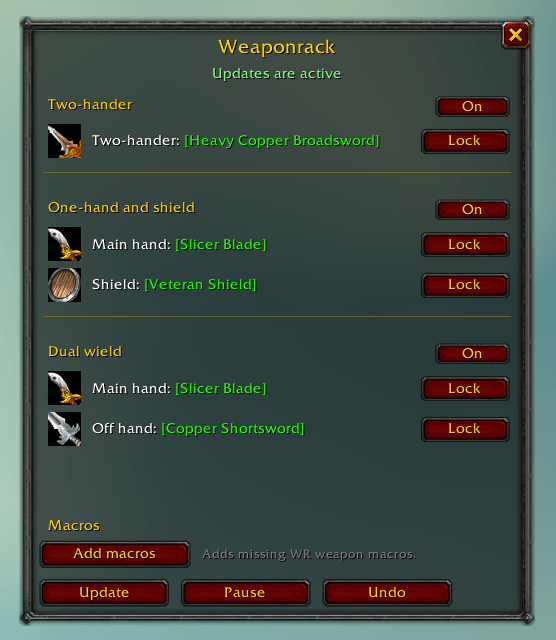
Three sets are shared by every matching macro:
- Two-hander, for a macro named with
2H, or a macro that only has/equipslot 16. - Dual wield, for a macro named with
DW. Two different one-handers. - One-hand and shield, for a macro named with
SHor1H.
A macro with both hands and none of those words gets the shield set. If that off-hand line already names a weapon, it stays dual wield.
Name your own macros so the set is obvious. A Shield Wall macro that should wield one-hander and shield can be called like WR 1H SW. Any character macro whose name is WR or starts with WR is updated. Account macros are left alone.
Using it
Open the window from the minimap button or with /wr or /weaponrack.
The first time you log in, updates are paused. Click Add macros to create the built-in macros. Macros you already have are not overwritten by that button. After that, bag and equipment changes update existing macros on their own. Edits wait until you leave combat.
Each set has its own On/Off switch. Click a weapon name in the window and type a name, or Ctrl-click a weapon in your bags, to force it. Unlock it to go back to the highest item level. Undo restores the last edit and pauses updates.
Commands
/wropens or closes the window./wr createadds any missing built-in macros./wr updatefills them now./wr pauseand/wr resume/wr enable dwand/wr disable dw(also2handshield)/wr lockand/wr unlock/wr undo/wr help
You must be logged in to leave a comment.