
LootChute
A real drag & drop loot filter: No Pickup, Easy Destroy, and per-zone rules without bloated menus or giant item databases. LootChute makes filtering unwanted loot fast, visual, and effortless.
Details
Expansion
 Forever
 Categories
Developers

Having issues?
🗑️ LootChute
LootChute is a lightweight, drag & drop loot filter and cleanup system built to do one job well: give you fast control over unwanted loot without burying the feature inside a giant bag addon, UI overhaul, or all-in-one suite.
At the center of LootChute is a simple workflow:
See unwanted loot → drag it onto a ruleset → decide whether to destroy it later or stop picking it up entirely.
Rules are organized by zone and dungeon, so the junk you want filtered in one part of Azeroth does not have to affect how you loot somewhere else.
LootChute combines Easy Destroy, Do Not Pick Up, recent-loot history, remote zone editing, profiles, searchable rules, and multiple ways to work through your delete queue—all while keeping the everyday interaction compact and immediate.
✨ Drag, Drop, Filter
There is no giant item catalog to configure and no database of every item in the game.
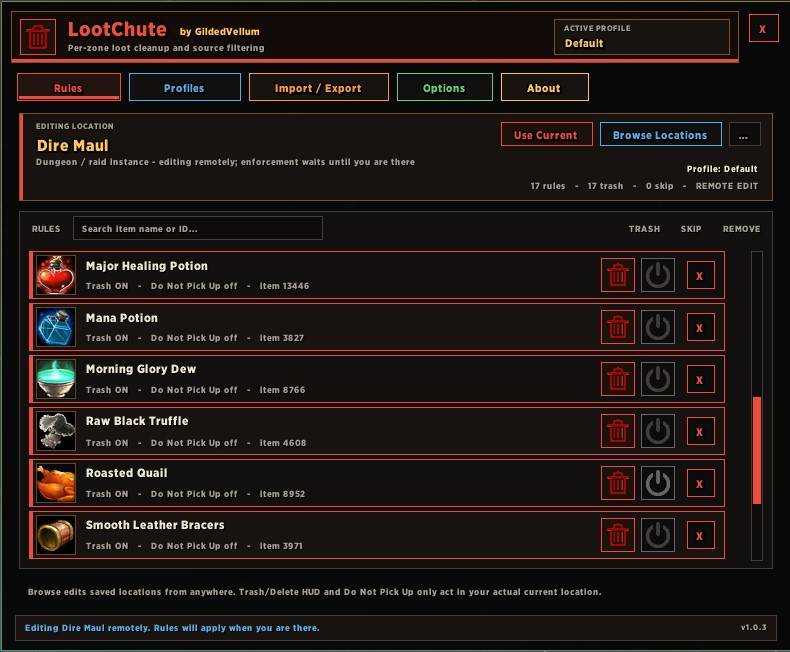
Simply drag an item from your bags directly onto the current zone or dungeon ruleset.
LootChute reads the item's information from the game client and creates the rule for you.
New rules default to Trash ON, making them eligible for LootChute's Easy Destroy queue. If an item is something you would rather never collect in that location, enable Do Not Pick Up instead.
This makes building a loot filter something you can do naturally while playing instead of stopping to dig through configuration menus.
⛔ Do Not Pick Up
For loot you simply do not want, LootChute can apply a Do Not Pick Up rule.
When LootChute is managing loot pickup, matching items can be left behind while other loot is collected normally.
That means less inventory clutter, fewer junk stacks to deal with later, and fewer interruptions while farming or running dungeons.
Different locations can have different rules, so an item can be ignored in one zone while remaining normal loot somewhere else.
🗑️ Easy Destroy
Not everything should be left on the corpse.
Items marked Trash are placed into LootChute's delete queue, giving you a fast, controlled way to remove unwanted stacks as you continue playing.
You can process the queue through whichever workflow fits you best:
- 🖱️ Use the compact Delete HUD
- 📍 Right-click the minimap button to delete the next queued stack
- ⌨️ Bind Delete Next through LootChute or WoW's native Key Bindings → LootChute section
The minimap button shows the current queued-stack count, and hovering it displays the live delete queue in order with item-quality coloring and compact handling for larger queues.
Prefer an even cleaner screen? The standalone Delete HUD can be disabled entirely while keeping the minimap and keybinding workflows available.
LootChute also includes safeguards intended to avoid casually feeding valuable soulbound or enchanted gear into the cleanup workflow.
🧾 Recent Loot History
Forgot to make a rule while you were inside the dungeon?
LootChute keeps a Recent Loot History so you can review items seen during recent zone and dungeon runs and create rules afterward.
You do not need to still have the item in your bags or travel back to the location just to configure the filter.
Combined with remote zone editing, this makes it easy to clean up a ruleset after a run while everything is still fresh in your mind.
🌍 Location-Based Rules
LootChute remembers rules by location rather than forcing one enormous global junk list.
You can:
- 🌍 Maintain separate rules for zones and dungeons
- 🗺️ Browse and edit other locations from anywhere
- 🔎 Search larger rule lists
- 📋 Copy zone rules between profiles
- 🧾 Add rules from Recent Loot History after leaving an area
On World of Warcraft: Forever, LootChute uses live client map and instance information rather than pretending older TBC location data is automatically valid for the new game.
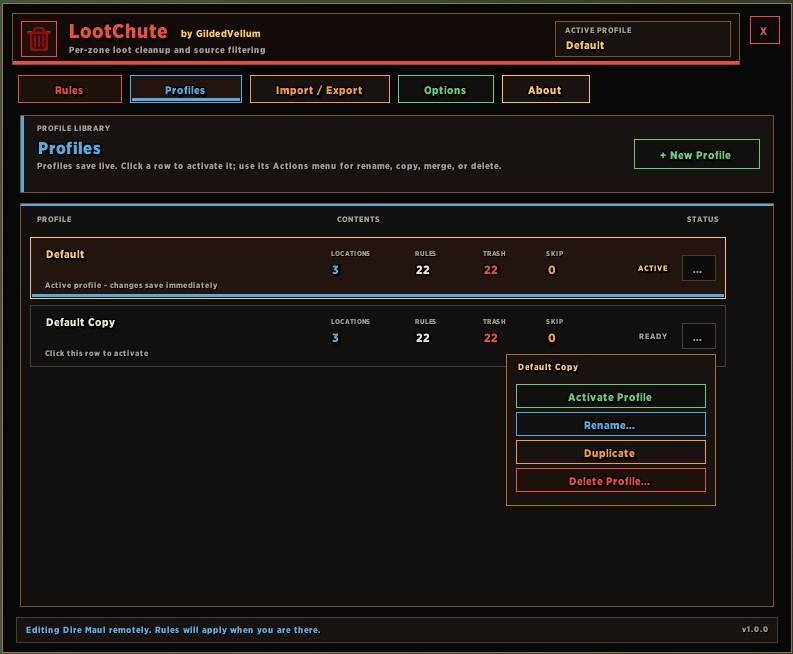
👤 Profiles
Maintain different LootChute setups for different characters, activities, or playstyles.
Profiles support:
- Rename
- Duplicate
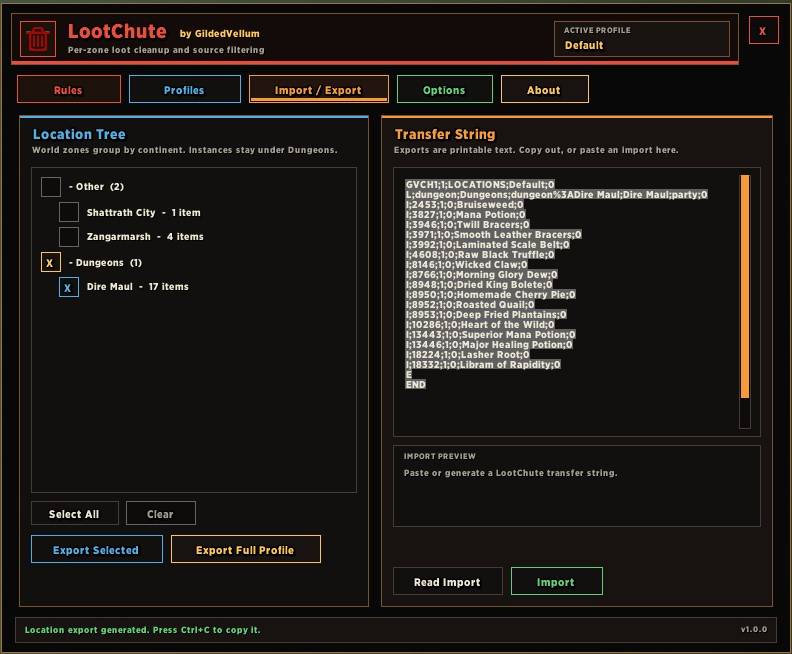
- Import / export
- Zone copying
- Independent location rule libraries
Item information used by a rule—such as its ID, name, icon, and link—is captured from the live game client when needed and stored with the rule.
LootChute does not ship with a giant prebuilt item database.
🎒 Example Workflow
Running Blackrock Depths?
- Open LootChute and select Blackrock Depths—it will already be active if you're inside BRD.
- Drag unwanted items directly from your bags onto the ruleset.
- Leave Trash ON for items you want handled through Easy Destroy.
- Enable Do Not Pick Up for drops you would rather leave behind entirely.
- Loot normally so corpses stop sparkling. ✨
- Process queued junk using the HUD, minimap button, or your Delete Next keybind.
- After the run, check Recent Loot History for anything you forgot to filter.
The next time you return, your BRD rules are already there.
📍 Compact Controls
LootChute is designed so opening the full window is optional during normal play.
The minimap button provides:
- Current queued-stack count
- Live delete-queue tooltip
- Right-click Delete Next
- Quick access to LootChute
The button positioning also follows the live minimap geometry so it sits cleanly around the minimap rather than relying on a fixed placement assumption.
⚡ Built to Stay Small
LootChute is deliberately not a bag replacement, full inventory manager, UI overhaul, auction addon, or giant loot database.
It focuses on:
Drag & Drop Rules → Loot Filtering → No Pickup → Easy Destroy
Everything else exists to make that workflow faster.
⚠️ World of Warcraft: Forever Beta
LootChute v1.0.5 supports the World of Warcraft: Forever beta client and its current addon APIs.
However, Blizzard currently has an Addon SavedVariable Loading Bug in the Forever beta.
Until Blizzard fixes this client bug, LootChute rules may not properly survive a full game-client restart.
LootChute still uses normal WoW addon SavedVariables for its data. It does not hide your rules inside macros or CVars as a workaround.
This warning is also displayed directly inside the Rules drag & drop window.
🔮 Maybe Later
A Disenchanting queue may be explored in a future update, with strict safeguards designed to avoid touching equipment you already owned.
For now, LootChute remains focused on being what it was built to be:
a fast, visual, lightweight loot filter that makes unwanted loot somebody else's problem—the chute's.
You must be logged in to leave a comment.