

Loot Rolls Inspector
Track who picked Need, Greed or Pass on every loot roll, live and before the dice resolve, with a per-day history.
Details
Addon ID:
27675
Addon Version:
1.1.2
Expansion:
1.60
Upload date:
Oct 06, 2026
Last Updated:
Oct 06, 2026
Downloads:
Less than 100
Website:
Source Link
Expansion
 Forever
 Categories
Developers

mr_mirror
Creator
Having issues?
Loot Rolls Inspector
Track who picked Need, Greed or Pass on every loot roll, live and before the dice resolve, with a per-day history.
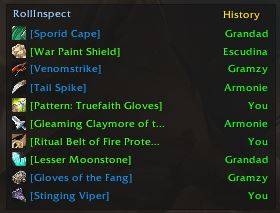
Ever wondered who passed, who went Greed and who rolled Need on that item, without scrolling through chat? Loot Rolls Inspector keeps a small, clean window with the latest items that went to a roll and shows every player's choice as it happens.
Features
- Minimalist window with the last 10 items that went to a roll, newest first. Drag it wherever you like; it remembers its position.
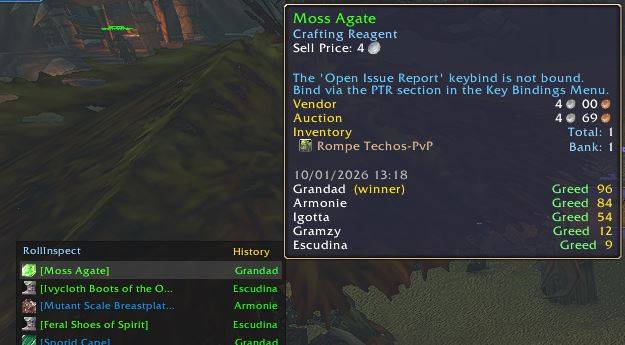
- Live choices: while an item is still being decided, each row shows a counter per choice (for example
N2 G1 D0 P1: Need, Greed, Disenchant, Pass). Once resolved, the row shows the winner. - Full detail on hover: the tooltip lists every player's choice and roll value, marks the winner, and tells you who hasn't decided yet. It updates in real time while you keep the mouse over it.
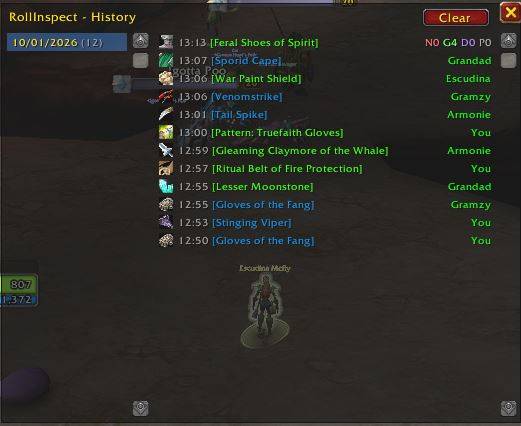
- Per-day history: open the History window to see a list of days. Click a day to browse the loot of that day. Only the current day is ever redrawn, so it stays fast even after years of play.
- Configurable retention: history is limited by number of days (365 by default), not by item count.
- Rolled items only: normal loot is ignored; only items that go to a roll are recorded.
- Shift+click any item to link it in chat.
- Localized: adapts to your client language (enUS, esES/esMX, deDE, frFR, ptBR; English fallback). Roll types use the game's own translated names.
Commands
You can use /lri or /lootrolls (both do the same).
| Command | What it does |
|---|---|
/lri | Show or hide the main window. |
/lri history | Open or close the History window (also accepts /lri h). |
/lri days | Print how many days of history are kept. |
/lri days N | Keep up to N days of history (default 365). Older days are deleted automatically. |
/lri reset | Delete the whole history (asks for confirmation). |
/lri pos | Reset the main window to its default position. |
How to use
- Install the addon and log in.
- Loot something in a group with Need/Greed rolls enabled. The item appears in the window as soon as the roll starts.
- Hover the row to see who chose what and who is still undecided.
- Click History to browse previous days.
Privacy and policy
- Read-only: it only displays information from chat and loot events.
- It does not make roll decisions for you and does not automate gameplay.
- No network access, no telemetry. History is stored locally in your
SavedVariables. - Free, open source (MIT), no ads.
Notes
- Built for WoW Classic. If the addon shows as out of date after a patch, enable "Load out of date AddOns".
- Not affiliated with or endorsed by Blizzard Entertainment.
Feedback and bug reports are welcome. If something looks wrong, include the Lua error text.
You must be logged in to leave a comment.