

Lightforged HUD
A Paladin HUD with an animated seal timer, secure spell buttons, Holy Fire effects and optional custom unit frames for WoW Forever.
Details
Expansion
 Forever
 Categories
Developers

Having issues?
Lightforged HUD
Keep your seal and key Paladin abilities close to the action. Lightforged HUD brings a glowing seal countdown, clear spell states and gold artwork to World of Warcraft: Forever.
Forever 1.60.1, client build 70009, interface 16001. Paladin only. No dependencies. Retail and other Classic clients are not supported.
0.1.11 update: Seal of Command damage procs no longer restart the timer or postpone alerts. Learned Seal flyouts, overrides and localized Forever Fury/Furor families are supported. Settings and saved layouts are retained.
Your seal, at a glance
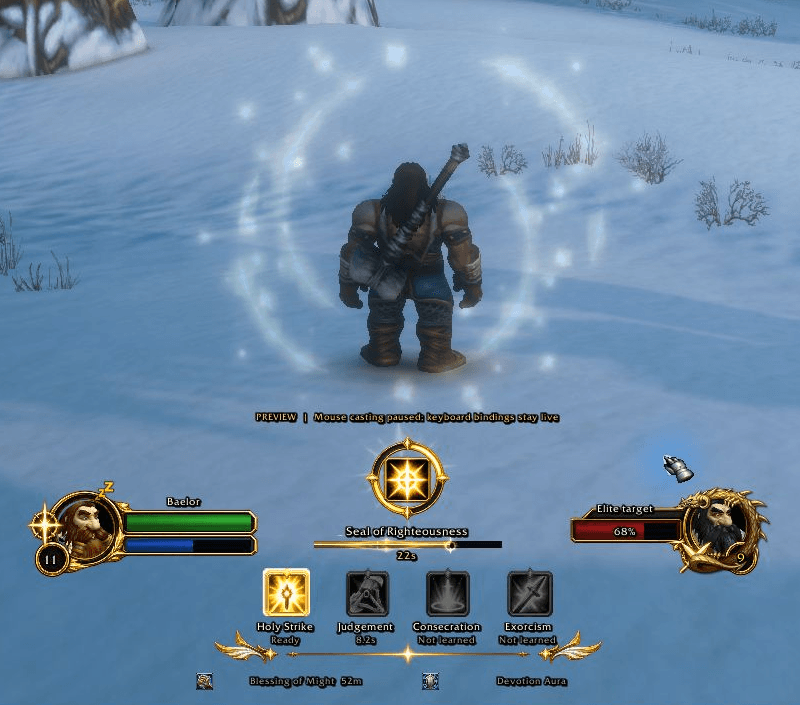
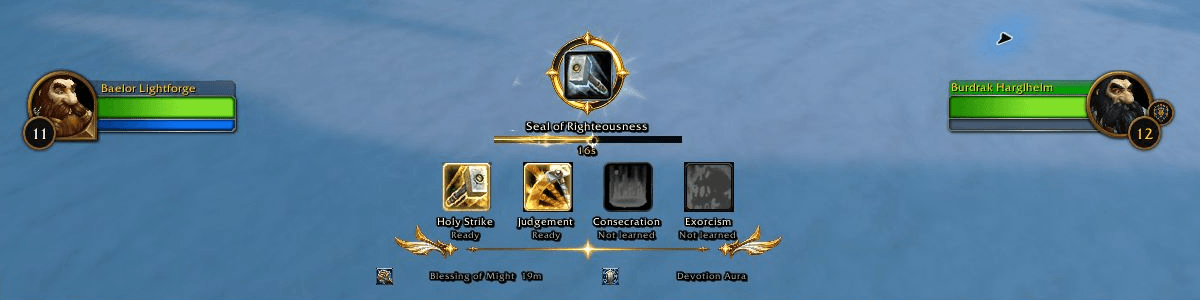
The seal timer drains as an animated bar of light, with a moving shimmer and a bright edge. It warms near expiry and can play an optional warning sound. A translucent Holy Fire effect surrounds the center of the screen during combat while a seal is tracked; you can turn it off in settings.
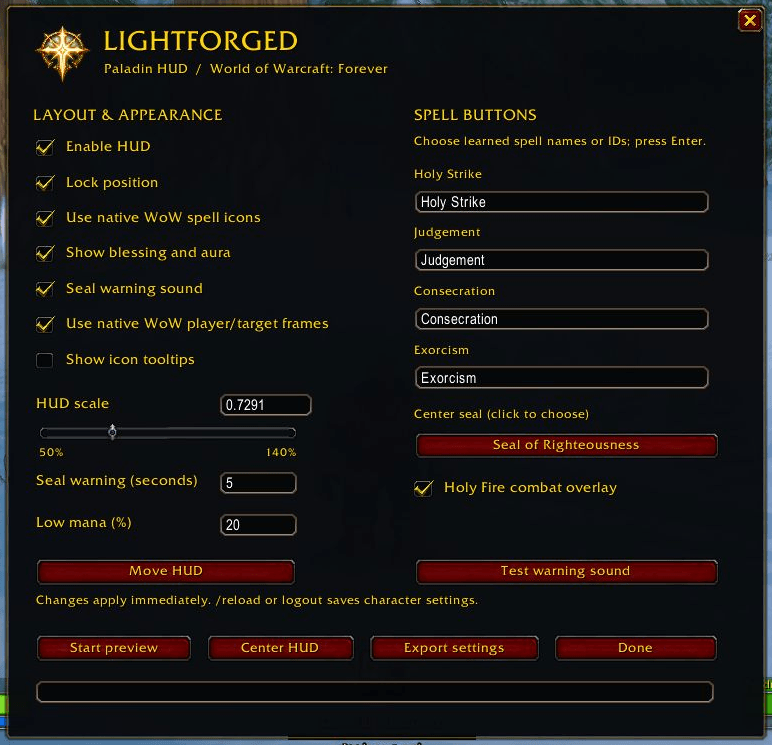
The center button casts your selected learned seal on your character, including with a dead, absent or distant target. Four configurable spell buttons start with Holy Strike, Judgement, Consecration and Exorcism. Use mouse clicks or assign your own keys through WoW's Key Bindings. Normal mana and cooldown requirements apply.
Available abilities glow around their borders. Confirmed unavailable abilities appear dimmed, out-of-range icons turn red and low-mana icons turn blue when the client exposes that information. Judgement shows Apply seal when a missing seal is confirmed. Native cooldown sweeps remain available when combat data is restricted.
Each click or keypress performs one normal spell action. Lightforged does not automate a rotation or cast spells for you.
Choose the look that fits your UI
- Native player and target frames by default. Keep WoW's frame positions, settings and interactions, or select Lightforged's custom frames in
/lf. - Optional custom unit frames. Gold artwork with native portraits and right-click menus, friendly target colors, level/skull displays and elite/rare/boss decorations. Player bar text follows WoW's Status Text setting, with a resting indicator when the game reports that you are resting.
- Native or custom spell icons. Use the familiar WoW icons or Lightforged's gold artwork.
- Move, scale and lock. Drag the HUD into position, use the smooth native scale slider or enter an exact value, then lock it. Center HUD restores the default location above the action bars.
- Blessing and aura strip. Keep those buffs alongside your abilities, with an optional low-mana notice.
- Optional tooltips and sound. Icon tooltips and seal warning sound start off. Help remains available in settings.
- Per-character preferences. Export and import settings codes to keep a backup or share a layout.
Both frame choices keep the seal timer and spell HUD available. Protected frame and spell changes requested during combat take effect afterward.
Getting started
- Install Lightforged HUD for your Forever client. For a manual install, extract the ZIP so
Interface/AddOns/LightforgedHUD/LightforgedHUD.tocexists, without a second nested folder. - Enable the addon and log into a Paladin. Restart the client if a new addon folder is not detected.
- Type
/lfto open settings. Try Start preview, then Done to return to live play. - Choose Move HUD, position it, and click Lock. Assign optional keys under Lightforged HUD in the game's Key Bindings.
Useful commands: /lf move, /lf lock, /lf center, /lf preview, /lf live, /lf on, /lf off, /lf export, /lf import <code>, and /lf status.
Preview shows sample values and blocks mouse casts on the HUD. Your keyboard spell bindings remain live. Entering combat exits preview.
Forever compatibility and feedback
Forever can hide combat information from addons. A ~ before the countdown marks an estimate, and ? marks an unconfirmed buff state. Hidden dispels, removals or duration changes may not be reflected until the client exposes them or the tracked timer expires. The Holy Fire effect follows that same timer. Unknown combat data does not mean an ability is unusable.
Learned application IDs distinguish real Seal casts from same-name damage procs. Same-name proc/absorb buffs cannot replace the actual Seal duration. Broader level, encounter and language coverage will benefit from player feedback.
If the beta client fails to restore preferences after restarting, keep an exported settings code as a backup. Please report problems in the project comments with your addon version, game build, /lf status output and steps to reproduce. Include the full Lua error if one appears.
By rbigbie. All Rights Reserved. Custom artwork was generated with AI for this project. In-game assets are referenced from the client and are not redistributed. This is an independent addon, not an official Blizzard product.
You must be logged in to leave a comment.