

Lazy Buffing
All-in-one raid buff manager for Druids, Mages, and Priests — auto-buff priority, one-click casting, and class roster tracking.
Details
Expansion
 Forever
 Categories
Developers

Having issues?
LazyBuffing
Automatic maintenance buff assistance for every class, every WoW edition.
LazyBuffing tracks what buffs your class can cast, finds the highest-ranked known version, and keeps them active across yourself and your group — no manual button-mashing, no forgetting Refreshments, no wasted uptime.
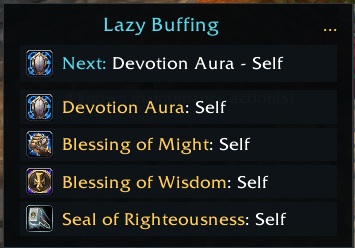
LazyBuffing sits in the corner of your screen and quietly evaluates your available maintenance actions on every login, talent change, spell learn, and group roster update. It then presents a clear list of what needs casting and who it should go on, with a single click or a secure auto-cast button handling the rest.
✨ At a Glance
- Class-aware maintenance logic — knows every buff, aura, weapon imbue, and oil your class can cast, across Retail, Mists Classic, TBC Classic, Classic Era, and Titan Reforged.
- Automatic target selection — finds the right target for each action: self, group, single ally, or a role-filtered teammate.
- Exclusive handling — knows which auras are mutually exclusive (e.g., presence stances, druid forms, paladin auras) and only suggests one at a time.
- Secure auto-cast — the main button securely casts the next missing buff on the correct target; a second binding routes the same action for raid-wide use.
- Always up to date — listens to spell learns, talent changes, group changes, and aura updates so the recommendations are never stale.
- Per-buff toggles — switch off any individual buff you don't want maintained; it stops being cast and stops being counted as missing.
- Pick your own within a group — choose which seal, aura, stance, armor, poison, or weapon imbue the addon maintains instead of taking the first one it knows.
- Fade alert — a sound plays the moment a maintained buff drops, so you notice before the next pull.
- Minimap button — every option, including per-buff toggles and group choices, in one right-click menu.
- Open with
/lazybuffingor/lb, or right-click the minimap button.
🎮 One Project, Every Supported WoW Version
LazyBuffing is a single CurseForge project with edition-specific data built in. Download the release matching your client — do not install a Retail package in a Classic client, or vice versa.
| Game client | Download the matching release | Highlights |
|---|---|---|
| Retail | Retail | Modern maintenance buffs, group-targeted auras, weapon imbue support, exclusive handling |
| Mists of Pandaria Classic | MoP-Classic | MoP-era buffs, legacy form stances, and classic group auras |
| Burning Crusade Classic | TBC-Classic | TBC buffs with group variants (Greater Blessings, Prayer variants, Gift of the Wild) |
| Classic Era / Season of Discovery / Hardcore | Classic-Era | Vanilla-era maintenance buffs and weapons enchants |
| Titan Reforged | Titan-Reforged | Wrath-era stock candidates with runtime validation |
Important: The available actions and targets adapt to the selected game client. Older clients only see buffs that make sense for that era.
⚔️ Core Features
Automatic Maintenance Buff Tracking
LazyBuffing scans every known maintenance action for your class — buffs, auras, weapon enchants, oils, and poisons. It resolves the highest-ranked version you know, checks whether it's already active, and presents only what needs casting.
Smart Target Selection
Each action has a defined target type: self, group, or single. For group actions, LazyBuffing scans your roster and picks the first eligible member who doesn't already have the aura. For single-target actions, it can be restricted to a specific role (e.g., healers only) or allow self-casting when appropriate.
Exclusive Aura Handling
Many classes have mutually exclusive buffs — druid forms, paladin auras and blessings, shaman shields and weapon imbues, mage armor types, warlock armor types, rogue poisons. LazyBuffing tracks these exclusivity groups and only suggests actions that don't conflict with what's already active.
Weapon Imbues and Oils
For classes that use weapon buffs (Shamans with Windfury/Earthliving, Rogues with poisons, Warlocks with Soulstone), LazyBuffing tracks weapon-slot enchantments separately and checks whether a weapon buff is already applied before suggesting a re-application.
Group Variant Support
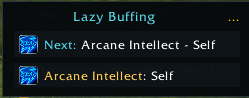
Some classic-class actions have cheaper single-target versions and more expensive group variants (e.g., Blessing of Kings → Greater Blessing of Kings, Arcane Intellect → Arcane Brilliance, Mark of the Wild → Gift of the Wild). LazyBuffing automatically checks reagent availability and prefers the group variant when possible.
Secure Auto-Cast
The main action button uses SecureActionButtonTemplate so it can be safely bound to a key or used in combat. The Raid binding button routes the same next action for raid-wide use. Both update automatically as your buffs change.
🚀 Getting Started
- Download the release whose filename matches your WoW client.
- Extract it into your WoW
InterfaceAddOnsfolder so the final path isInterfaceAddOnsLazyBuffing. - Start or reload WoW. The addon loads automatically.
- Open the panel by typing
/lazybuffingor/lb. - Click the main button to cast the next missing maintenance buff, or use the config panel to toggle visibility and lock the frame.
Configuration
Right-click the minimap button for everything in one place, or use the gear button on the frame for the panel.
- Enabled — toggle the addon on or off.
- Sound when a buff falls off — plays an alert the moment a maintained buff drops. On by default.
- Show when solo — show the panel even when not in a group.
- Lock frame — prevent the panel from being dragged.
- Auto-buff these — a checkbox per buff your character knows. Unchecking one stops it being cast and stops it counting as missing, so it won't sit in the panel nagging you.
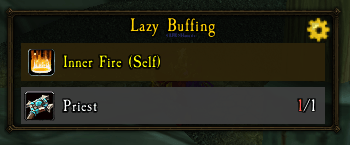
- Choose which to use — for any group where your class has options (paladin seals and blessings, druid forms, hunter aspects, warrior stances and shouts, mage armors, warlock armors, shaman shields and weapon imbues, rogue poisons, death knight presences, priest inner buffs, monk stances), pick the one you actually want instead of letting the addon take the first it knows.
Slash Commands
| Command | What it does |
|---|---|
/lb | Toggle the addon on or off |
/lb config | Open the config panel |
/lb buffs | List every buff you know, with its on/off state |
/lb toggle <name> | Turn one buff on or off — accepts the key, the full name, or part of it |
/lb list | Show exclusive groups and which option is selected |
/lb choose <key> | Pick which option a group uses (/lb choose auto returns to automatic) |
/lb sound | Toggle the buff-fade alert |
/lb lock | Lock or unlock the frame |
/lb minimap | Show or hide the minimap button |
For example, a Paladin who wants Seal of Righteousness rather than whichever seal the addon picks first can run /lb choose righteousness, or set it from the minimap menu under Choose which to use → Paladin seal.
👥 Built For Every Kind of Player
- Casual players: Let LazyBuffing handle the boring buff maintenance while you focus on gameplay.
- Raiders and dungeon players: Never miss a maintenance buff in the middle of combat — the auto-cast button covers you.
- Alt players: The class data is loaded automatically; no configuration needed for new characters.
- Theorycrafters: The data-driven design means all spell candidates are listed and resolved by rank — you always know what's available.
📝 Notes
- Settings, including the locked state and visibility preferences, persist between play sessions.
- The addon does not add Retail-only maintenance actions to Classic clients or vice versa.
- All spell resolution is done client-side using the character's known spell book — no external data is required.
- The addon has no external runtime dependency.
🐛 Support
Found an issue or have an idea? Please open an issue or leave a comment on CurseForge. When reporting a bug, include your game version, addon version, and the full error message if one appears. Appreciate any patreons to help as this is costing me time and money to maintain: https://www.patreon.com/c/LazyLoafs504
Made for players who would rather play WoW than worry about buff timers.
You must be logged in to leave a comment.