
Krowi’s World Map Buttons
A library for World of Warcraft addon development that simplifies adding custom buttons to the world map interface with automatic positioning and dynamic layout management
Details
Addon ID:
25814
Addon Version:
1.4.11
Expansion:
1.60
Upload date:
Oct 06, 2026
Last Updated:
Oct 06, 2026
Downloads:
Less than 100
Website:
Source Link
Expansion
 Forever
 Categories
Developers

Krowi
Creator
Having issues?
A library for World of Warcraft addon development that simplifies adding custom buttons to the world map interface with automatic positioning and dynamic layout management.
Features
World Map Button Library (Krowi_WorldMapButtons-1.4)
- Easy Button Integration: Add custom buttons to the world map with a single function call
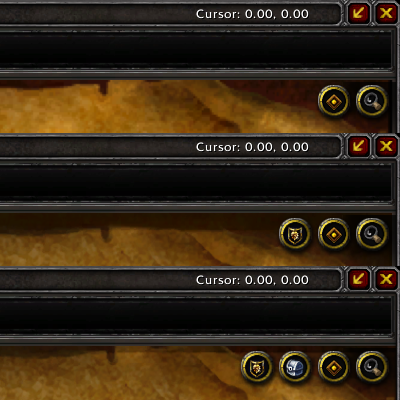
- Automatic Positioning: Buttons are automatically positioned in the top-right corner of the map
- Dynamic Layout: Automatically adjusts layout when buttons are shown or hidden
- Multi-Version Support: Works across Retail (Mainline) and Classic variants (Wrath, Classic, TBC)
- Default Button Integration: Automatically manages default Blizzard buttons (tracking, options)
- Independent: No dependency on other addons for world map modifications
- LibStub Support: Standard LibStub library structure for dependency management
Usage Examples
Basic Button Setup
local _, addon = ...
addon.Gui.WorldMapButton = {}
local worldMapButton = addon.Gui.WorldMapButton

-- Get the library instance
addon.WorldMapButtons = LibStub("Krowi_WorldMapButtons-1.4")

function worldMapButton.Load()
    -- Add button using your custom template
    worldMapButton = addon.WorldMapButtons:Add("YourAddon_WorldMapButton_Template", "BUTTON")
    addon.Gui.WorldMapButton = worldMapButton
end
Button Mixin Example
YourAddon_WorldMapButtonMixin = {}

function YourAddon_WorldMapButtonMixin:OnLoad()
    -- Initialize your button
end

function YourAddon_WorldMapButtonMixin:OnMouseDown(button)
    -- Handle mouse down event
end

function YourAddon_WorldMapButtonMixin:OnMouseUp()
    -- Handle mouse up event
end

function YourAddon_WorldMapButtonMixin:OnClick()
    -- Handle click event
end

function YourAddon_WorldMapButtonMixin:OnEnter()
    -- Show tooltip or highlight
end

function YourAddon_WorldMapButtonMixin:OnHide()
    -- Clean up when hidden
end

function YourAddon_WorldMapButtonMixin:Refresh()
    -- Called when map opens or changes
    -- Use this to update button state:
    -- self:Enable(), self:Disable(), self:Show(), self:Hide()
end
Button Template Example (XML)
See ButtonTemplate.xml for a complete example template.
Custom Offset Configuration
local WorldMapButtons = LibStub("Krowi_WorldMapButtons-1.4")

-- Customize button positioning offsets
WorldMapButtons:SetOffsets(8, -4)  -- xOffset, yOffset
API Reference
Library Functions
| Function | Parameters | Returns | Description |
|---|---|---|---|
Add(templateName, templateType) | templateName (string), templateType (string) | frame | Creates and adds a button to the world map using the specified XML template |
SetOffsets(xOffset, yOffset) | xOffset (number, optional), yOffset (number, optional) | - | Sets custom positioning offsets for buttons. Defaults: xOffset=4, yOffset=-2 |
SetPoints() | - | - | Internal function that recalculates and updates button positions |
Add() Parameters
| Parameter | Type | Required | Description |
|---|---|---|---|
templateName | string | Yes | The name of your button template defined in XML |
templateType | string | Yes | The frame type, typically "BUTTON" |
Returns: The created button frame object
Button Mixin Methods
Your button mixin should implement these methods:
| Method | Parameters | Description |
|---|---|---|
OnLoad() | - | Called when button is first created |
OnMouseDown(button) | button (string) | Called when mouse button is pressed down |
OnMouseUp() | - | Called when mouse button is released |
OnClick() | - | Called when button is clicked |
OnEnter() | - | Called when mouse enters button area (show tooltip) |
OnHide() | - | Called when button is hidden |
Refresh() | - | Called when map opens or changes. Update button state here |
Library Properties
| Property | Type | Description |
|---|---|---|
HasNoOverlay | boolean | True if running WoW version without overlay frame system (Classic variants) |
IsMainline | boolean | True if running Retail/Mainline version (11.x+) |
XOffset | number | Horizontal offset for button positioning (default: 4) |
YOffset | number | Vertical offset for button positioning (default: -2) |
Buttons | table | Array of all registered buttons |
Positioning Behavior
Retail (Mainline)
- Buttons are stacked vertically from top to bottom
- Position: Top-right corner of the map
- Each button is 32 pixels below the previous one
Classic Variants (Wrath, Classic, TBC)
- Buttons are arranged horizontally from right to left
- Position: Top-right corner of the map
- Each button is 32 pixels to the left of the previous one
Dynamic Layout
- When a button is hidden, remaining buttons automatically shift to fill the gap
- Buttons maintain their relative order based on addon load order
- Default Blizzard buttons (tracking, options) are integrated into the layout system
Technical Details
Version Detection
The library automatically detects the WoW version and adjusts behavior:
- Classic Era / TBC Classic / Wrath Classic: Uses
WorldMapFrame.ScrollContainerparent - Retail/Mainline: Uses
WorldMapFramewith overlay frame system
Refresh Hook
The library hooks into the appropriate map refresh event:
- Classic variants:
WorldMapFrame.OnMapChanged - Retail:
WorldMapFrame.RefreshOverlayFrames
This ensures buttons update correctly when:
- Opening the world map
- Switching between different maps
- Zooming in/out
- Changing continents or zones
Use Cases
- Quick access to addon features from the world map
- Toggle visibility of custom map overlays or pins
- Open addon configuration panels
- Display addon-specific information
- Navigate to addon-related content
- Filter or search map data
- Any functionality requiring map-context interaction
Requirements
- LibStub
You must be logged in to leave a comment.