

Insightful Unit Frames
Custom WoW Forever unit frames showing quest progress, threat percentage, damage dealt, buffs and debuffs with click-to-dispel, cast bars, raid target markers, and ready check/summon/resurrection status.
Details
Addon ID:
26811
Addon Version:
1.0.4
Expansion:
1.60
Upload date:
Oct 06, 2026
Last Updated:
Oct 06, 2026
Downloads:
Less than 100
Website:
Source Link
Expansion
 Forever
 Categories
Developers

BeerSalsa
Creator
Having issues?
Insightful Unit Frames (WoW Forever)
Unit frames packed with the details that matter.
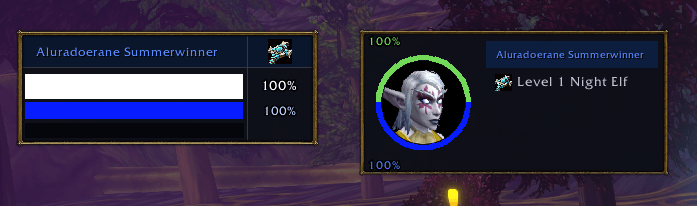
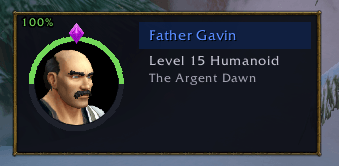
Insightful Unit Frames replaces your player, target, focus, party and raid frames with one matching set designed to put the information you normally have to hunt for right on the frame: quest progress, threat, buffs and debuffs, cast bars, raid target markers, personal damage, and more.
Target frames
- Works on anything you target: enemies, NPCs, friendly players
- Forever's first and last names, with a class icon beside player names
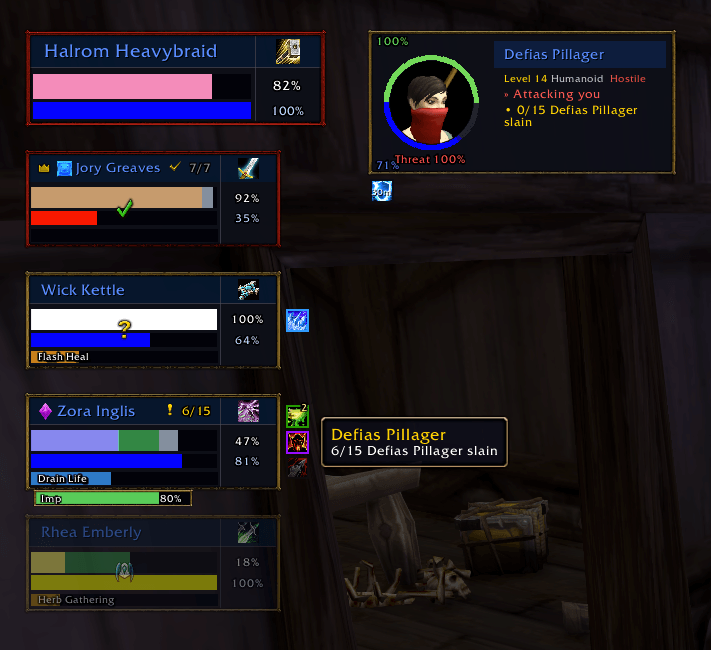
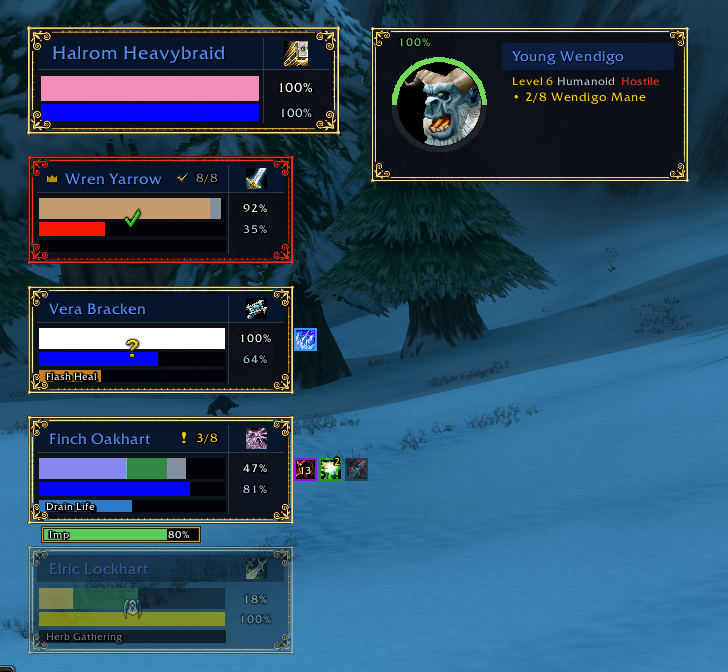
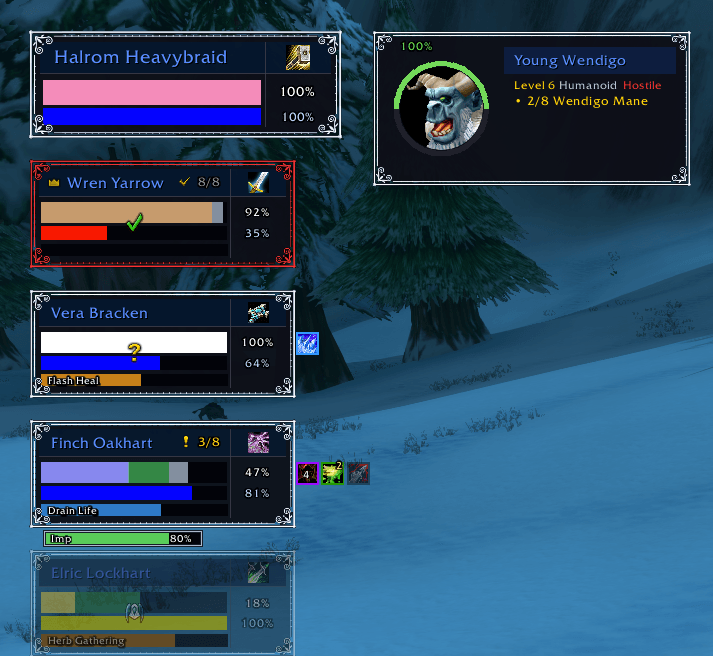
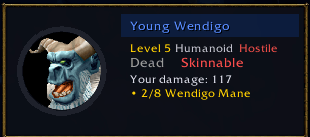
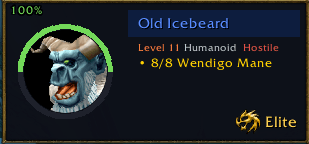
- Quest objectives you still need from the targeted mob
- Your personal damage on a mob after it dies, pulled directly from the game's combat tracking
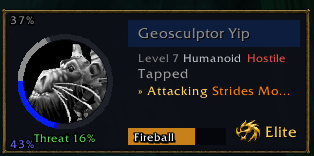
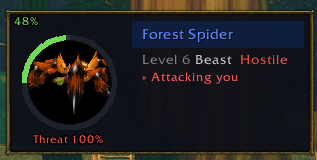
- Who the enemy is attacking, plus your threat percentage: green under 50%, yellow up to 80%, red once you're in danger
- A cast bar with the spell name, grayed out when the spell can't be interrupted
- Buffs and debuffs below the frame, with your own debuffs shown first in a gold border
- Red Hostile and yellow Neutral tags on creatures
- Elite, Rare, Rare Elite, Boss and Minion badges
- Dead, Skinnable and Tapped statuses
- PvP flag, NPC subtitle (like Innkeeper) and guild
- Detailed tooltips when you hover over buffs and debuffs
- An option to hide the mouseover tooltip when you're looking at your current target
Party frames
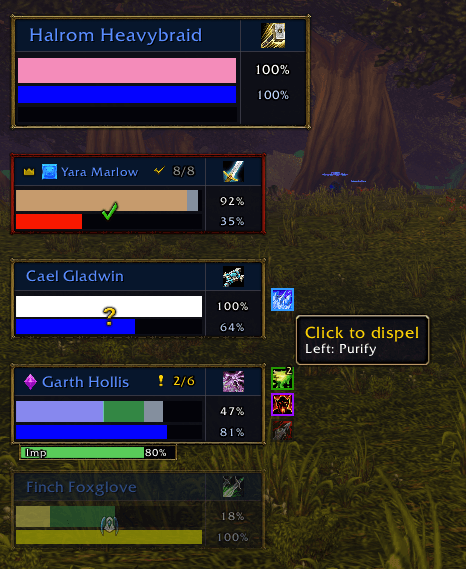
- Party members' quest progress totals appear while targeting a quest mob, i.e., 3/8, switching to a checkmark when the objective is completed
- Health and mana, rage or energy with percentages, shown in class colors or classic green
- Cast bars showing who is casting or gathering, with the spell name and progress
- Up to three debuffs beside each frame, with border colors showing the dispel type: blue Magic, purple Curse, green Poison, and gold/brown Disease
- Click-to-dispel: click a debuff to cast your dispel on that player without targeting them first. For classes with two dispels, left-click uses your first and right-click uses your second. When only one of your two dispels can remove a particular debuff, the icon shows which button to use
- In-combat dispels: when the game hides aura details from addons during combat, dispellable debuffs can still appear and remain clickable using information provided directly by the game. This is experimental and falls back cleanly on older clients
- Incoming heals and shields displayed on the health bar
- A red border on characters with aggro, and a fade when they're out of range
- A crown marks the party leader
- Raid target markers appear beside the name when one is placed
- A slim pet health bar sits under each owner's frame, for hunters, warlocks, and anyone else with one out
- Ready check, summon and resurrection icons
Raid frames
- Compact tiles arranged by group, with class-colored health, a name strip, a thin mana line, a raid target marker, and one debuff icon you can click to dispel (same in-combat fallback as party frames). They also show incoming heals, an aggro border, range fading and ready check icons. Blizzard's default raid frames are hidden while Insightful's raid frames are enabled.
- Use /insightful raidtest to preview a 20-player raid.
Settings
- Type /insightful or /iuf, or find Insightful Unit Frames under Options > AddOns. Almost everything updates as soon as you change it: frame style, sizes, text, spacing, colors and what each frame displays.
- Shift+drag any frame to move it.
- Save and Exit closes the settings page.
- Exit Without Saving undoes changes made since you opened the page.
- Reset to Defaults restores everything to its original settings.
- A handful of settings determine which frames are built at all, such as enabling or disabling raid frames. These are marked "(reload needed)".
Commands
- /insightful — opens the settings
- /insightful test — creates a fake party
- /insightful raidtest — creates a fake 20-player raid
- /insightful reset — moves the frames back to their default positions
Installing
Install through the CurseForge app, or extract the addon folder into the AddOns folder of your Forever installation. Then /reload or restart the game.
Good to know
- Built for World of Warcraft: Forever. Insightful follows the beta's addon restrictions. When the game hides something from addons during combat, the frame leaves it blank, uses the last value it was allowed to see, or lets the game provide the information itself rather than throwing an error.
- Still new in places. Raid frames and markers have been tested through the built-in test modes but haven't seen heavy use in real raids yet. Click-to-dispel, including the in-combat fallback, also needs more real-group testing. If something looks wrong, please let me know.
- Doesn't replace anything else. Insightful doesn't touch nameplates, action bars, chat or the minimap. The raid target markers shown on these frames sit alongside the markers the game already displays above characters.
- Standalone. No other addons are required.
- English only for now.
Feedback
- Bug reports and ideas are welcome in the comments.
- If you get a Lua error, please email me at beersalsa@proton.me and paste the full error text and mention what you were doing when it happened. That makes it much easier to track down.
You must be logged in to leave a comment.