
Hoard Value
What your character and account are really worth in gold: bags, bank and warband bank, priced with TSM or Auctionator.
Details
Expansion
 Forever
 Categories
Developers

Having issues?
What is your hoard really worth?
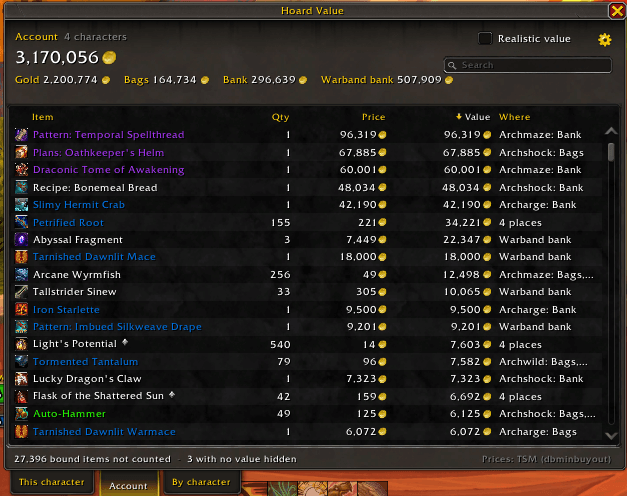
Hoard Value adds up everything you own and tells you, in gold, what your character and your whole account are worth: the gold you carry plus every item in your bags, your bank and your warband bank, priced with TradeSkillMaster or Auctionator.
Your net worth at a glance
- One big total, split into gold, bags, bank and warband bank.
- This character, Account (every character plus the warband bank, counted once) and By character tabs.
- Hover the minimap button for your character and account totals without opening anything.
Every item, most valuable first
- A list of everything you own, sorted by value. Click any column to sort by name, quantity, price, value or where it is.
- Search by item name or place.
- Hover an item to see exactly where it is and what each one is worth. Shift-click links it in chat.
Realistic value
Market prices are optimistic. Turn on Realistic value to see what you'd actually get selling everything: each item at the lower of its market value and the cheapest auction right now, minus the auction house's 5% cut.
Honest about soulbound items
Soulbound and warbound items can't go on the auction house, so they're left out by default. Turn them on in the options to count them at what a vendor pays.
Prices
Uses TradeSkillMaster first and falls back to Auctionator for anything TSM has no price for. Items with no auction price, like gray junk, count at vendor price, and so does anything a vendor pays more for than the auction house. Without either addon, only vendor prices are used.
Retail and Classic
Works on Retail, Mists of Pandaria Classic, TBC Anniversary, WoW Forever and Classic Era (including Season of Discovery and Hardcore). Classic has no warband bank, so that part is simply left out there.
How to use
- Click the coin button on the minimap, pick Hoard Value in the minimap's addon menu, or type /hoard.
- Visit a banker once on each character. Banks can only be read while open; Hoard Value remembers what's there and updates it every time you visit.
- Log in on your other characters once so they show up in the account total.
Options
Click the gear in the window, right-click the minimap button, or type /hoard options:
- Count soulbound items (at vendor price)
- Include the warband bank in the account total
- Price addon: Automatic, TSM only or Auctionator only
- TSM price: market value, lowest auction, historical or region average
- Realistic value
- Minimap button on or off (drag it to move it)
- Show amounts down to gold, silver or copper
- List items with no value
Good to know
- Prices are looked up every time you open the window, so totals for your other characters follow the market even if you haven't logged in on them.
- Not counted yet: mail, items you have listed on the auction house, and equipped gear.
You must be logged in to leave a comment.