

Hammerprice
TradeSkillMaster-style gold making, synced between your accounts: auctions, crafting queues and leveling plans, mail to alts, merchant restocks, disenchanting and a gold ledger.
Details
Expansion
 Forever
 Categories
Developers

Having issues?
Hammerprice
Hammerprice is an auction house, gold and crafting addon in the style of TradeSkillMaster. The download contains three addons: Hammerprice, and the optional Hammerprice Mail and Hammerprice Crafting.
- Prices: full scans, auction house searches and the desktop app's network prices, shown on item tooltips.
- Auction house: buying by search or shopping group, posting and cancelling by group with TSM-style auctioning operations, and a Deals list of auctions priced under market value.
- Merchants and bank: buys a group's restock from merchants, sells surplus to merchants, and takes needed items out of the bank.
- Disenchanting: disenchant value on tooltips, and a window that disenchants the most valuable items first.
- Ledger: gold, sales, purchases and crafts per character over time.
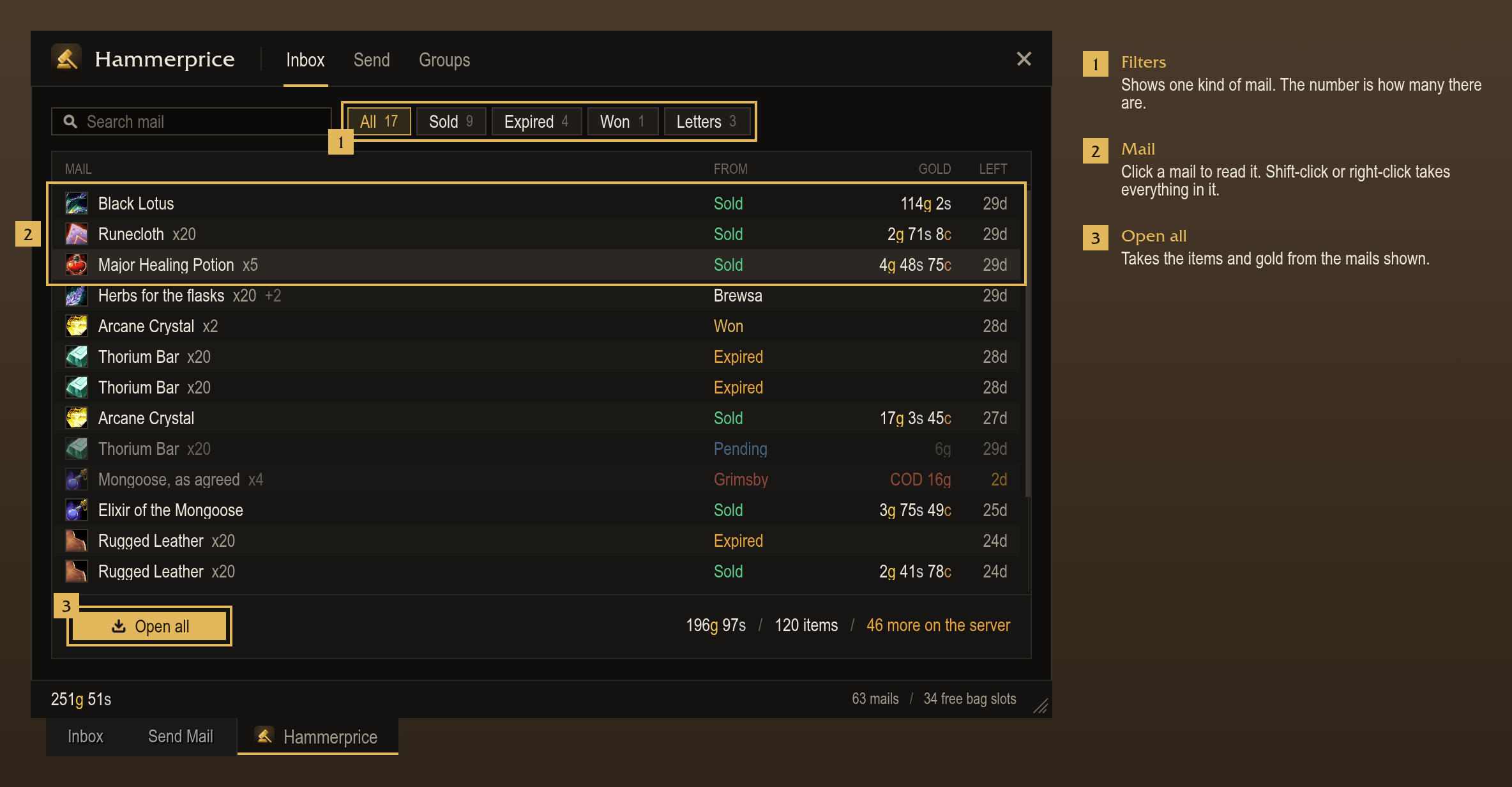
- Hammerprice Mail: an inbox with search and filters, Open all, and mail operations that send a group's items to other characters.
- Hammerprice Crafting: a crafting queue with restock, profit per craft, materials from the cheapest source, a profession leveling planner and cooldown tracking.
- Other accounts: characters, groups, operations, prices and the crafting queue sync between accounts.
Supports WoW: Forever and TBC Anniversary. Available in English, German, French and Spanish.
Blizzard requires a key or mouse press for each post, bid, buyout and cancel, so Hammerprice does not automate them. It prepares each one so that it takes one press. A commodity purchase takes two: one for the quote and one to confirm it.
Prices
- Reads the whole auction house in one full scan. The server allows one full scan per account every 15 minutes.
Start it with the Scan button in the auction house window or with
/hp scan. - Updates prices from each completed auction house search, Blizzard's or Hammerprice's.
- Stores market value, lowest buyout, a 14-day weighted history, vendor price and crafting cost for each item.
- Uses network prices from the Hammerprice desktop app, which uploads scans to the Hammerprice network and downloads other players' prices. For each item, the newer of this account's scan and the network price is used.
- Sharing scans with the desktop app can be turned off in Settings, Desktop app.
Tooltips
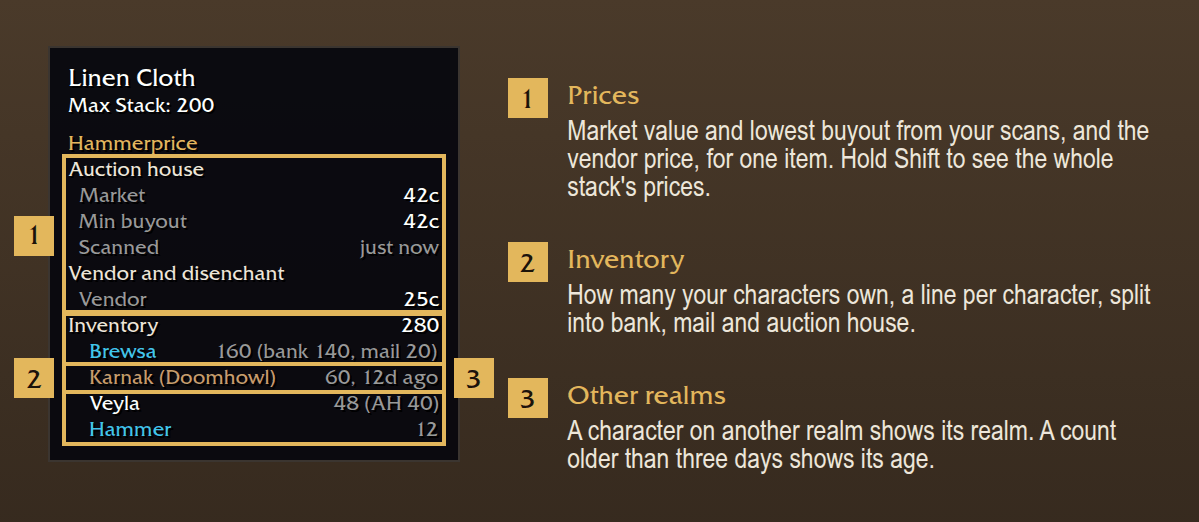
- Shows market value, lowest buyout and vendor price for one item. Holding Shift shows the values for the whole stack.
- Can show nothing until Shift is held (Settings, Tooltips).
- Shows how many of the item each character owns, with the counts in the bank, in the mail and on the auction house.
- Groups the lines in sections: Auction house, Ledger, Crafting, Vendor and disenchant, Inventory. The sections can be reordered.
- Each line can be turned on or off: how many are listed, average buy and sell prices, when the item was last bought or sold, craft profit, disenchant value and the item ID.
Buying
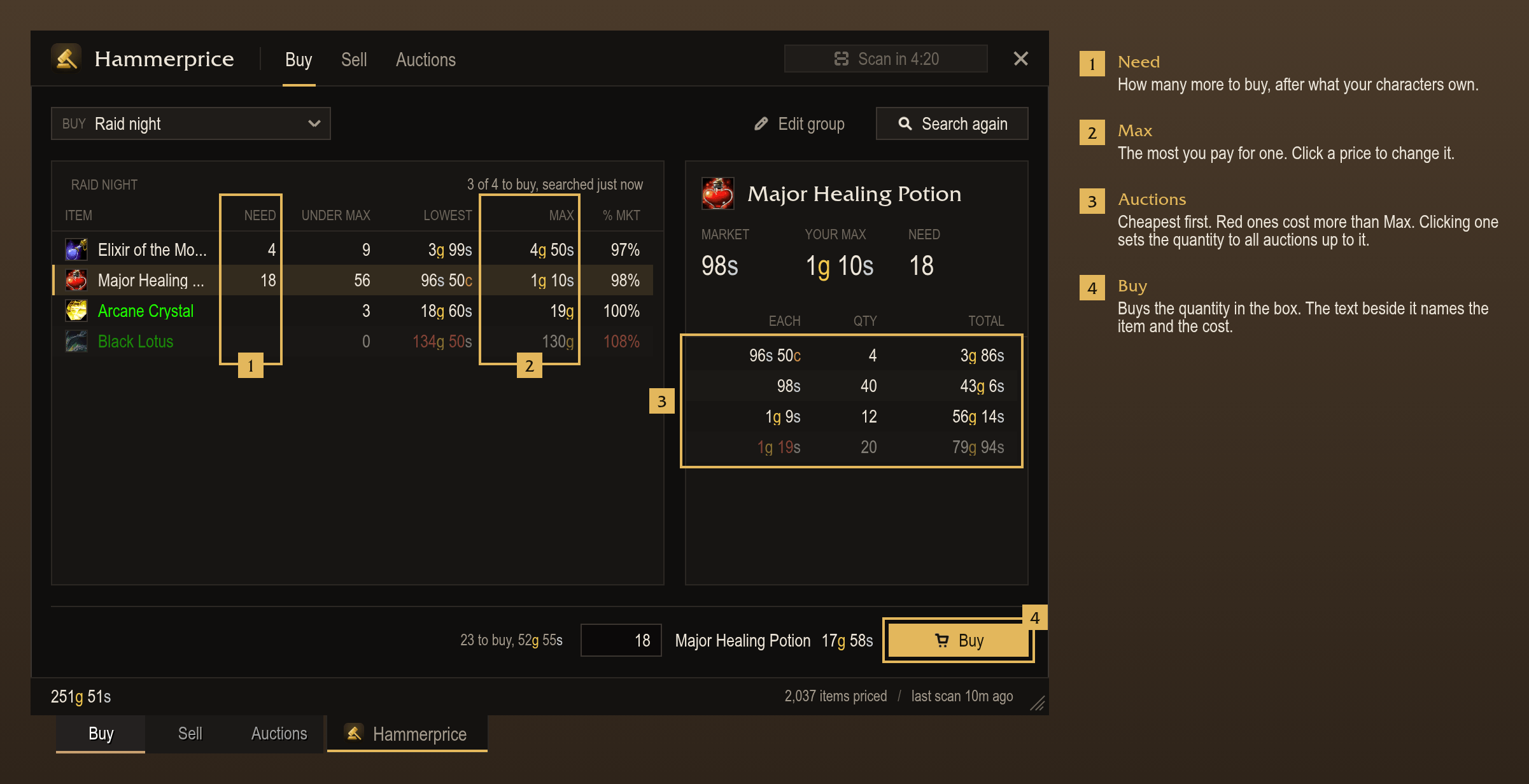
- The Buy panel has one menu with three sources: Search, shopping groups and Deals. It opens on Search.
- Search has the filters of Blizzard's Buy tab: level, item level, quality, price, category, type and armor slot.
- Accepts TSM's shorthand in the search box (
/rare/plate/chest/50g). Separate several searches with;. - Groups random-suffix gear under its item.
- Shopping groups list each item's need: the group's quantity, less what the characters own and what has been bought.
- Shows how many of each item are listed under its max price, and the lowest price as a percentage of market value.
- Search group searches a group's items and skips items that are already stocked.
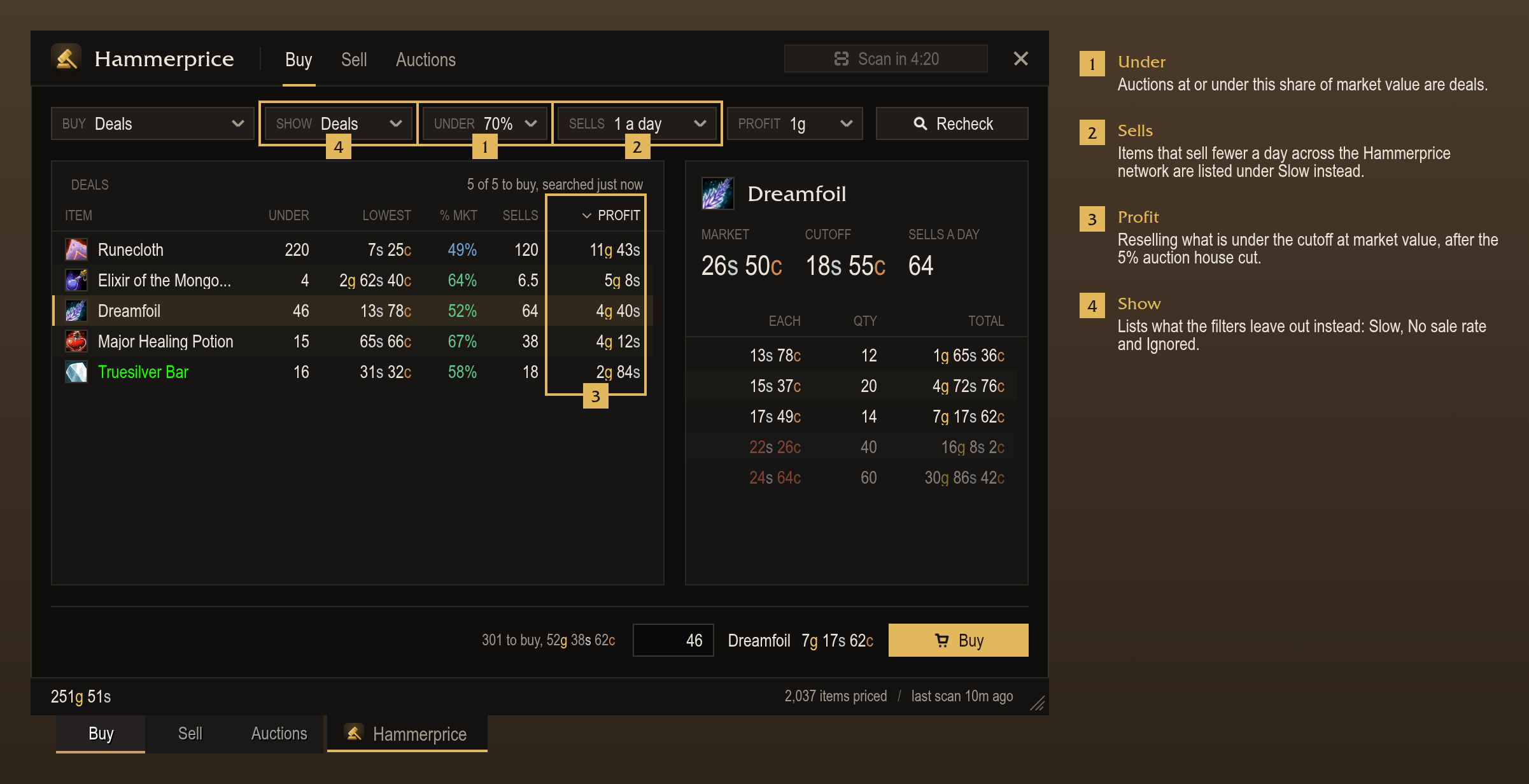
- Deals lists auctions from the last full scan priced under a share of market value (50 to 90%), for items that sell.
- Filters Deals by sale rate and by resale profit.
- Buy next shows what its next press buys, and moves to the next item after each purchase. It can be bound to a key.
- Asks for confirmation before a purchase of 10% or more of the character's gold. The limit can also be an amount, or every purchase (Settings, Buying).
- When another player buys an auction first, shows a message, removes the auction from the list and selects the next one.
Selling and cancelling
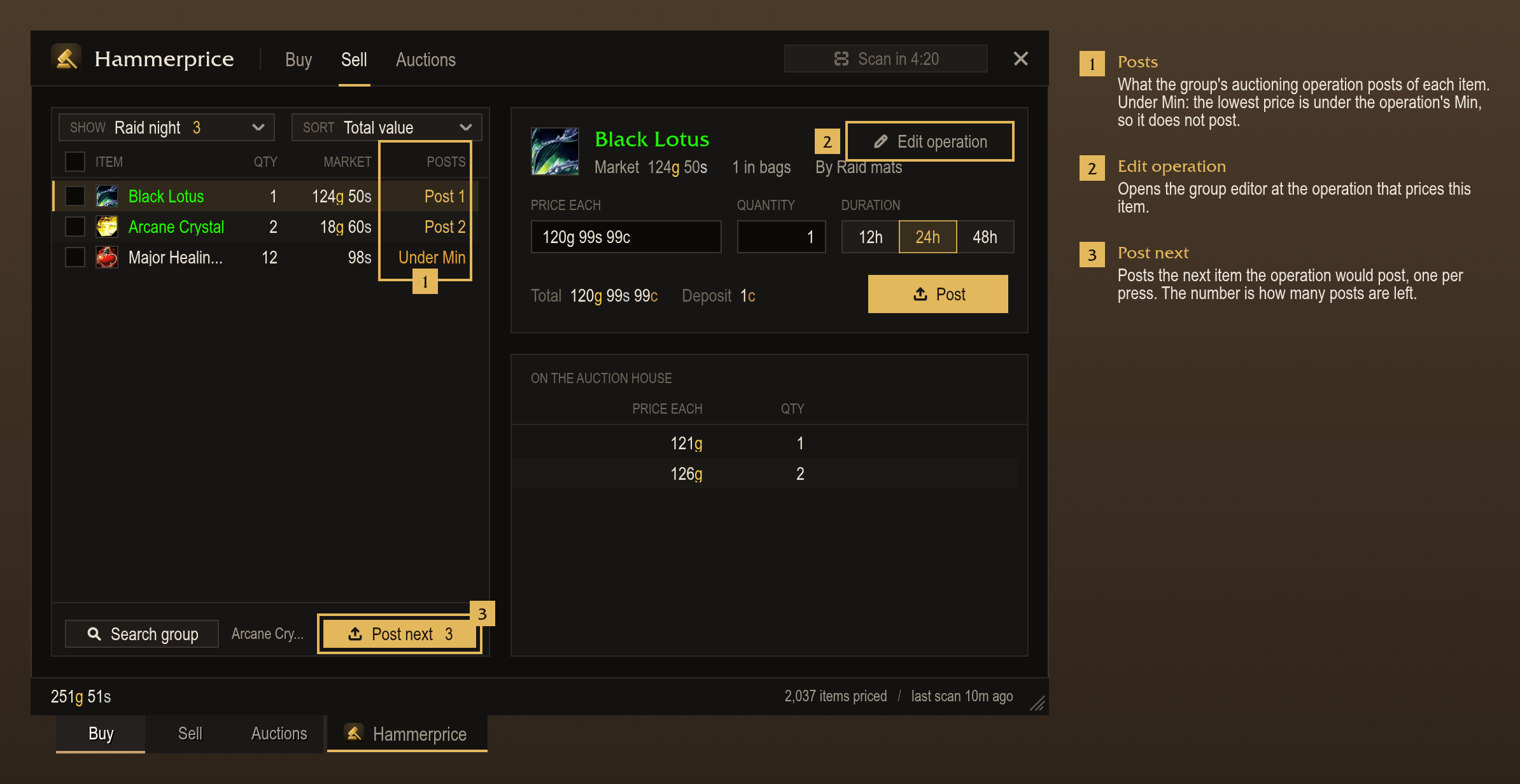
- Sell lists the items in the bags. Selecting one shows the competing auctions.
- Posts at 1 copper under the lowest competing auction by default, one press per auction.
- Posts several ticked items in turn: Post moves to the next item after each.
- Sorts the bags by total value, margin, margin %, price, quantity or name.
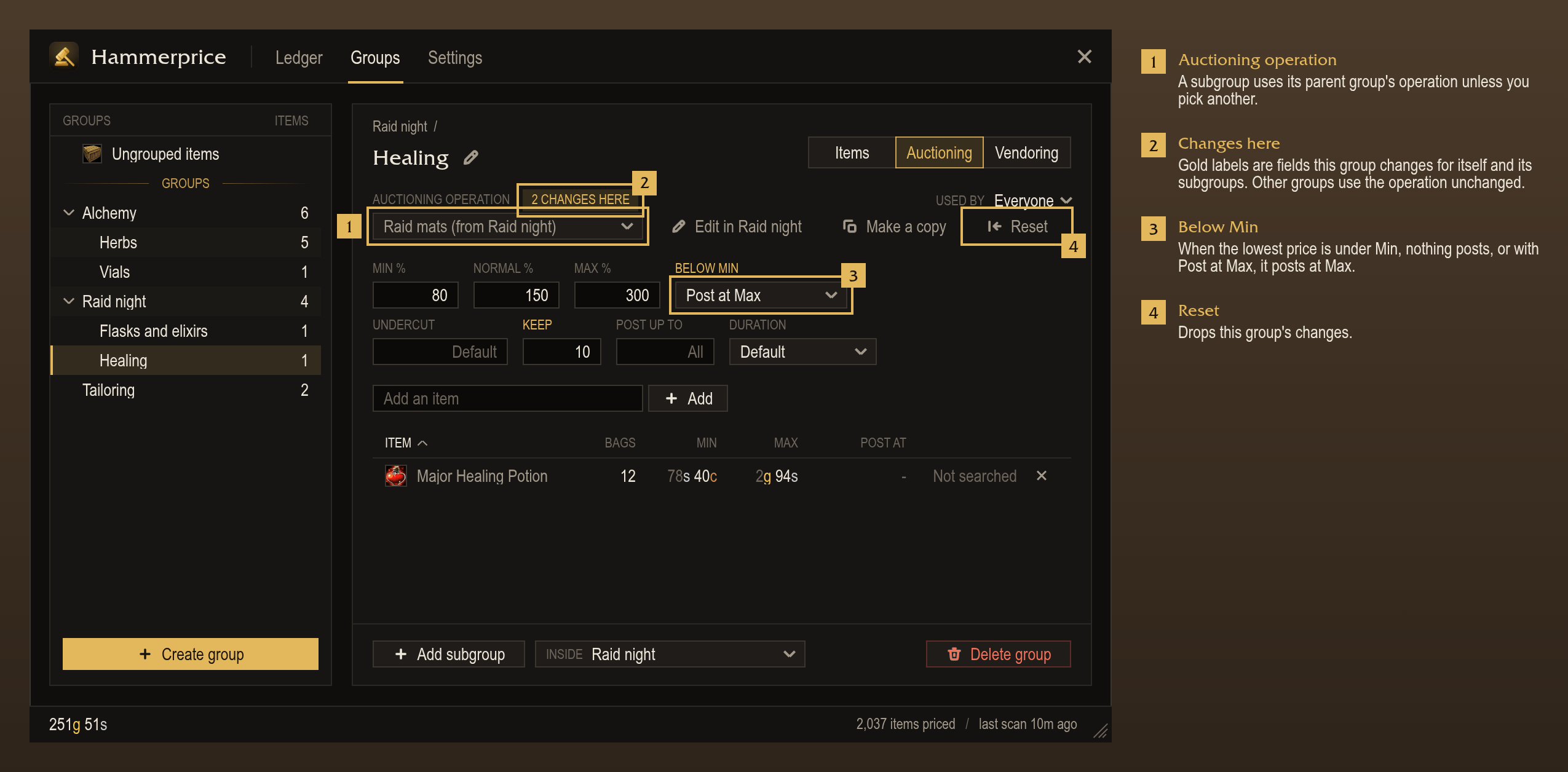
- Auctioning operations, as in TSM, set Min, Normal and Max as a percentage of market value or as a fixed price.
- Each auctioning operation also sets the undercut, Keep (how many stay in the bags), Post up to (how many to have on the auction house) and the duration.
- Shows a group's items in Sell. Post next posts the group one press at a time.
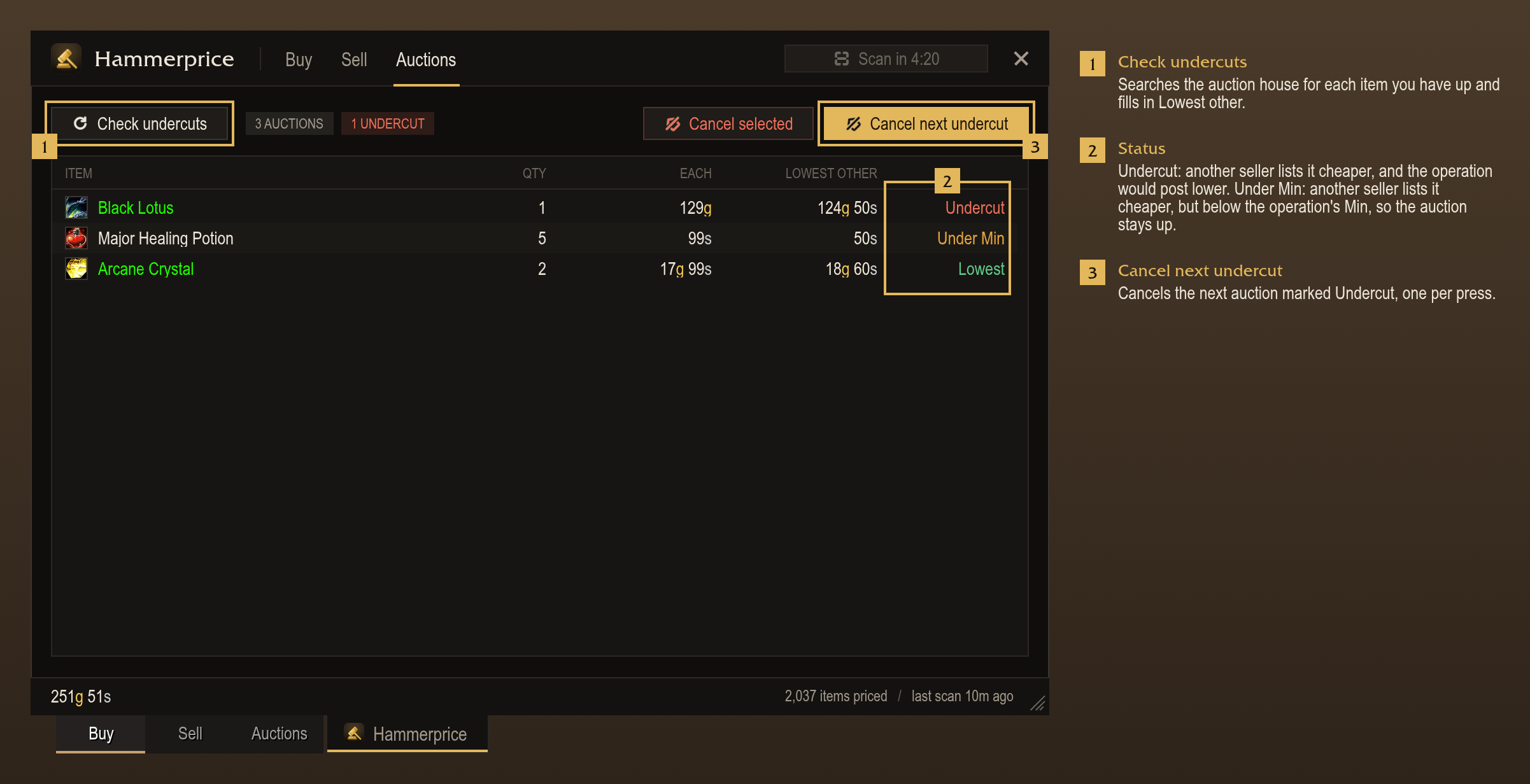
- Auctions shows which auctions are undercut. Cancel next undercut cancels them one press at a time.
- After a full scan, names your other characters with undercut auctions in chat, and lists their undercut items in the Auctions list, greyed out under a heading per character.
- Cancels an item that has an auctioning operation only when the operation would post it lower.
Merchants
- Vendoring operations buy a group's items from merchants until the character has the Restock to count.
- Sell what is over Keep, either always or only when a merchant pays more than the auction house.
- At a merchant, a card lists what to buy and what to sell. One press buys the list, one press sells it.
Bank
- At the bank, a card takes out the items a restock or the crafting queue needs, in one press. It shows with Blizzard's, Baganator's or ElvUI's bank window and can be moved.
Disenchanting
- Shows disenchant value on tooltips and the item card: the average market value of what disenchanting the item gives.
- The disenchant window (
/hp disenchant) lists the disenchantable items in the bags, most valuable first. - Disenchant next disenchants the next item in the list, one press per item. It can be bound to a key.
- Leaves out grouped items, items the auction house or a merchant pays more for, and epics unless Disenchant epics is on (Settings, Disenchanting). Click an item to include it.
- Right-click an item to never disenchant it. Settings, Disenchanting lists these items and can restore them.
Groups
- Stores items in nested groups, as in TSM, edited in the
/hpwindow. - Adds items by drag and drop, by shift-click, or by name or ID. Items can be dragged between groups.
- Allows an item in sibling groups (for example two per-character groups under Consumables), each with its own quantity and max price.
- Each group can have auctioning, vendoring, mail and crafting operations.
- Subgroups inherit their parent's operations and can change single fields.
- When an item is in several groups, the most specific group's operation applies, then the operation with the higher Priority.
- Ungrouped items takes an operation for the items in the bags that are in no group.
Ledger and item card
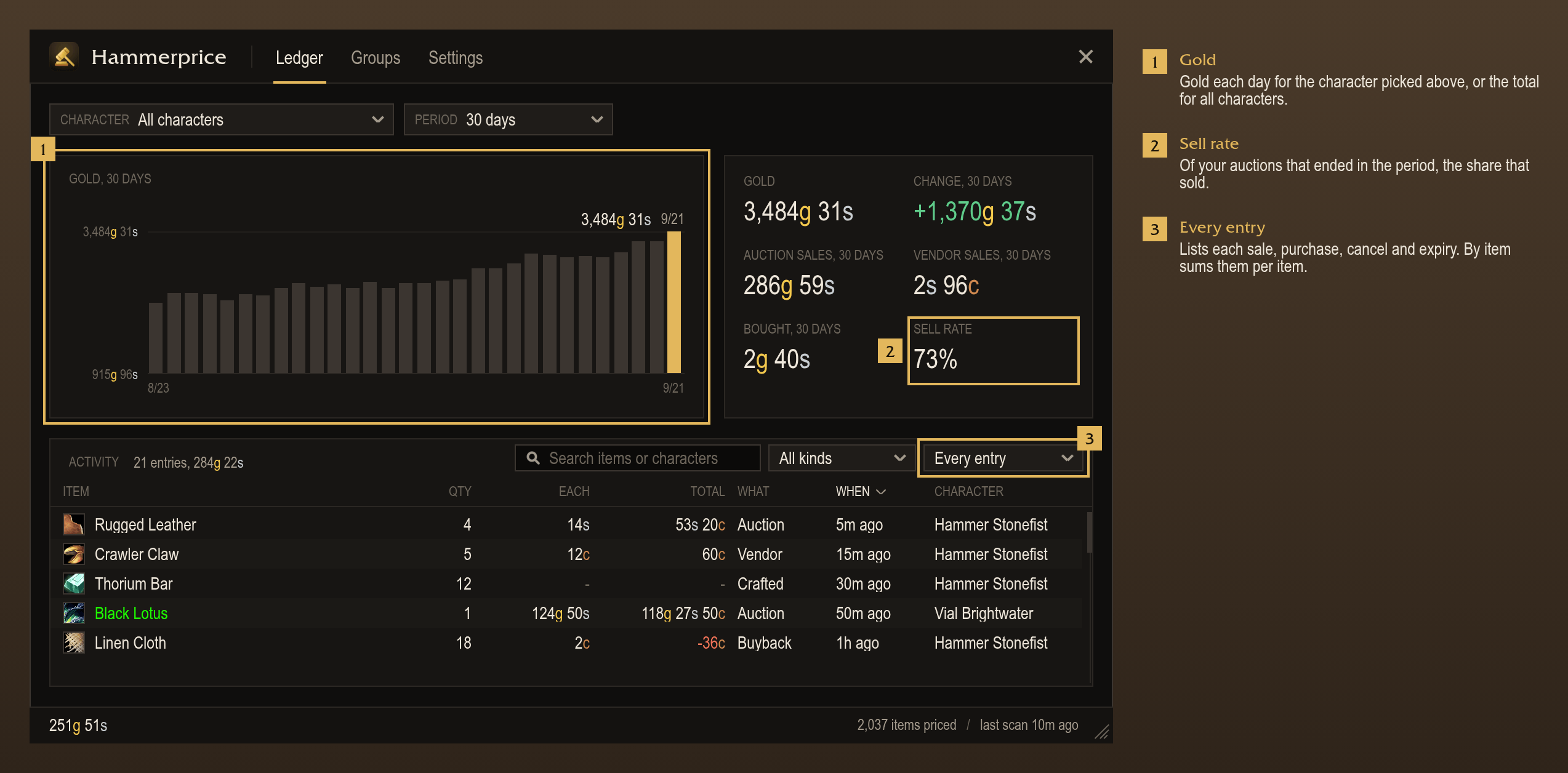
- The Ledger shows gold per character over time.
- Records sales to merchants and on the auction house, auction house purchases, cancelled and expired auctions, and crafts.
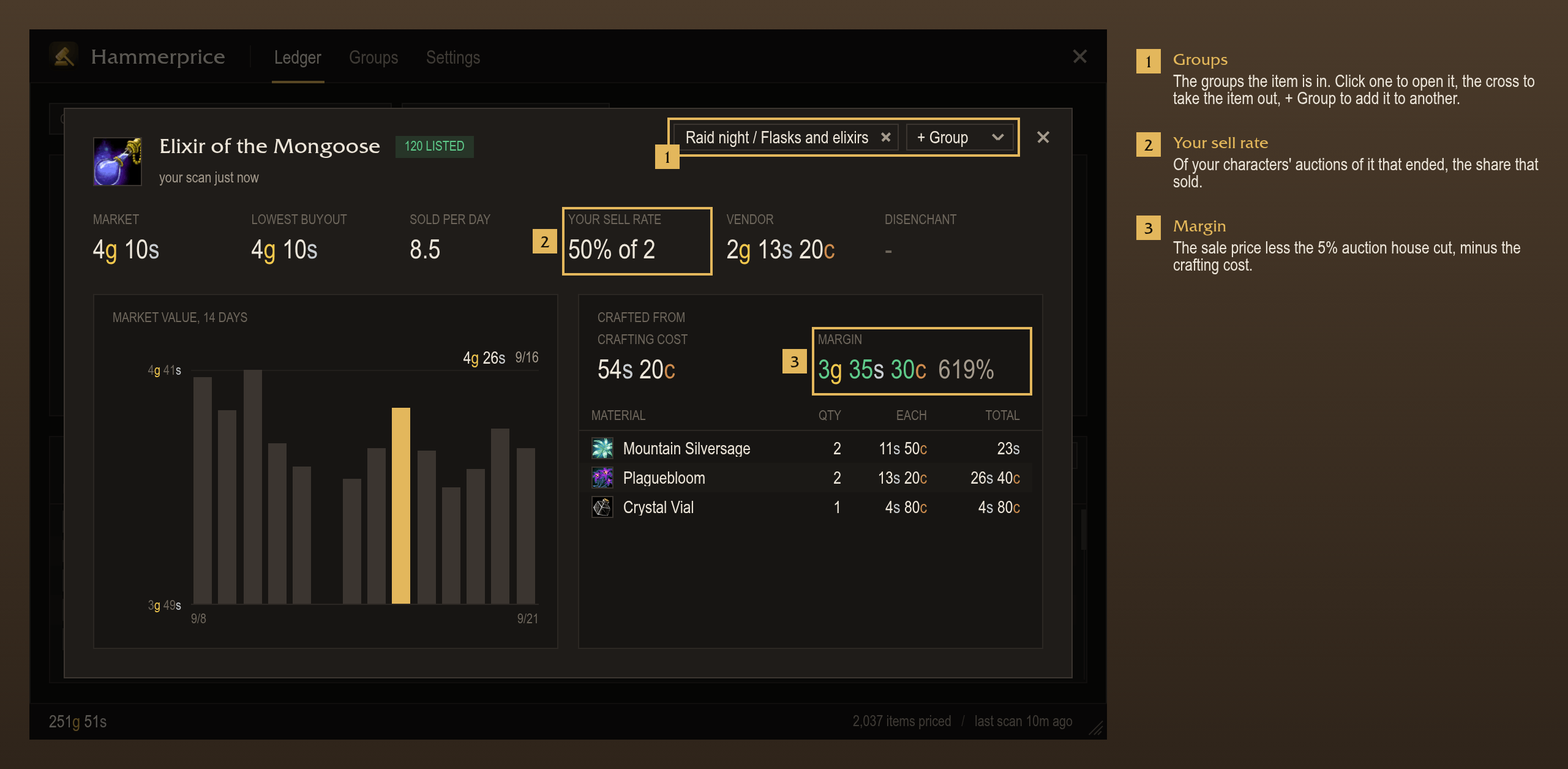
- Shows each item's sell rate.
- Filters by character, period, kind or text, or groups the entries by item.
- Grouped by item, shows each item's average cost (purchases and crafts) and the profit on what sold. More columns, such as margin, market value and expired auctions, can be shown from the table's menu.
- The item card shows an item's prices, 14-day history, crafting cost and margin, and the groups it is in.
- Opens the item card from an item's name, a ledger entry or
/hp price <item>.
Hammerprice Mail
- The Inbox shows each mail as one row, with search and Sold, Expired, Won and Letters filters.
- Open all opens the mails shown. It stops when the bags are full, and continues past the 50 mails the server loads at a time.
- Send sends mail to your characters or recent names, with twelve attachment slots, gold or COD.
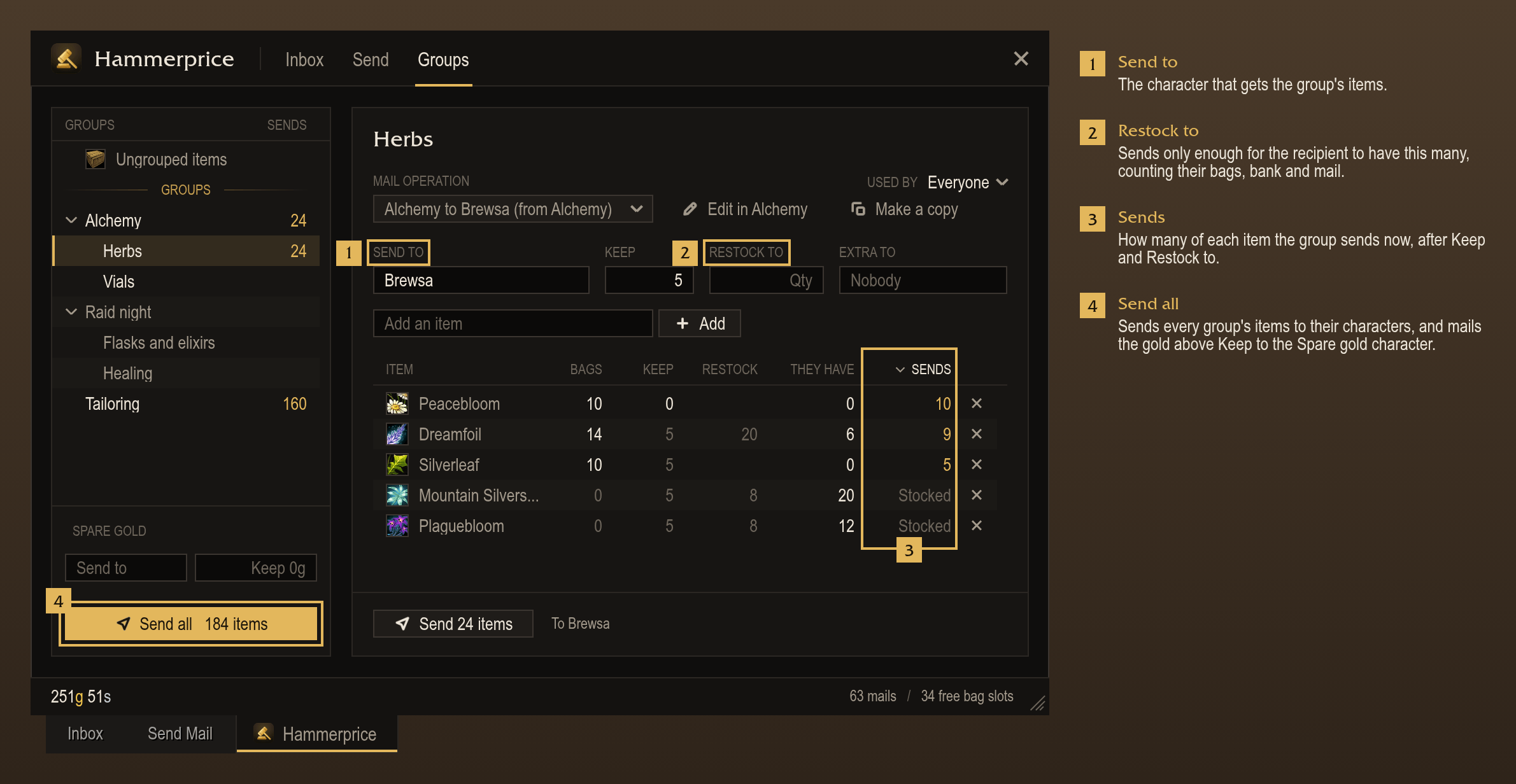
- Mail operations send a group's items to one character, keeping a number back (Keep) or restocking the recipient to a count (Restock to).
- Extra to names a character that receives what is left over.
- Send all sends the items of all groups, and the gold above a set amount if one is set.
- At a mailbox, a card lists what other characters are short of that this character holds, and sends it in one press.
- During a trade with another of your characters, a card puts those items in the trade window.
- At login, names each character whose mail with items or gold expires within 1, 3 or 7 days (Settings, Mail).
Hammerprice Crafting
- Queues crafts by hand in the crafting queue.
- Restock queues the crafts each group's crafting operation needs, counting what the characters own.
- Shows the profit per craft and which character can craft it.
- Lists the materials the queue needs: what the bags, bank, mailbox and other characters hold, what a character can craft first, and the rest from a vendor or the auction house, whichever is cheaper.
- Shows the queue over the profession window, with a Craft button for the next ready craft
(
/click HammerpriceCraftButtonin a macro). - Recipes lists each recipe's cost and profit, and which characters know it.
- Lists the recipes no character knows under Missing, with where each one is learned.
- Leveling calculates the cheapest way to level a profession at current prices, step by step, with its cost. Queue adds the plan to the crafting queue.
- Cooldowns shows each character's transmutes, Mooncloth and Salt Shaker, and when each one is ready.
- At login, names the cooldowns that are ready and the characters they are ready on. This can be turned off (Settings, Crafting).
- Adds the queue's missing materials as a source in the Buy panel.
- Offers the missing materials at merchants that sell them.
- At the mailbox, other characters send the crafter the materials they hold for the queue. At the bank, a card takes them out into the bags.
Other accounts
- Shows characters on other accounts as if they were on this one: gold, ledger, bags, bank, mail, auctions, professions and cooldowns.
- Shares groups, operations, the crafting queue and prices between accounts.
- Syncs between characters that are online at the same time on one realm. Set the same code on each account (Settings, Accounts).
TBC Anniversary
- Supports full scans, searches, Buy, Sell, Auctions and auctioning operations on TBC's classic auction house.
- Posts one stack per press, splitting off a smaller stack first when needed.
- Tooltips, the Ledger, Mail and Crafting work as on Forever, with TBC's recipes and disenchant table.
Commands
/hp: open or close the Hammerprice window (Ledger, Groups, Settings, and Crafting with Hammerprice Crafting). The minimap button does the same./hp scan: start a full scan (at the auction house)./hp price <item>: open an item's card./hp disenchant: open the disenchant window./hp help: list all commands.
For addon authors
Other addons can read prices with Hammerprice.GetPrice(itemLinkOrID, source).
You must be logged in to leave a comment.