
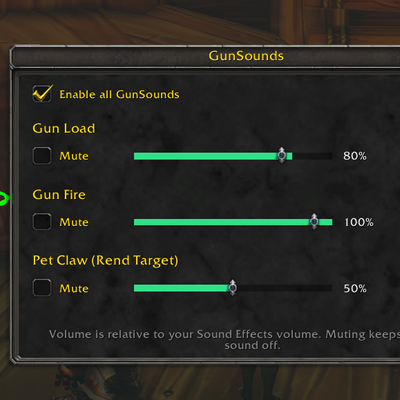
GunSounds – Custom gun sound
Gives guns a Silenced/Suppressed sound + volume control
Details
Addon ID:
26888
Addon Version:
1.2.1
Expansion:
1.60
Upload date:
Oct 06, 2026
Last Updated:
Oct 06, 2026
Downloads:
Less than 100
Website:
Source Link
Expansion
 Forever
 Categories
Developers

Kelayz
Creator
Having issues?
Silenced/Suppressor sound mod for guns, with load/fire volume control + pet claw noise control (summon hawk makes the claw noise and on top of pet its just too much lol)
Functions
- Replaces the stock gun reload and gun fire sounds on Auto Shot, Shoot and your hunter shots and stings (every rank).
- Only plays when you have a gun equipped or Transmogged. IF you tmog a bow/xbow into a gun > the noise plays and if you tmog a gun into a bow/xbow > the noise is default bow sound
Sound settings
Type /gs, or open Options → AddOns → GunSounds, or use the minimap addon menu.
Each sound has its own row:
- Mute: turn that sound off
- Volume: 0–100% in 10% steps
- Test: hear it at the chosen volume
Volume is relative to your in-game Sound Effects volume.
Commands
| Command | What it does |
|---|---|
/gs | Open the sound settings window |
/gs status | Show current settings |
/gs toggle | Turn all GunSounds playback on/off |
/gs add <spell> / /gs remove <spell> | Choose which of your spells play gun sounds |
/gs mute <id> / /gs unmute <id> | Mute any game sound by FileDataID |
/gs force | Play gun sounds regardless of equipped weapon |
/gs mogcheck | Toggle the transmog check |
/gs debug | Print cast info to chat for troubleshooting |
/gs help | List all commands |
Notes
- Built for World of Warcraft Forever (interface 16001).
- Settings are saved per account.
- Found a bug? Leave a comment with the error text and what you were doing.
Gun sound mod file is from: https://www.wowinterface.com/downloads/info25361-GunSilencerSuppressorClassic.html - Huge shoutout to the creator of this sound file. Sadly for WoW Forever just dropping a sound folder in with the .ogg does not work which lead to this mod creation.
## 1.2.1
- Transmog fix: a bow or crossbow transmogrified to look like a gun now plays GunSounds. The game plays the appearance's sounds, so those shots were previously silent (stock gun sounds are muted).
- Transmog detection now reads the appearance by item ID, before did generic naming scheme that wasn't consistent
- Added a built-in list of every bow, gun and crossbow in WoW Forever as a name fallback, plus keyword matching ("Rifle", "Blunderbuss", "Crossbow", ...) for anything newer.
- Fixed transmogged weapons staying silent after login until the weapon was moused over: the transmog details are now loaded at login automatically.
- New reload timing setting to fix no reload noise(`/gs` window or `/gs reload`): the reload sound can play a set time before your next Auto Shot (default 0.65s, follows your ranged speed and haste), after each shot, or not at all. Starting Auto Shot also plays a reload, so one-shot kills and new targets get one. Aimed/Steady Shot still reload at cast start.
You must be logged in to leave a comment.