

goldcap.gg
See what any item sells for right in its tooltip — before you post it or sell it to a vendor. Graded deals, smart posting and profit on what sold. Retail and WoW: Forever; US, EU, KR, TW
Details
Expansion
 Forever
 Categories
Developers

Having issues?
goldcap.gg brings the auction-house data from goldcap.gg into the game, in Retail and in WoW: Forever.
WoW: Forever
- Scans and tooltips: GoldCap scans the auction house when you open it (the game allows a full scan every 15 minutes) or when you press SCAN. Tooltips show what an item is worth there, how old that price is, and whether to sell it on the auction house, to a vendor, or not at all because it would not cover the deposit.
- Prices from every player: Blizzard publishes no auction data for Forever, so with the Companion, tooltips, Deals and Buy use prices from every goldcap.gg player's scans and say how many players scanned the item and how long ago. Your own scan counts first when it is newer.
- Deals: what your scan found under the vendor price, to buy on the auction house and sell to a vendor for more. Each row says the most to pay and what the vendor gives. Commodities offered far under their value are listed too, marked as the riskier kind.
- Sell: prices from your scan, and the POST queue skips anything a vendor pays more for.
/gc bagsshows what your bags are worth at a vendor and on the auction house. - Road to 40: your gold plus what your bags would fetch, against the level-40 riding cost, and the level you reach it at your pace. Set the cost with
/gc mountuntil Blizzard publishes it;/gc mount shareputs the line in your chat box. - Upgrades:
/gc upgradeslists, for each equipment slot, the cheapest piece in your last scan that beats what you wear and that your character can use, compared by stat weights you can change with/gc weights. - Drops: GoldCap counts what drops from what you loot, per creature and zone, with no names, for drop rates on goldcap.gg once the Companion shares it.
/gc loot offstops it.
On the site, goldcap.gg/forever has item prices from everyone's scans, what is rising and falling, each market, professions, recipes and what crafting costs.
The tabs
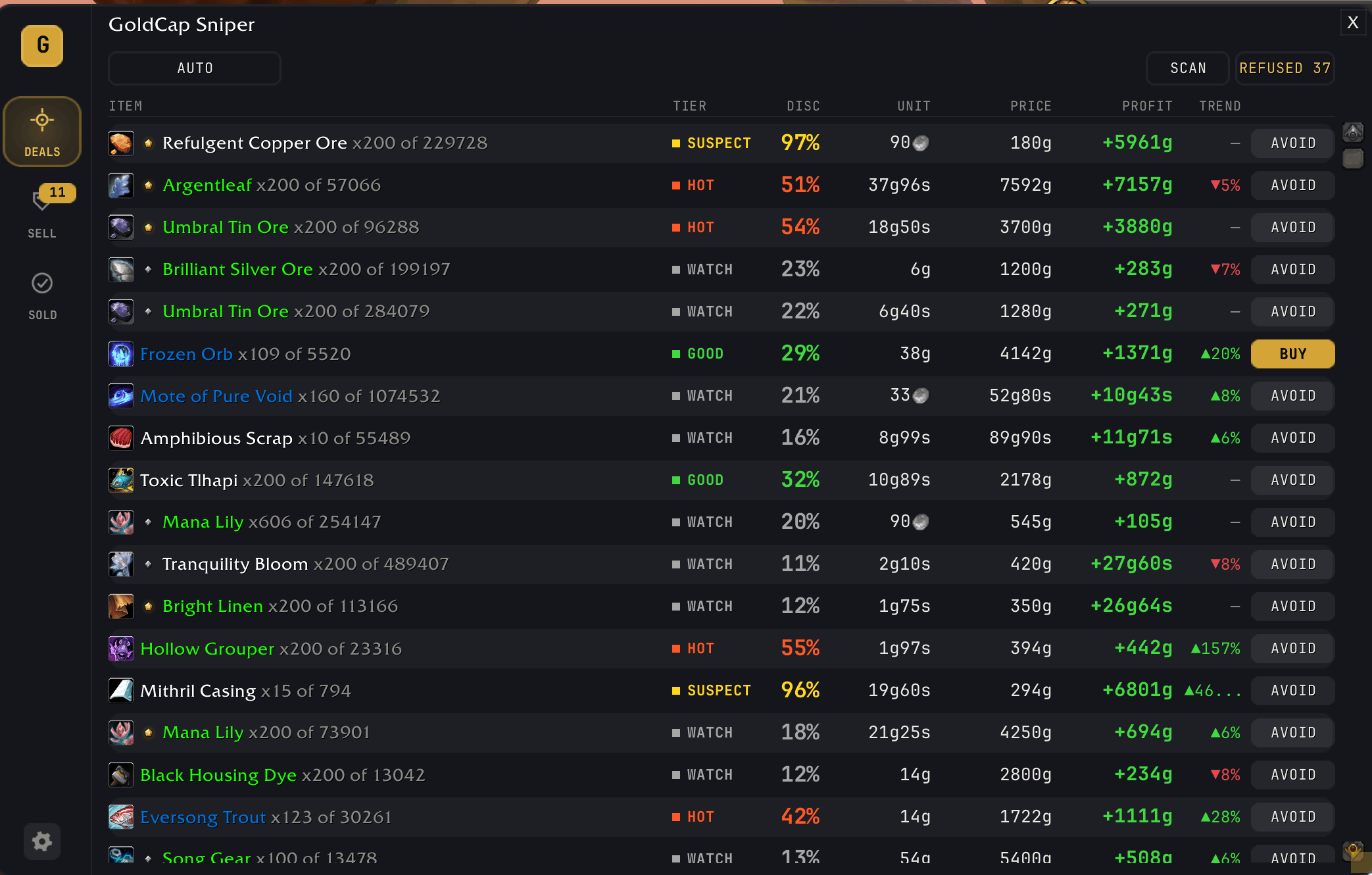
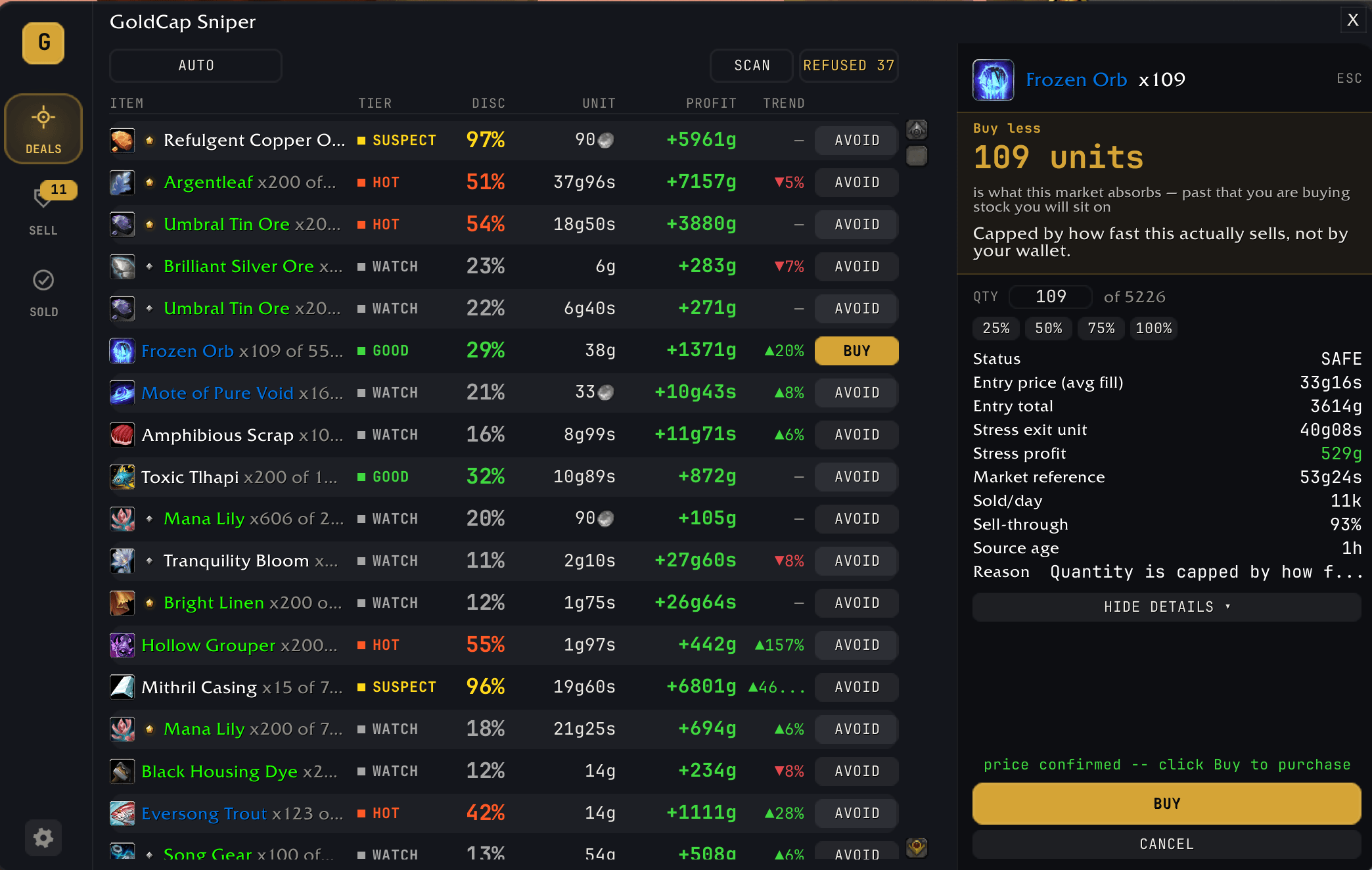
- Deals: in Retail, every underpriced auction on your realm, live-checked against the order book. SAFE with the profit you would actually clear, WATCH, or AVOID once it has been checked, with a queue marker until it has. The buy dialog caps the quantity at what the market actually absorbs, shows the profit that survives a cheap exit, and re-checks the price before you pay.
- Buy: your shopping lists at the auction house, both the ones you save on goldcap.gg (a profession's reagents, a list you follow, whatever your price alerts are hitting) and the ones you make right in the tab. Shift-click items in or type their ids, import a TSM item string or an Auctionator shopping list, and export any list for either. Each line shows how many are left to buy, the price each and what the rest costs. Press BUY, check Blizzard's price, then CONFIRM, and it never buys above the cap you set. Gear is bought one lot per press, the cheapest first. With the auction house open, the search box finds every item on sale, with its cheapest price and how many are up, and a result can be bought or added to a list.
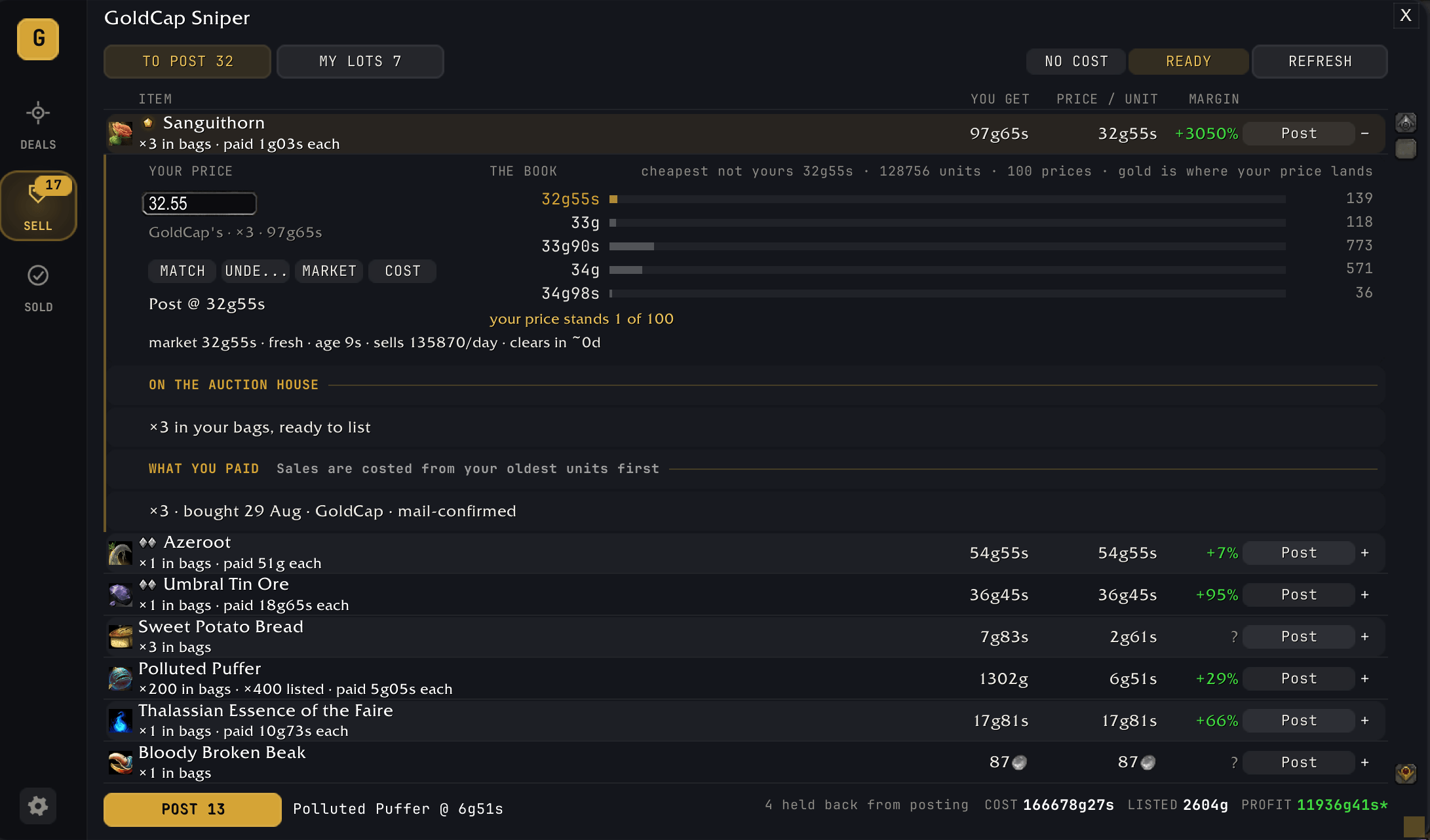
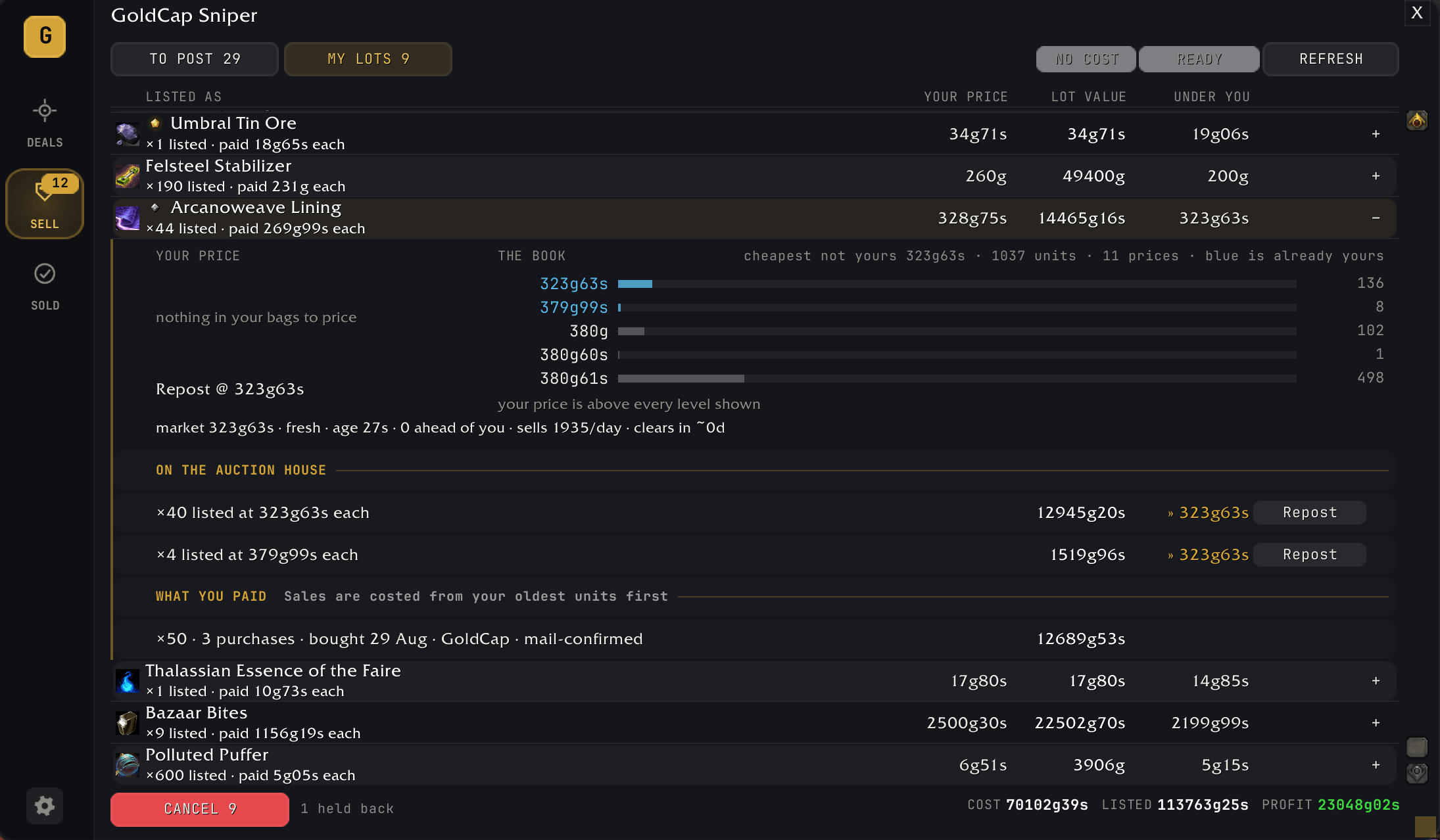
- Sell: two decks, what you can post from your bags and what you already have live. Both sit against the order book, with the depth behind every price and your own lots marked so you never undercut yourself. Its own price is a rung above the cheapest competing ask when the stock queued below it clears within hours, and a match otherwise, not a copper under. One click switches to matching, undercutting, the market price or what you paid.
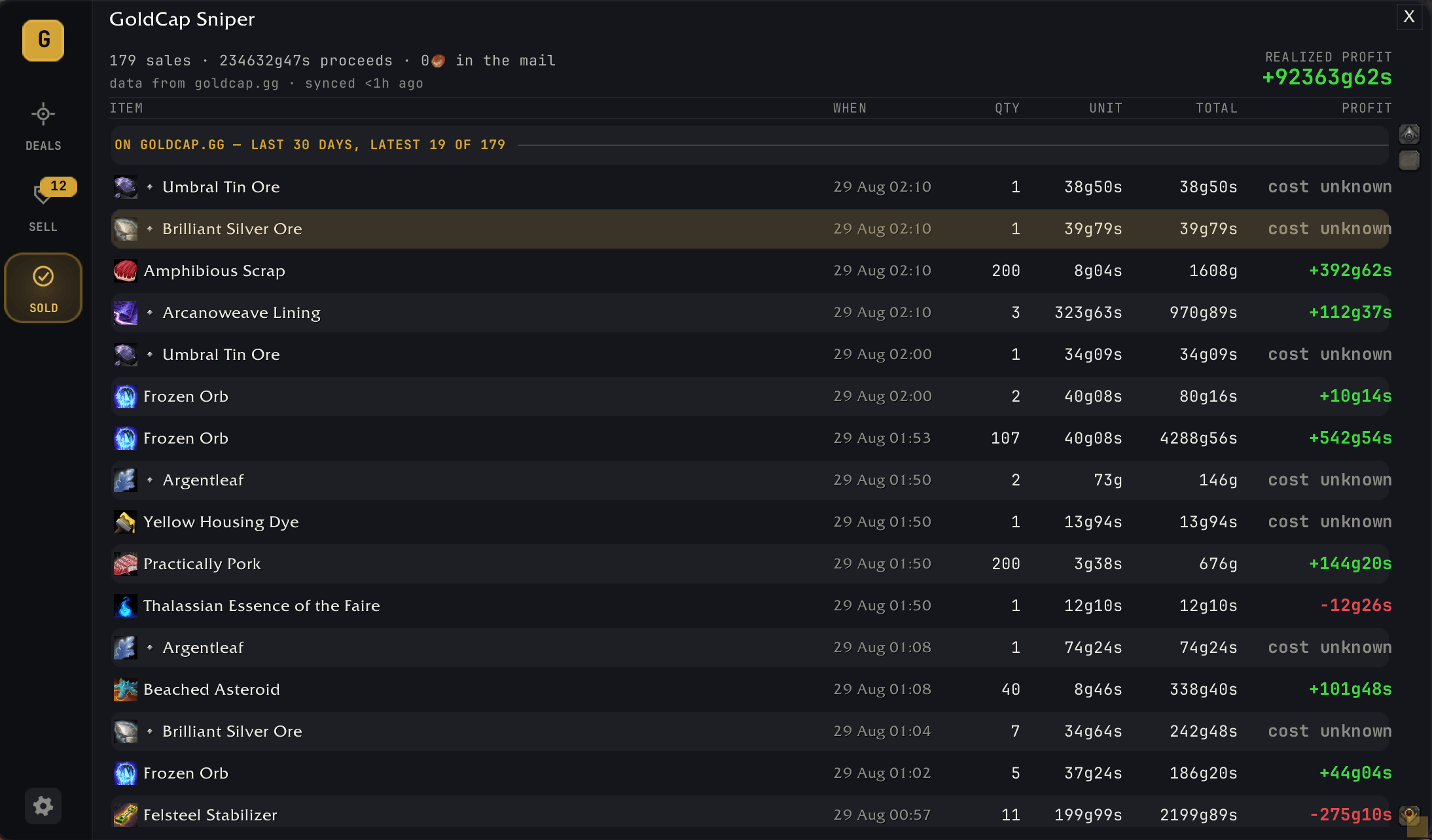
- Sold: what sold, at what price, and the profit against what you paid (FIFO), losses included, for today, 7 or 30 days. Hover a sale to see where the money went: the sale price, the auction house cut, what you paid and how the price compares with the market now. A craft is costed from its reagents, whether you bought them at the auction house or a vendor, crafted them yourself or got them from another of your characters. Sales sync to your ledger on goldcap.gg.
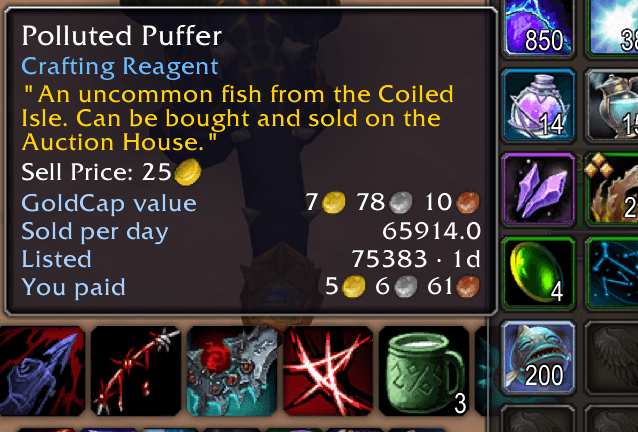
- Tooltips: market value, the 24-hour trend, sold per day, what you paid for the ones you are still holding, and how deep the market is: the units on the shelf and how many days they last at the rate they are selling.
- Quest rewards: when a quest lets you choose, a gold frame marks the reward worth the most on the auction house, with a line saying what it is worth.
- At a vendor: a note beside the vendor window says how many items in your bags fetch more on the auction house than the vendor pays, and how much more. Items on your Buy list that this vendor sells at or under your cap get a button that buys what you still need.
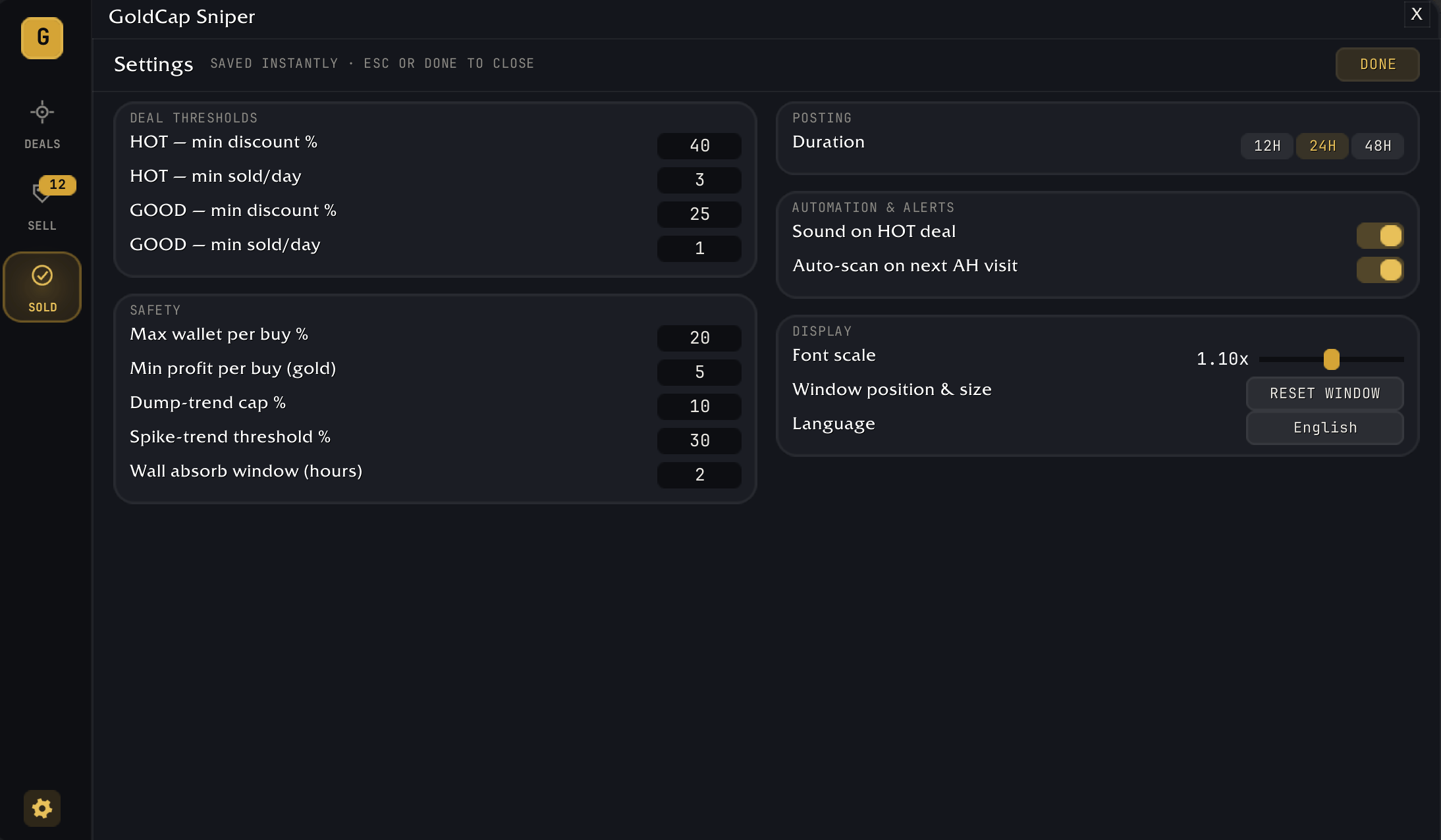
You set the rules. The smallest profit and return worth taking, how much of your wallet a single buy may spend, and how far a price may have fallen before a deal is refused are all yours to change, and they save as you type.
Your ledger. The companion uploads your sales to goldcap.gg, where they stop being a list and become a record: what you sold, what it cost you, what is still sitting in stock at today's prices, your win rate, and your best and worst flips. It is also honest about its own gaps. A sale out of stock it never saw you buy cannot be costed, and it says so instead of counting the cost as zero. Realized profit, the per-item breakdown, time-to-sale and how much of it the addon found for you are part of Pro.
Will it sell? Every commodity page on goldcap.gg answers the question a price never does: how many units actually sell in a day, how long everything currently listed would take to clear at that rate, and, for each position in the order book from undercutting the floor to the dearest few percent, the share of listings posted there that sold within a day. It is measured from what the auction house did, not modelled from what it should do, and a position with too few listings behind it shows a dash instead of a number.
The rest of the site. goldcap.gg also carries a crafting profit calculator, the deals and movers boards, a tracker for what each patch added to the game, and Discord alerts when a price crosses a line you set.
Data is hourly snapshots of every realm's auction house in US, EU, KR and TW, plus live prices from other goldcap.gg users' scans. In WoW: Forever, prices come from players' scans.
Getting data into the game. WoW addons cannot talk to the internet. The free GoldCap Companion (Windows/macOS, https://goldcap.gg/downloads) keeps the addon's prices fresh automatically, shares your Forever scans, brings your shopping lists into the Buy tab and uploads your sales to your ledger. The addon runs without it, on the prices that shipped with the release or whatever you last imported, and a list can be pasted in by hand.
Languages. English, Deutsch, Español (España and Latinoamérica), Français, Italiano, Português (Brasil), Русский, Українська, 한국어, 简体中文 and 繁體中文. The addon follows your game client, and you can pick a language yourself in its settings.
Pro. Nothing in the addon is locked. Pro is a goldcap.gg subscription for the deeper views on the site, such as realized profit in your ledger and longer price history.
Site: https://goldcap.gg · Companion: https://goldcap.gg/downloads · Discord: https://goldcap.gg/discord
You must be logged in to leave a comment.