

FunLoot (Loot Toasts)
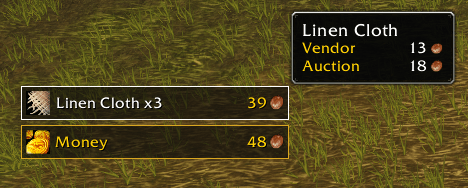
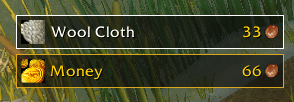
Clean loot pop-ups showing what you picked up and what the vendor value is, with a coin bar that adds recent money loot
Details
Addon ID:
26133
Addon Version:
0.4.0
Expansion:
1.60
Upload date:
Oct 06, 2026
Last Updated:
Oct 06, 2026
Downloads:
Less than 100
Website:
Source Link
Expansion
 Forever
 Categories
Developers

yougarp
Creator
Having issues?
FunLoot shows a clean pop-up for everything you loot - the item, its icon, quality color, stack count, and vendor value - plus a coin bar underneath that keeps a running total for some time.
It's designed to stay simple and out of the way, while still giving you a quick visual summary of what you just looted.
Features
- Item loot pop-ups with icon, quality-colored name and border, stack count, and vendor value
- Coin loot accumulates into a single running bar instead of creating one pop-up per coin pickup
- Newest item appears at the bottom while older ones rise upward
- Hover a loot toast to view the full item tooltip
- Hovering pauses the toast so it doesn’t disappear while you’re reading it
- Toasts fade in and out automatically and clean themselves up
- Movable anchor with position saved across sessions and characters
- Uses the game’s own loot strings, which should help compatibility with non-English clients
- Built specifically for Forever
In-game settings
Options → AddOns → FunLoot
You can currently configure:
- Toast size
- Toast duration
- Show or hide poor-quality (gray) item toasts
- Lock or unlock the toast anchor
The anchor preview also scales with your selected toast size, making positioning easier.
Commands
/funloot unlock— show and unlock the anchor so you can move it/funloot lock— lock the anchor in place/funloot test— show a test toast using your current settings
What it doesn’t do yet
- Quest rewards and crafted items do not currently create toasts
- Filtering is currently limited to poor-quality items
- No minimap button yet
Planned
- More item-quality filters
- Additional loot filtering options
- Easier access to settings through a minimap button
- More customization options over time
You must be logged in to leave a comment.