
ForeverThreatMeter
Threat Meter that matches Blizzard forever style.
Details
Expansion
 Forever
 Categories
Developers

Having issues?
#ForeverThreatMeter
The threat meter that goes with Blizzard's built-in Damage Meter.
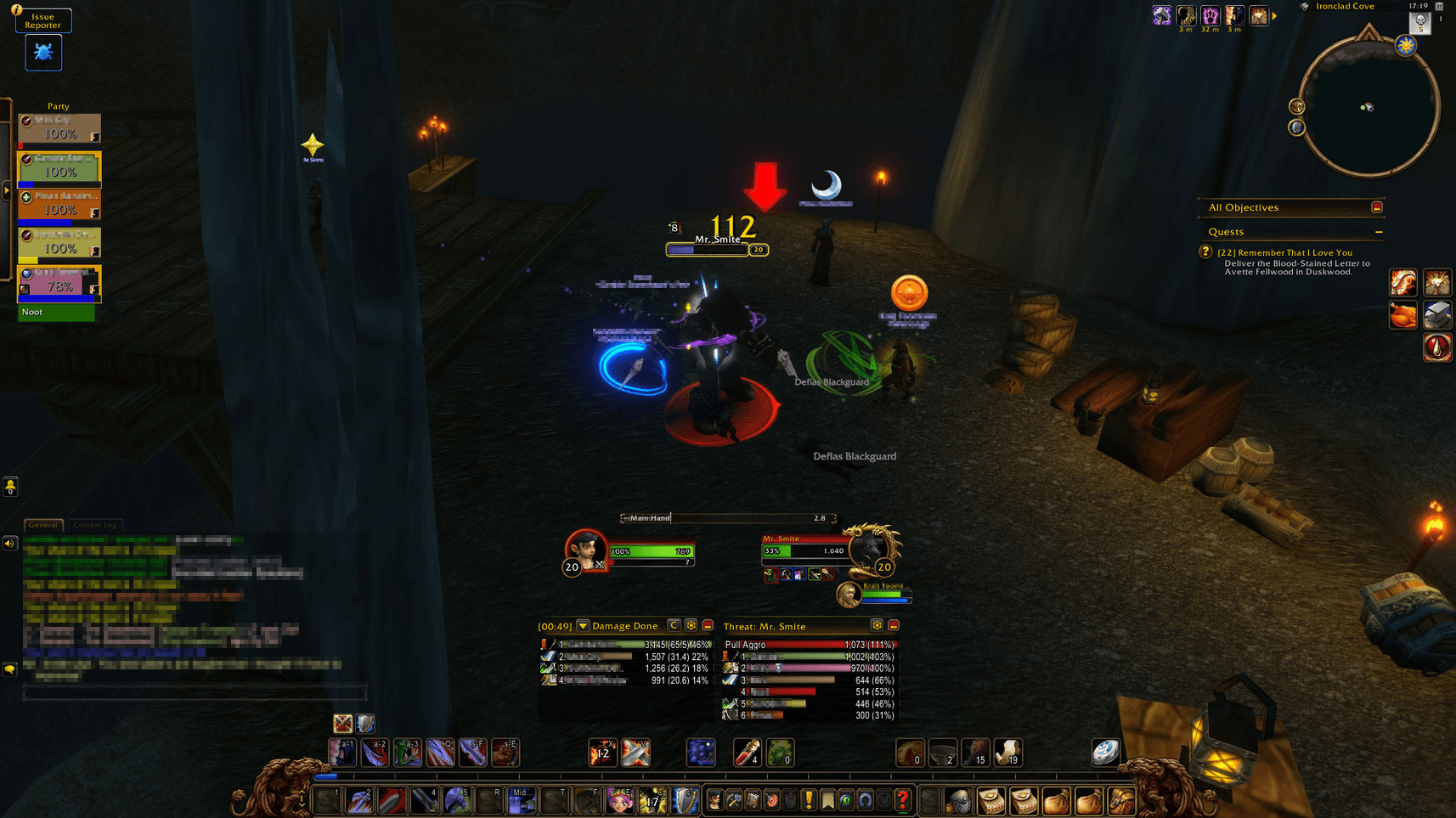
The ForEver realms come with Blizzard's own Damage Meter, but no threat meter to go with it. ForeverThreatMeter adds one, built to look like part of the same UI. It uses the same window, header bar, bar textures, fonts, class icons and resize handle as the Damage Meter. It even follows your Damage Meter settings, so the two windows always match.
You see your whole group's threat on your current target, live, in a window that looks like it shipped with the game.
---
What it does in game
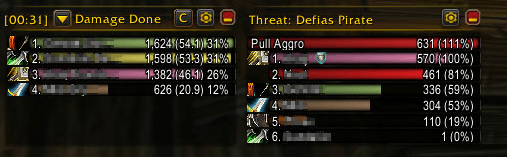
- Live threat for your whole group: every party or raid member (and their pets) who has threat on your target gets a bar, sorted from highest to lowest threat. Each bar shows the player's name, their threat value and their percentage of the tank's threat.
- Know exactly when you'll pull aggro: a Pull Aggro bar shows how much threat you need to take the mob. When possible it uses the game's own threshold, which already accounts for melee (110%) or ranged (130%) range.
- You are always visible: in a big raid your own bar stays pinned at the bottom of the window even when you are far down the list, just like in the Damage Meter.
- Works when you heal: when you target a friendly player, the meter shows the threat on their target. As a healer targeting the tank, you still see the fight.
---
Matches the Damage Meter
- Same visuals: it uses the same window assets as Blizzard's Damage Meter. When the game allows it, the bars are Blizzard's own Damage Meter bars.
- Follows your Edit Mode settings: bar height, bar spacing, text size, window opacity, background opacity, class icons, class colours and bar style are read from your Damage Meter. Change them in Edit Mode and the threat meter updates too.
- Snaps to the Damage Meter: attach the window below, on the left side or on the right side of the Damage Meter. Below, it takes the same width; on a side, it takes the same height. If you move the Damage Meter in Edit Mode, the threat meter follows.
---
Features
- Move and resize freely: drag the window to detach it and place it anywhere, and resize it from the corner handle, which appears on mouse-over like in the Damage Meter.
- Minimise button: collapse the window to its header bar when you don't need it.
- Settings menu: open it with the gear button or a right-click on the window.
- Lock the window
- Attach below / left / right of the Damage Meter, or not attached
- Show or hide the Pull Aggro bar
- Use your target's target when you target a friendly player
- Numbers: threat and percent, percent only, or threat only
- When to show the window: always, in a group, in combat only, or at the same time as the Damage Meter
- Test mode: fills the window with a fake group so you can set up size and position without being in a fight. It turns off automatically when combat starts.
- Slash commands: `/ftm` shows or hides the window. `/ftm lock`, `/ftm attach below|left|right|off`, `/ftm test` and `/ftm reset` are also available.
- Lightweight: it updates only while the window is shown and uses no external libraries.
- Settings are saved: position, size and options are kept between sessions.
---
Why this addon?
Classic threat meters come with their own look and don't match Blizzard's new Damage Meter. ForeverThreatMeter is for players who use the built-in Damage Meter and want threat information that looks and feels like the same interface. Place it next to your Damage Meter and it looks like the game always had one.
Compatibility
- Made for the ForEver realms and Blizzard's built-in Damage Meter.
- Also works without the Damage Meter, as a free-standing window with the same style.
- Pairs well with ForeverThreatPlate, which adds threat colours to Blizzard's nameplates.
Feedback
Found a bug or want a feature? Leave a comment or open an issue.
You must be logged in to leave a comment.