

ForeverRecruiter
Guild recruitment for WoW: Forever. Scans Classic zones for unguilded players, sends invites with your custom whisper, and keeps lockouts and a blacklist so nobody gets pestered twice.
Details
Expansion
 Forever
 Categories
Developers

Having issues?
ForeverRecruiter - Guild Recruitment Assistant for WoW: Forever
ForeverRecruiter finds unguilded players for you, whispers them a recruitment message, sends guild invites and keeps track of who has already been asked, so nobody gets pestered twice. It was built for World of Warcraft: Forever (Interface 16001) and works within Retail's addon rules.
QUICK START
1. Click the minimap button (or type /forever) to open the menu.
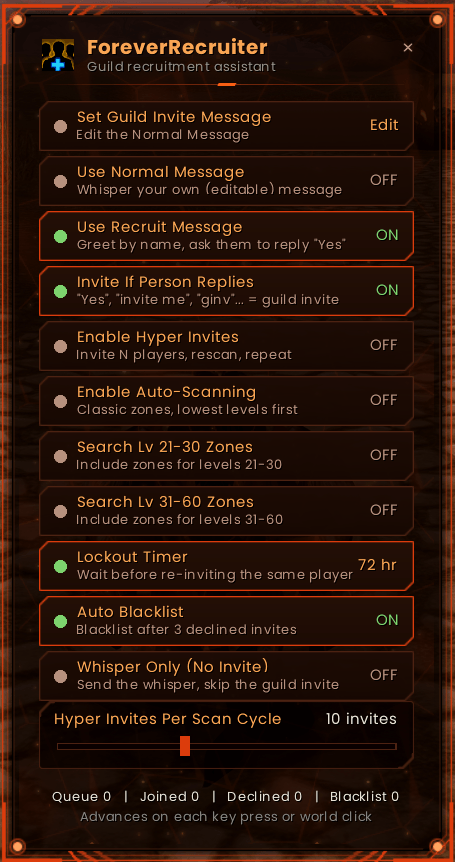
2. Pick your whisper: write your own with Set Guild Invite Message, or switch on Use Recruit Message for the ready-made WoW Forever recruiting message.
3. Turn on Invite If Person Replies so players who answer "yes" get their invite.
4. Turn on Enable Auto-Scanning and/or Enable Hyper Invites. The Recruit Bar appears.
5. Play normally. Your key presses and clicks drive the scanning and inviting.
- You need a guild rank that is allowed to invite (not required in Whisper Only mode).
HOW IT WORKS
WoW only allows /who searches and guild invites in response to a real key press or mouse click, so no addon can do them on a hidden timer. ForeverRecruiter works with this:
- It listens quietly for your normal key presses and world clicks.
- Each one releases exactly one action: one /who search or one guild invite.
- Any key counts: WASD, Q/E, Tab, Space, Shift/Ctrl/Alt, the number row, the keypad and more. Your keys still reach the game as normal.
- Holding a key down counts once. Tapping it again counts again.
- Actions are paced automatically: 9 seconds between /who searches and 1.5 seconds between invites.
- It pauses in combat and in battlegrounds and arenas.
- The Friends/Who window does not pop open during scans.
- Hyper Invites and Auto-Scanning keep running until you turn them off.
- If the game rejects an action, the player is kept in the queue and the search simply starts over.
WHISPER MESSAGES
You have two messages, each with its own toggle. Only one can be active at a time: switching one on switches the other off.
Use Normal Message (default)
- Whispers your own message, written with Set Guild Invite Message.
- Use {name} for the player's name and {guild} for your guild's name.
- Press Enter or close the window to save, or click Cancel to discard.
- Leave it empty to send no whisper.
- Until you write your own, a sensible default is used.
Use Recruit Message
- A ready-made message that greets the player by name and introduces your guild:
"Hey {name}! {guild} is recruiting for WoW Forever and we're looking for like-minded players who want to join an active community. If you're interested, just whisper back "Yes" or "Invite me" for an invite to the guild!"
- Hover over the option in the menu to preview it with your guild's name.
Both messages
- Invites you send yourself (right-click invite or /ginvite) also get the active whisper.
INVITE IF PERSON REPLIES
When this is on, players who whisper back asking to join get a guild invite automatically.
- It understands "Yes", "invite me", "inv", "ginv", "invite to guild", "Sure" and many other variations, such as "yea", "yep", "ok", "sure why not", "yesss pls", "can I join?", "count me in" and "I'm interested".
- Capitals, punctuation and stretched letters don't matter.
- It never invites on a "no": "no thanks", "not now", "maybe later", "don't invite me" and "already in a guild" are ignored.
- Players the addon whispered recently can just say "yes".
- Anyone else has to ask for a guild invite ("ginv", "can I join your guild"), so a stranger asking for a party invite isn't guild-invited.
- The invite goes out on your next key press or world click, even with Hyper Invites and Auto-Scanning turned off.
- The Recruit Bar shows who is waiting.
- GM whispers are ignored, nobody is queued twice, and requests older than 10 minutes are dropped.
HYPER INVITES
- Continuous inviting until you turn it off.
- Invites up to N different unguilded players (one per key press or click), runs a fresh /who search, then repeats.
- Set N from 1 to 25 with the slider in the menu. It also sets your invite pace.
AUTO-SCANNING
Runs /who searches for unguilded players in the background and builds a queue of candidates. Each sweep always goes from the lowest levels upward:
1. Every Classic (1-60) zone for your faction, searched at that zone's quest level range (Elwynn Forest 1-10, Westfall 10-20 ... Eastern Plaguelands 53-60).
2. Your current zone, if it isn't already in the list.
3. Your faction's capital cities.
4. Plain level brackets: 1-5, 6-10 ... 56-60.
- The other faction's home zones are skipped because they return nothing.
- Searches that hit the 50-player /who limit are automatically split by class so nobody is missed.
LEVEL BANDS
- Levels 1-20 are always searched.
- Search Lv 21-30 Zones: toggle to include levels 21-30.
- Search Lv 31-60 Zones: toggle to include levels 31-60.
- Turn both off to recruit only levels 1-20.
- The toggles limit the whole sweep: zones, cities, your current zone and level brackets.
- Players outside the enabled levels are never invited.
LOCKOUT TIMER
- Choose 24, 48 or 72 hours.
- A player who was invited or whispered won't be contacted again until the timer runs out.
- Failed invites (offline or already in a guild) don't start a lockout.
AUTO BLACKLIST
- A player who declines 3 separate invites from the addon is blacklisted and never invited again.
- View or remove entries with /forever blacklist and /forever unblacklist.
WHISPER ONLY (NO INVITE)
- Hyper Invites whispers each player your message but doesn't send the guild invite.
- Scanning, pacing, the slider, lockouts and filters all work the same.
- Your guild rank doesn't need invite permission in this mode.
- Pair it with the Recruit Message and Invite If Person Replies to invite only the players who say yes.
SMART FILTERING
- Skips players who are already in a guild.
- Skips names made only of non-Latin letters (Chinese, Korean, Cyrillic and so on). Accented and mixed names are still invited.
- Drops candidates older than 15 minutes as stale.
- A player who joins has their history cleared.
- Whispers are only sent for invites that actually went out.
WHISPER WINDOW CLEANUP
- If the addon's whisper opens a whisper tab or window, it is closed right after the message is sent.
- Windows you opened yourself, or that a player's reply opened, are never touched.
RECRUIT BAR, MINIMAP BUTTON AND KEYBIND
Recruit Bar
- A small movable bar that shows the next action: scan, invite or reply invite.
- Shows cooldowns, queue size and invites sent.
- Warns you when it's waiting for input.
- Its button advances one step.
Minimap button
- Click to open the menu.
- Drag to move it.
- Hover for a quick status summary.
Keybind (optional)
- Options > Keybindings > AddOns > ForeverRecruiter > Next Scan / Invite.
SLASH COMMANDS
General
- /forever or /frec - open the menu
- /forever next - advance one step (handy in a macro)
- /forever status - current settings and session statistics
- /forever minimap - show or hide the minimap button
Messages and invites
- /forever message - show your Normal Message
- /forever message <text> - set a new Normal Message
- /forever message default - go back to the default message
- /forever usemsg normal - use the Normal Message
- /forever usemsg recruit - use the Recruit Message
- /forever replyinvite - toggle Invite If Person Replies
- /forever whisperonly - toggle Whisper Only mode
Blacklist and history
- /forever blacklist - list blacklisted players
- /forever unblacklist <name> - remove a player from the blacklist
- /forever reset - clear invite history (reset all also clears the blacklist)
Scanning
- /forever mode zones - scan Classic zone level ranges (default)
- /forever mode levels - scan plain level brackets only
- /forever zone - list the zone sweep for your faction
- /forever zone add <lo> <hi> <name> - add a zone, for example: /forever zone add 20 30 Mount Hyjal
- /forever zone remove <name> - remove a zone you added
- /forever filter <text> or none - set the extra /who filter (default: no guild)
Options
- /forever whowindow - show the Who tab during scans (default off)
- /forever closewhispers - toggle whisper window cleanup (default on)
- /forever foreignnames - toggle the non-Latin name filter (default on)
- /forever debug - print a message for every rejected action, for bug reports
GOOD TO KNOW
- Forever's new zones (Mount Hyjal, Zephras Isle, Riverglades) aren't in the zone list by default. Add them with /forever zone add.
- Zone names are in English. Other client languages need Zones.lua edited.
- If a game patch changes the interface number, update the ## Interface line in ForeverRecruiter.toc. Type /dump select(4, GetBuildInfo()) in game to find the new number.
- Updating: replace the ForeverRecruiter folder. Your settings, history and blacklist carry over.
This addon is in beta. Bug reports and feedback are welcome.

You must be logged in to leave a comment.