
ForeverForge UI
Complete UI replacement: unit frames, party and raid frames, action bars, cast bars, chat, minimap, world map, quest log and tooltips - move, resize and restyle everything, with 5 skins including WoW Classic.
Details
Expansion
 Forever
 Developers

Having issues?
ForeverForge UI
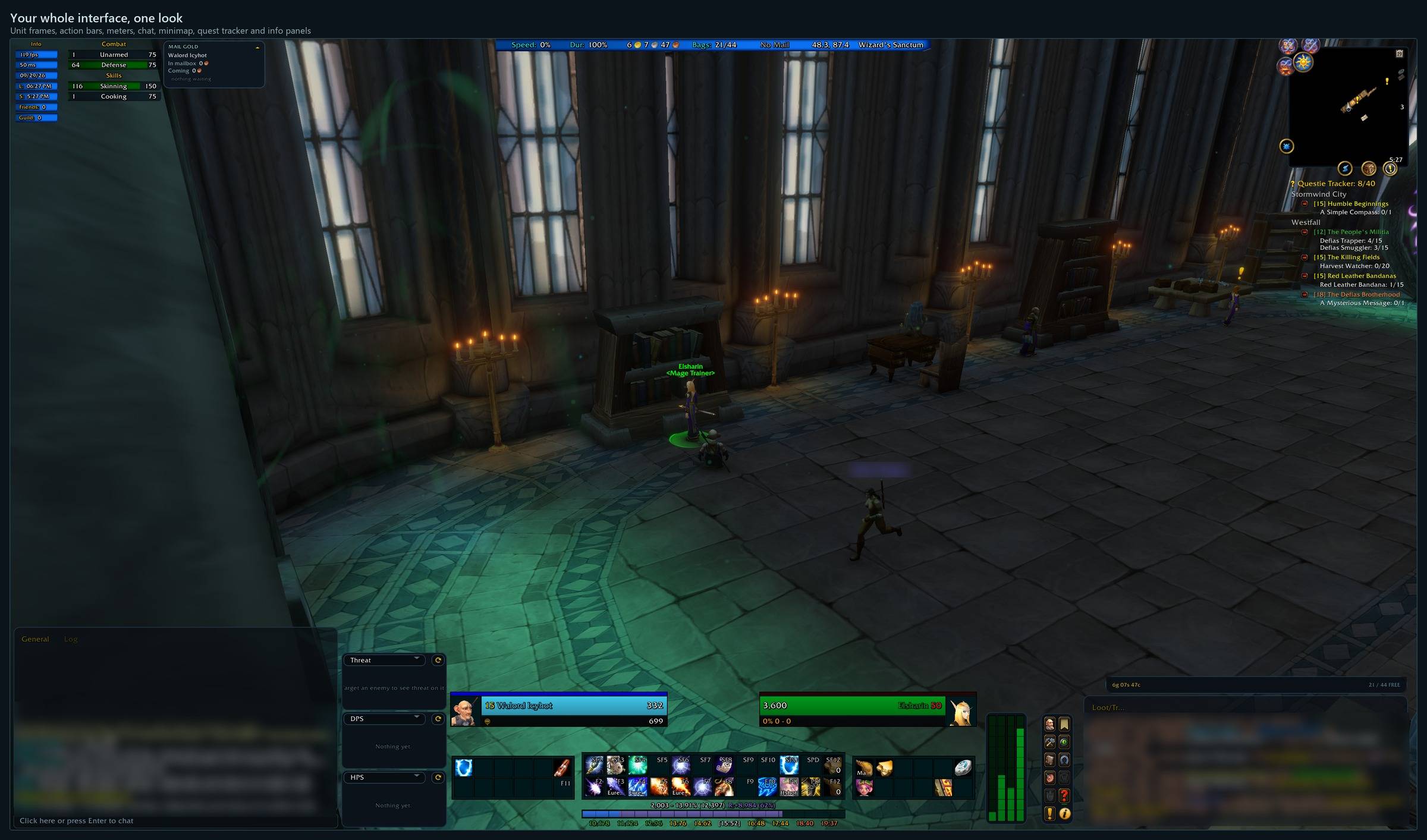
Your whole interface in the ForeverForge look — arranged your way. Part of the ForeverForge suite for WoW: Forever. Needs the ForeverForge core addon. The successor to CustomUI (your CustomUI setup can sit side by side while you switch).
Playable from the first login: it ships as a finished layout — the author's own — with Blizzard's frames it replaces tucked away (bring any back in one click). Chat, tooltip, meters and reputation bars fit themselves to your screen. Then change anything you like.
Type /ffui for the settings, or open the ForeverForge window » UI.
Shortcuts
- Shoot pill - Out of combat it shows OUT until your target is in range, then FIRE - eyes on the world, not your buttons. In combat it's your swing timer.
- Up / Down in the chat box - Steps back through what you typed, like a command prompt. No Alt needed.
- Hover a link in chat - Items, spells, quests and achievements show their tooltip - no click needed.
- /ffui move · /ffui hide · /ffui kb - Move frames; click anything to hide or show it; hover a button and press a key to bind it.
- Built-in meters - DPS, HPS and threat windows. Click a meter's title to switch what it shows.
Every shortcut for every ForeverForge addon: in game under /forge » Core » Tips & shortcuts, or the #feature-guide channel on the ForeverForge Discord.
Unit frames
- Player, target, target of target, focus, pet — health, power, cast bars, portraits and text you choose piece by piece.
- Party and raid frames — role order, sort by class or role, offline members fade, range fade, party and raid pets of their own.
- Group Tools — ready check, role check, markers and world markers, pings and uninvite, in a pop-out you place anywhere.
Bars and panels
- Action bars in the suite's look, plus the extra action button and zone ability.
- Micro menu, reputation bars, XP bar, damage meters — each its own element you can move and size.
- Auras panels, including auras by the minimap.
- Chat windows in the suite's look: a right-hand chat, a tidy typing box, tabs inside the panel.
- FIT TO SPACE puts meters and panels between your chat and action bars in one go.
Map, minimap and quest log
- World map in the suite's look, with your and your cursor's coordinates, fade while moving, size it by dragging its corner, a compact title, and it follows you into new zones while you run.
- Quest log as a window of its own (L), like the old one.
- Minimap in the suite's look, with its own button menu.
- Plays nicely with Leatrix Maps — pick which addon does what.
Tooltips and more
- Tooltips restyled, with NPC titles and the lines you choose, placed where you like (anchor, cursor or default).
- Shoot pill for hunters and wand users: out of range / fire, and your swing timer in combat.
Move mode
/ffui move unlocks everything: drag groups, snap to the grid, nudge by the pixel, scale a whole group at once. /ffui preview fills every frame with sample data while you arrange them.
Everything is kept in ForeverForge's settings, so Carry my setup copies your whole layout to another character.
The ForeverForge suite
One look, one settings window (/forge), made for WoW: Forever. Pick the ones you want - they all use the ForeverForge core addon, and the LFG Bulletin Board also runs on its own.
- ForeverForge (the core) - one settings window for the whole suite, faster auto loot, auto quests, and vendors that sell your greys and repair.
- Bags - one bag window with smart sections or your own sorting, and Ctrl+Shift+click to disenchant, prospect, mill or pick locks.
- Auction - a faster, simpler auction house: price tooltips you can customize, one-press posting, a sniper and safe bulk buying.
- LFG Bulletin Board - group posts sorted by dungeon and shared between players, so you see groups from every zone.
- UI - unit frames, action bars, chat and meters in one clean look.
- Training - pre-pick your talents, see the spells still to come, and a better trainer window.
- Macros - build macros line by line in plain English, plus the one-click tag macro.
- Mass Mail & Trade - send a pile of items to anyone: one mail per click, trades that fill themselves.
- Custom Info Panels - build info bars: FPS, gold, bags, coords, durability, XP and more.
- Skill Tracker - progress bars for your professions and weapon skills.
Bug reports and suggestions: ForeverForge Discord Support development: ko-fi.com/walord
You must be logged in to leave a comment.