

ForeverForge Macros
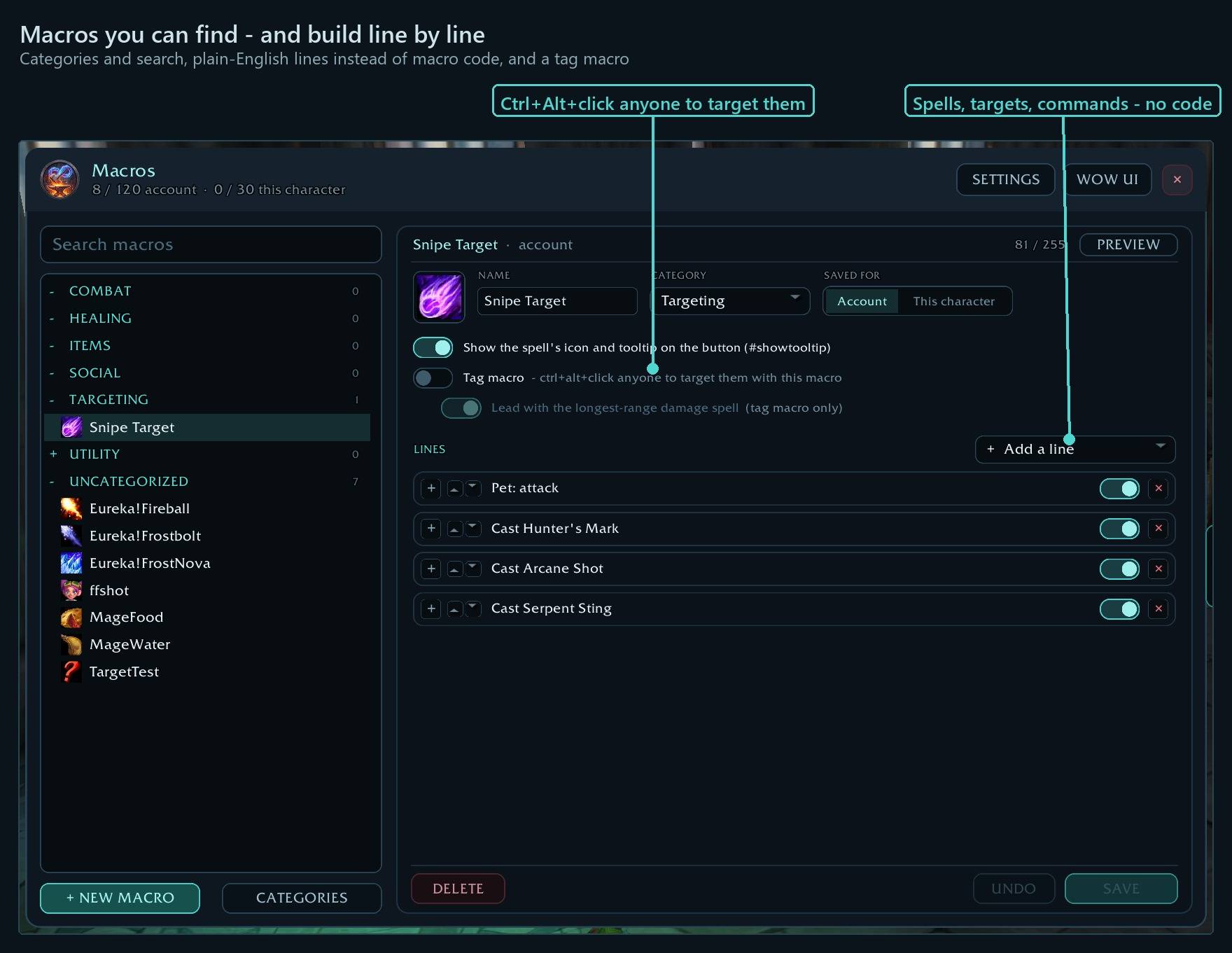
Macro editor made easy: categories and search, a line-by-line macro builder with plain-English conditions, custom macro tooltips, and a target macro you retarget with Ctrl+Alt+click on any mob or player.
Details
Expansion
 Forever
 Categories
Developers

Having issues?
ForeverForge Macros
A macro window you can actually find things in — and a builder that writes the macro code for you. Part of the ForeverForge suite for WoW: Forever. Needs the ForeverForge core addon.
Type /ffm (or /macro) to open it.
Shortcuts
- ⭐ Ctrl+Alt + click a mob or player - Its name goes into your tag macro's target line, so the button you spam targets it. Ctrl+Alt + click your player frame to take it back out.
- ⭐ Lead with the longest-range damage spell - Tagging also moves your shot above /petattack or Hunter's Mark; clearing puts it back. Switch it on in the tag macro's editor.
- Hover a macro on your bars + press Ctrl+Alt - Opens it for editing without firing it.
- Build a macro line by line - Spells, ranks, targets and plain-English conditions - the macro code is written for you.
Every shortcut for every ForeverForge addon: in game under /forge » Core » Tips & shortcuts, or the #feature-guide channel on the ForeverForge Discord.
Find your macros
- Categories — every macro sits under a category, A-Z: Combat, Healing, Utility, Items, Targeting, Social, or your own. Fold the ones you don't need.
- Search — by name, category, the code, or what the macro does in plain words: "target", "mouseover", "Shift" all find what you'd expect.
- Account and character macros in one list, with how many slots you have left.
- Drag any macro straight onto an action bar.
- Hover a macro on any action bar and press Ctrl+Alt — the window opens with that macro selected. No click, so the macro doesn't fire.
Build them line by line
No syntax to remember:
- + Add a line: cast a spell, target something, a command (start attacking, pet attack, stop casting…) or code you type yourself.
- Spells from your spellbook: Highest rank (goes up as you train) or a set rank. Cast on your target, the mouseover (or mouseover, else target), yourself, focus, pet or the cursor. Otherwise lines try the next spell when the one above doesn't cast.
- "Only if" conditions in plain English — target is an enemy, alive, holding Shift, in combat, mounted… Only conditions that work on Forever are offered: the game treats a misspelled one as always true, so the builder never writes one.
- The exact code and its length (255 at most) in a side panel. Nothing changes in the game until you SAVE.
- Your existing macros are read in as lines; anything the builder doesn't know yet stays as code and keeps working.
Custom tooltips
Hover the macro on your bar and see what it does:
- A part per line, top to bottom: each spell's tooltip (full, name and stats — mana, range, cast time — or name only), target and command lines in plain words ("Target: Mangy Wolf").
- Your own text before or after a name, or instead of it, in your colours and sizes; your own lines above and below; section dividers.
- PREVIEW shows it before you save.
The tag macro
Mark one macro as your tag macro, then Ctrl+Alt+click any creature or player — alive or dead, enemy or friend — and its name goes into the macro's target line. Spam the button to target it: out-tag others on rares, or keep your heal on the one you're looking after. No window, no typing. (In a fight the game won't change macros: the name goes in the moment it ends.)
Blizzard's window is one click away
/macro opens whichever you used last. WOW UI switches to Blizzard's window, its ForeverForge button switches back. Your macros stay real WoW macros — Blizzard's window shows them exactly as they are, and the tooltips keep working.
The ForeverForge suite
One look, one settings window (/forge), made for WoW: Forever. Pick the ones you want - they all use the ForeverForge core addon, and the LFG Bulletin Board also runs on its own.
- ForeverForge (the core) - one settings window for the whole suite, faster auto loot, auto quests, and vendors that sell your greys and repair.
- Bags - one bag window with smart sections or your own sorting, and Ctrl+Shift+click to disenchant, prospect, mill or pick locks.
- Auction - a faster, simpler auction house: price tooltips you can customize, one-press posting, a sniper and safe bulk buying.
- LFG Bulletin Board - group posts sorted by dungeon and shared between players, so you see groups from every zone.
- UI - unit frames, action bars, chat and meters in one clean look.
- Training - pre-pick your talents, see the spells still to come, and a better trainer window.
- Macros - build macros line by line in plain English, plus the one-click tag macro.
- Mass Mail & Trade - send a pile of items to anyone: one mail per click, trades that fill themselves.
- Custom Info Panels - build info bars: FPS, gold, bags, coords, durability, XP and more.
- Skill Tracker - progress bars for your professions and weapon skills.
Part of ForeverForge: Bags, Auction, UI, Training, LFG Bulletin Board, Skill Tracker, Info Panels. Enjoying it? Ko-fi
Bug reports and suggestions: ForeverForge Discord
You must be logged in to leave a comment.