

ForeverForge Auction
Auction house made easy: instant search, price tooltips from full AH scans shared between players, one-click buying, a mouse-wheel sniper for cheap listings, rule-based auto posting, gear upgrade compare and disenchant values.
Details
Expansion
 Forever
 Categories
Developers

Having issues?
ForeverForge Auction
A faster, simpler auction house for WoW: Forever, part of the ForeverForge suite. Requires the ForeverForge core addon.
Talk to an auctioneer and the ForeverForge window opens in place of Blizzard's. One click switches to Blizzard's window and back, and it remembers which you used last.
Shortcuts
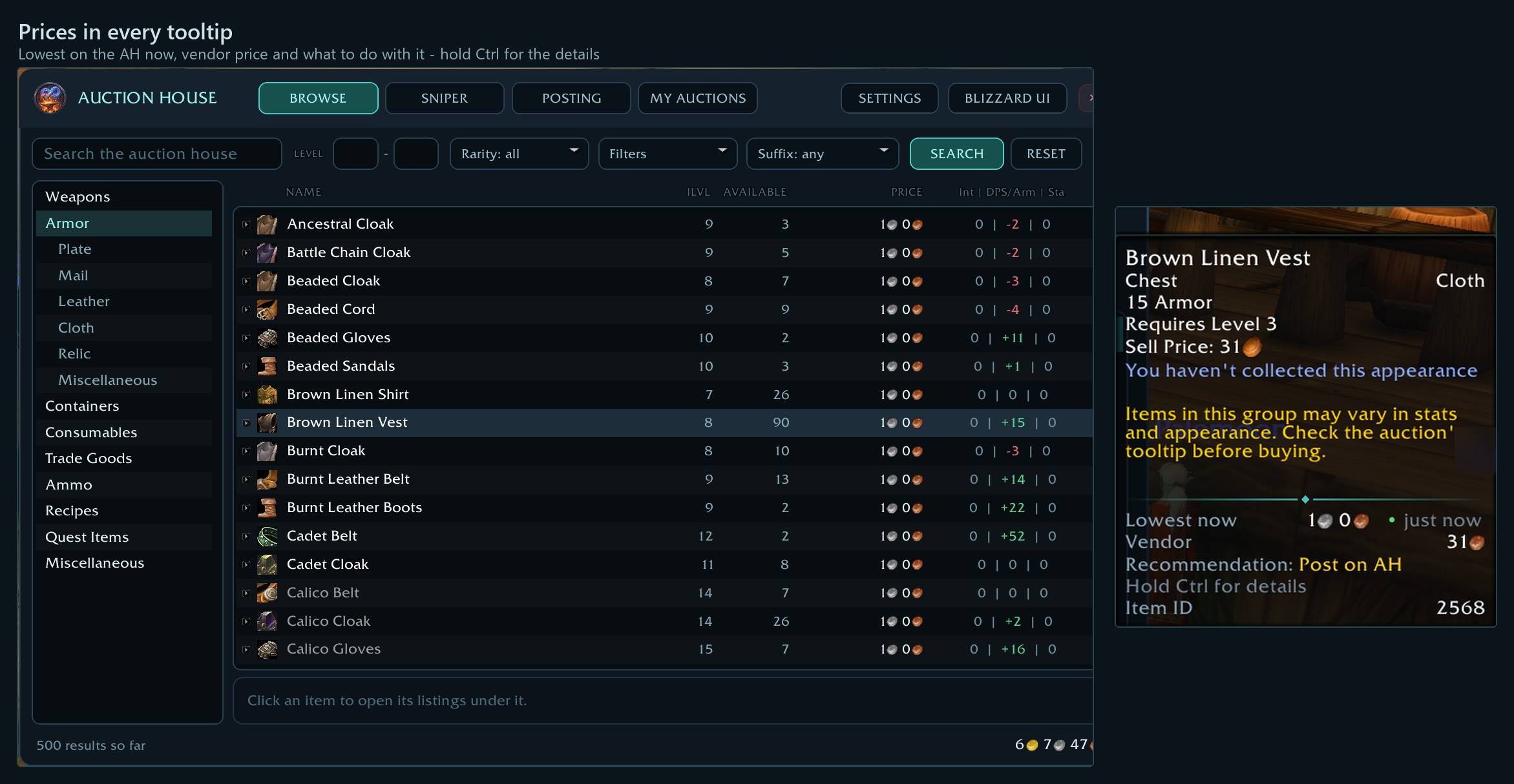
- Hold Ctrl on an item's tooltip - AH price now, Post all, vendor, disenchant results and what to do with it - Ctrl adds the details.
- ⭐ Make the tooltip yours - Every line: always, with Ctrl or hidden, in your order, font and colors - plus extra lines like After fees and Trend. Auction » Tooltip & prices.
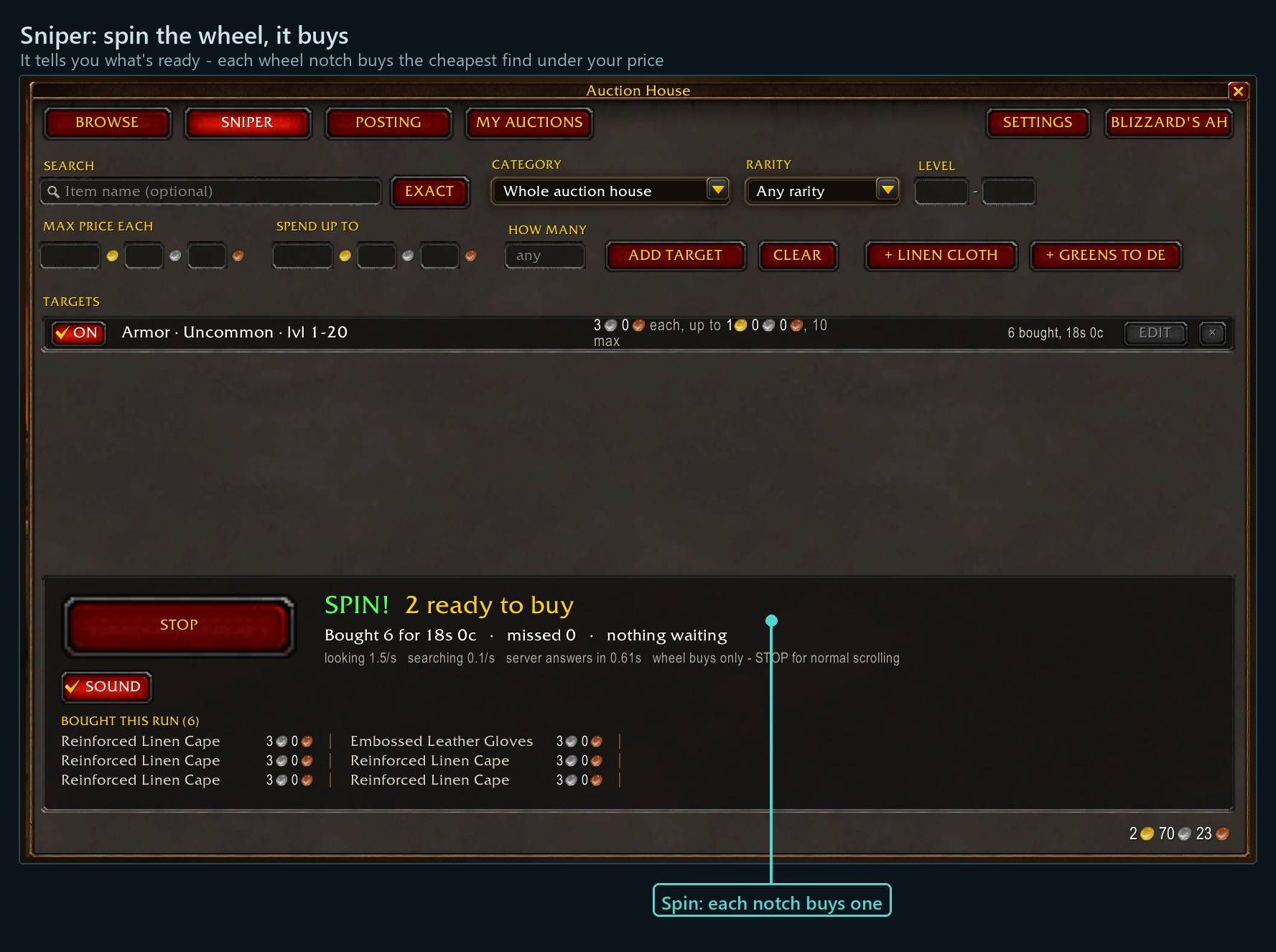
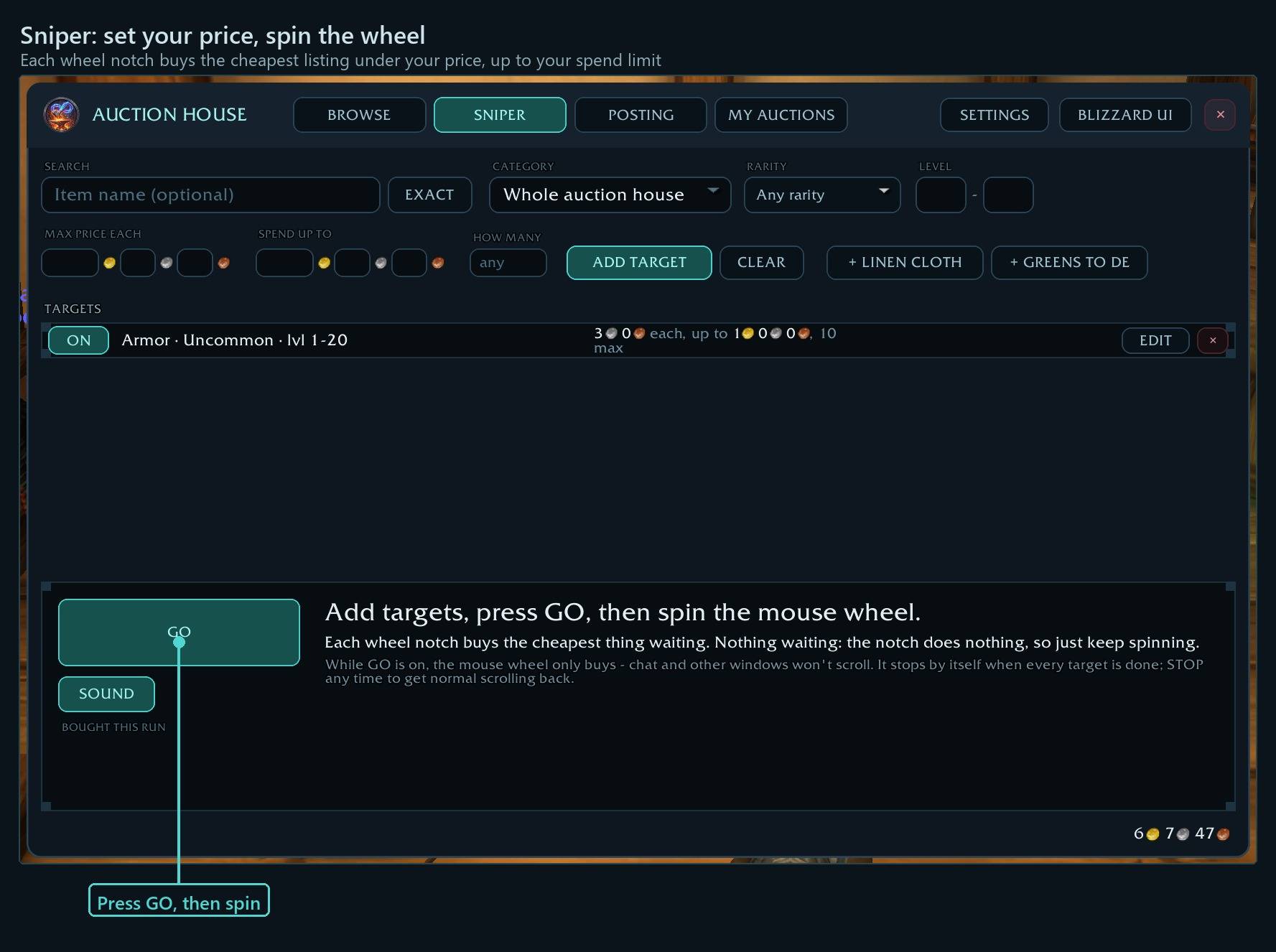
- Sniper: press GO, spin the mouse wheel - Each notch buys the cheapest find under your price, up to your spend limit.
- Sniper: LEAVE some up - The priciest few of the cheap ones stay listed, so the AH keeps showing a low price and others keep posting there. The sniper buys the extras.
- Sniper: Under DE value - Buys gear listed for less than it disenchants into, priced from your scans. Pick the roll: Low (safe), Average or High (risky).
- Sniper: Under vendor - Buys anything listed for less than a vendor pays, when one buy makes your minimum profit.
- ⭐ Buy stackables in one go, never above your max - Cheapest first; if the price jumps, the purchase is canceled -no falling into 999g trap listings.
- Shift+click any item to search it - From your bags, a chat link or any window: Browse searches for it while the auction window is open.
- ⭐ BAIT? and BUY on an amber post line - A few items posted far under the rest. BUY buys them and prices the line again; BAIT? prices past them (or a % over them - Posting settings).
- ⭐ You paid - in every tooltip - Everything you buy at the AH or a vendor remembers its price, even after weeks in the bank. Posting lines show what your price makes after the cut.
- Posting: deposits and SCAN AH - The status line adds up the deposits for what's left to post. SCAN AH (or /ffah scan) runs the full scan by hand.
- Right-click the Browse column headings - Pick the columns, the font and its size. Drag a heading to move it, its left edge to size it; empty columns hide themselves.
- Click UPGRADE again - Sorts by your 2nd ranked stat, then the 3rd. Random-suffix gear says 'varies - open': each listing under it shows its own roll.
- ⭐ DE and PROFIT columns in Browse - What an item disenchants into, less its price. Click L / A / H for a Low, Average or High roll; profit in green, loss in red.
- POST NEXT and SKIP - Work down everything you can sell with two buttons.
- CANCEL NEXT UNDERCUT - Cancels your undercut auctions one press at a time, ready to post again.
- Mail gold panel - Gold in your mailbox and on its way from sales, with a countdown - and a column per alt.
Every shortcut for every ForeverForge addon: in game under /forge » Core » Tips & shortcuts, or the #feature-guide channel on the ForeverForge Discord.
Browse
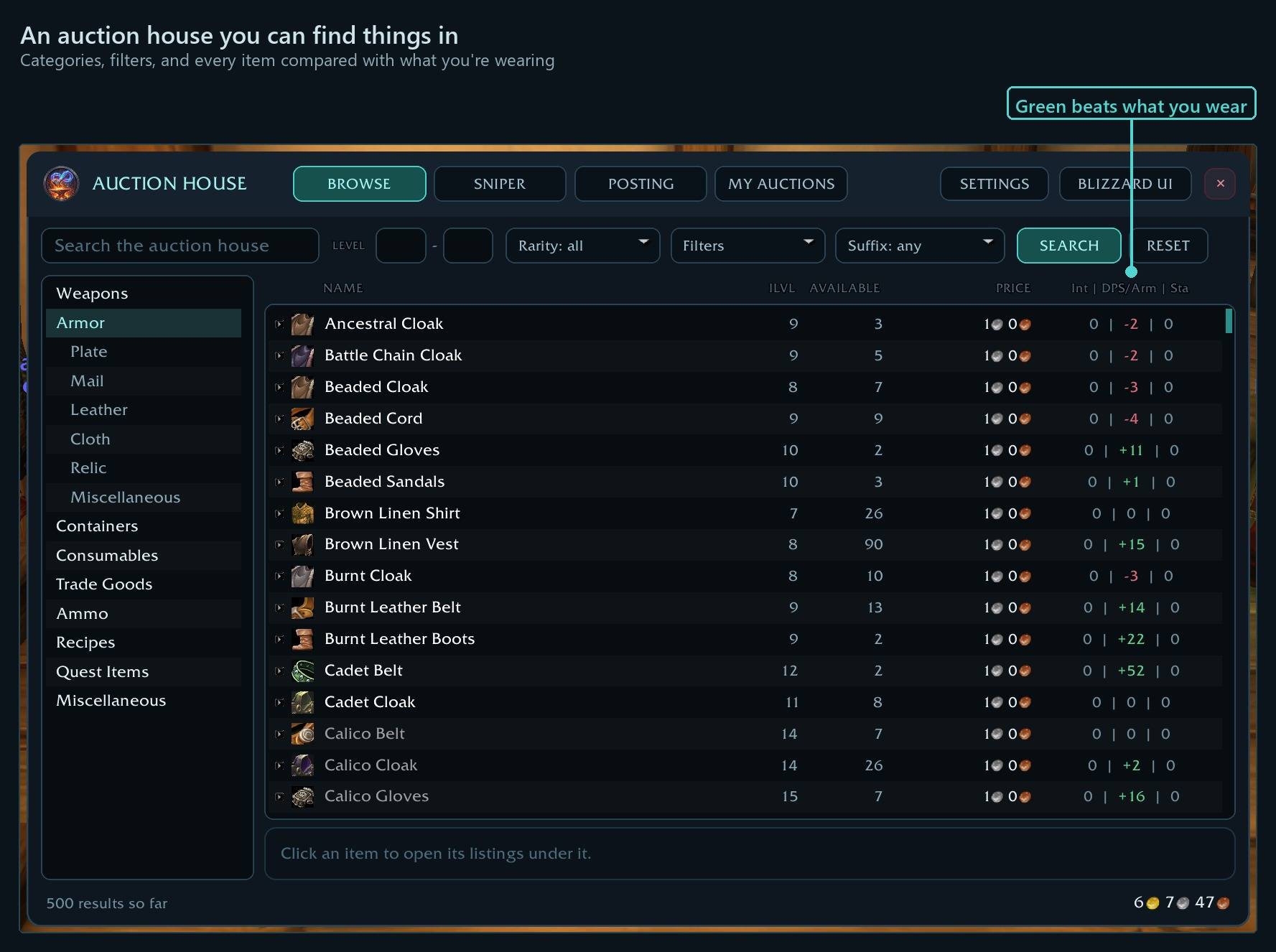
- Instant search: the same single request Blizzard's window uses, so results arrive just as fast.
- Filters: level range, rarity (tick any), usable, upgrades, uncollected, and a multi-select random suffix filter ("of the Bear", "of the Eagle"…).
- Upgrade comparison: every result shows
+5 | +3 | -1.4against the gear you're wearing, on three stats you rank. "DPS / Armor" uses DPS for weapons and armor for everything else. - Click an item and its listings open right under it. Buy without the "are you sure" popup (optional), double-click to buy, and buy cloth, ore and other stackables in any quantity, cheapest first, with a warning if the price rises.
Sniper
Spin to win. Build targets - a search, a category (Armor + Weapons covers all gear), rarity, level range, a max price each and how much to spend - press GO, then spin the mouse wheel. Each notch buys the cheapest thing waiting that fits a target; with nothing waiting it does nothing, so just keep spinning. It stops by itself at your spend limit. + LINEN CLOTH and + GREENS TO DE fill in the usual disenchanting buys. Stackables are bought in one go and never above your max price, so 999g "trap" listings can't catch you.
Posting
Press SCAN BAGS and see every item with its quantity, price and the rule that set it - the tab stays empty until you do. While prices come in, every button waits, so nothing can be posted before its price is known; then post one per press, working down the list. SKIP moves a line to WON'T POST for now - click it there to put it back, and scanning again brings every skipped line back. Type your own price or quantity on any line.
The side panel has two tabs: WON'T POST (held back by your conditions, a SKIP or your ignore list - click one to bring it back) and CAN'T POST (soulbound, quest items, your hearthstone, protected profession tools - with the reason).
With ForeverForge Bags: set one of your bag sections to Post on the auction house and it's posted when you open the AH - the tab opens with just those items, and anything your conditions turn down is offered one at a time afterwards: post it anyway, or skip.
Prices come from posting conditions you set: minimum, normal and maximum, each an ordered list of lowest on the AH, average seen, vendor price or a fixed amount, with optional multipliers. There's also a posting ignore list you fill by dragging items in.
Item tooltips
Every item's tooltip shows your auction house's numbers under a divider: Lowest now (and how old that price is), Post all (the lowest less your undercut, times how many you have), Vendor (one and all), what it disenchants into, and a Recommendation - Vendor, Disenchant or Post on AH. The recommendation assumes an item sells on its third posting (the 5% cut and three deposits come off) and says Vendor if that's less than the vendor price. Hold Ctrl for the going rate, how many are listed, the 14-day range and each disenchant result's value.
Soulbound items get a crimson SOULBOUND - Can't Auction heading. Hold Ctrl to see what one goes for on the auction house anyway - handy when a guildie needs a new weapon. Never seen on the auction house? Ctrl says so instead of leaving a gap.
Make it yours (Tooltip & prices » Customize the tooltip). Every line can show always, only while you hold Ctrl, or not at all; the parts of a line can be moved or hidden (how old the price is, a disenchant result's chance and value); each line gets its own font, size, colors and fancy dividers above or below; and the lines go in any order. Extra lines to switch on: After fees (what one really brings in), Deposit, Trend (against its usual 14-day level), You have (bags and bank, and what they're worth) and Item ID. Switched off, the tooltip is exactly the standard one.
Prices come from a full scan that runs by itself when you open the auction house - once every 15 minutes per account, about 10 seconds, with a progress bar - and are shared by all your characters. Disenchant odds start from Classic's and switch to your own once you've done 15 disenchants at that item level.
My auctions
Everything you have up, with the cheapest price from anyone else and whether you've been undercut. Cancel undercut auctions one per press. Sold auctions count down to the money arriving in your mail.
One press per purchase or post
The game requires a real click or key press for every purchase, post and cancel, and no addon can get around that. To go faster, bind a key under Key Bindings > AddOns > ForeverForge Auction.
The ForeverForge suite
One look, one settings window (/forge), made for WoW: Forever. Pick the ones you want - they all use the ForeverForge core addon, and the LFG Bulletin Board also runs on its own.
- ForeverForge (the core) - one settings window for the whole suite, faster auto loot, auto quests, and vendors that sell your greys and repair.
- Bags - one bag window with smart sections or your own sorting, and Ctrl+Shift+click to disenchant, prospect, mill or pick locks.
- Auction - a faster, simpler auction house: price tooltips you can customize, one-press posting, a sniper and safe bulk buying.
- LFG Bulletin Board - group posts sorted by dungeon and shared between players, so you see groups from every zone.
- UI - unit frames, action bars, chat and meters in one clean look.
- Training - pre-pick your talents, see the spells still to come, and a better trainer window.
- Macros - build macros line by line in plain English, plus the one-click tag macro.
- Mass Mail & Trade - send a pile of items to anyone: one mail per click, trades that fill themselves.
- Custom Info Panels - build info bars: FPS, gold, bags, coords, durability, XP and more.
- Skill Tracker - progress bars for your professions and weapon skills.
Settings: /ffah, or the ForeverForge settings window.
Bug reports and suggestions: ForeverForge Discord Support development: ko-fi.com/walord
You must be logged in to leave a comment.