
Forever Unit Frames
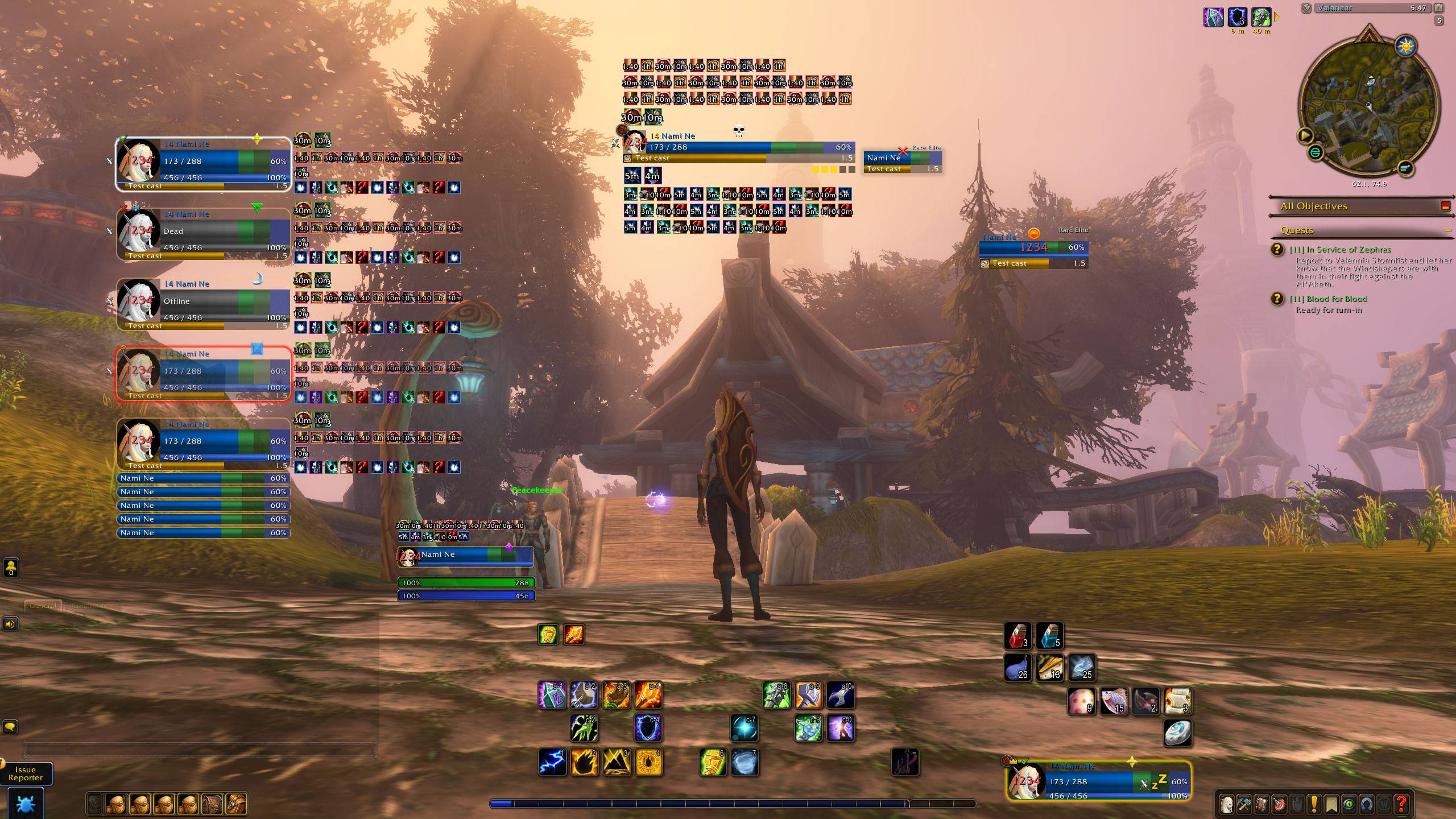
Unit frames built for WoW: Forever (Beta), in the spirit of Shadowed Unit Frames. Every size, position, colour and font is configurable in a movable options window. The frames look good out o f the box.
Details
Addon ID:
25083
Addon Version:
0.21.0
Expansion:
1.60
Upload date:
Oct 06, 2026
Last Updated:
Oct 06, 2026
Downloads:
Less than 100
Website:
Source Link
Expansion
 Forever
 Categories
Developers

StephanTxC
Creator
Having issues?
Forever Unit Frames
Unit frames built for WoW: Forever, in the spirit of Shadowed Unit Frames. Every size, position, colour and font is configurable in a movable options window. The frames look good out of the box.
📖 Wiki: every setting explained, getting started and FAQ. Each option with what it does, its default and the frames it applies to, always matching the current version.
Frames
- Player, Target, Target of Target, Focus, Pet and Party.
- Party pets: a list directly below the party block, showing only the pets that exist, without gaps (can be turned off). Their buffs and debuffs in one row beside each pet, with their own icon size, count, side and offset. Pets can stand in a list below the group or each one beside its owner (left or right), with their own width, height, spacing and X/Y offset.
- Party targets: beside each member a small frame with what that member has targeted, right, left, above or below; size and X/Y offset adjustable (off by default).
- Party frames hide while you are in a raid group (can be turned off).
- Player frame can fade out of combat while nothing is going on (out of combat, not casting, full health, no target); opacity configurable. Selecting a target brings it back so you see your resources before a pull.
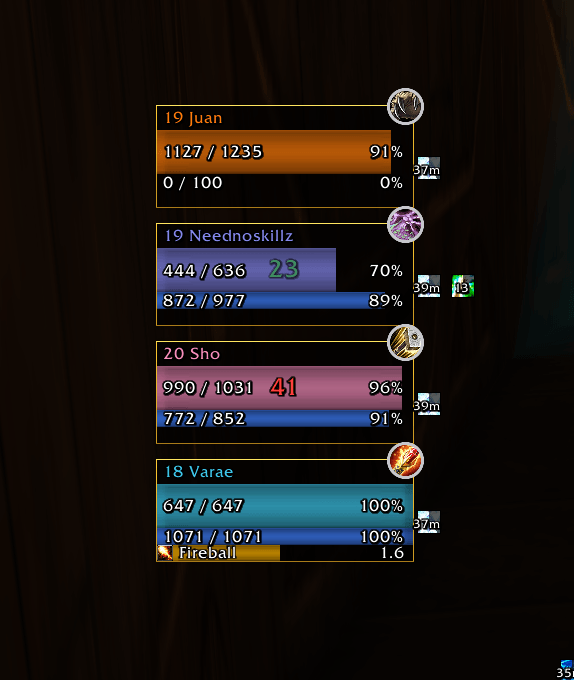
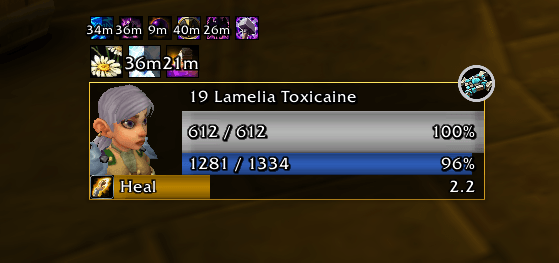
- A three-row layout: a title row with name and level in class colour, health, and power. Each row's height is set in percent of the frame.
- Round class badge, and a secondary name (surname) that can be turned on or off.
- A small gold AFK or red DND badge right after the name of anyone who is away or busy.
- Elite, rare and boss marker on the portrait, as a word, or as a thin gold (elite) or silver (rare) ring around the frame.
- Creatures someone else has tapped (no experience or loot for you) get a grey health bar, as on Blizzard's target frame.
- Combo points on the target frame: a row of square or round pips below the frame (size, color, position, hide when empty).
- Combat icon on target, target of target, focus and party (see who pulled), and a PvP crest on every player frame; both optional, with size and position. Combat icons show two animated swords clashing while in combat (or Blizzard's icon springing in with a flash, pulsing, or still).
- Absorb shields and incoming heals drawn in the health bar, with an optional overheal lane; incoming heals can also be drawn in full past the frame's edge. Shields can also sit at the bar's end, so they show at full health too.
- Texts on each bar: name, level, health or power values, or level, class and race ("60 Mage Gnome"; creatures show their type, "60 Humanoid"). Names on the bars can take the class or reaction color; in "level, class and race" just the class (or creature type) can. Value texts can be compact (1234/1234) and have a size of their own.
- Level numbers can take their difficulty color (red, orange, yellow, green, grey), independent of the rest of the line.
- Power bar colors per type (mana, rage, focus, energy).
- Optionally no empty power bar on NPCs without power (target, target of target, focus): the health bar takes its space.
- Druids see their mana in bear and cat form: a thin strip along the bottom of the power bar.
- Health bar colored by class, reaction, a gradient or one color of your choice; the reaction colors (friendly, neutral, hostile) are yours to pick too.
- Damage and heal numbers on the frame (combat feedback).
- Combat and resting icons on the player frame, with Blizzard's own art: crossed swords while you are in combat, the animated "Zzz" while you rest in an inn or a city. Centred on the health bar by default, side by side when both show. Each can be turned off; size, anchor point on the health bar and X/Y offset are configurable.
- 2D or 3D portraits, for players and creatures.
Status
In a "Status" tab per frame.
- Raid target markers (skull, cross, star, …) on every frame, in Blizzard's art, centred on the frame's top edge by default; size, anchor point and X/Y offset are configurable.
- Group icons on the player and party frames: leader (or guide) and assistant, the ready check (waiting, ready, not ready; the result stays a few seconds after the check) and an incoming resurrection. Blizzard's own art, in a row at the frame's top left corner by default.
- Dead, ghost and offline units always grey out and show "Dead", "Ghost" or "Offline" instead of their health values.
- Range fading: party members, their pets, your pet, the target and the focus fade while out of range (the opacity is configurable). Under General > Status > Range you choose, separately for friends and enemies, how range is measured: automatic (your class's spell, e.g. Priest: Lesser Heal / Smite, Druid: Healing Touch / Wrath, Shaman: Healing Wave / Lightning Bolt, Paladin: Holy Light, Mage: Arcane Intellect / Fireball, Warlock: Unending Breath / Shadow Bolt, Hunter: Mend Pet / Auto Shot), any spell by name or ID, or a range in yards (5 to 40). Classes without a suitable spell, such as Warriors and Rogues, use yards automatically: group members by their exact distance, others by item range checks, with the follow distance as the last resort.
- Target highlight: the party member you have targeted gets a bright border, in a color and thickness of your choice.
- Threat glow: the player and party frames glow in the threat colour while the unit has threat; on the target, focus and target of target it shows your threat on the unit (off by default there).
- Dispel highlight: the border of the player and party frames takes the debuff's colour while the unit carries a debuff your class can dispel.
Auras
- Buffs and debuffs on every frame, drawn by the game's own aura containers, so they keep updating in combat.
- Weapon enchants (poisons, sharpening stones, Rockbiter Weapon …) before the player's buffs, with their time left and the weapon's tooltip.
- Your own debuffs come first and bigger.
- Buff borders by caster: yours in one color (green by default), everyone else's in another (red).
- Party: debuffs you can dispel can get a group of their own, with their own size and position (for example big in the middle of the frame); the normal debuff row then leaves them out.
- Wraps to new rows when they don't fit, with a limit per row.
- Anchor to the frame, the health bar, the power bar, the castbar or the other aura group, with any of the 9 points and an X/Y offset.
- Size, spacing, growth direction, maximum count, "only mine", "dispellable only", "hide tracking" (herb, mineral and treasure finding, hunter tracking, sensing), "hide permanent" (every aura without a duration, e.g. auras and stances), "hide longer than N minutes" (hour potions, food, hour-long buffs), remaining time, dispel-type colours and an icon border that can be switched off or made thicker.
Castbars
- Castbars for player, target, target of target, focus and party.
- Docked below or above the frame, or detached with its own position.
- "Always show" keeps an empty bar in the frame so nothing below it jumps.
- The player castbar can run alongside Blizzard's, or hide it.
Threat bar
- An optional row below the player frame and its docked castbar, inside the same border: your threat on your target (a healer with a friendly target: on the target's target).
- Tank: your threat and your lead over the next player. Green while they are far off, yellow when they close in, red when you are overtaken, purple when another tank took it.
- Damage and healers: your share of the threat needed to pull (the 110 % / 130 % rule included) and the gap to the tank. Green, yellow from the warning share, red with aggro.
- Works in dungeons: only your target is read, whose threat numbers the client keeps readable there. Role detected automatically (assigned role, Defensive Stance, Bear Form, Righteous Fury) or set by hand; height and warning share adjustable.
Totems
- Totem icons on the player frame, one per totem slot, with the remaining time. Right-click one to destroy it.
- Placed next to the player frame by default; size, spacing, anchor point and X/Y offset are configurable.
Look
- Bar textures, including Blizzard's own; LibSharedMedia textures and fonts appear too if another addon provides them. Fonts with size and outline (including a soft outline) and colours.
- Rounded corners, and an outer border (Flat or Gold with shading) that encloses the frame and its docked castbar.
- Soft drop shadow.
- The title row's background can be switched off on its own, so the bars keep theirs and the missing health stays visible.
- Global font settings with "Apply to all frames".
Options
/fufopens a movable options window: frames on the left, tabs on top.- General > Frames: every frame with an on/off switch in one list.
- Works with click-casting addons such as Clique: every unit frame registers itself through the common ClickCastFrames table.
- Long option descriptions show in full in a tooltip when you hover the row.
- A minimap button: left-click opens the options, right-click unlocks or locks the frames, drag it around the minimap (round or square). It can be hidden; with a LibDataBroker display it also appears there, and it is listed in Blizzard's addon compartment.
- Every position can be set by dragging (
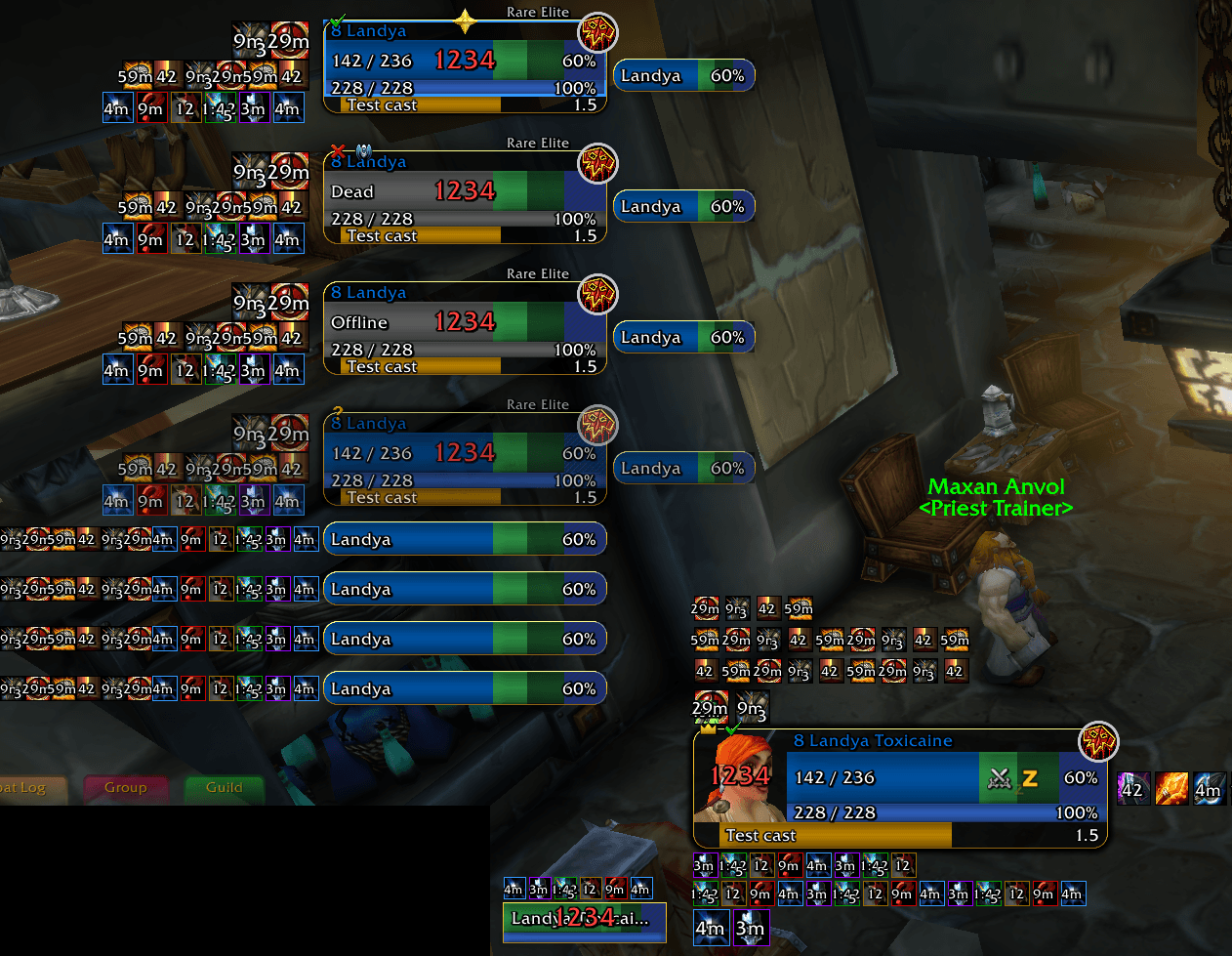
/fuf unlock) or as exact X/Y values. - Test mode shows every enabled indicator on every frame: sample auras, casts, totems, the combat, resting and PvP icons, raid markers, the group and ready check icons, a threat glow on the player, and a full party with one member dead, one offline, one out of range, a threat glow and a dispel highlight, so you can set everything up without a group.
- Settings are stored compactly. They can be exported and imported as a string. Importing a profile keeps your own language.
Commands
/fuf (options), /fuf unlock, /fuf lock, /fuf status, /fuf reset <frame|all>, /fuf set <scope> <setting> <value>
Notes
- Made for WoW: Forever only. It relies on Forever's API and will not load on other clients.
- Languages: English, German (Deutsch), Spanish (Español, also for Latin American clients) and French (Français). The addon follows the game's language; a dropdown at the bottom of the options window's frame list picks another one, and the change applies at once. Other game languages use English.
- The translations were not written by native speakers: corrections are very welcome on the issue tracker.
- Updating from 0.2.x: the settings backup in the "FUF Save" character macros is no longer needed. Settings found only there are moved to the normal saved settings once, then the addon deletes its own backup macros.
- Bug reports and ideas are welcome on the project's issue tracker.
You must be logged in to leave a comment.