

Forever Skill Tracker
A fully customizable addon to track profession levels and weapon and defense skill levels
Details
Expansion
 Forever
 Categories
Developers

Having issues?
This addon has moved. It is now ForeverForge Skill Tracker, part of the ForeverForge suite for WoW: Forever, and that is where every update goes. This version is no longer updated - please install ForeverForge Skill Tracker, then disable or delete this one. Log in once with both enabled and your settings come across on their own. Questions or bugs: ForeverForge Discord
Forever Skill Tracker
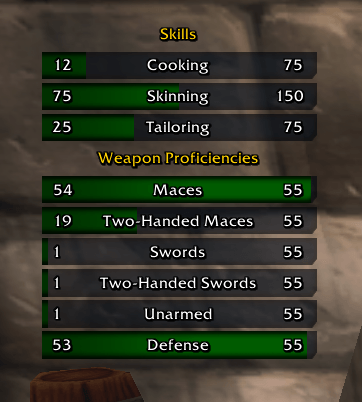
Track your skills and professions on floating progress bars — organised into your own named groups.
Built specifically for the WoW: Forever client. Forever doesn't expose the old Classic skill API, so addons written against GetNumSkillLines() throw errors on it. Forever Skill Tracker reads your skills through a compatibility layer that tries every available source in turn, which means it just works instead of spamming Lua errors.
Features
Your own groups, your own order
Skills aren't a flat list. Create groups, name them whatever you like — Professions, Weapons, Secondary — and drop skills into them. Group names display as headers above their bars and can be aligned left, centre or right. Up/down buttons on every group and every skill let you reorder the whole display in seconds.
A real options window
No hunting through the Blizzard settings panel. Everything lives in one movable window: bar width, row height, spacing, font size, background opacity, font and bar colour pickers, display mode and a position lock. Press Escape to close it.
Two display modes
Progress bars, or simple text rows showing Skill: current / max.
Modern bar art
The bar texture list isn't limited to the three old Classic textures. It picks up the newer atlas-based bar art your client actually ships — breath/mirror timer, cast bar, player health and mana, experience bar and more — by reading them live from the UI and validating every candidate before offering it. LibSharedMedia textures and fonts are included automatically if you have it installed.
Settings backup
A copyable backup string at the bottom of the options window saves your entire setup, groups included. Paste it back any time to restore everything. Settings are also written to both an account-wide and a per-character saved variable, and the newer copy wins at login — so if one of them fails to write, your configuration survives.
Minimap button
Left-click to show or hide the bars, right-click for options, drag to reposition it around the minimap.
Slash commands
| Command | Does |
|---|---|
/fst | Open or close the options window |
/fst show / /fst hide | Show or hide the bars |
/fst export | Print your settings backup string |
/fst reset | Restore default settings |
/fstsaves | Report which saved-variable copies are present |
/fstdebug | Diagnostics: which skill APIs your client exposes, what was detected, how many bar textures are available |
Notes
Forever Skill Tracker uses its own saved variables and frame names, so it can be installed alongside the original Skill Tracker without conflict — though you'll want only one of them enabled at a time.
If the bars come up empty, run /fstdebug and it'll tell you exactly what your client exposes.
Support
If this addon is useful to you: https://ko-fi.com/walord
Two things worth deciding before you publish. The title/summary field — I'd use "Skill and profession progress bars with custom groups, for the WoW: Forever client", since "Forever" in the name plus that line is what will make it findable by people on that client. And the changelog field — point it at Changelog/2.1.0.md the way you do with your others, rather than pasting.
Want me to also drop this into a README.md in the addon folder so it ships with the package?
You must be logged in to leave a comment.