

Forever Quest Marker
Marks quests that are new or modified in WoW Forever
Details
Expansion
 Forever
 Categories
Developers

Having issues?
WoW Forever mixes well over a thousand new quests into familiar zones, and nothing in the game tells you which ones are new. ForeverQuest Marker adds a small, Classic-styled marker so you can tell at a glance whether a quest is new, or from classic.
Markers
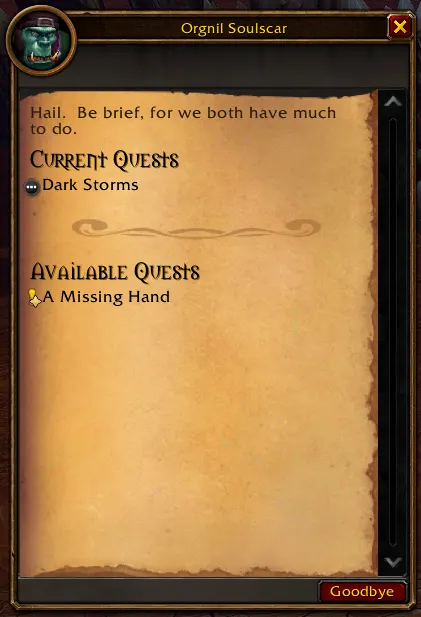
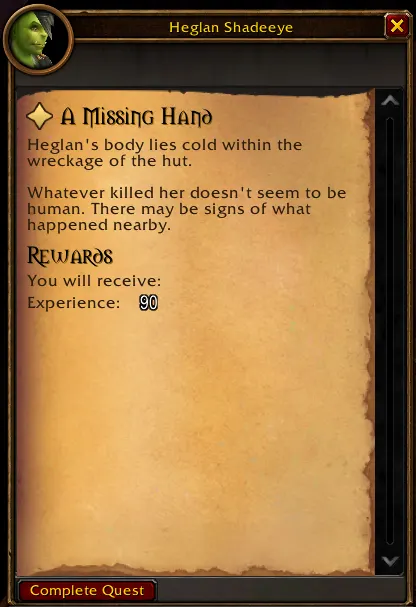
- Solid gold star: New in WoW Forever. Found in the Forever client's quest data, or confirmed by player reports.
- Hollow gold star: Likely new. Not in any Classic, Season of Discovery or Classic Era data, but not confirmed yet.
- Half-filled blue star: Changed. An original Classic quest that players reported as modified in Forever.
- Violet diamond: Season of Discovery. Not original Classic, but not new in Forever either.
- No marker: original Classic quest.
The states differ by shape as well as color, and an option adds a short text label (New, New?, Changed, SoD).
Where markers appear
- Quest window: before the title when a quest is offered, checked or completed, and in quest details opened from the quest log.
- Quest giver lists: on the quest icon in gossip and greeting windows.
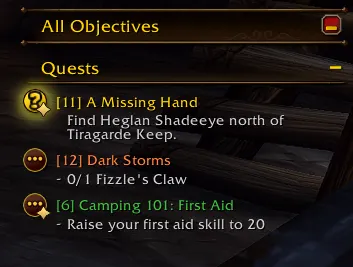
- Quest log and objective tracker: on the corner of the quest's map marker button.
- Tooltips: markers, quest giver rows, quest log entries, tracked quests, world map quest pins and quest links in chat explain the state.
If another addon replaces the quest window (for example Immersion), the quest's state is printed in chat instead.
Commands
/fqmopens the settings./fqm check <questID>explains how any quest is classified and why./fqm statusshows data versions and which windows are marked./fqm tuneadjusts marker size and position live.
Help complete the list
The addon can remember the non-Classic quests you meet: ID, title, level, quest giver and location. Nothing leaves your computer unless you choose to share it. /fqm export produces a document you can paste at https://forever.swafox.com. Quests reported by several independent players are promoted from "likely new" to "confirmed" in a later release. The export contains no character name, realm or account data, and recording can be turned off in the settings.
Notes
- No dependencies. Interface text is English for now.
- Addons that replace the quest log with their own window (for example ClassicUI Forever's classic quest log) do not show quest log markers yet. The quest window, quest giver lists, tracker and tooltips are not affected.
- Found a wrong marker? Run
/fqm check <questID>and open an issue with the output.
Credits
Original Classic quest IDs come from QuestieDB. Forever and Classic Era client quest tables come from wago.tools.
You must be logged in to leave a comment.