

Forever Level Gains
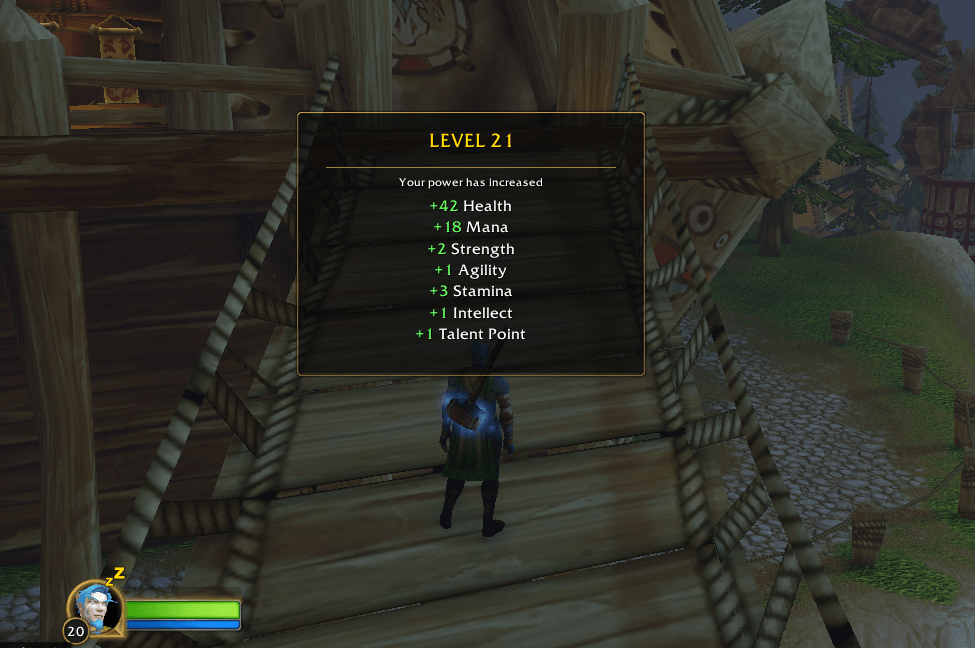
Provides a classic level up display showing your stat gains in World of Warcraft: Forever
Details
Expansion
 Forever
 Categories
Developers

Having issues?
Forever Level Gains
Forever Level Gains provides a classic level up display for World of Warcraft: Forever, showing the stat increases your character receives when gaining a level.
The addon is designed to bring back the feeling of older World of Warcraft level ups, where you could clearly see how your character had grown rather than only seeing the level number change.
Features
• Displays your new level
• Shows Health gained
• Shows your resource gain, such as Mana, Rage, Energy or Focus
• Shows Strength gained
• Shows Agility gained
• Shows Stamina gained
• Shows Intellect gained
• Shows Talent Points gained when applicable
• Movable display
• Adjustable scale
• Adjustable display duration
• Settings are saved between sessions
• Lightweight with no external dependencies
Forever Level Gains uses the stat increases provided directly by the game when your character levels up.
Preview the Display
You do not need to gain a level every time you want to test the addon.
Type:
/flg test
This will show a preview of the level up display using example stat gains.
Moving the Display
To move the level up display, type:
/flg unlock
You can then drag the panel to the position you want.
When you are finished, type:
/flg lock
The position will be saved for future sessions.
Scale
You can change the size of the display using:
/flg scale 60-160
For example:
/flg scale 80
sets the display to 80% scale.
/flg scale 120
sets the display to 120% scale.
Display Duration
You can control how long the level up information remains on screen.
Use:
/flg duration 2-15
For example:
/flg duration 8
keeps the display visible for approximately 8 seconds.
Enable or Disable
Use:
/flg on
to enable Forever Level Gains.
Use:
/flg off
to disable it without uninstalling the addon.
Reset Settings
Use:
/flg reset
to restore the default scale, position and display duration.
Commands
/flg test
Preview the level up display.
/flg unlock
Unlock the display so it can be moved.
/flg lock
Lock the display in its current position.
/flg scale 60-160
Change the size of the display.
/flg duration 2-15
Change how long the display remains visible.
/flg on
Enable the addon.
/flg off
Disable the addon.
/flg reset
Restore the default settings.
Installation
Install Forever Level Gains through the CurseForge app, or manually place the ForeverLevelGains folder inside your World of Warcraft: Forever AddOns folder.
For the current Forever beta installation this is normally:
World of Warcraft/_classic_beta_/Interface/AddOns/
Then restart World of Warcraft or use:
/reload
Compatibility
Designed for:
World of Warcraft: Forever
Forever 1.60.1
Interface 16001
Forever Level Gains does not replace any Blizzard levelling systems. It simply provides an additional visual display showing the stat gains your character receives when levelling up.
You must be logged in to leave a comment.