
FDQ · Forever Dungeon Quests
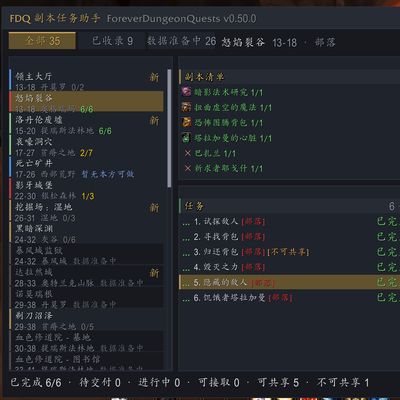
FDQ turns a dungeon's whole quest chain into one checklist: real-time quest status, out-of-dungeon prerequisites, arrow navigation, multi-floor maps with boss portraits, and one-click party sharing. 9 dungeons, 71 quests, zero dependencies.
Details
Expansion
 Forever
 Categories
Developers

Having issues?
FDQ · Forever Dungeon Quests
FDQ turns a dungeon's whole quest chain into one checklist — quest status, out-of-dungeon prerequisites, arrow navigation, multi-floor maps with boss portraits, and one-click party sharing. 9 dungeons, 71 quests, zero dependencies.
Features
Five-state quest tracking — available / in progress / ready to turn in / completed / missing prerequisite. Only trusts server responses; it never treats "I have this item in my bags" as proof of completion.
Full quest chains, including out-of-dungeon prerequisites — prerequisites often live outside the instance. FDQ folds them into the same chain, so you can see at a glance which step you're on, what's missing, and whether the chain can be shared.
On-screen arrow navigation — world coordinates converted to a heading and distance in real time, and it keeps pointing the right way across map boundaries. If the direction looks mirrored, /fdq arrow flip flips it.
Dungeon maps with boss portraits — multi-floor dungeons are switchable, the map art is Blizzard's own, and each boss is pinned on the map with a portrait that greys out after a kill. Scroll to zoom, drag to pan, and the window opens on the dungeon you just entered.
One-click party report — dumps the current dungeon's quest state into the party channel on an interval (so it won't spam), then pushes every shareable quest to your group one by one.
Small touches that matter — faction auto-detection by race/class with manual override, the dungeon list pops open by itself when you enter an instance, a location sound you can pick or replace, and a resettable minimap button.
Installation
Download the file and extract the ForeverDungeonQuests folder into:
World of Warcraft_classic_beta_InterfaceAddOnsThen /reload or restart the client. Type /fdq in chat to get started, /fdq help for the full command list.
If the CurseForge app can't find your Forever beta
The app may not know about the Forever beta yet, and the Install button can sit on "Processing Deep Link Request" indefinitely. Two ways around it:
- Click Download instead, then unpack the folder into
InterfaceAddOnsyourself. - Or add "World of Warcraft: Forever" as a game in the app first, pointed at your
classic_betafolder — after that, Install works.
Requirements
- World of Warcraft: Forever Beta (
wow_classic_beta, build 1.60.1 / Interface 16001). Any locale. - No third-party addons required.
Credits
- Map art under
Media/DungeonMaps/comes from Blizzard's client data and remains a Blizzard asset. It is referenced by this project, not authored or redistributed by it. - The optional location sound "Tararan" is by Rurutia. It is credited by name, used with attribution, and not bundled — FDQ references it from the author's own
SharedMedia_Rurutiaaddon at runtime.
成品文案(中文对照)
FDQ 把一个副本的完整任务链整理成一张看得懂的清单 —— 任务状态、副本外前置、屏幕箭头导航、多层副本地图与 Boss 头像、以及一键通报与共享。9 个副本、71 条任务、零依赖。
功能
五态任务判定 —— 可接取 / 进行中 / 待交付 / 已完成 / 缺前置。只信服务器反馈;绝不把「我背包里有这件东西」当作完成的证据。
完整任务链,含副本外前置 —— 前置任务常常在副本外。FDQ 把它们并进同一条链,让你一眼看清当前走到第几步、缺哪一步、这条链能不能共享。
屏幕箭头导航 —— 世界坐标实时换算成方位与距离,跨地图依然指得对。如果方向左右反了,/fdq arrow flip 一键镜像。
副本地图 + Boss 头像 —— 多层副本可切层,底图用的是暴雪官方原图,每个 Boss 用头像钉在地图上、击杀后置灰。滚轮缩放、拖动平移,进副本时窗口会自动打开对应的图。
一键通报与自动共享 —— 把当前副本的任务状态按格发进小队频道(间隔发送,不刷屏),随后把可共享的任务逐个推送给队伍。
细节打磨 —— 阵营自动判定(按种族/职业,可手动覆盖)、进副本自动弹出副本清单、定位音效可自选或替换、小地图按钮位置可重置。
安装
下载文件,把 ForeverDungeonQuests 文件夹解压到:
World of Warcraft_classic_beta_InterfaceAddOns然后 /reload 或重启客户端。聊天框输入 /fdq 开始使用,/fdq help 查看完整指令列表。
如果 CurseForge 客户端找不到你的 Forever beta
客户端可能还不认识 Forever beta,Install 按钮会一直卡在 "Processing Deep Link Request"。两个绕法:
- 改点 Download,然后自己把文件夹解压到
InterfaceAddOns。 - 或者先在客户端里把「World of Warcraft: Forever」添加为游戏,指向你的
classic_beta目录,之后 Install 就正常了。
运行要求
- 《魔兽世界:Forever》测试服(
wow_classic_beta,build 1.60.1 / Interface 16001),任意语言客户端。 - 不需要任何第三方插件。
致谢与版权
Media/DungeonMaps/下的地图素材来自暴雪客户端数据,版权仍属暴雪。本项目只是引用,并未创作或再分发。- 可选的定位音效「Tararan」由 Rurutia 创作。此处已署名其作者,插件不打包该音频——FDQ 只在运行时从作者自己的
SharedMedia_Rurutia插件中引用。
You must be logged in to leave a comment.