

EPGP Forever
EPGP Forever is a lightweight, modern EPGP loot and priority distribution addon for World of Warcraft Forever featuring raid filters, automated standby management, CSV import/export, and strict officer security.
Details
Expansion
 Forever
 Categories
Developers

Having issues?
EPGP Forever is a remastered, modernized port of the classic EPGP addon, built upon the legacy of the original developers. Tailored strictly for World of Warcraft Forever, it delivers a clean, lightweight, and streamlined system designed to keep your guild's loot distribution transparent, fast, and fair.
📌 What is EPGP?
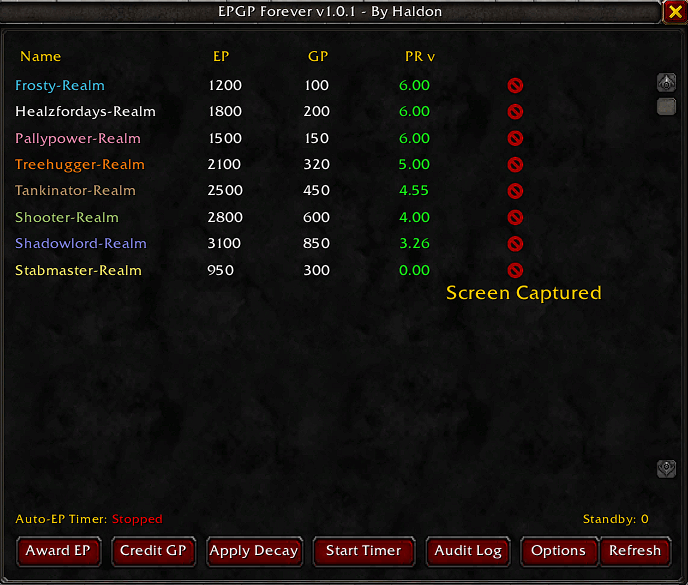
EPGP (Effort Points / Gear Points) is a fair and mathematically sound loot distribution system for World of Warcraft guilds:
• Effort Points (EP): Earned by attending raids, downing bosses, and showing up on time. It rewards commitment and participation.
• Gear Points (GP): Received when you win items. It tracks the gear value you have acquired.
• Priority (PR): Calculated automatically as a ratio of your effort to your gear ($PR = EP / GP$). The higher your PR, the higher priority you have for the next piece of loot.
It completely eliminates the politics of traditional loot councils by letting a transparent, automated formula decide who needs an upgrade most!
✨ Key Features
• Dual Roster Display Mode:
- In Guild (Outside Raid): Displays all guild members and their current standings.
- In Raid: Automatically filters the list to show only active raid members plus any players currently on Standby.
• Streamlined Raid Loot & Voting System:
- Master Looter Mode (Default): Officers or master looters can shift-click any item link in chat or use slash commands to instantly launch a timed raid vote.
- Auto Loot Tracking Mode: Automatically detects boss drops and raid loot, opening vote sessions for items meeting your quality threshold.
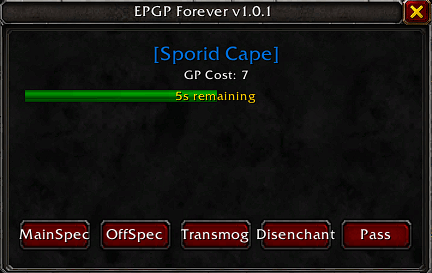
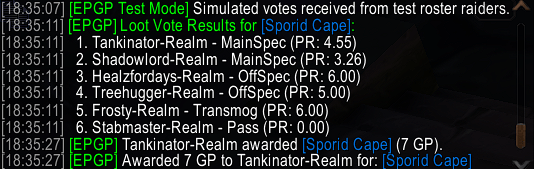
- Interactive Vote Popups & Countdown Bar: Raiders vote in real-time (MainSpec, OffSpec, Transmog, Disenchant, Pass) backed by a visual timer bar. Votes are automatically tallied and sorted by PR.
• Intelligent Standby Management:
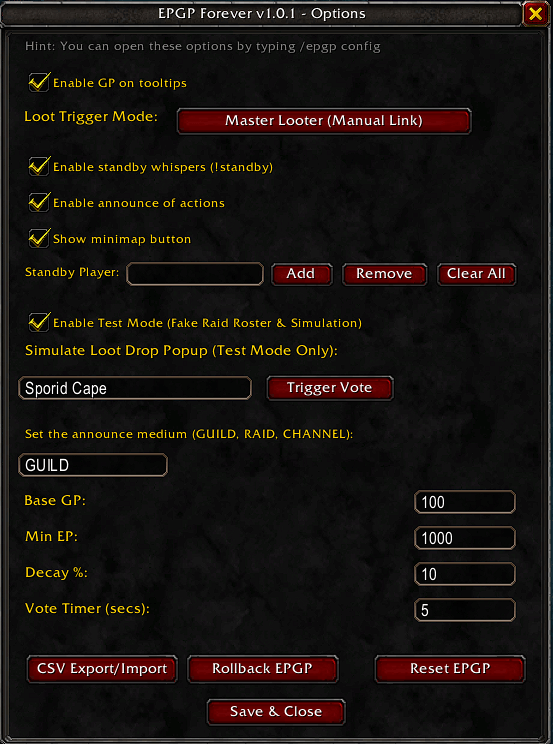
- Add players manually via slash command (/epgp sb <name>), through the options menu, or have them whisper !standby directly to you.
- Automatic Raid Disband Cleanup: The moment your raid group disbands or you leave the raid, the standby list automatically clears itself out to keep your roster fresh for next time.
• CSV Export & Import Integration:
- Easily export your entire guild or test standings into a clean CSV format (Name,Class,EP,GP) to copy and paste into Google Sheets or Discord.
- Batch-import CSV data back into the addon to update officer notes seamlessly with a single click.
• Robust History & Audit Logging:
- Full action logs track every EP/GP award, decay, reset, and timer tick with a built-in Direct Undo feature and snapshot rollbacks.
• Built-in Test Mode & Raid Simulation:
- Toggle Test Mode (/epgp test) to simulate a complete fake raid roster locally, test loot drop popups, and evaluate votes without needing a live raid group.
🔒 Officer Security
To protect your guild's progression data, critical write actions—such as Reset EPGP, Applying Decay, Awarding Points, and CSV Imports—are strictly protected and restricted to players with Guild Master or Officer permissions (CanEditOfficerNote). Regular members can view standings safely, but attempts to alter data without proper rights are automatically blocked.
⚙️ Default EPGP Settings & Recommendations
• Base GP (100): Acts as a safety buffer to prevent new recruits from distorting early Priority (PR) calculations.
• Min EP (1000): Requires a baseline amount of attendance/effort before a player is eligible for loot.
• Decay % (10% Weekly): Helps combat point inflation and keeps the leaderboard fresh and competitive over time.
🛠️️ Slash Commands
• /epgp or /epgpforever — Toggle the main standings window.
• /epgp config — Open the options and settings panel.
• /epgp poll [ItemLink] — Manually start a loot voting session for an item.
• /epgp sb <name> — Add a player to the standby list (or use clear / remove subcommands).
• /epgp test — Toggle local Test Mode on/off.
• /epgp testloot [ItemName] — Simulate a test loot drop popup in Test Mode.
• /epgp csv — Open the CSV Export and Import utility.
• /epgp log — View the event and audit log window.

You must be logged in to leave a comment.