

Emberwell Forever
A Warlock soulshard counter and spell launcher for WoW: Forever, with alerts for a missing self buffs or Healthstones and a warning when you cast a downranked spell.
Details
Expansion
 Forever
 Categories
Developers

Having issues?
Emberwell
A Warlock companion for World of Warcraft: Forever.
Emberwell puts a single hex sigil on your screen. It tells you how many soul shards are in your bags, opens your Warlock spells as a menu of tiles, and quietly points out the things a Warlock forgets: no demon out, no armor buff up, no Healthstone in the bags.
It is built for Forever specifically, against interface 16001 and the Mainline API family this client uses — not a vanilla addon with a new TOC glued on.
The sigil
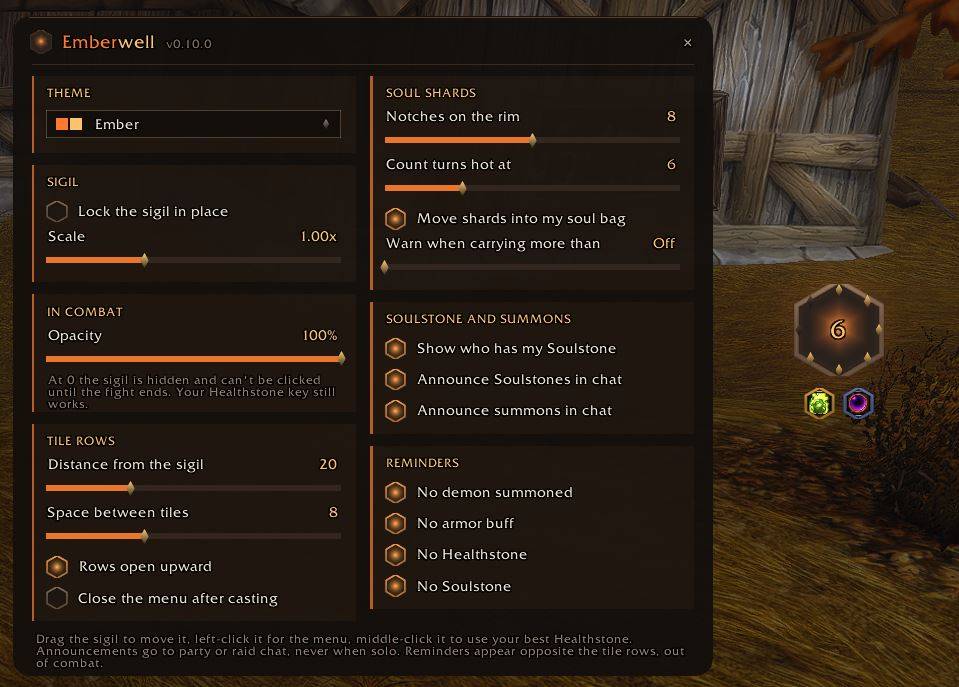
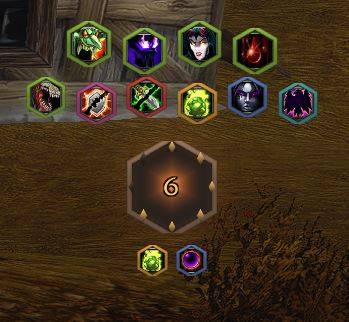
The number in the middle is simply the soul shards in your bags. No fractions, no invented maximum. It turns amber when you're carrying a lot, and the plate pulses when you're empty, which is the one state worth interrupting you about.
Notches are struck around the rim, one lit per shard, so you can read your count at a glance without reading a digit.
Drag it anywhere. Right-click opens the settings. Middle-click eats your best Healthstone. If you'd rather it stayed out of the way in a fight, set how visible it is in combat, down to fully hidden.
The tile menu
Left-click the sigil and a row of category tiles fans out of it — Demons, Banes, Curses, Stones, Control, Self. Pick one and its spells appear as a second row above. Switching categories is a hard cut: two menus are never on screen at once.
Spells cast by name, so you always get the highest rank you know, and every tooltip, icon and cooldown is drawn from that rank rather than from Rank 1.
Banes and Curses don't work from a fixed list. They're found by pattern against your live spellbook, so whatever Forever decides to call a Bane lands on the Banes row without waiting for an addon update — including ones that don't exist yet. A category holding nothing at all simply isn't shown, so a level 12 Warlock sees three tiles and a level 60 sees six.
Your class mounts are spellbook spells like any other, so Felsteed and Dreadsteed sit on the Demons row.
Every entry is matched against your actual spellbook when you log in. This matters on Forever, where Curse of Agony is called Bane of Agony — Emberwell finds it, binds to the real name, and hides anything you haven't trained rather than leaving you a button that silently does nothing.
Hiding means hiding. The spellbook on this client also lists spells you'll learn twenty levels from now, and Emberwell won't put those on a tile wearing a question mark. Train one and it appears on the spot, with no reload and no relog.
Themes
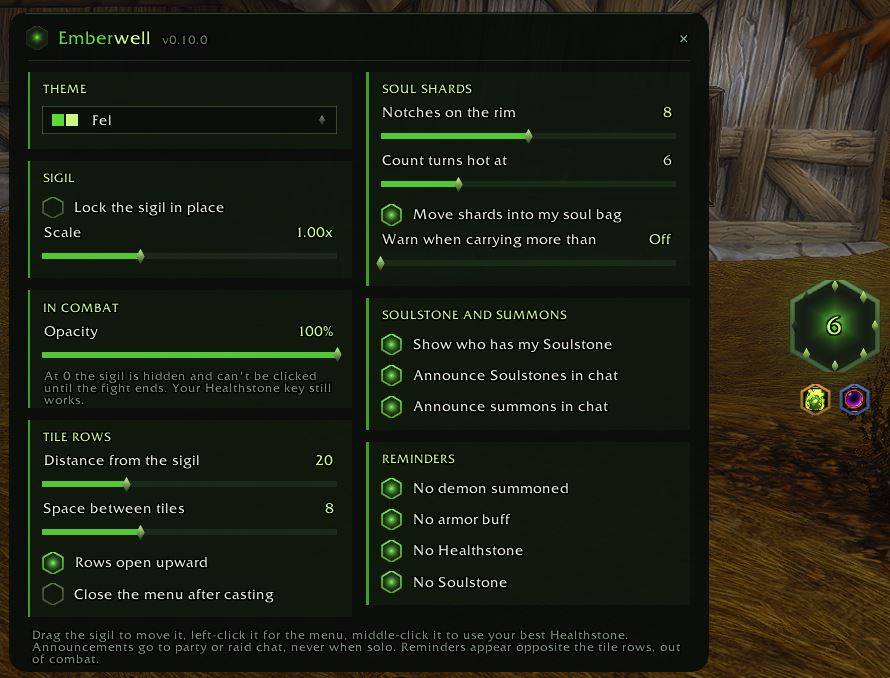
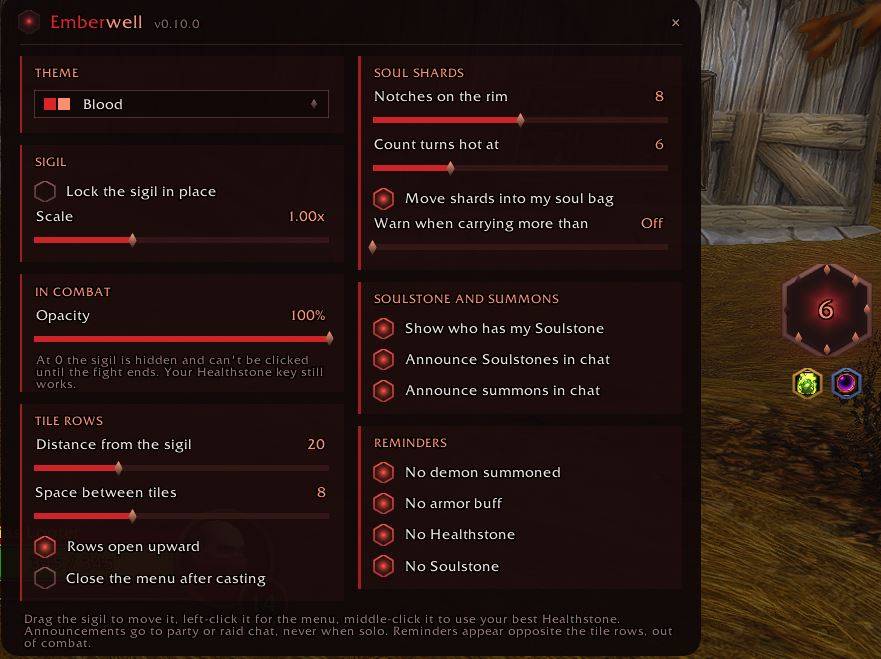
Three looks, picked from a dropdown at the top of the settings: Ember, the default orange on ash; Fel, green fire on black; and Blood, deep red on black. The theme changes the sigil itself, with its own plate, bevel and glow, along with the settings panel. Your spell tiles keep their category colours in every theme, so Demons is always green and Curses always red. In the Blood theme an empty shard count turns amber rather than red, so it still stands out.
Healthstone on a key
Middle-click the sigil, or bind a key (Key Bindings, under Emberwell), and you eat the best Healthstone in your bags — Major before Greater, whatever bag it's in. It works in combat, which is the only time you want it. The button is pointed at your best stone out of combat, whenever your bags change, so it's always ready when the fight starts. A macro can use it too: /click EmberwellHealthstoneButton.
Soul bag sorting
Shards that land in your ordinary bags are moved into your Soul Pouch (or Felcloth Bag, or Box of Souls) once you're out of combat, one at a time, never while you're holding something on the cursor. If the pouch is full, Emberwell says so once instead of quietly filling your bags. You can also set a shard cap and get a single warning when you go over it.
Soulstone tracker
When your Soulstone lands, a small gem appears beside the sigil with who has it and how long is left. In a party it's announced to party chat, in a raid to raid chat, including when you stone yourself, so the group knows a res is covered. It only goes out once the cast has actually landed, never for an interrupted cast, and never when you're solo. Out of combat it checks the buff itself, so the timer is right and the badge clears when the stone gets used.
Summon announcements
Start a Ritual of Summoning and Emberwell asks for help in party or raid chat: "Summoning Bob - Please click!" The line goes out once the ritual has actually started, so a cast the game refuses never sends it. With nobody targeted it still asks for clickers, just without a name. Like the Soulstone line, it can be switched off in the settings.
Reminders
Out of combat, a small row of one-click prompts appears when something's missing: no demon summoned, no Demon Armor, no Healthstone, no Soulstone. Click one and it casts the fix. Each can be switched off.
The demon prompt brings back the demon you had out last, not always the Imp. Emberwell remembers it for each character, whether you summoned it from a tile, a bar or a macro, and the Demons tile shows its icon.
Downrank warnings
If you cast a rank of a spell lower than the one in your spellbook — a dragged-out hotbar from a respec, usually — Emberwell says so once. /ember rank ignore <spell> silences it for spells you downrank on purpose. The feature goes dormant by itself on a client with no spell ranks.
Commands
| Command | What it does |
|---|---|
/ember | list the commands |
/ember config | open the settings panel |
/ember lock / unlock | stop or allow dragging the sigil |
/ember reset | put the sigil back in the middle |
/ember spells | what resolved against your spellbook, what didn't, and what you know that's on no tile |
/ember shards | every bag scanned and the shards found in each |
/ember sort | switch soul bag sorting on or off |
/ember ss | who has your Soulstone, and what the client reported about the last cast |
/ember rows | tile visibility and click state, for when something looks wrong |
/ember rank ignore <spell> | stop warning about one spell you downrank on purpose |
/ember diag | a copyable diagnostic report |
/ember retest | re-run the client capability probes |
/ew works as a short form.
Honest notes on the Forever beta
Blizzard has closed the combat log to addons in this API generation. Emberwell has no DoT timers and no proc alerts, because they cannot be built on this client — anything claiming otherwise is drawing bars from guesses. If a later build reopens it, /ember retest reports that in one line and the feature goes in.
Aura, health and cooldown data are also secret to addons during combat on this build. That's why the reminders only appear out of combat; it isn't laziness, it's the only time the addon can see the answer.
Early beta builds wrote SavedVariables at logout but didn't read them back at login, so in-game settings changes were lost on the next launch. If yours don't stick, edit Settings.lua in the addon folder and restart the client. On a build that loads SavedVariables properly, that file quietly stops mattering.
If the client ever refuses one of the things Emberwell does on your behalf — moving a shard, or posting the Soulstone line — that feature switches itself off and says so, rather than throwing the same error at you on every bag update. It tries again after the next client update.
Installing
Drop the Emberwell folder into InterfaceAddOns. Warlock only — on any other class it loads, says so, and does nothing.
Fully restart the client after updating rather than using /reload; this client caches addon code against the TOC version.
Bug reports and suggestions are welcome. If something looks wrong on screen, /ember diag produces a copyable report that says far more than a screenshot can.
You must be logged in to leave a comment.