
Edit Mode Tweaks
Adds some fine tuning tweaks to blizzards Edit mode
Details
Expansion
 Forever
 Developers

Having issues?
Edit Mode Tweaks
Pixel-perfect positioning for Edit Mode — nudge any UI element one pixel at a time in any direction, plus advanced visibility controls including mouse-over, combat-only, and target-based display options for the ultimate customizable UI.
🔍 What It Does
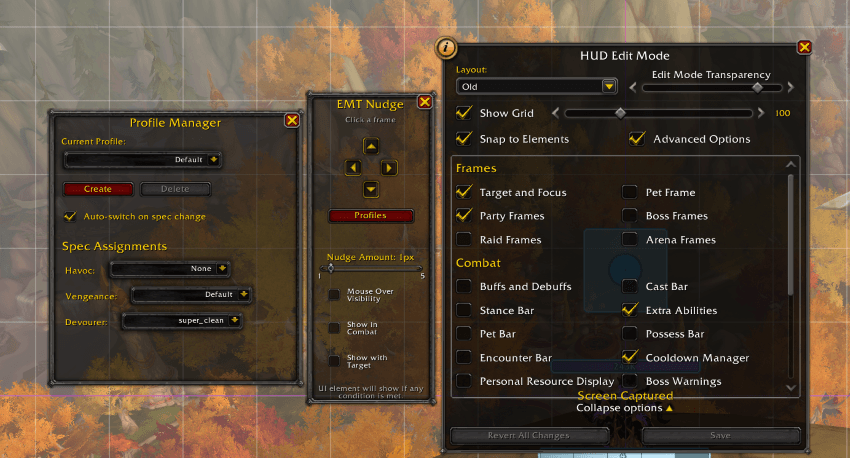
Blizzard's Edit Mode is great for repositioning your UI… but sometimes you need that exact pixel-perfect alignment and advanced control over when UI elements appear. This addon adds a simple control panel that lets you nudge selected UI elements one pixel at a time — up, down, left, or right — with instant visual feedback. Now with the ability to click and nudge any frame (not just Edit Mode elements) and powerful visibility options to show/hide elements based on mouse-over, combat state, or target selection!
✨ Features
🎯 Nudge Controls
- ✔ Click-to-select any frame — Works with Edit Mode elements AND addon frames
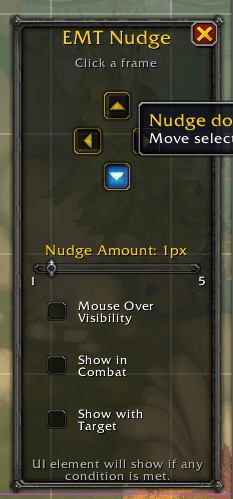
- ✔ Arrow button interface — Intuitive cross-pattern controls docked to Edit Mode
- ✔ Adjustable nudge amount — Slider control (1-5 pixels) or slash command for precise control
- ✔ One pixel at a time — Precise micro-adjustments for perfect alignment
- ✔ Real-time updates — Changes apply instantly as you nudge
- ✔ Visual feedback — Shows currently selected element name
- ✔ Smart frame detection — Automatically finds named frames in the hierarchy
🎨 Advanced Visibility Controls
- ✔ Mouse Over Visibility — Make any UI element invisible until you mouse over it
- ✔ Combat Visibility — Show UI elements only during combat for a cleaner out-of-combat interface
- ✔ Target Visibility — Display elements only when you have a target selected
- ✔ Flexible OR Logic — Check multiple options and the element shows if ANY condition is met
- ✔ Smooth fade animations — 0.2 second fade in/out transitions for mouse-over mode
- ✔ Per-element control — Toggle individually for each frame
- ✔ Persistent settings — All visibility states saved and restored on login
- ✔ Perfect for minimalists — Maximize screen space while keeping functionality
- ✔ Works with any frame — Player frame, action bars, party frames, addon frames, and more
🔧 Customization
- ✔ Adjustable nudge amount — Change from 1-5 pixels with visual slider
- ✔ Toggle on/off — Hide the nudge panel if you don't need it
- ✔ Docked interface — Stays attached to Edit Mode frame, out of your way
- ✔ Auto-show — Appears automatically when Edit Mode is active
- ✔ Slash commands —
/emtfor quick configuration
💾 Quality of Life
- ✔ Works with all frames — Edit Mode elements, action bars, party frames, addon frames
- ✔ Saves with Edit Mode — Your adjustments save when you click "Save" in Edit Mode
- ✔ Visibility persistence — All visibility settings saved per character
- ✔ Zero taint — Safe for all UI interactions
- ✔ Clean interface — Simple, focused, and stays out of your way
- ✔ Smart filtering — Automatically ignores system frames and unsupported elements
🛠️ Easy In-Game Usage
Basic Nudging
- Press ESC and click Edit Mode (or use your keybind)
- Click any UI element to select it (works with default UI and addon frames)
- The EMT Nudge panel appears automatically on the left
- Use the arrow buttons to nudge the element 1 pixel at a time
- Adjust the slider to change nudge amount (1-5 pixels)
- Click Save in Edit Mode when you're done
Visibility Controls
- Select a frame using the steps above
- Choose your visibility options:
- Mouse Over Visibility — Frame only appears when you mouse over it
- Show in Combat — Frame only appears during combat
- Show with Target — Frame only appears when you have a target
- Check multiple options for OR logic — frame shows if ANY condition is met
- Settings are saved automatically per frame
Example Combinations:
- Combat + Target — Shows in combat OR when you have a target
- All three checked — Shows on mouseover OR in combat OR with target
- Combat only — Perfect for action bars you only need in fights
- Mouse Over only — Ideal for rarely-used UI elements
Slash Commands:
/emtor/editmodetweaks— Show help/emt toggle— Toggle the nudge panel on/off/emt amount <1-5>— Set nudge amount (default: 1)
🎯 Perfect For
- Precise UI alignment — Get those frames exactly where you want them
- Minimalist UIs — Hide frames until you need them with advanced visibility options
- Combat-focused interfaces — Show critical elements only when fighting
- OCD-friendly positioning — Satisfy your inner perfectionist
- Screenshot preparation — Dial in that perfect UI layout
- Custom UI building — Fine-tune complex layouts with ease
- Addon frame positioning — Move and adjust frames from any addon
- Screen space optimization — Maximize visibility while keeping functionality
- PvP interfaces — Show targeting frames only when you have a target
- Roleplay setups — Hide combat UI when not in combat
🔄 What's New in Version 2.0.0
Major Features
- ✨ Combat Visibility — Show UI elements only during combat
- ✨ Target Visibility — Show UI elements only when you have a target
- ✨ Flexible OR Logic — Combine multiple visibility conditions (shows if ANY is met)
- ✨ Enhanced UI — Redesigned nudge panel with better layout and spacing
Improvements
- ⚡ Visual slider for nudge amount (1-5 pixels)
- ⚡ Clear explanatory text for how conditions work
- ⚡ Better organized controls with logical grouping
- ⚡ Improved frame height and spacing
- ⚡ Helpful tooltips on all visibility options
Previous Releases
Version 1.5.0:
- Click-to-select any frame (not just Edit Mode elements)
- Mouse Over Visibility feature
- Smart frame detection with hierarchy walking
Version 1.0.0:
- Initial release with pixel-perfect nudging
- Four-direction arrow controls
- Midnight beta compatibility
📝 Compatibility
- Game Version: 12.0.0 (Midnight Beta)
- Interface: 120000
- Works with: All default Edit Mode elements, action bars, party frames, player frame, and most addon frames with named elements
💡 Tips & Tricks
Visibility Combinations
- Combat Action Bars: Enable "Show in Combat" for clutter-free out-of-combat UI
- Targeting Frames: Enable "Show with Target" on target/focus frames to hide when empty
- Hybrid Setup: Enable both Combat + Target to show frames in fights OR when targeting
- Full Minimalist: Enable all three options for maximum flexibility
- Mouse-over Everything: Combine mouse-over with combat for frames that fade in during fights but can also be accessed by hovering
Positioning Tips
- Precise Positioning: Use 1-pixel nudging for final adjustments after rough positioning in Edit Mode
- Addon Frames: Click directly on addon frames to position them perfectly alongside your default UI
- Quick Adjustments: Use the slider when you need to move something farther, then fine-tune with 1-pixel nudging
UI Design Ideas
- Clean Questing UI: Hide combat bars with "Show in Combat" for immersive exploration
- PvP Focus: Show target frames only with "Show with Target" to reduce visual clutter
- Roleplay Mode: Hide all combat UI when out of combat for cinematic screenshots
- Raid Leading: Keep important frames visible in combat but hidden otherwise
📝 Known Limitations
- Some addon frames without proper naming may show as "Anonymous Frame" and cannot be nudged
- Visibility controls require frames to have a name to persist settings
- Protected frames may have positioning restrictions in certain states
- Combat visibility changes may not work on some protected action bar frames due to Blizzard restrictions
🙏 Support & Feedback
Found a bug? Have a feature request? Please report it on the issues page or leave a comment!
If this addon helps perfect your UI, please consider leaving a review! ⭐
🔧 Check Out Our Other Addon!
Cooldown Manager Tweaks — Clean, customizable icon grids for Blizzard's cooldown trackers with pixel-perfect control!
The Edit Mode Tweaks Team
You must be logged in to leave a comment.